> ## Documentation Index
> Fetch the complete documentation index at: https://help.kajabi.com/llms.txt
> Use this file to discover all available pages before exploring further.
# Manage two-factor authentication (2FA)
> How to manage two-factor authentication for a Kajabi account.
**Multi-Factor Authentication** (MFA), also known as **two-factor authentication** (2FA), is a mandatory security feature on Kajabi accounts. As this authentication method is essential for ensuring the safety and integrity of user accounts, it cannot be disabled under any circumstances.
MFA adds an additional layer of security by requiring a verification code in addition to your password when logging in. The code is sent via SMS or generated by your authenticator app. The importance of MFA lies in reducing the risks of account breaches caused by compromised passwords, ensuring that your personal and business information remains secure.
MFA enforcement depends on your account's security settings - it may be required. Even if it isn't, enabling it is strongly recommended to help protect your account.
**Note:** MFA is only available for Kajabi account owners or users. It's not currently available for customers of websites powered by Kajabi.
### Share account access by adding account users
Kajabi allows you to securely collaborate with others by adding them as [**Account Users**](/articles/account-settings/users/account-users). This means that your team members can have individual logins, eliminating the need to share your credentials or MFA codes. By assigning each user a unique login, access to your account is streamlined and secure, reducing the risk of any login complications.
## Set up two-factor authentication (2FA)
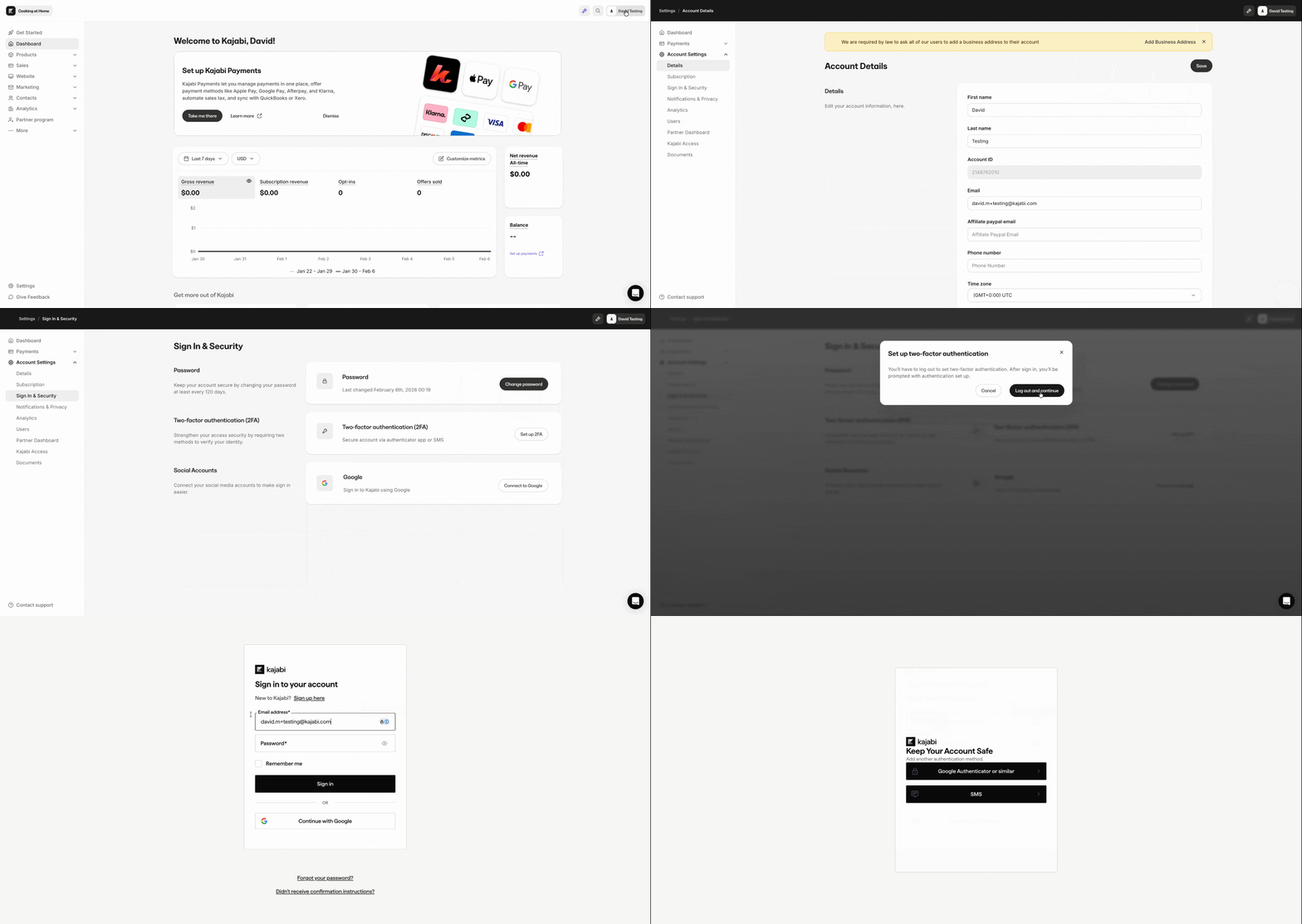
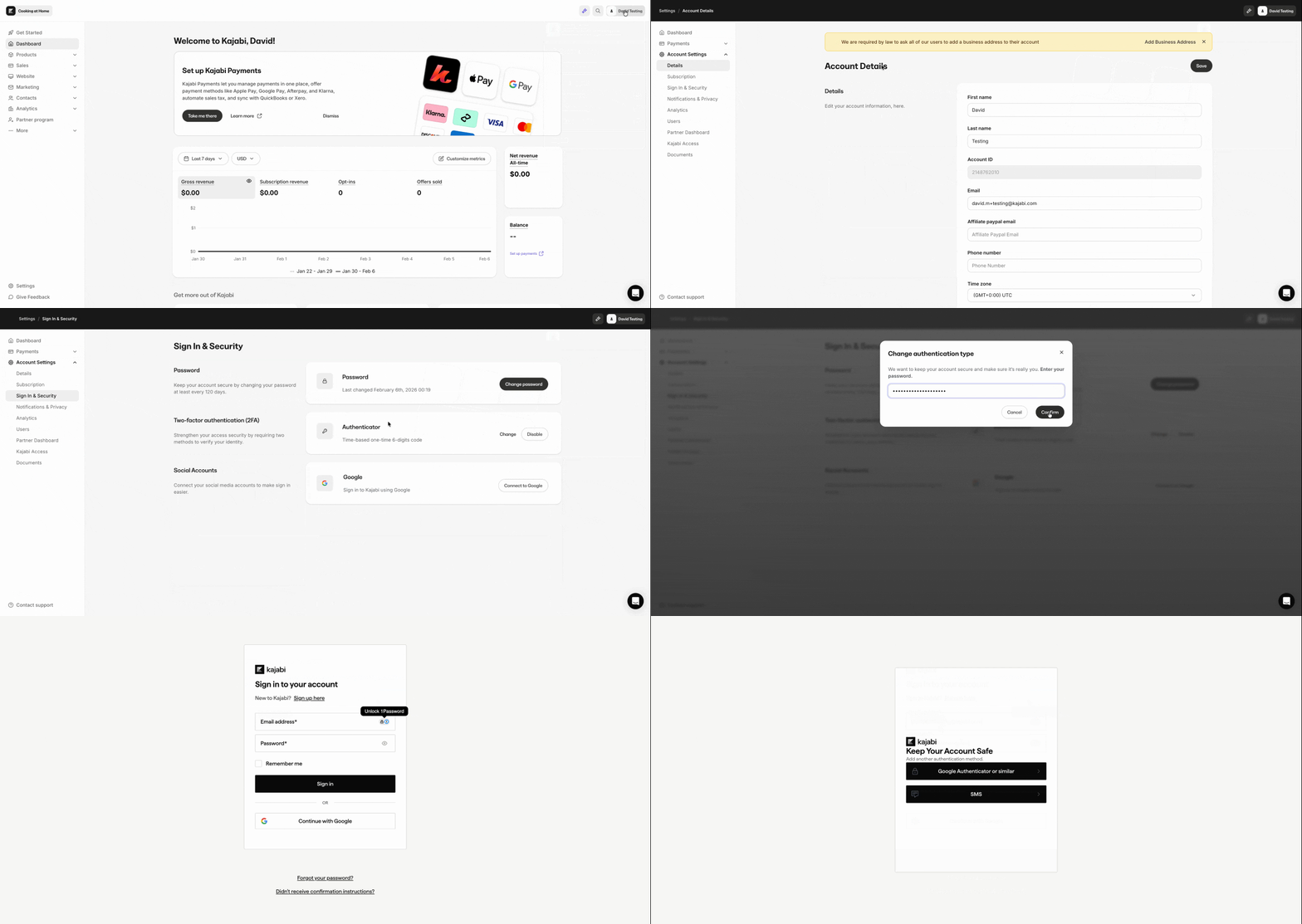
1. On the top-right, click your **Name**.
2. Click **Account settings**.
3. On the left sidebar, click **Sign In & Security**.
4. In the two-factor authentication section, click **Set up 2FA**.
5. Click **Log out and continue**.
6. Sign in to Kajabi.
7. Choose one of the following authentication methods and follow the steps listed in the sections below:
* **Google Authenticator or similar authentication apps**
* **SMS**
 ## Add Kajabi to an authenticator app
### Google Authenticator or similar authentication apps
1. If you do not have an authenticator app on your mobile device already, download one. Here are some free options:
* Google Authenticator ([iOS](https://apps.apple.com/us/app/google-authenticator/id388497605), [Android](https://play.google.com/store/apps/details?id=com.google.android.apps.authenticator2\&hl=en_US))
* Microsoft Authenticator ([iOS](https://apps.apple.com/us/app/microsoft-authenticator/id983156458), [Android](https://play.google.com/store/apps/details?id=com.azure.authenticator\&hl=en_US))
* Ente ([iOS](https://apps.apple.com/us/app/ente-auth-2fa-authenticator/id6444121398), [Android](https://play.google.com/store/apps/details?id=io.ente.auth))
* 2FAS ([iOS](https://apps.apple.com/us/app/2fa-authenticator-2fas/id1217793794), [Android](https://play.google.com/store/apps/details?id=com.twofasapp))
2. To add Kajabi to your authenticator app, scan the **QR code**.
* Alternatively, you can click **Trouble Scanning?** to get a code that you can enter manually into the app.
3. Enter the **one-time code** from your authenticator app and click **Continue**.
4. Store your **recovery code** somewhere safe—use this code to log in to your account if you lose access to your authenticator app.
### SMS authentication
**Note:** SMS is not available in all countries.
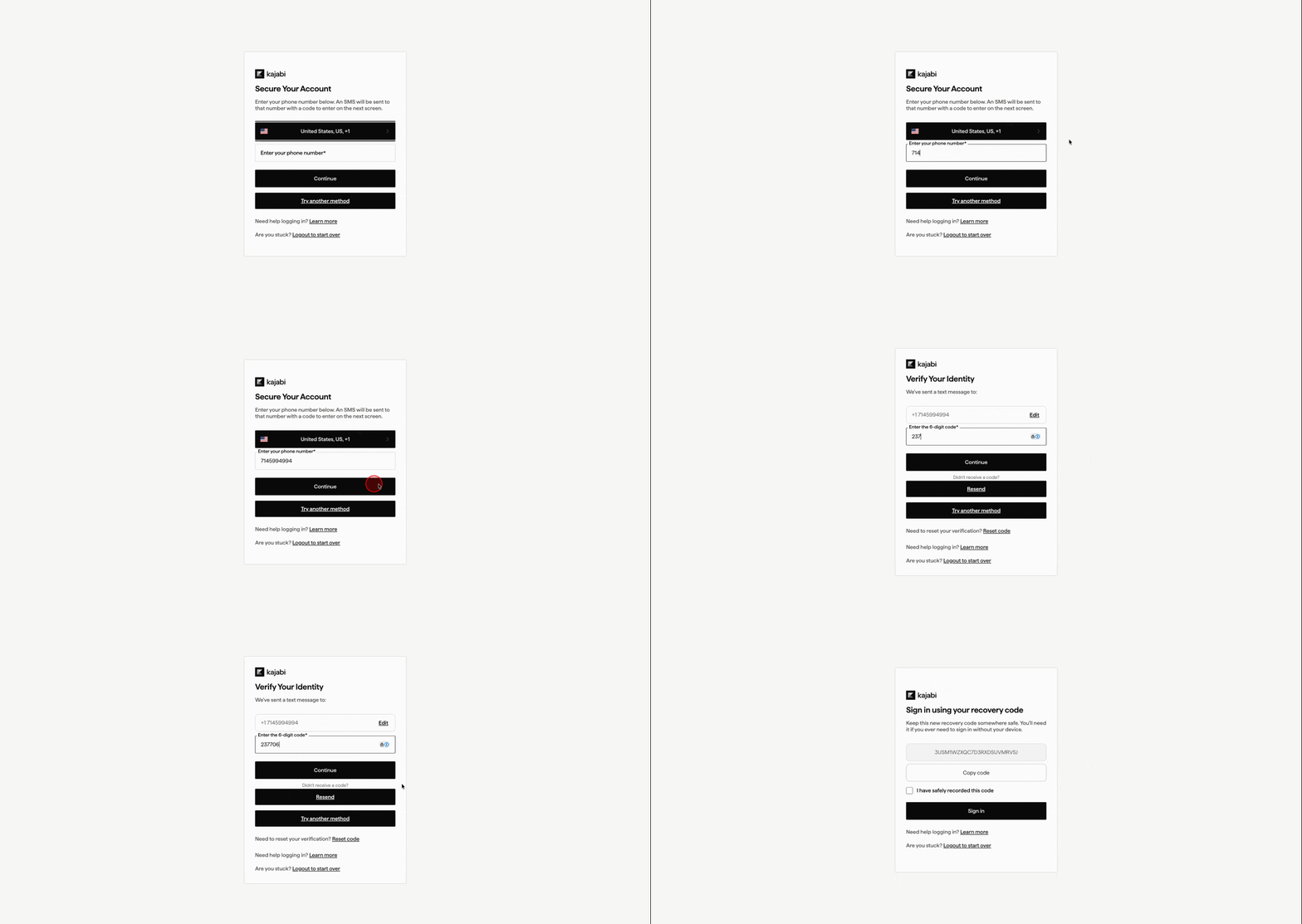
1. If necessary, select the **Country** related to your phone number.
2. Enter your **Phone Number** (without the country code) and click **Continue**.
3. An SMS will be sent to your phone number. Enter the 6-digit code and click **Continue**.
* If you don't receive the code, confirm your phone number is correct and click **Resend**.
4. A **recovery code** will display. It's very important to store this code somewhere safe—use this code to log in to your account if you lose access to your authenticator app. After storing this code, check the box "I have safely recorded this code" and click **Sign in**.
## Add Kajabi to an authenticator app
### Google Authenticator or similar authentication apps
1. If you do not have an authenticator app on your mobile device already, download one. Here are some free options:
* Google Authenticator ([iOS](https://apps.apple.com/us/app/google-authenticator/id388497605), [Android](https://play.google.com/store/apps/details?id=com.google.android.apps.authenticator2\&hl=en_US))
* Microsoft Authenticator ([iOS](https://apps.apple.com/us/app/microsoft-authenticator/id983156458), [Android](https://play.google.com/store/apps/details?id=com.azure.authenticator\&hl=en_US))
* Ente ([iOS](https://apps.apple.com/us/app/ente-auth-2fa-authenticator/id6444121398), [Android](https://play.google.com/store/apps/details?id=io.ente.auth))
* 2FAS ([iOS](https://apps.apple.com/us/app/2fa-authenticator-2fas/id1217793794), [Android](https://play.google.com/store/apps/details?id=com.twofasapp))
2. To add Kajabi to your authenticator app, scan the **QR code**.
* Alternatively, you can click **Trouble Scanning?** to get a code that you can enter manually into the app.
3. Enter the **one-time code** from your authenticator app and click **Continue**.
4. Store your **recovery code** somewhere safe—use this code to log in to your account if you lose access to your authenticator app.
### SMS authentication
**Note:** SMS is not available in all countries.
1. If necessary, select the **Country** related to your phone number.
2. Enter your **Phone Number** (without the country code) and click **Continue**.
3. An SMS will be sent to your phone number. Enter the 6-digit code and click **Continue**.
* If you don't receive the code, confirm your phone number is correct and click **Resend**.
4. A **recovery code** will display. It's very important to store this code somewhere safe—use this code to log in to your account if you lose access to your authenticator app. After storing this code, check the box "I have safely recorded this code" and click **Sign in**.
 **Note:** If you enter an incorrect phone number multiple times, you must wait at least 10 minutes before trying again.
## Disable 2FA
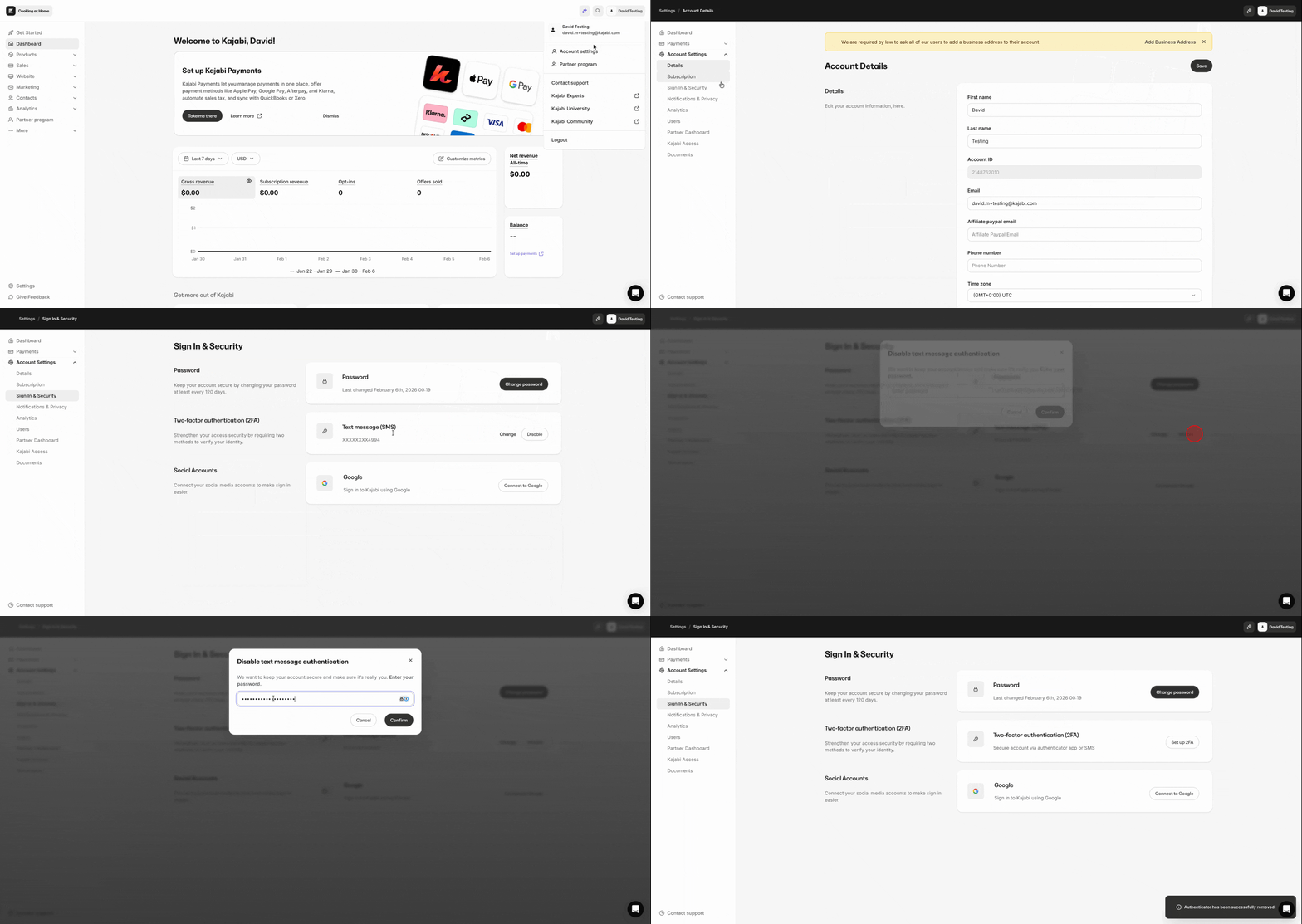
1. On the top-right of the Kajabi app, click your **Name**.
2. Click **Account settings**.
3. On the left sidebar, click **Sign In & Security**.
4. In the two-factor authentication section, click **Disable**.
5. Enter your Kajabi password and click **Confirm**.
**Note:** If you enter an incorrect phone number multiple times, you must wait at least 10 minutes before trying again.
## Disable 2FA
1. On the top-right of the Kajabi app, click your **Name**.
2. Click **Account settings**.
3. On the left sidebar, click **Sign In & Security**.
4. In the two-factor authentication section, click **Disable**.
5. Enter your Kajabi password and click **Confirm**.
 **Note:** Depending on your account, you may not be able to disable 2FA.
## Access, reset, or change a 2FA method
### Use a recovery code
When you set up 2FA, you will be shown a recovery code. If you lose access to your authenticator app or phone number later, you can use this recovery code to sign in.
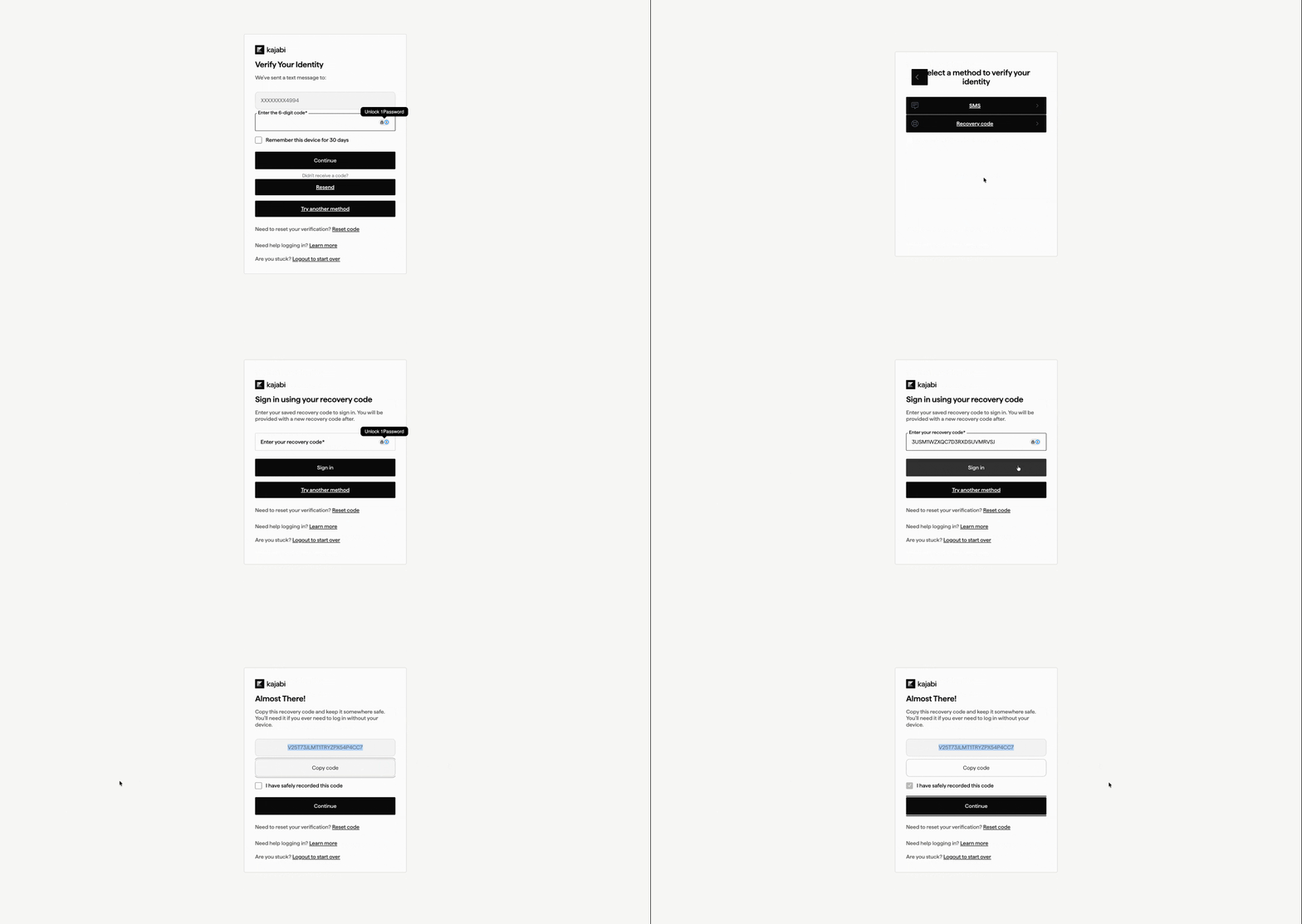
1. Sign in to Kajabi.
2. When asked for your 2FA code, click **Try another method** (this also may be worded as **Use recovery code**).
3. Click **Recovery code**.
4. Enter your recovery code and click **Sign in**.
5. A new **recovery code** will display. Store this code somewhere safe. You can use this code to log in to your account if you lose access to an authentication method. After storing this code, check the box "I have safely recorded this code" and click **Continue**.
**Note:** Depending on your account, you may not be able to disable 2FA.
## Access, reset, or change a 2FA method
### Use a recovery code
When you set up 2FA, you will be shown a recovery code. If you lose access to your authenticator app or phone number later, you can use this recovery code to sign in.
1. Sign in to Kajabi.
2. When asked for your 2FA code, click **Try another method** (this also may be worded as **Use recovery code**).
3. Click **Recovery code**.
4. Enter your recovery code and click **Sign in**.
5. A new **recovery code** will display. Store this code somewhere safe. You can use this code to log in to your account if you lose access to an authentication method. After storing this code, check the box "I have safely recorded this code" and click **Continue**.
 ### How to reset 2FA
1. On the [login page](https://app.kajabi.com/login), enter your email and password. Then, click **Sign in**.
2. Under the "Try another method" button, click **Reset code**.
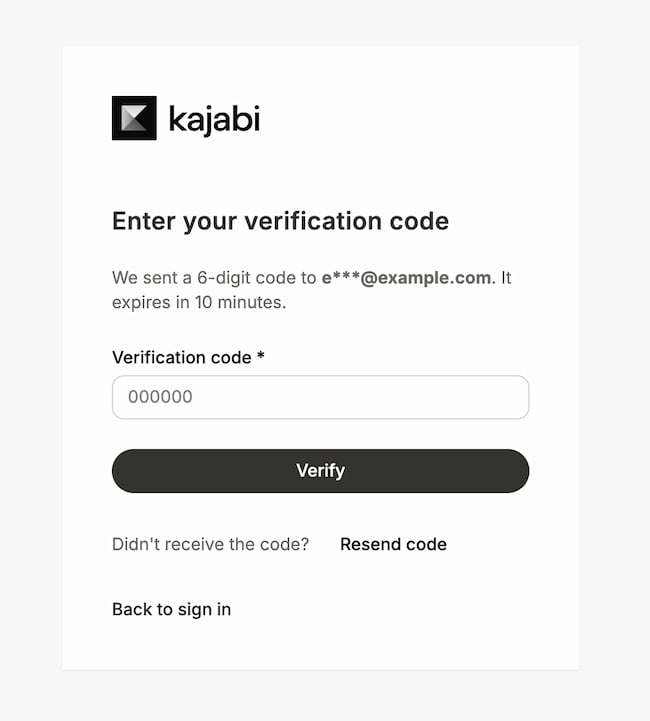
3. A 6-digit code will be sent to your email. This code expires in 10 minutes. Enter the code and click **Verify**. If necessary, you can click **Resend code**. \[SEE SCREENSHOT]
1. Email subject: Your Kajabi verification code
2. Email sender: [support@m.kajabimail.net](mailto:support@m.kajabimail.net)
4. After entering the verification code correctly, you'll be brought to the login page. Enter your email and password. Then, click **Sign in**.
5. You can now choose a new 2FA method.
### How to reset 2FA
1. On the [login page](https://app.kajabi.com/login), enter your email and password. Then, click **Sign in**.
2. Under the "Try another method" button, click **Reset code**.
3. A 6-digit code will be sent to your email. This code expires in 10 minutes. Enter the code and click **Verify**. If necessary, you can click **Resend code**. \[SEE SCREENSHOT]
1. Email subject: Your Kajabi verification code
2. Email sender: [support@m.kajabimail.net](mailto:support@m.kajabimail.net)
4. After entering the verification code correctly, you'll be brought to the login page. Enter your email and password. Then, click **Sign in**.
5. You can now choose a new 2FA method.
 ### Change your 2FA method
1. On the top-right of the Kajabi app, click your **Name**.
2. Click **Account settings**.
3. On the left sidebar, click **Sign In & Security**.
4. In the two-factor authentication section, click **Change**.
5. Enter your Kajabi password and click **Confirm**.
6. Click **Log out and continue**.
7. After signing in to Kajabi, you can choose a new 2FA method.
### Change your 2FA method
1. On the top-right of the Kajabi app, click your **Name**.
2. Click **Account settings**.
3. On the left sidebar, click **Sign In & Security**.
4. In the two-factor authentication section, click **Change**.
5. Enter your Kajabi password and click **Confirm**.
6. Click **Log out and continue**.
7. After signing in to Kajabi, you can choose a new 2FA method.
 ## FAQs
### Can I temporarily disable MFA or 2FA?
No, MFA/2FA cannot be temporarily or permanently disabled. Only through resetting MFA for account recovery purposes can it be temporarily removed, and it must be set up again immediately afterward.
### Can Kajabi permanently disable MFA for an account?
No, Kajabi does not offer an option to permanently disable or remove MFA. All accounts must have MFA enabled at all times for security purposes.
### What should I do if I need to change my email address associated with the account?
Avoid trying to bypass MFA as it cannot be disabled for such changes. Instead, ensure your contact information is up to date and accessible to complete the process smoothly.
### How do I reset my verification?
To reset your MFA, select **Reset code** located under the Sign in button.
## FAQs
### Can I temporarily disable MFA or 2FA?
No, MFA/2FA cannot be temporarily or permanently disabled. Only through resetting MFA for account recovery purposes can it be temporarily removed, and it must be set up again immediately afterward.
### Can Kajabi permanently disable MFA for an account?
No, Kajabi does not offer an option to permanently disable or remove MFA. All accounts must have MFA enabled at all times for security purposes.
### What should I do if I need to change my email address associated with the account?
Avoid trying to bypass MFA as it cannot be disabled for such changes. Instead, ensure your contact information is up to date and accessible to complete the process smoothly.
### How do I reset my verification?
To reset your MFA, select **Reset code** located under the Sign in button.