> ## Documentation Index
> Fetch the complete documentation index at: https://help.kajabi.com/llms.txt
> Use this file to discover all available pages before exploring further.
# Report: Payment balance summary by month
> Starting and ending Kajabi Payments balance by month.
The **Payment balance summary by month** report shows your Kajabi Payments balance for a given month: what it started at, what it ended at, and the activity that moved it between them.
It is built for month-end reconciliation. If you have ever tried to answer "what did I actually earn in April?" by exporting transactions and adding up columns by hand, this is the report that replaces that work.
This report is most useful for:
* Closing out your books at the end of a month or quarter
* Handing a clean summary to a bookkeeper or accountant
* Reconciling fees and refunds against what actually landed in your bank account
* Reviewing balance activity across a custom date range
## Before you begin
The report is only available if your site has an active Kajabi Payments integration.
## Open the report
There are two ways in, and both land on the same report:
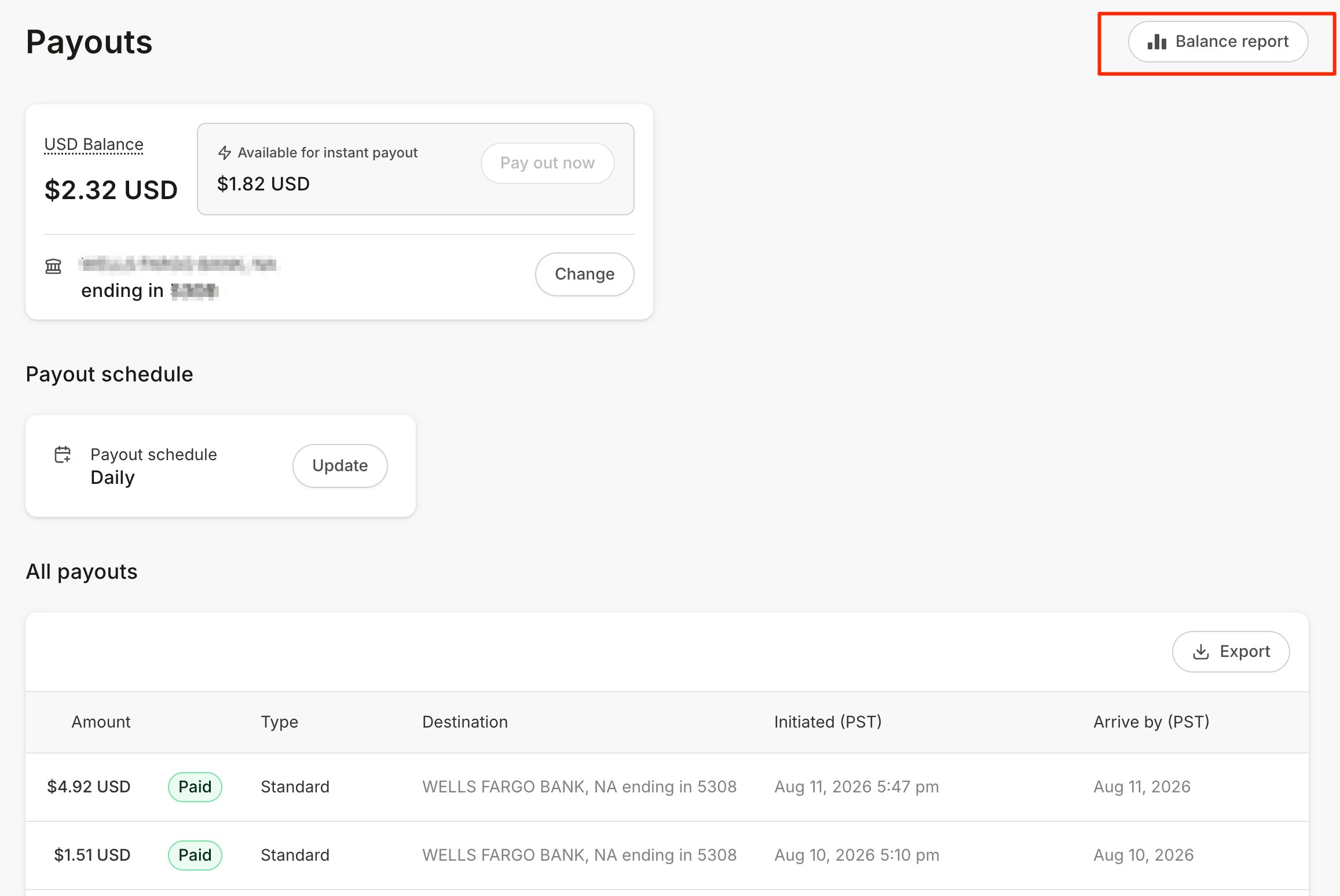
### From the Payouts page
1. From your Dashboard, select **Sales** > **Payouts**
2. Click **Balance Report** in the upper right of the All Payouts section
 ### From Analytics
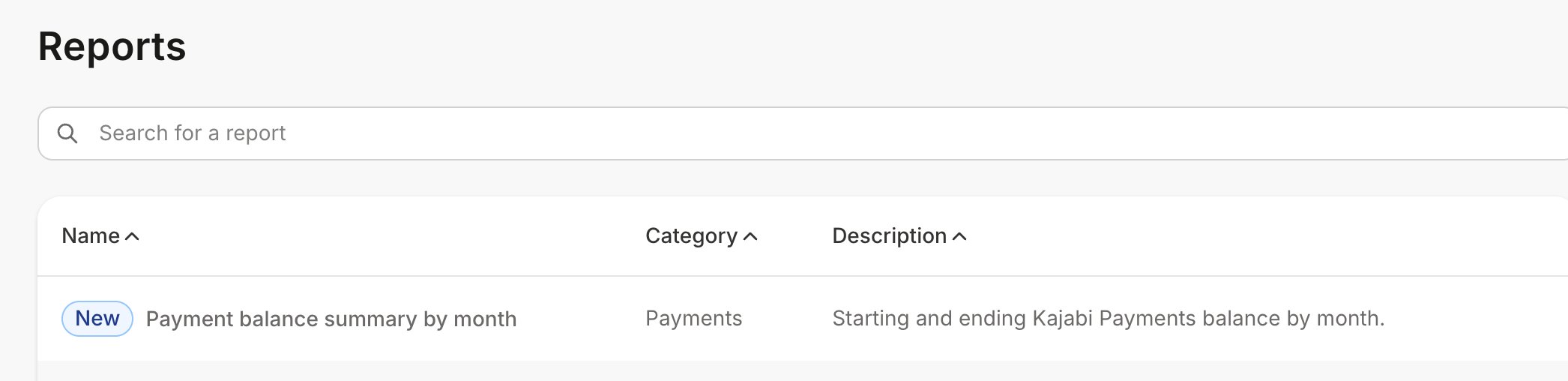
1. Open the **Analytics** tab from your Dashboard
2. Click **Reports**
3. Select **Payment balance summary by month**
### From Analytics
1. Open the **Analytics** tab from your Dashboard
2. Click **Reports**
3. Select **Payment balance summary by month**
 ## What the report shows
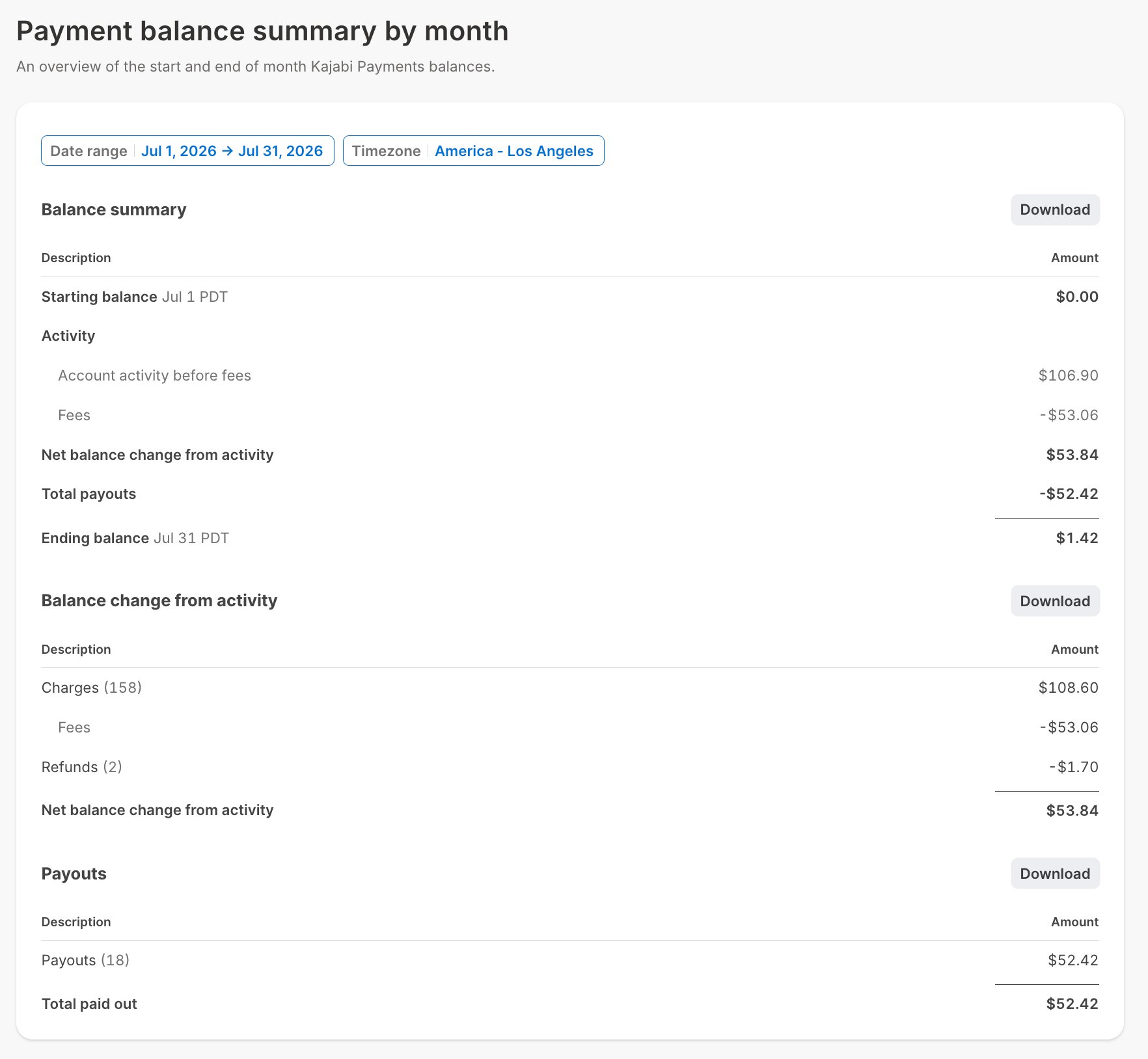
For each month in the range you select, the report shows your opening balance, your closing balance, and a breakdown of the activity between them, including charges, refunds, fees, and payouts.
**Note on payout schedules:** If you are on a daily payout schedule, your balance is swept to your bank account continuously, so the balance on the first and last day of the month will not tell you much on its own. The activity figures are the meaningful part for you: the number and value of charges, refunds, and fees over the period.
### Filter and export the report
The report includes its own date filtering and download controls. Set the range you need, then download the report to hand off or file.
## What the report shows
For each month in the range you select, the report shows your opening balance, your closing balance, and a breakdown of the activity between them, including charges, refunds, fees, and payouts.
**Note on payout schedules:** If you are on a daily payout schedule, your balance is swept to your bank account continuously, so the balance on the first and last day of the month will not tell you much on its own. The activity figures are the meaningful part for you: the number and value of charges, refunds, and fees over the period.
### Filter and export the report
The report includes its own date filtering and download controls. Set the range you need, then download the report to hand off or file.
 ## Balance report or payout export?
Both tell you about money, and they answer different questions.
| Use this | To answer |
| :----------------------------------------------------------------------------------------------------------- | :---------------------------------------------------------------------------------- |
| **Payment balance summary by month** | What did my balance do over this month, and what was the total activity behind it? |
| [**Payout exports**](/articles/sales/kajabi-payments/how-to-view-kajabi-payments-payouts-and-payout-details) | What transactions made up this specific payout, and what were the fees on each one? |
Reach for the balance report when you are closing a period. Reach for a payout export when you are tracing an individual deposit.
## Frequently asked questions
### Does this report include revenue from Stripe or PayPal?
No. This report covers your Kajabi Payments balance only. For revenue across all payment processors, use the [Gross Revenue](/articles/analytics/report-gross-revenue) and [Net Revenue](/articles/analytics/report-net-revenue) reports.
### Why do my balance figures not match my Gross Revenue report?
They measure different things. Gross Revenue counts what you sold. Your Kajabi Payments balance reflects money moving through your Kajabi Payments account, which is affected by processing fees, refunds, disputes, adjustments, and the timing of when funds become available. A sale on the last day of the month may not reach your balance until the next one.
### Can I get this report by week or by day instead?
Use the date filtering inside the report to set a custom range. The report is organized by month.
## Related articles
* [Kajabi Payments payouts](/articles/sales/kajabi-payments/kajabi-payments-payouts)
* [View Kajabi Payments payouts and payout details](/articles/sales/kajabi-payments/how-to-view-kajabi-payments-payouts-and-payout-details)
* [View Analytics reports](/articles/analytics/analytics-reports)
* [Kajabi Payments processing fees](/articles/sales/kajabi-payments/kajabi-payments-processing-fees)
* [Integrate QuickBooks Online with Kajabi Payments](/articles/sales/kajabi-payments/how-to-integrate-quickbooks-online-with-kajabi-payments)
## Balance report or payout export?
Both tell you about money, and they answer different questions.
| Use this | To answer |
| :----------------------------------------------------------------------------------------------------------- | :---------------------------------------------------------------------------------- |
| **Payment balance summary by month** | What did my balance do over this month, and what was the total activity behind it? |
| [**Payout exports**](/articles/sales/kajabi-payments/how-to-view-kajabi-payments-payouts-and-payout-details) | What transactions made up this specific payout, and what were the fees on each one? |
Reach for the balance report when you are closing a period. Reach for a payout export when you are tracing an individual deposit.
## Frequently asked questions
### Does this report include revenue from Stripe or PayPal?
No. This report covers your Kajabi Payments balance only. For revenue across all payment processors, use the [Gross Revenue](/articles/analytics/report-gross-revenue) and [Net Revenue](/articles/analytics/report-net-revenue) reports.
### Why do my balance figures not match my Gross Revenue report?
They measure different things. Gross Revenue counts what you sold. Your Kajabi Payments balance reflects money moving through your Kajabi Payments account, which is affected by processing fees, refunds, disputes, adjustments, and the timing of when funds become available. A sale on the last day of the month may not reach your balance until the next one.
### Can I get this report by week or by day instead?
Use the date filtering inside the report to set a custom range. The report is organized by month.
## Related articles
* [Kajabi Payments payouts](/articles/sales/kajabi-payments/kajabi-payments-payouts)
* [View Kajabi Payments payouts and payout details](/articles/sales/kajabi-payments/how-to-view-kajabi-payments-payouts-and-payout-details)
* [View Analytics reports](/articles/analytics/analytics-reports)
* [Kajabi Payments processing fees](/articles/sales/kajabi-payments/kajabi-payments-processing-fees)
* [Integrate QuickBooks Online with Kajabi Payments](/articles/sales/kajabi-payments/how-to-integrate-quickbooks-online-with-kajabi-payments)