> ## Documentation Index
> Fetch the complete documentation index at: https://help.kajabi.com/llms.txt
> Use this file to discover all available pages before exploring further.
# Meta Pixel enhancements
> Integrate your Kajabi site with the latest Meta Pixel enhancements.
Explore the latest **Meta Pixel** enhancements to integrate your Kajabi site with Meta Pixel (formerly Facebook Pixel).
## Latest enhancements
As privacy laws and your site visitors' operating systems continue to evolve, they will impact how Meta receives and processes Events from tracking tools like the Meta Pixel.
If you optimize, target, or report on website Events from [Meta Pixel](https://www.facebook.com/business/help/742478679120153?id=1205376682832142) or any of Meta's other business tools, you can take steps to update your Event setup and manage these evolving changes. [Learn more about these changes](https://www.facebook.com/business/help/126789292407737?id=428636648170202).
Kajabi supports [Meta's Conversions API](https://www.facebook.com/business/help/2041148702652965?id=818859032317965) to ensure lead and purchase Events reach Meta, even when the Meta Pixel alone can't.
## Send lead and purchase events to Meta
### What is the Meta Conversions API?
Changes to Meta's ability to track Events may impact Kajabi's ability to send conversion Event information that you normally track in your Ads Manager.
[Learn more about these anticipated changes](https://www.facebook.com/business/help/331612538028890?id=428636648170202).
The Conversions API allows Kajabi to send purchase and lead Events that visitors complete on your Kajabi site directly to your Meta Ads Manager instead of relying on the visitor's web browser. [Learn more about Facebook's Conversions API](https://www.facebook.com/business/help/2041148702652965?id=818859032317965).
### Send lead and purchase events to Meta
To set up your Meta Conversions API and send lead and purchase events from Kajabi to Meta, you will need two items:
* [Meta Pixel ID](https://www.facebook.com/business/help/952192354843755?id=1205376682832142)
* [API Access Token](/articles/api-integrations/analytics-integrations/meta-pixel-with-kajabi)
Your Pixel ID and Access Token must be added to your Pixel integration in your Kajabi Site Settings.
#### Add Meta Pixel ID and API Access Token to Kajabi
* Click open **Settings** at the lower left of your Kajabi dashboard.
* Select **Third Party Integrations**.
* Scroll down to Facebook Pixel and click the toggle to **On**.
* Enter your Pixel ID in the **Pixel Id** field.
* Then, enter your Access Token in the **Access Token** field.
* Click **Save** to complete your integration.
After setting up your integration, Kajabi can send the following Events to Facebook:
* Purchases
* Leads
[Learn how to connect Meta Pixel with Kajabi](/articles/api-integrations/analytics-integrations/meta-pixel-with-kajabi).
## How does this work with existing browser events?
Your current browser events will still send in addition to the server events from the Conversions API.
Meta deduplicates identical events sent through the Meta Pixel and the Conversions API by checking the Event name and ID to determine if there are duplicates.
[Read more about event deduplication](https://developers.facebook.com/docs/marketing-api/conversions-api/deduplicate-pixel-and-server-events).
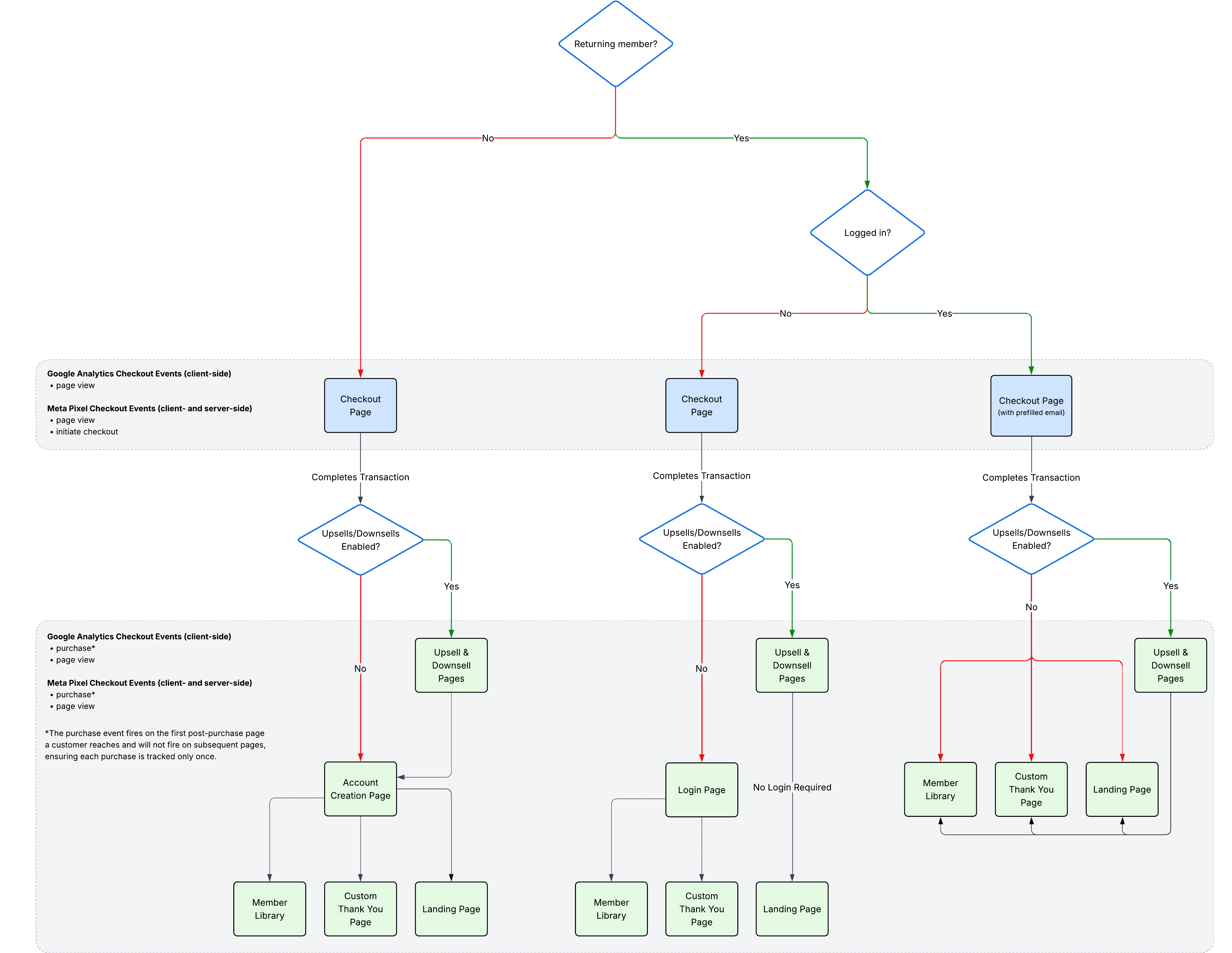
## Where the purchase event fires
Kajabi sends purchase events to Meta in two ways: through the customer's browser (client-side) and directly from Kajabi's servers (server-side). When both events are sent for the same purchase, Meta automatically deduplicates them using the purchase ID.
Purchase events fire on the first post-purchase page a customer reaches, such as:
* Login page (for new or returning customers)
* Account creation page (for new customers)
* Upsell page
To provide extra reliability, the purchase event is also configured to fire on post-purchase thank-you pages, landing pages, and the member library. However, once the event has fired on one page, it will not fire again on subsequent pages.
This ensures:
* Purchases are captured as early as possible.
* Tracking is consistent, even if a customer does not continue through every step of the flow.
See the flow chart below for a visual breakdown of where the purchase event fires in [Enhanced Checkout](../../sales/checkout/enhanced-checkout-overview), depending on whether the customer is new or returning, and whether returning members are already logged in or not:
 **Warning:**
Utilizing Meta Conversions API may require additional review of your compliance obligations under data regulation laws applicable to you and your customers.
**Warning:**
Utilizing Meta Conversions API may require additional review of your compliance obligations under data regulation laws applicable to you and your customers.