> ## Documentation Index
> Fetch the complete documentation index at: https://help.kajabi.com/llms.txt
> Use this file to discover all available pages before exploring further.
# Use ConvertKit with Kajabi
> Send Kajabi form submissions to ConvertKit for email marketing and automation.
**ConvertKit** is an email marketing service for running email marketing campaigns. With ConvertKit, create opt-in forms, tag subscribers, set-up automation, and send email follow-up messages.
Connect ConvertKit and Kajabi to send your ConvertKit emails to contacts opting into your Forms on Kajabi. If you wish to send additional information including tags to ConvertKit, read [Use Zapier with Kajabi](../zapier/use-zapier-with-kajabi).
Learn more about Kajabi's [Email Campaigns](/articles/marketing/email-campaigns/email-campaigns-overview) to create and design engaging emails directly from your Kajabi site.
## Activate the ConvertKit integration
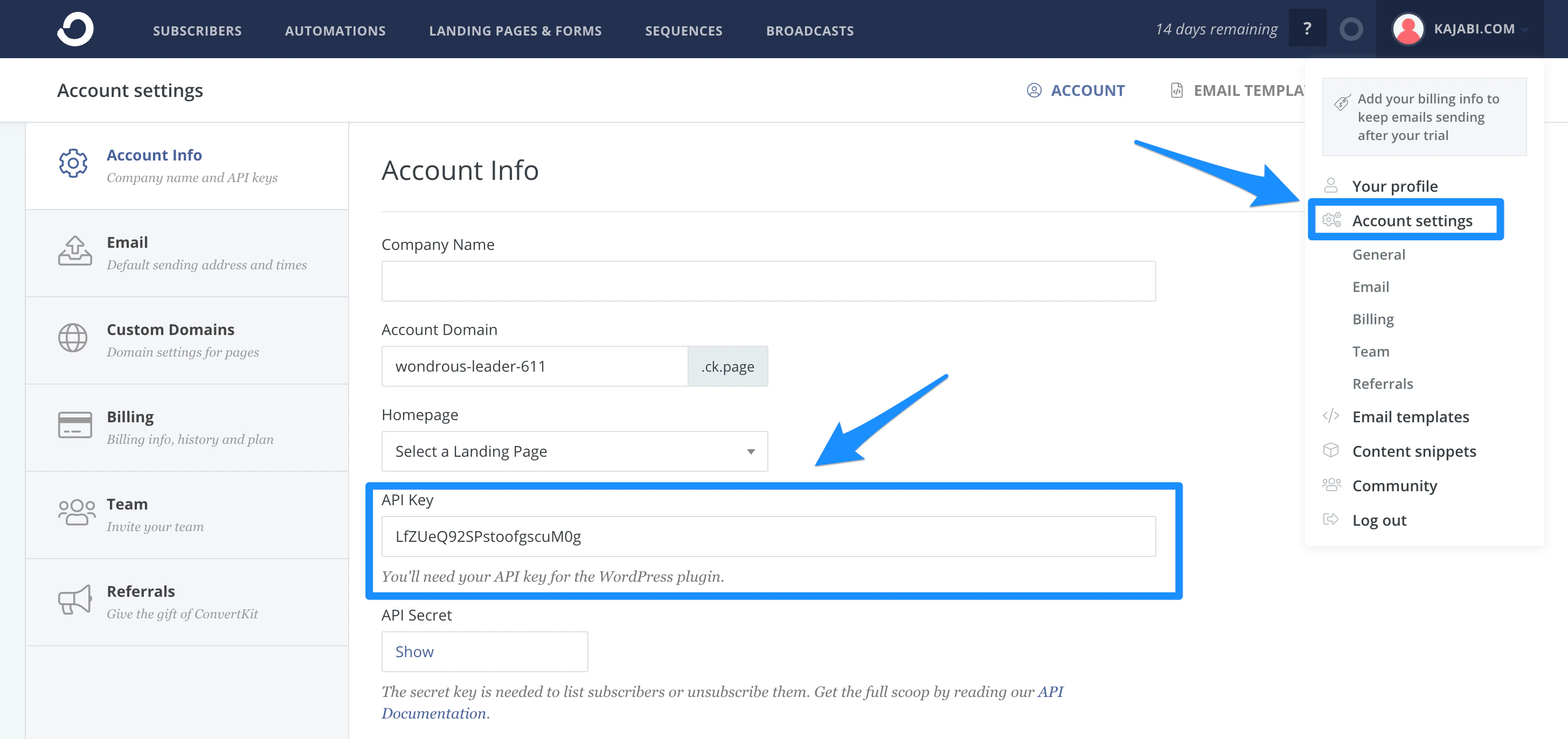
### Get the ConvertKit API Key
1. Go to **Account Settings**.
2. Copy the **API Key**:
 ### Activate the ConvertKit integration in Kajabi
1. Open the **Settings** tab.
2. Select **Third Party Integrations**.
3. Toggle **On** the **ConvertKit** integration.
4. Paste the **ConvertKit API Key**.
5. Click **Save.**
## Add the ConvertKit Form ID to a Kajabi Form
### Get the ConvertKit Form ID
1. Create a new **Form.**
Enable [double opt-in on your ConvertKit Form](https://help.convertkit.com/en/articles/2971364-the-all-important-double-opt-in).
2. Copy the **Form ID** from the Form page URL.
**Tip:** If double opt-in is enabled on both ConvertKit and Kajabi, your form submitters will receive two emails asking to confirm their intention to subscribe to your list. Be sure to disable double opt-in from your Kajabi Form to avoid duplicates.
### Add the Form ID to Kajabi
1. Create a new **Form** or edit an existing one.
Disable [double opt-in from your Kajabi Form to avoid duplicate emails](/articles/marketing/forms/how-to-set-up-a-form-with-double-opt-in).
2. Check the box next to **Send the contact to a third party email provider**.
3. Select **ConvertKit**.
4. Paste the **Form ID**.
5. Click **Save** at the top right of the page.
Submissions through that Kajabi Form will be added to your Form in ConvertKit.
**Tip:** Test your integration by completing and submitting your Form with a valid email address.
If you wish to send a Customer's information to ConvertKit after an Offer is purchased read how to [set up post-purchase settings](/articles/sales/offers/create-an-offer#post-purchase).
Keep in mind, if an [Offer is granted](/articles/sales/offers/how-to-grant-an-offer), the Customer's information will not be sent to your third-party email provider.
### Activate the ConvertKit integration in Kajabi
1. Open the **Settings** tab.
2. Select **Third Party Integrations**.
3. Toggle **On** the **ConvertKit** integration.
4. Paste the **ConvertKit API Key**.
5. Click **Save.**
## Add the ConvertKit Form ID to a Kajabi Form
### Get the ConvertKit Form ID
1. Create a new **Form.**
Enable [double opt-in on your ConvertKit Form](https://help.convertkit.com/en/articles/2971364-the-all-important-double-opt-in).
2. Copy the **Form ID** from the Form page URL.
**Tip:** If double opt-in is enabled on both ConvertKit and Kajabi, your form submitters will receive two emails asking to confirm their intention to subscribe to your list. Be sure to disable double opt-in from your Kajabi Form to avoid duplicates.
### Add the Form ID to Kajabi
1. Create a new **Form** or edit an existing one.
Disable [double opt-in from your Kajabi Form to avoid duplicate emails](/articles/marketing/forms/how-to-set-up-a-form-with-double-opt-in).
2. Check the box next to **Send the contact to a third party email provider**.
3. Select **ConvertKit**.
4. Paste the **Form ID**.
5. Click **Save** at the top right of the page.
Submissions through that Kajabi Form will be added to your Form in ConvertKit.
**Tip:** Test your integration by completing and submitting your Form with a valid email address.
If you wish to send a Customer's information to ConvertKit after an Offer is purchased read how to [set up post-purchase settings](/articles/sales/offers/create-an-offer#post-purchase).
Keep in mind, if an [Offer is granted](/articles/sales/offers/how-to-grant-an-offer), the Customer's information will not be sent to your third-party email provider.