> ## Documentation Index
> Fetch the complete documentation index at: https://help.kajabi.com/llms.txt
> Use this file to discover all available pages before exploring further.
# Connect Stripe to Kajabi
> Connect a Stripe account to Kajabi to accept payments.
If your business operates in any of the following regions, you can leverage [Kajabi Payments](../../sales/kajabi-payments/kajabi-payments-overview) to simplify setup and streamline payment management directly within Kajabi. You'll also unlock exclusive features, including [Apple Pay and Google Pay](../../sales/kajabi-payments/how-to-enable-apple-pay-and-google-pay-on-kajabi-payments-offers), [Buy Now Pay Laters (Afterpay and Klarna)](../../sales/kajabi-payments/buy-now-pay-later-methods-with-kajabi-payments), Kajabi's [Sales Tax](../../sales/kajabi-payments/kajabi-payments-sales-tax-overview) feature, seamless integration with accounting software including [QuickBooks](../../sales/kajabi-payments/how-to-integrate-quickbooks-online-with-kajabi-payments) and [Xero](../../sales/kajabi-payments/how-to-integrate-xero-with-kajabi-payments), and more.
* Australia
* Canada
* United Kingdom
* United States
* United Arab Emirates
* European Union countries (Austria, Belgium, Croatia, Cyprus, and more)
## Connect to Stripe
Connect Stripe to your site on Kajabi to begin accepting payments through the Stripe payment provider. [Learn about Stripe.](../../sales/kajabi-payments/transactions#h_80edf9e0-aedf-4550-b664-6238b5a2bbb8)
**Note:**
To connect Stripe to your site you must be signed into Kajabi as the account owner. If you are an account user, you will not be able to connect to Stripe. [Learn more about account user roles.](../../account-settings/users/account-users)
### Connect Stripe
* Open the **Settings** tab from your Dashboard.
* Click **Integrations & Webhooks** in Site Settings.
* Locate the **Third-party payment provider** section
* Select "**View third-party payment provider**"
* Select "**Connect**" to begin the Stripe integration:
## Connect a Stripe account
After clicking **Connect** from your Kajabi account you will be prompted to complete the setup with an existing Stripe Account or with a new Stripe Account:
* [I have a Stripe Account](#if-you-have-an-existing-stripe-account)
* [I don't have an Account with Stripe](#if-you-dont-have-a-stripe-account)
## If you have an existing Stripe account
If you already have an existing Stripe account, you can connect it to your site on Kajabi.
However, if your existing Stripe account is already connected or has existing transactions (e.g., another Kajabi site, third-party software) you may see the error message "Looks like this account has been connected to another Kajabi Site."
If you receive this message, you will need to create a new account within your existing Stripe account. You can use your same Stripe email login credentials for this new account.
To connect your Stripe account, start by logging into your Stripe account from the Stripe integration on Kajabi.
### Log in to Stripe
* Click **Log in to Stripe**.
* Enter the email address associated with your Stripe Account.
* Enter your password for your Stripe Account.
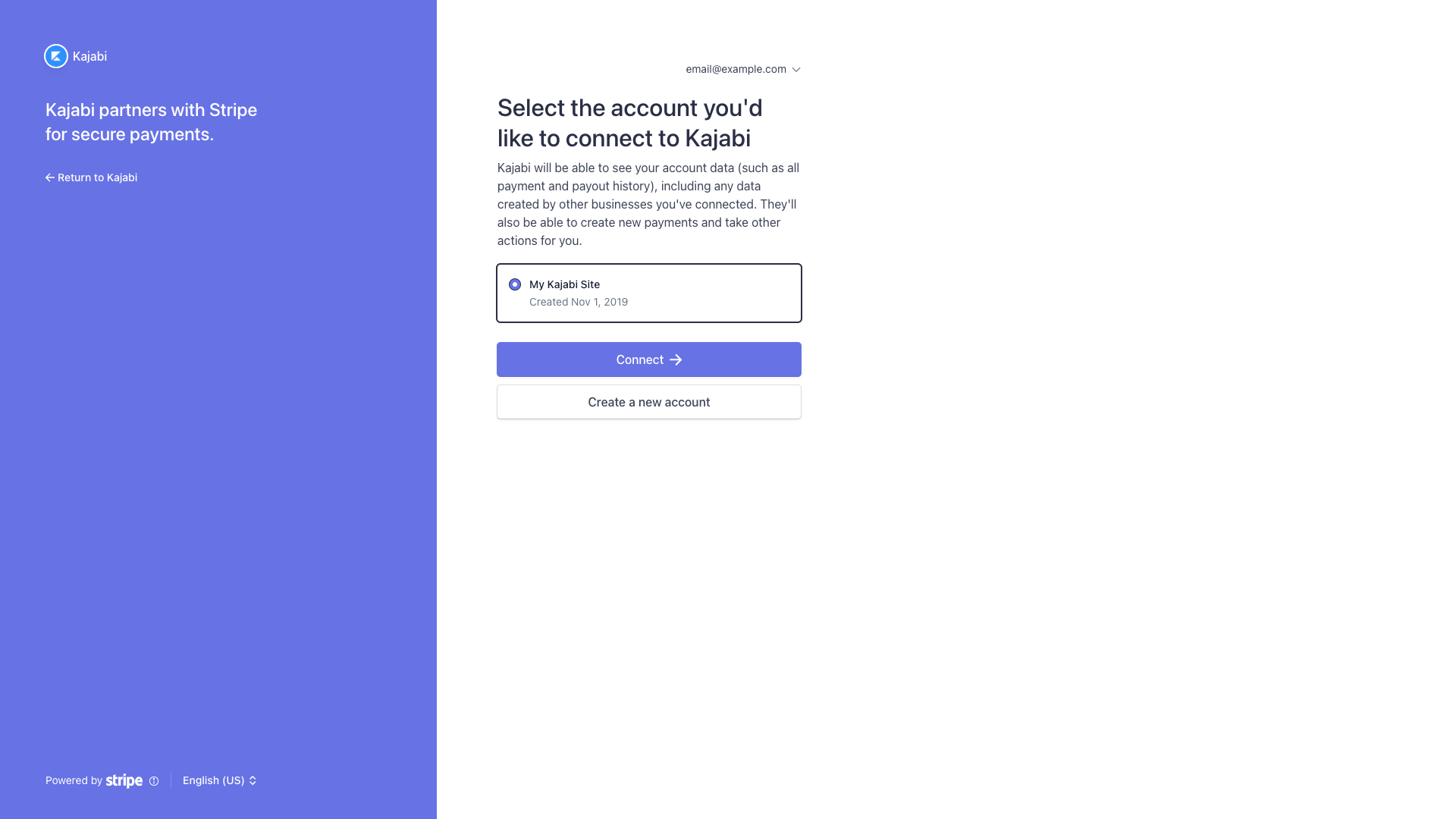
* Select the account you'd like to connect to Kajabi.
* Then, click **Connect**.
* If your Stripe Account is currently connected to another site on Kajabi, you will need to create a new account. Simply click **Create a new account** to get started. [Learn how to create and manage multiple Stripe accounts](https://stripe.com/docs/multiple-accounts).
* Then, complete the prompts to create your new Stripe Account.
 **Note:**
You can create additional Stripe Accounts under the same email address if you already have an existing Stripe Account.
If you need to create a new account, Kajabi will help you create a new account with Stripe to easily connect to Kajabi. To set up a new account, follow the on-screen instructions provided by Kajabi's integration with Stripe.
## If you don't have a Stripe account
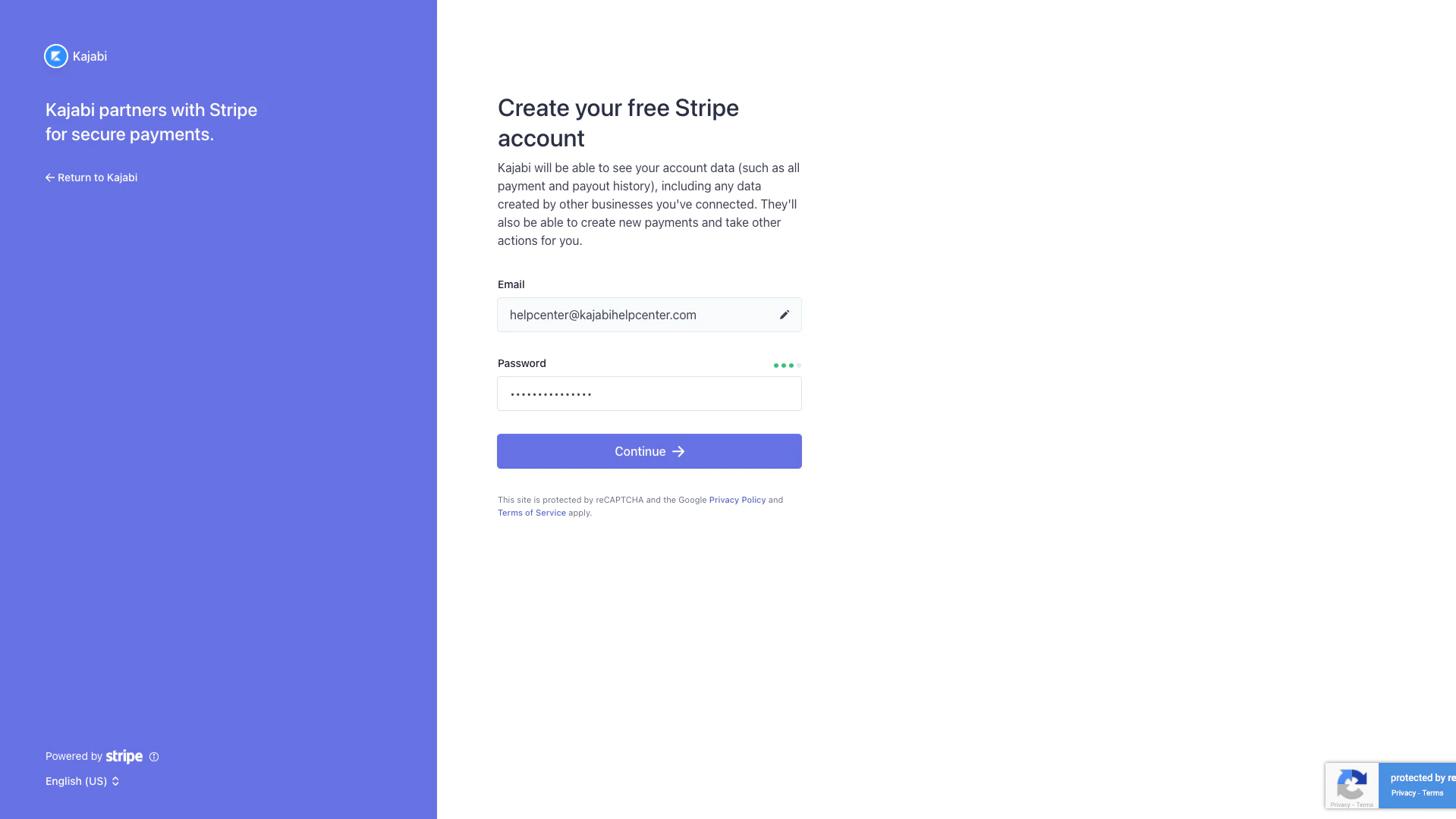
If you don't have a Stripe account but wish to integrate Kajabi with Stripe, create a Stripe account directly through Kajabi's integration with Stripe:
* Select **Create Stripe account**.
* Enter your desired Stripe account credentials (email and password).
* Click **Continue**.
* Then, follow the on-screen instructions to set up your account:
**Note:**
You can create additional Stripe Accounts under the same email address if you already have an existing Stripe Account.
If you need to create a new account, Kajabi will help you create a new account with Stripe to easily connect to Kajabi. To set up a new account, follow the on-screen instructions provided by Kajabi's integration with Stripe.
## If you don't have a Stripe account
If you don't have a Stripe account but wish to integrate Kajabi with Stripe, create a Stripe account directly through Kajabi's integration with Stripe:
* Select **Create Stripe account**.
* Enter your desired Stripe account credentials (email and password).
* Click **Continue**.
* Then, follow the on-screen instructions to set up your account:
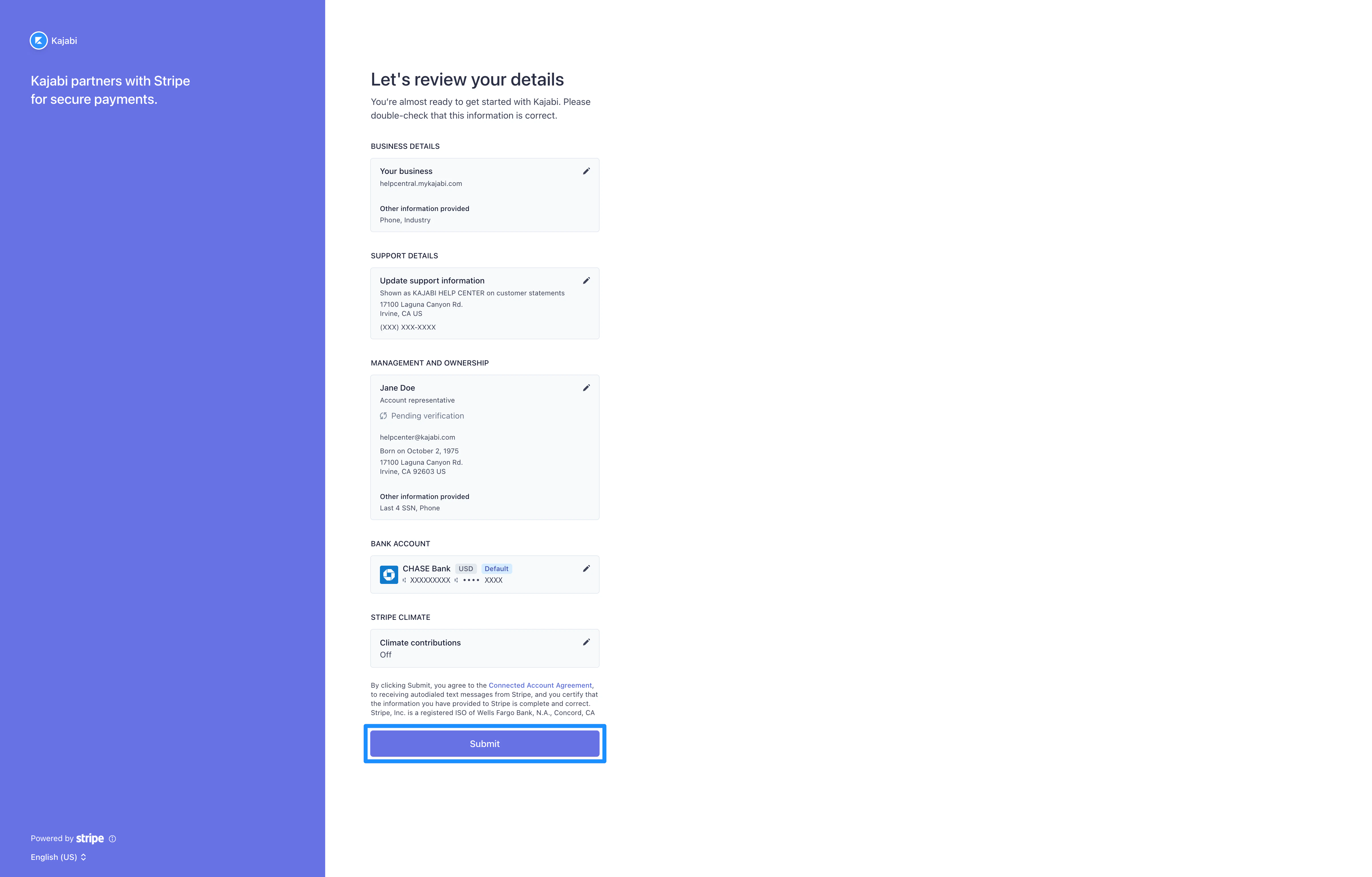
 After completing the connection process, Kajabi will prompt you to review your details.
* Be sure to complete any missing required information.
* After reviewing your details, click **Submit**:
After completing the connection process, Kajabi will prompt you to review your details.
* Be sure to complete any missing required information.
* After reviewing your details, click **Submit**:
 After successfully connecting your Stripe account, you will be redirected back to your Payments page on Kajabi.
## Remove a Stripe account
Did you connect the wrong account, or need to change the Stripe account connected to Kajabi?
Detach your Stripe account from Kajabi to connect a different account. [Learn more](./detach-stripe-and-paypal-from-kajabi)
After successfully connecting your Stripe account, you will be redirected back to your Payments page on Kajabi.
## Remove a Stripe account
Did you connect the wrong account, or need to change the Stripe account connected to Kajabi?
Detach your Stripe account from Kajabi to connect a different account. [Learn more](./detach-stripe-and-paypal-from-kajabi)