> ## Documentation Index
> Fetch the complete documentation index at: https://help.kajabi.com/llms.txt
> Use this file to discover all available pages before exploring further.
# Use Kajabi's public API
> Create API keys and access documentation for Kajabi's public API.
**Kajabi's public API** allows you to build custom integrations and automate workflows. This article walks you through creating API keys and accessing the API documentation.
**Note:**
The public API is included with the Pro Plan. Check out [kajabi.com/pricing](https://kajabi.com/pricing) for more details. It is also available as a \$25/mo add-on. Reach out to [support@kajabi.com](mailto:support@kajabi.com) to add this to your plan.
For those on Growth or Pro Plans without public API access, Webhooks provide a similar purpose. Kajabi offers both inbound and outbound Webhooks, allowing you to send and receive information from third-party applications. See [How to use Webhooks with Kajabi](../webhooks/webhooks-explained).
## API keys
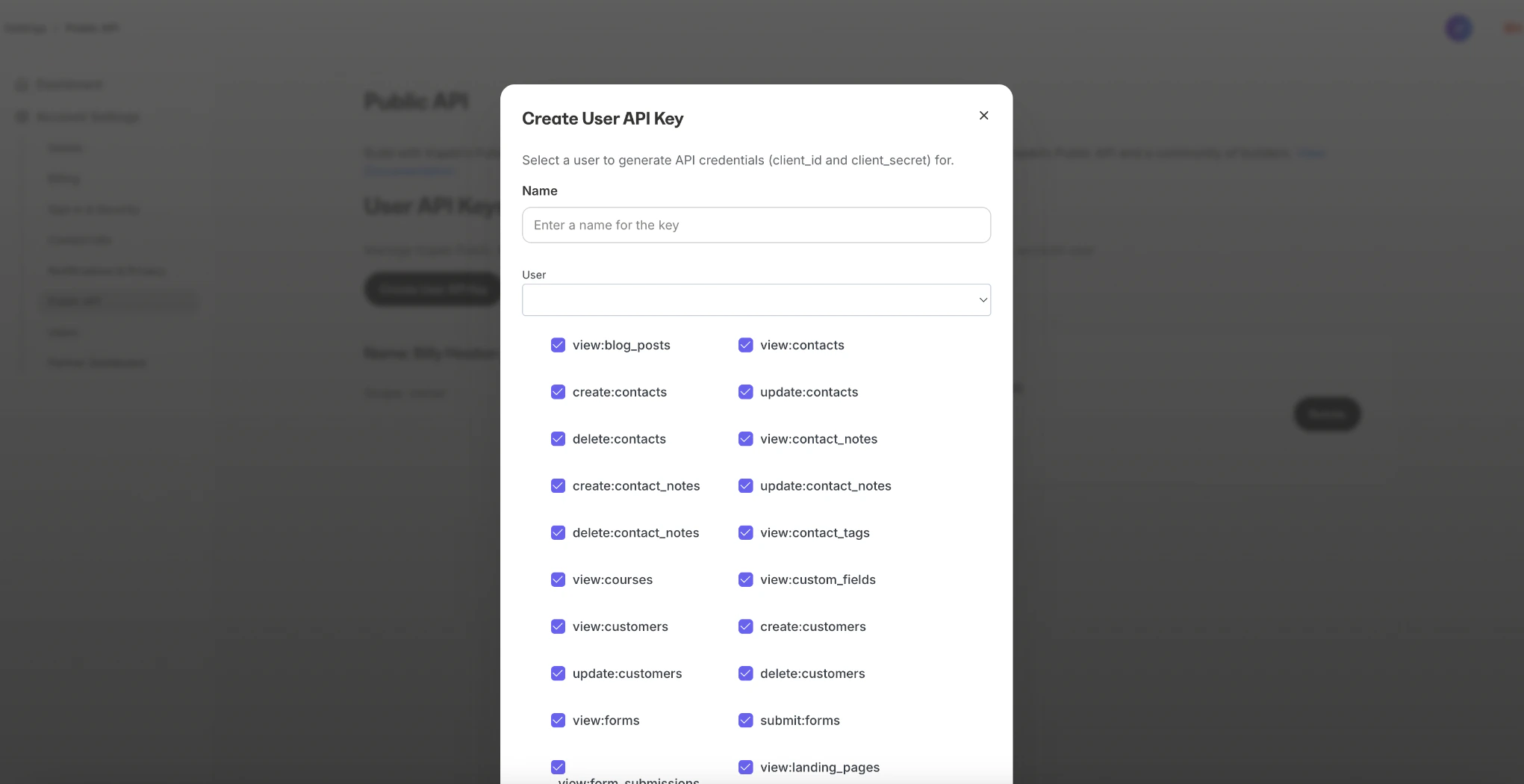
To create an API key:
* Go to Settings > [Public API](https://app.kajabi.com/admin/settings/public_api)
* Click **Create User API Key**
* Enter a **name** for your key
* Select the account user and permissions
* Click **Create**
**Important:**
Only Owners and Subowners can create API Keys.
 **Note:**
For security purposes, you may "Delete" or "Rotate" the API credentials at any time. This will invalidate any access tokens granted with those credentials.
## API documentation
For detailed information about endpoints, request parameters, and examples, visit the **Kajabi Public API Documentation**:
* [help.kajabi.com/api-reference](https://help.kajabi.com/api-reference)
This documentation provides a comprehensive guide on how to use various endpoints, error handling, and best practices for integrating with the public API.
## Get help
If you encounter a possible bug or have questions about the functionality of the Kajabi public API, [contact our support team](../../resources/support/how-to-contact-kajabi-support).
Kajabi is not able to support inquiries specific to custom coding. If you need assistance implementing or troubleshooting custom code with the API, we recommend seeking guidance from an expert or developer.
**Note:**
For security purposes, you may "Delete" or "Rotate" the API credentials at any time. This will invalidate any access tokens granted with those credentials.
## API documentation
For detailed information about endpoints, request parameters, and examples, visit the **Kajabi Public API Documentation**:
* [help.kajabi.com/api-reference](https://help.kajabi.com/api-reference)
This documentation provides a comprehensive guide on how to use various endpoints, error handling, and best practices for integrating with the public API.
## Get help
If you encounter a possible bug or have questions about the functionality of the Kajabi public API, [contact our support team](../../resources/support/how-to-contact-kajabi-support).
Kajabi is not able to support inquiries specific to custom coding. If you need assistance implementing or troubleshooting custom code with the API, we recommend seeking guidance from an expert or developer.