> ## Documentation Index
> Fetch the complete documentation index at: https://help.kajabi.com/llms.txt
> Use this file to discover all available pages before exploring further.
# Troubleshoot webhooks
> Resolve common webhook payload errors and learn best practices for connecting webhooks in Kajabi.
**Webhooks** in Kajabi are URLs that link two apps together, automatically triggering an action in an app after completing an action in another app. For example, adding a contact to InfusionSoft using an Activation Webhook URL for a specific Offer in your Kajabi account will automatically grant the Contact access to that Offer in Kajabi.
**Note:**
Webhooks on Kajabi are exclusively accessible for Heroes on our Growth or Pro Plans. Learn how to upgrade your Kajabi subscription plan [here](../../account-settings/billing/manage-your-subscription).
## Common payload errors
When troubleshooting Kajabi Webhooks, you may encounter the following payload errors:
* **email:** can't be blank
* **name:** can't be blank
* **email:** is invalid
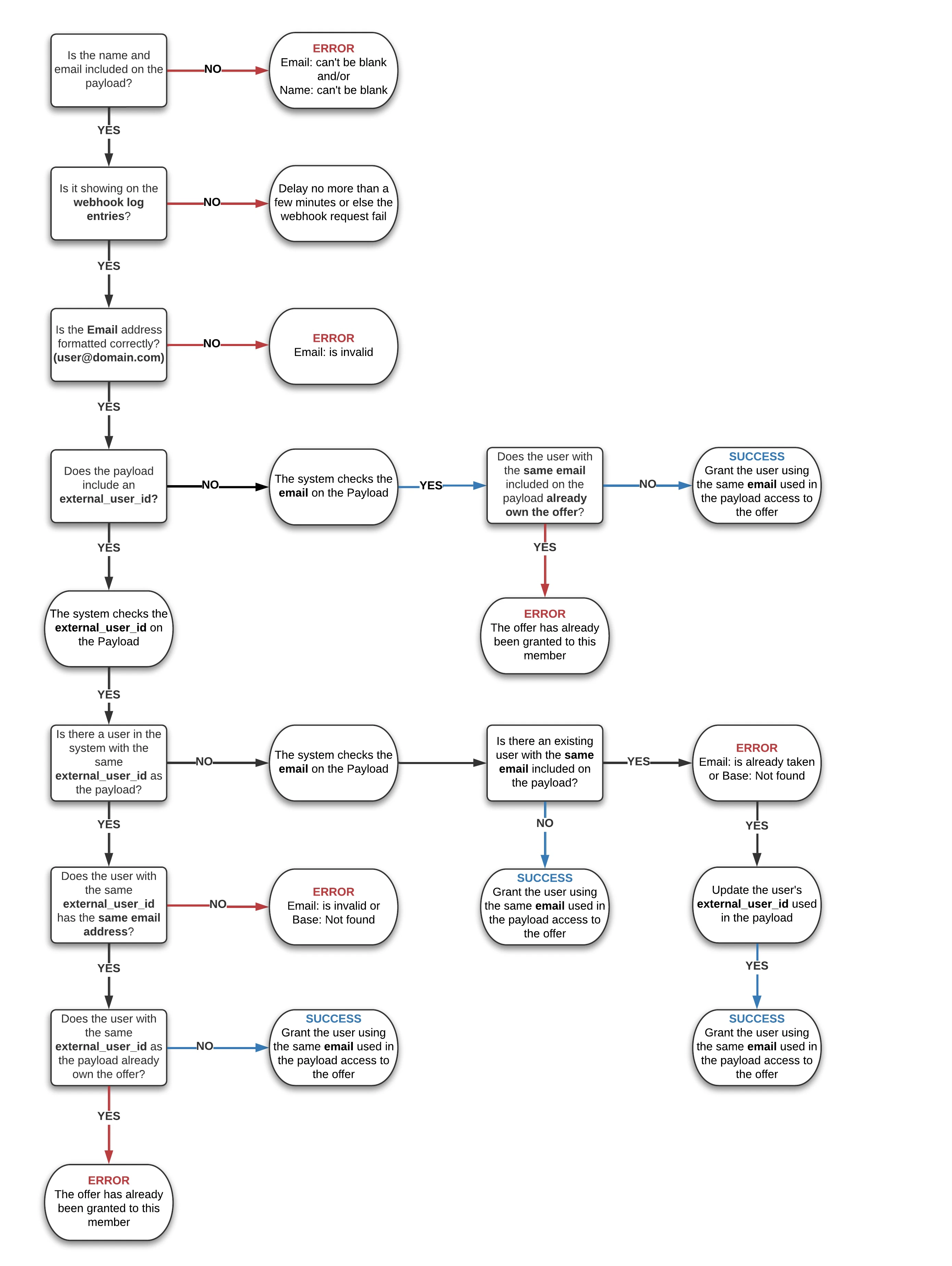
Often, the solution is verifying that both the name and email are included on the Webhook.
It is also good practice to confirm the email is valid.
**Follow this chart to successfully troubleshoot your Webhooks error:**
 ## Additional information when troubleshooting webhooks
* Webhooks always require the name, email, and external\_user\_id. All values should be lowercase.
* The external\_user\_id will be prioritized over email.
* The easiest way of making the email and external\_user\_id match is to use the email address as the external\_user\_id. If you need assistance updating your existing users' external\_user\_ids to be the email address, [reach out to Support](../../resources/support/how-to-contact-kajabi-support).
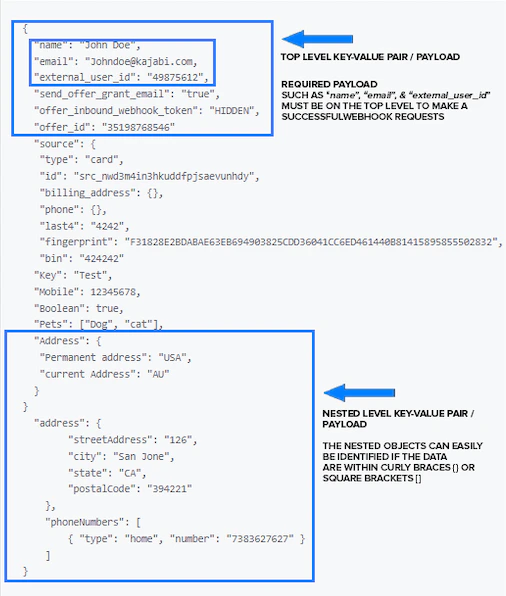
* Make sure the required Key-Value Pair/payload is on the top-level. If it's nested underneath it will not work and will give you the "Email can't be blank and Name can't be blank" error as shown below.
### Sample payload comparing top level payload & nested objects payload
## Additional information when troubleshooting webhooks
* Webhooks always require the name, email, and external\_user\_id. All values should be lowercase.
* The external\_user\_id will be prioritized over email.
* The easiest way of making the email and external\_user\_id match is to use the email address as the external\_user\_id. If you need assistance updating your existing users' external\_user\_ids to be the email address, [reach out to Support](../../resources/support/how-to-contact-kajabi-support).
* Make sure the required Key-Value Pair/payload is on the top-level. If it's nested underneath it will not work and will give you the "Email can't be blank and Name can't be blank" error as shown below.
### Sample payload comparing top level payload & nested objects payload