> ## Documentation Index
> Fetch the complete documentation index at: https://help.kajabi.com/llms.txt
> Use this file to discover all available pages before exploring further.
# Cofounder + MCP: Draft resources and edit Themes
> Go from idea to draft without leaving the Cofounder chat.
**Beta:** This feature is being released in phases to ensure stability across all accounts. If you do not see this setting, the feature has not been made available to your account yet. Check back at a later time to try the new experience.
**Note**: Currently, Cofounder MCP is included with all plans. Future limits may apply.
[**Cofounder**](/articles/cofounder/cofounder-overview) can read what is in your site and create draft content for you, all from the conversation. Most things Cofounder creates land as unpublished drafts that you review and publish yourself. Cofounder never publishes. You always publish. It can, however, edit resources that are already published, with your permission.
## **Key benefits**
* **Grounded, specific feedback**: Cofounder reads your actual page content and responds with recommendations tied to what is on the page, not generic advice.
* **Drafts built for you**: Ask Cofounder to create a Landing Page, Course, Email, Offer, or Blog Post and it handles the build while you stay in the conversation.
* **Live theme editing**: Open Cofounder inside the Theme Builder to apply section, block, and theme-wide style changes without switching tools.
* **You stay in control**: Cofounder creates drafts and publishes only when you ask it to.
**Note:** Cofounder can edit published pages, so be careful when selecting what pages to edit. If you are editing a theme and are in the Builder, those changes can be seen before they are saved.
## **What Cofounder can see**
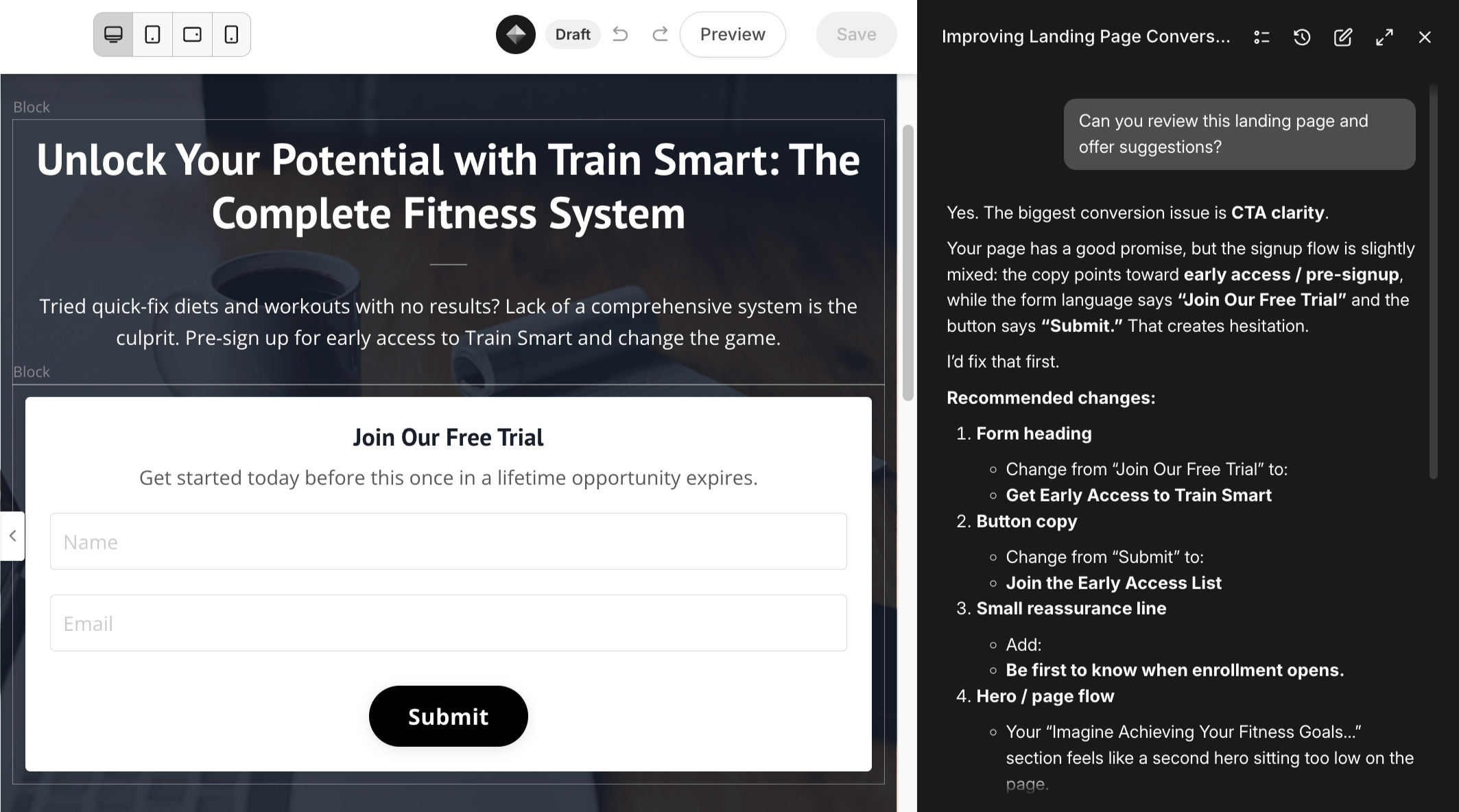
Cofounder can read the themed content that makes up your pages, including::
* Landing Page sections and content blocks
* Offer Checkout Page structure
* Theme configurations and page layouts
It can also read your Kajabi settings, including Products, Offers, and your Site profile.
Website Pages work a little differently. For a Website Page, Cofounder reads the page title, path, status, and SEO details. The on-page sections for Website Pages come from your Site's Theme, which Cofounder reads separately, rather than per page the way it does for Landing Pages.
When you ask Cofounder to review a page, it reads the list of section types in your Theme, which lets it spot what is present or missing. For example, it might say: "Your Offer page has a hero section and a pricing table but no testimonials or FAQ, both of which tend to perform well for coaching programs." Then, it readsthe full copy inside each section.
Cofounder also knows which page you're on and can see any unsaved changes you have open in the Builder.
 ## **Cofounder’s Action Panel**
When Cofounder needs several pieces of information before it builds something, or when it is about to take a significant action such as creating a draft, it shows an **Action Panel**: an inline form right in the chat.
The Action Panel includes:
* **Lettered options** (A, B, C) for common answers so you can respond quickly
* **Something else...** A field for free-form input when the provided options do not fit
* A **Skip** option on multi-step panels. Every step is optional, so you can skip any question.
* An **X** to exit the flow if you want to back out entirely
* A second confirmation message to ensure you want to take the outlined actions
While the Action Panel is open, the main chat input is hidden so there is no ambiguity about where your response goes.
**Note:** When provided lettered options by Cofounder, you need to click on the option you wish to move forward with. You cannot just type “A” if you would like to select option A.
When you skip a question, Cofounder may proceed without that input or use the context it already has. It will not silently substitute a value that materially changes what it is about to do.
## **Create resources with Cofounder**
Cofounder can create draft resources for you. Describe what you need, for example "Create a landing page for my photography coaching program," and Cofounder collects the details it needs before building. When it is done, it returns a direct link so you can review and edit the draft in the relevant builder before publishing.
**Note**: Before creating anything, Cofounder will show you a summary of what it's about to do and ask you to confirm.
### **Landing Pages**
Cofounder creates a Landing Page draft and gives you a link to open it in the **Page Builder**, where you can review and make any changes.
### **Courses**
Cofounder can create Course drafts and add Module and Lesson content. Confirm the course title and structure and it builds the draft for you to review in the **Course Builder**. You can also ask it to update an existing course, such as, "Add a lesson to my photography course on lighting basics."
### **Emails**
Cofounder can create Broadcast and Email Sequence drafts. Confirm the subject, audience, and content direction and it builds the draft for you to review in your email editor.
**Note:** Email Sequences drafted by Cofounder will not be using the Visual Editor. Email Broadcasts will be drafted using the Visual Editor.
### **Offers**
Cofounder can create Offer drafts. After confirming key details, the Offer is created as a draft with no automatic publishing or notifications triggered.
### **Blog Posts**
Cofounder can create and update Blog Post drafts. Confirm the topic and direction and it writes the draft for you to review and publish from your Blog.
### **Newsletters**
Cofounder can create Newsletter and Newsletter Post drafts so you can review the content before sending.
### **Forms**
Cofounder can create opt-in forms, including custom fields, for you to review and place on your pages.
### **Coaching**
Cofounder can create drafts for Coaching programs, including 1:1 and Group Coaching.
### **Digital Downloads**
Cofounder can create a Digital Download draft so you can add your files and set it up before making it available.
### **Events**
Cofounder can create Events. Unlike the draft resources above, an Event is saved to your Site right away rather than as a draft, so review the details before you ask Cofounder to create it.
**Note:** Cofounder respects your plan's resource limits. If you have reached the maximum number of a resource type on your plan, Cofounder lets you know and does not proceed, prompting you to upgrade or remove an unused resource instead.
## **Edit a Theme with Cofounder**
When you are working in the **Theme Builder**, Cofounder can read and edit the Theme you have open. Open the Cofounder panel while you are in the Builder and it can suggest and apply changes.
## **Cofounder’s Action Panel**
When Cofounder needs several pieces of information before it builds something, or when it is about to take a significant action such as creating a draft, it shows an **Action Panel**: an inline form right in the chat.
The Action Panel includes:
* **Lettered options** (A, B, C) for common answers so you can respond quickly
* **Something else...** A field for free-form input when the provided options do not fit
* A **Skip** option on multi-step panels. Every step is optional, so you can skip any question.
* An **X** to exit the flow if you want to back out entirely
* A second confirmation message to ensure you want to take the outlined actions
While the Action Panel is open, the main chat input is hidden so there is no ambiguity about where your response goes.
**Note:** When provided lettered options by Cofounder, you need to click on the option you wish to move forward with. You cannot just type “A” if you would like to select option A.
When you skip a question, Cofounder may proceed without that input or use the context it already has. It will not silently substitute a value that materially changes what it is about to do.
## **Create resources with Cofounder**
Cofounder can create draft resources for you. Describe what you need, for example "Create a landing page for my photography coaching program," and Cofounder collects the details it needs before building. When it is done, it returns a direct link so you can review and edit the draft in the relevant builder before publishing.
**Note**: Before creating anything, Cofounder will show you a summary of what it's about to do and ask you to confirm.
### **Landing Pages**
Cofounder creates a Landing Page draft and gives you a link to open it in the **Page Builder**, where you can review and make any changes.
### **Courses**
Cofounder can create Course drafts and add Module and Lesson content. Confirm the course title and structure and it builds the draft for you to review in the **Course Builder**. You can also ask it to update an existing course, such as, "Add a lesson to my photography course on lighting basics."
### **Emails**
Cofounder can create Broadcast and Email Sequence drafts. Confirm the subject, audience, and content direction and it builds the draft for you to review in your email editor.
**Note:** Email Sequences drafted by Cofounder will not be using the Visual Editor. Email Broadcasts will be drafted using the Visual Editor.
### **Offers**
Cofounder can create Offer drafts. After confirming key details, the Offer is created as a draft with no automatic publishing or notifications triggered.
### **Blog Posts**
Cofounder can create and update Blog Post drafts. Confirm the topic and direction and it writes the draft for you to review and publish from your Blog.
### **Newsletters**
Cofounder can create Newsletter and Newsletter Post drafts so you can review the content before sending.
### **Forms**
Cofounder can create opt-in forms, including custom fields, for you to review and place on your pages.
### **Coaching**
Cofounder can create drafts for Coaching programs, including 1:1 and Group Coaching.
### **Digital Downloads**
Cofounder can create a Digital Download draft so you can add your files and set it up before making it available.
### **Events**
Cofounder can create Events. Unlike the draft resources above, an Event is saved to your Site right away rather than as a draft, so review the details before you ask Cofounder to create it.
**Note:** Cofounder respects your plan's resource limits. If you have reached the maximum number of a resource type on your plan, Cofounder lets you know and does not proceed, prompting you to upgrade or remove an unused resource instead.
## **Edit a Theme with Cofounder**
When you are working in the **Theme Builder**, Cofounder can read and edit the Theme you have open. Open the Cofounder panel while you are in the Builder and it can suggest and apply changes.
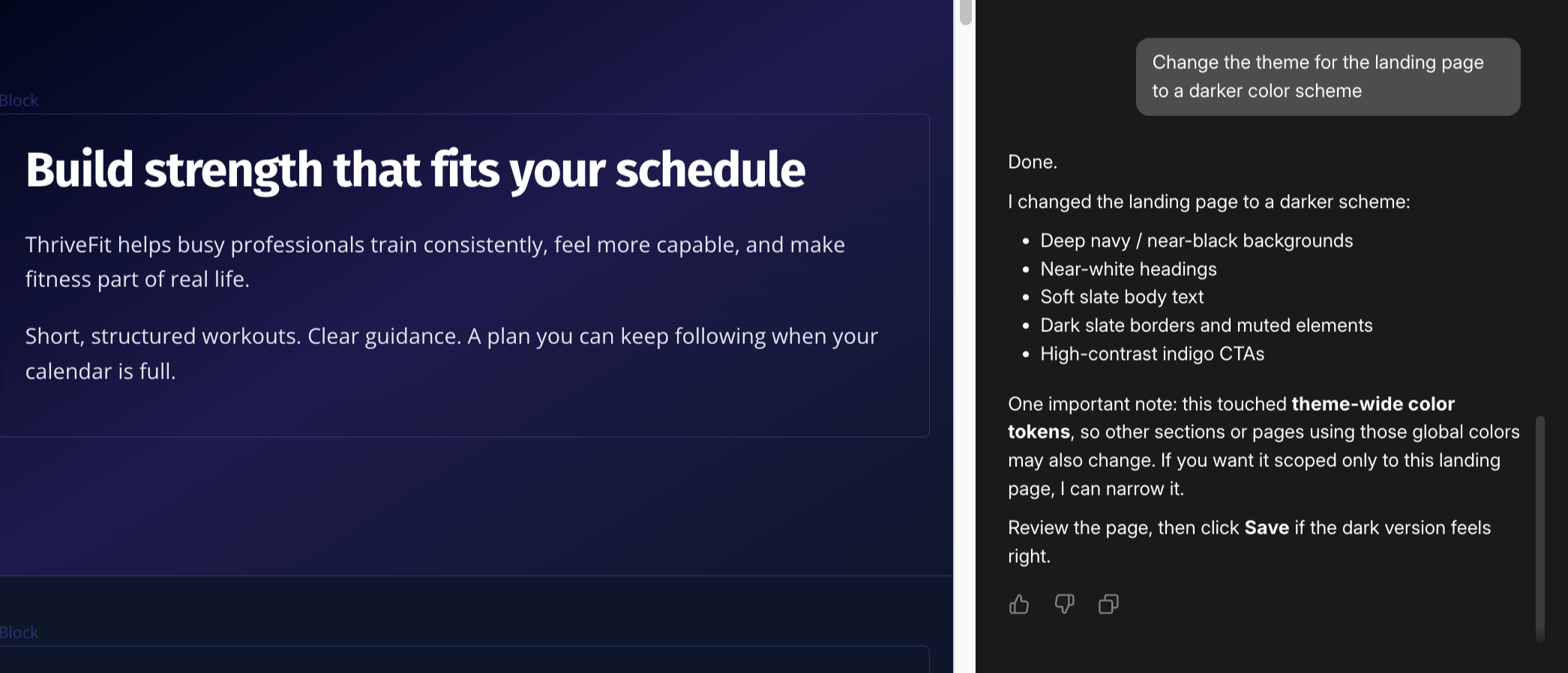 * Cofounder usually targets the section you are focused on, but it can also add, remove, and reorder whole sections, and make Theme-wide style changes such as fonts and brand colors.
* It works only on the Theme you have open. It will not edit other pages or pull content from external sites.
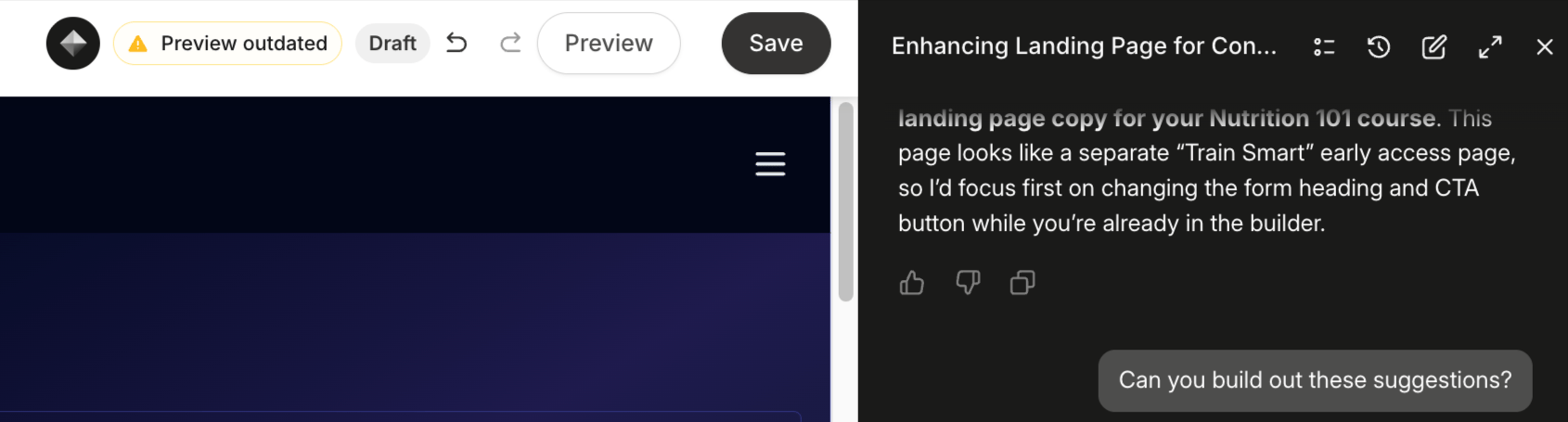
Most changes, such as editing a Section or Block's text, colors, or order, appear in the preview right away. Theme-wide changes like global fonts and brand colors appear after you click **Save**. Until you save, you will see a "Preview outdated" notice. A single undo (Cmd+Z) reverses all of Cofounder's changes.
* Cofounder usually targets the section you are focused on, but it can also add, remove, and reorder whole sections, and make Theme-wide style changes such as fonts and brand colors.
* It works only on the Theme you have open. It will not edit other pages or pull content from external sites.
Most changes, such as editing a Section or Block's text, colors, or order, appear in the preview right away. Theme-wide changes like global fonts and brand colors appear after you click **Save**. Until you save, you will see a "Preview outdated" notice. A single undo (Cmd+Z) reverses all of Cofounder's changes.
 ## Publishing resources
Publishing is always yours to do. Cofounder creates and edits drafts and links you directly to each resource so you can review it, but it does not publish, activate, or make anything live, even if you ask. When a draft is ready, open it from the link Cofounder provides and publish it yourself.
**Note**: Cofounder can edit content on pages that are already published (for example, theme and page content), and those edits can take effect without a separate publish step. It will not, however, publish or unpublish a resource for you.
## **Built-in safety**
Cofounder is built for safety:
* Every piece of text Cofounder writes is automatically checked for security threats before it's saved.
* Every change Cofounder makes is logged..
* To prevent misuse, actions like sending messages are limited in how often they can happen.
* If you've reached your plan limit, Cofounder will let you know and show you how to upgrade — rather than creating more than your plan allows.
**Note**: Cofounder MCP respects your existing Kajabi permissions. If a team member's role does not allow them to perform an action in the account, that same restriction applies through MCP. MCP access does not grant any account user more permissions than their role already allows.
## **FAQs**
### **Will Cofounder delete anything I have built?**
Cofounder cannot delete your top-level resources: Courses, Offers, Contacts, Products, Pages, or Posts.
There are two small exceptions: it can remove a single Navigation Menu link, and it can detach a field from a Form.
If you need to delete a resource, do it manually from the relevant section of your dashboard.
### **Can Cofounder publish without my confirmation?**
No. Cofounder only creates and edits drafts. It does not publish, activate, or make anything live, even if you ask it to. Publishing is always done by you from the relevant builder or dashboard.
**Note:** Cofounder can make edits to pages that are already published, so be careful when selecting which pages to edit.
### **Does Cofounder import contacts?**
Cofounder cannot import contacts or create new contact records. It can, however, help you organize existing contacts: it can create tags and segments and tag or untag people you already have.
### **Can Cofounder create Community posts or announcements?**
Not currently. Creating Community posts and announcements is not available through Cofounder at this time. To post in your Community, go directly to your Community dashboard.
### **What if my plan does not support the resource type Cofounder is trying to create?**
Cofounder checks what your plan includes before creating anything.. If you have reached the limit for a resource type, Cofounder lets you know and shows you how to upgrade — rather than creating more than your plan allows.
### **Are Theme changes in the Builder saved automatically?**
If you are in the Builder when interacting with Cofounder, then you will need to click save for any changes made. If you are editing a theme and don’t have the builder open when chatting with Cofounder, the changes will be saved automatically.
You can make Theme edits from anywhere in Kajabi, but we recommend being in the Builder when editing themed areas like pages, emails, Course templates, etc.
## Publishing resources
Publishing is always yours to do. Cofounder creates and edits drafts and links you directly to each resource so you can review it, but it does not publish, activate, or make anything live, even if you ask. When a draft is ready, open it from the link Cofounder provides and publish it yourself.
**Note**: Cofounder can edit content on pages that are already published (for example, theme and page content), and those edits can take effect without a separate publish step. It will not, however, publish or unpublish a resource for you.
## **Built-in safety**
Cofounder is built for safety:
* Every piece of text Cofounder writes is automatically checked for security threats before it's saved.
* Every change Cofounder makes is logged..
* To prevent misuse, actions like sending messages are limited in how often they can happen.
* If you've reached your plan limit, Cofounder will let you know and show you how to upgrade — rather than creating more than your plan allows.
**Note**: Cofounder MCP respects your existing Kajabi permissions. If a team member's role does not allow them to perform an action in the account, that same restriction applies through MCP. MCP access does not grant any account user more permissions than their role already allows.
## **FAQs**
### **Will Cofounder delete anything I have built?**
Cofounder cannot delete your top-level resources: Courses, Offers, Contacts, Products, Pages, or Posts.
There are two small exceptions: it can remove a single Navigation Menu link, and it can detach a field from a Form.
If you need to delete a resource, do it manually from the relevant section of your dashboard.
### **Can Cofounder publish without my confirmation?**
No. Cofounder only creates and edits drafts. It does not publish, activate, or make anything live, even if you ask it to. Publishing is always done by you from the relevant builder or dashboard.
**Note:** Cofounder can make edits to pages that are already published, so be careful when selecting which pages to edit.
### **Does Cofounder import contacts?**
Cofounder cannot import contacts or create new contact records. It can, however, help you organize existing contacts: it can create tags and segments and tag or untag people you already have.
### **Can Cofounder create Community posts or announcements?**
Not currently. Creating Community posts and announcements is not available through Cofounder at this time. To post in your Community, go directly to your Community dashboard.
### **What if my plan does not support the resource type Cofounder is trying to create?**
Cofounder checks what your plan includes before creating anything.. If you have reached the limit for a resource type, Cofounder lets you know and shows you how to upgrade — rather than creating more than your plan allows.
### **Are Theme changes in the Builder saved automatically?**
If you are in the Builder when interacting with Cofounder, then you will need to click save for any changes made. If you are editing a theme and don’t have the builder open when chatting with Cofounder, the changes will be saved automatically.
You can make Theme edits from anywhere in Kajabi, but we recommend being in the Builder when editing themed areas like pages, emails, Course templates, etc.