> ## Documentation Index
> Fetch the complete documentation index at: https://help.kajabi.com/llms.txt
> Use this file to discover all available pages before exploring further.
# Share an Assessment
> Distribute Assessments built in Kajabi through direct links or custom landing pages.
Assessments in Kajabi are great for creating standardized tests and surveys to share with your audience without the need of a Product or Offer.
Share your Assessments built in Kajabi by copying and pasting the Assessment link in your email campaigns and your social platforms.
## Link directly to an Assessment
If you wish to simply link directly to an Assessment without any customization, copy and paste the Assessment link in your email campaigns or social platforms.
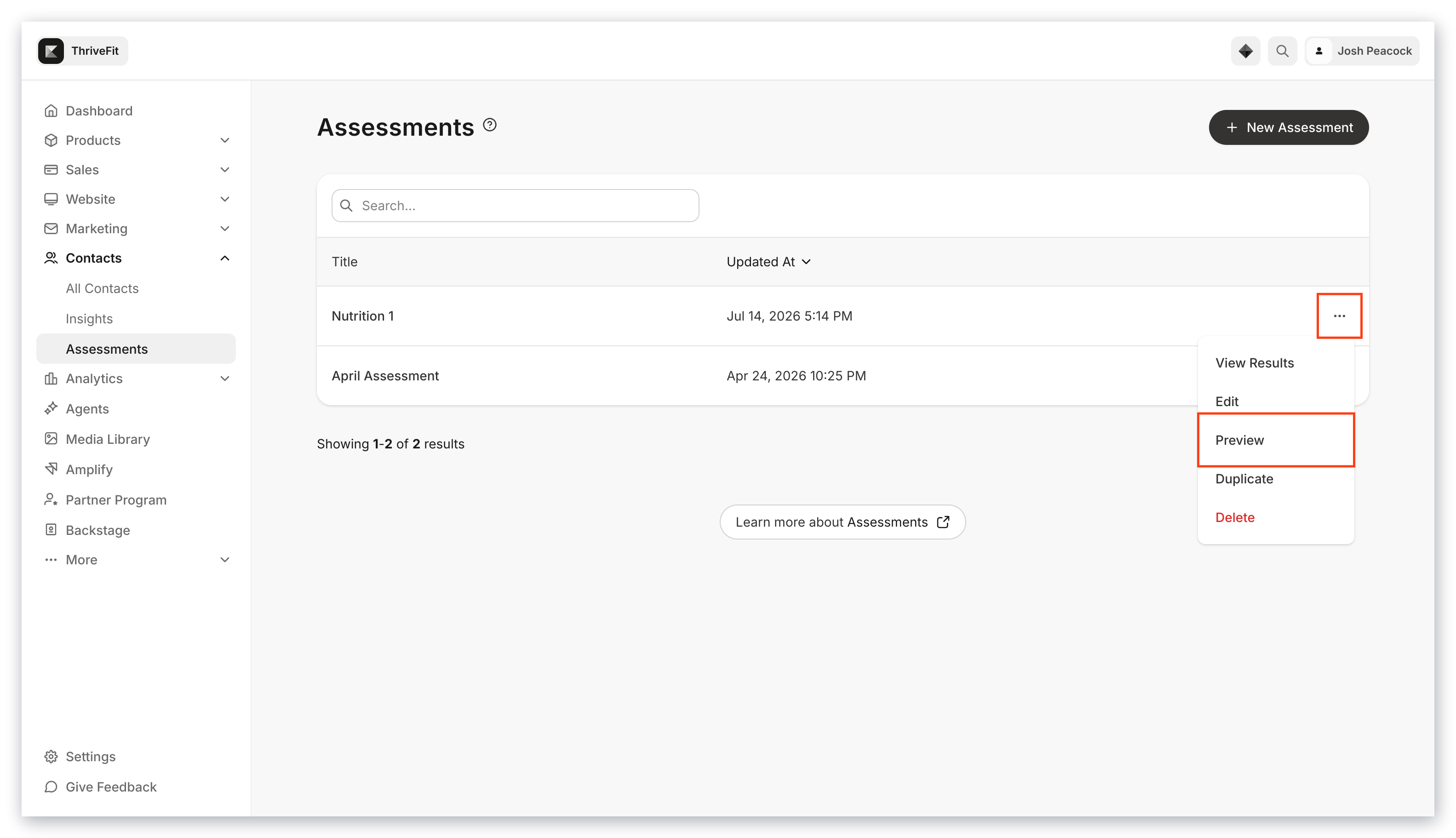
To access the Assessment link:
1. Open the **Contacts** tab from the Dashboard.
2. Select **Assessments**.
3. Locate the Assessment you wish to share.
4. Click the **...** menu to the right of the Assessment.
5. Select **Preview**.
6. Copy the URL link in your browser address bar.
 When visitors complete the Assessment, they are automatically prompted to subscribe to your email list with their name and email address:
**Note:**
The Assessment opt-in displayed at the completion of an Assessment is generated by default and cannot be customized.
## Share an Assessment using a custom landing page
Create and design a custom landing page for an Assessment:
 Learn to [add an Assessment to a landing page](../../website/pages/how-to-add-an-assessment-block) for details.
After designing a custom landing page, copy and paste the page link to your email campaigns or social platforms to share with your audience. [Learn to copy a page link](../../website/pages/how-to-copy-your-page-link)
When site visitors complete an Assessment on a landing page, they are automatically prompted to subscribe to your email list with their name and email address.
**Note:**
The Assessment opt-in displayed at the completion of an Assessment is generated by default and cannot be customized.
Learn to [add an Assessment to a landing page](../../website/pages/how-to-add-an-assessment-block) for details.
After designing a custom landing page, copy and paste the page link to your email campaigns or social platforms to share with your audience. [Learn to copy a page link](../../website/pages/how-to-copy-your-page-link)
When site visitors complete an Assessment on a landing page, they are automatically prompted to subscribe to your email list with their name and email address.
**Note:**
The Assessment opt-in displayed at the completion of an Assessment is generated by default and cannot be customized.