> ## Documentation Index
> Fetch the complete documentation index at: https://help.kajabi.com/llms.txt
> Use this file to discover all available pages before exploring further.
# Manage contact profiles
> Track activity, perform actions, and update details from a contact's profile page.
Contact profiles let you track activity, perform actions, and manage details for each contact and customer on your site.
## Access a contact's profile
1. Open the **Contacts** tab from the Dashboard.
2. Select the name of the person you wish to view.
3. Click **Open full profile**:
Customer Profiles include different features than Contact Profiles. Refer below for the different features. For more details learn the [Difference between Customers and Contacts](../../contacts/manage-your-contacts/what-is-the-difference-between-a-customer-contact-and-a-subscriber).
## Customer profile features
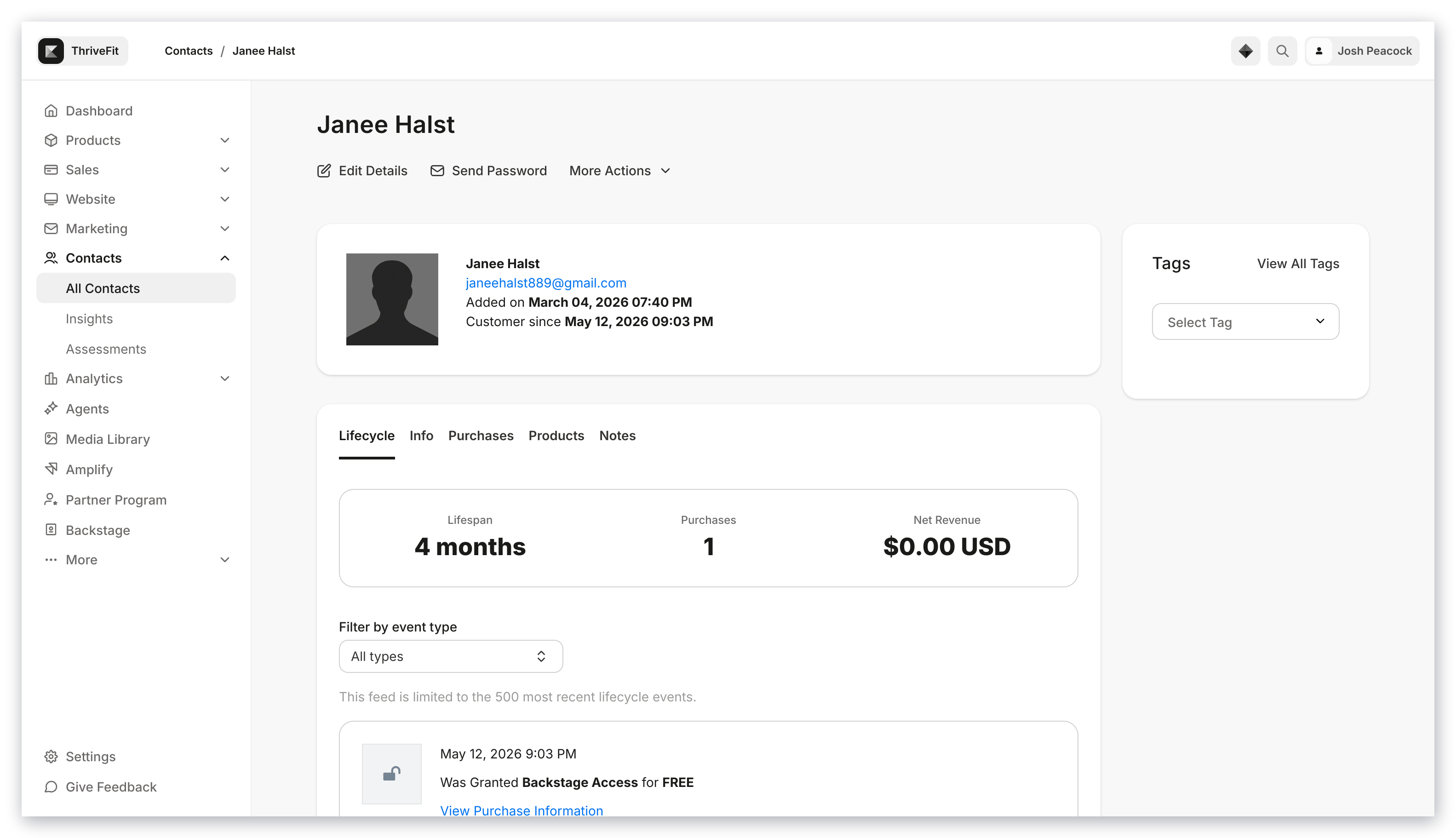 ### Lifecycle
#### Track a Customer's lifecycle including
* Offers Purchased and Granted
* Email Campaigns sent
* Email recipient actions on broadcast and sequence emails (e.g., opened, clicked, unsubscribed, complained, or bounced)
* Forms submitted
* Emails sent from an Automation, shown as *Received automation email* with a **View Automation** link to the Automation that sent it
* Automation enrollments, shown as *Enrolled in Automation: \[name]* with a status of Active, Paused, Completed, or Error
* Tags added, shown on the timeline as *Tagged with \[tag name]*
* How the contact was created, shown as *Contact created via \[source]* (for example, Form Submission, Import, or Offer Purchase)
* **Lifespan**: number of days from start date (date added to Contacts through import, purchase, or opt-in)
* **Purchases**: number of purchases made and Offers Granted
* **Net Revenue**: Net revenue generated by Customer
**Note:** The timeline loads 20 events at a time. You can page through up to the 500 most recent events, and filtering by an event type shows the 500 most recent events of that type.
**Note:** Tag removals are not tracked. If you remove a Tag from a contact, its *Tagged with* event no longer appears on the timeline, so the timeline is not a complete Tag history. Automation email events are recorded going forward, so automation emails sent before this appeared on the timeline may not be shown.
### Info
* Added on date
* Net Revenue
* [Subscription to Marketing Emails Status](../../contacts/manage-your-contacts/how-auto-unsubscribe-helps-you-maintain-a-healthy-mailing-list#h_549ed792-86b8-41dd-8aa1-eeae61b70b60)
* Customer Start Date
* Sign in count: total number of sign ins
* Last activity at: The date and time of the Customer's last activity on your site. [Learn more](../../contacts/manage-your-contacts/how-to-define-customer-activity)
* Additional Info: Customer ID & Products owned
### Purchases
* Offers Purchased
* Offers Granted (this includes information about the person that granted the Offer: Owner or account user.)
**Note:** In the event of an [Account User](../../account-settings/users/account-users) granting, revoking, or canceling a Customer's Offer or Product access, you can see the person responsible (noted by their email address) by navigating to the Customer and viewing their Purchases tab.
### Products
* Products owned by Customer
### Notes
* Add notes.
* Review and remove previous notes.
### Edit details
Edit Customer Details to update the name, email, and form submission answers of Customers.
* **Name**
* **Email**
* **External user id** for third-party integrations
* **Contact Information**
* **Custom Fields**
Read [Edit contact information](../../contacts/manage-your-contacts/how-to-edit-your-contacts-information) for details.
### Send password
Send a [password reset link](../../contacts/manage-your-contacts/how-to-reset-your-customers-password) to a Customer.
### More actions
* **Mute** Customers. Read [Muting Customers](https://help.kajabi.com/hc/en-us/articles/360041542213) for details.
* **Hide** a Customer's profile from the Contacts tab.
* **Grant Offers** to Customers. Read [Grant an Offer](../../sales/offers/how-to-grant-an-offer) to learn more.
* **Change Password** for a Customer.
* **Delete** a Customer permanently. Read [Delete a Customer](../../contacts/manage-your-contacts/how-to-delete-a-contact) for details.
### Tags
Add Tags to filter and segment your List to easily organize and categorize it. Tags can be used when sending Email Campaigns and creating Automations. Read [Use Tags](../../contacts/manage-your-contacts/tags-overview) to learn more.
## Contact profile features
### Lifecycle
#### Track a Customer's lifecycle including
* Offers Purchased and Granted
* Email Campaigns sent
* Email recipient actions on broadcast and sequence emails (e.g., opened, clicked, unsubscribed, complained, or bounced)
* Forms submitted
* Emails sent from an Automation, shown as *Received automation email* with a **View Automation** link to the Automation that sent it
* Automation enrollments, shown as *Enrolled in Automation: \[name]* with a status of Active, Paused, Completed, or Error
* Tags added, shown on the timeline as *Tagged with \[tag name]*
* How the contact was created, shown as *Contact created via \[source]* (for example, Form Submission, Import, or Offer Purchase)
* **Lifespan**: number of days from start date (date added to Contacts through import, purchase, or opt-in)
* **Purchases**: number of purchases made and Offers Granted
* **Net Revenue**: Net revenue generated by Customer
**Note:** The timeline loads 20 events at a time. You can page through up to the 500 most recent events, and filtering by an event type shows the 500 most recent events of that type.
**Note:** Tag removals are not tracked. If you remove a Tag from a contact, its *Tagged with* event no longer appears on the timeline, so the timeline is not a complete Tag history. Automation email events are recorded going forward, so automation emails sent before this appeared on the timeline may not be shown.
### Info
* Added on date
* Net Revenue
* [Subscription to Marketing Emails Status](../../contacts/manage-your-contacts/how-auto-unsubscribe-helps-you-maintain-a-healthy-mailing-list#h_549ed792-86b8-41dd-8aa1-eeae61b70b60)
* Customer Start Date
* Sign in count: total number of sign ins
* Last activity at: The date and time of the Customer's last activity on your site. [Learn more](../../contacts/manage-your-contacts/how-to-define-customer-activity)
* Additional Info: Customer ID & Products owned
### Purchases
* Offers Purchased
* Offers Granted (this includes information about the person that granted the Offer: Owner or account user.)
**Note:** In the event of an [Account User](../../account-settings/users/account-users) granting, revoking, or canceling a Customer's Offer or Product access, you can see the person responsible (noted by their email address) by navigating to the Customer and viewing their Purchases tab.
### Products
* Products owned by Customer
### Notes
* Add notes.
* Review and remove previous notes.
### Edit details
Edit Customer Details to update the name, email, and form submission answers of Customers.
* **Name**
* **Email**
* **External user id** for third-party integrations
* **Contact Information**
* **Custom Fields**
Read [Edit contact information](../../contacts/manage-your-contacts/how-to-edit-your-contacts-information) for details.
### Send password
Send a [password reset link](../../contacts/manage-your-contacts/how-to-reset-your-customers-password) to a Customer.
### More actions
* **Mute** Customers. Read [Muting Customers](https://help.kajabi.com/hc/en-us/articles/360041542213) for details.
* **Hide** a Customer's profile from the Contacts tab.
* **Grant Offers** to Customers. Read [Grant an Offer](../../sales/offers/how-to-grant-an-offer) to learn more.
* **Change Password** for a Customer.
* **Delete** a Customer permanently. Read [Delete a Customer](../../contacts/manage-your-contacts/how-to-delete-a-contact) for details.
### Tags
Add Tags to filter and segment your List to easily organize and categorize it. Tags can be used when sending Email Campaigns and creating Automations. Read [Use Tags](../../contacts/manage-your-contacts/tags-overview) to learn more.
## Contact profile features
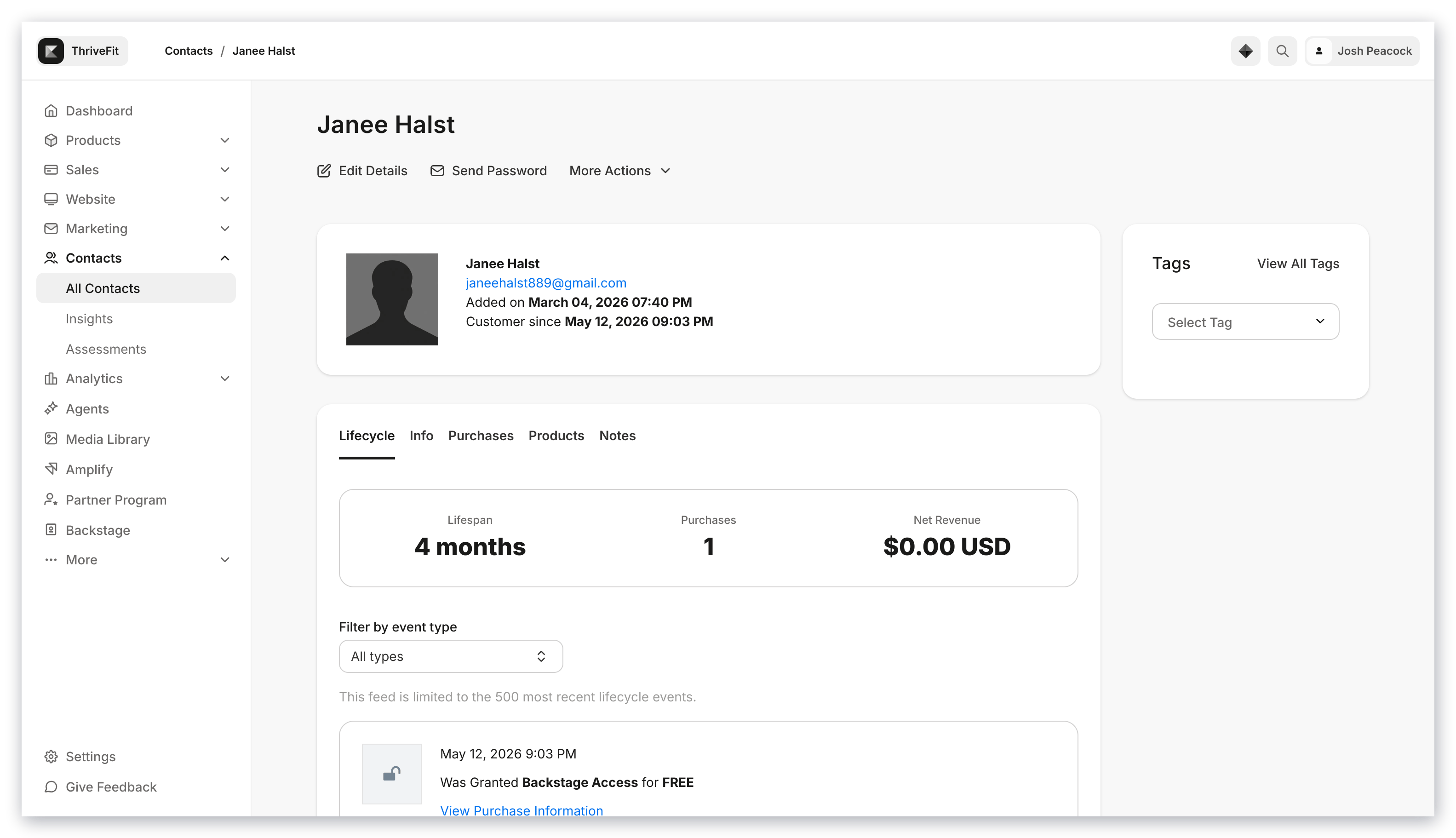 ### Lifecycle
#### Track a Contact's lifecycle including
* Email Campaigns sent
* Email recipient actions on broadcast and sequence emails (e.g., opened, clicked, unsubscribed, complained, or bounced)
* Forms submitted
* Emails sent from an Automation, shown as *Received automation email* with a **View Automation** link to the Automation that sent it
* Automation enrollments, shown as *Enrolled in Automation: \[name]* with a status of Active, Paused, Completed, or Error
* Tags added, shown on the timeline as *Tagged with \[tag name]*
* How the contact was created, shown as *Contact created via \[source]* (for example, Form Submission, Import, or Offer Purchase)
* **Lifespan:** number of days from start date (date added to Contacts through import or opt-in)
* **Purchases:** number of purchases made (As a contact, this will appear as a 0 until converted into a Customer)
* **Net Revenue:** Net revenue generated by a Contact (As a contact, this will appear as a 0 unless converted into a Customer with a Purchase)
**Note:** The timeline loads 20 events at a time. You can page through up to the 500 most recent events, and filtering by an event type shows the 500 most recent events of that type.
**Note:** Tag removals are not tracked. If you remove a Tag from a contact, its *Tagged with* event no longer appears on the timeline, so the timeline is not a complete Tag history. Automation email events are recorded going forward, so automation emails sent before this appeared on the timeline may not be shown.
### Info
* Added on date
* [Subscription to Marketing Emails Status](../../contacts/manage-your-contacts/how-auto-unsubscribe-helps-you-maintain-a-healthy-mailing-list#h_549ed792-86b8-41dd-8aa1-eeae61b70b60)
* Additional Info will display if additional info applies (e.g., [custom field](../../marketing/forms/how-to-add-and-edit-fields-on-a-form) submissions in a Form)
### Purchases
This will remain empty unless converted into a Customer.
### Products
This will remain empty unless converted into a Customer.
### Notes
* Add notes.
* Review and remove previous notes.
### Edit details
Edit Contact Details to update the name, email, and form submission answers of Contacts.
* **Name**
* **Email**
* **Contact Information**
* **Custom Fields**
Read [Edit contact information](../../contacts/manage-your-contacts/how-to-edit-your-contacts-information) for details.
### More actions
* **Hide** a Contact's profile from the Contacts Dashboard.
* **Grant Offers** to a Contact and convert into a Customer. Read [Grant an Offer](../../sales/offers/how-to-grant-an-offer) to learn more.
* **Delete** a Contact permanently. Read [Delete a Customer](../../contacts/manage-your-contacts/how-to-delete-a-contact) for details.
### Tags
Add Tags to filter and segment your List to easily organize and categorize it. Tags can be used when sending Email Campaigns and creating Automations. Read [Use Tags](../../contacts/manage-your-contacts/tags-overview) to learn more.
### Lifecycle
#### Track a Contact's lifecycle including
* Email Campaigns sent
* Email recipient actions on broadcast and sequence emails (e.g., opened, clicked, unsubscribed, complained, or bounced)
* Forms submitted
* Emails sent from an Automation, shown as *Received automation email* with a **View Automation** link to the Automation that sent it
* Automation enrollments, shown as *Enrolled in Automation: \[name]* with a status of Active, Paused, Completed, or Error
* Tags added, shown on the timeline as *Tagged with \[tag name]*
* How the contact was created, shown as *Contact created via \[source]* (for example, Form Submission, Import, or Offer Purchase)
* **Lifespan:** number of days from start date (date added to Contacts through import or opt-in)
* **Purchases:** number of purchases made (As a contact, this will appear as a 0 until converted into a Customer)
* **Net Revenue:** Net revenue generated by a Contact (As a contact, this will appear as a 0 unless converted into a Customer with a Purchase)
**Note:** The timeline loads 20 events at a time. You can page through up to the 500 most recent events, and filtering by an event type shows the 500 most recent events of that type.
**Note:** Tag removals are not tracked. If you remove a Tag from a contact, its *Tagged with* event no longer appears on the timeline, so the timeline is not a complete Tag history. Automation email events are recorded going forward, so automation emails sent before this appeared on the timeline may not be shown.
### Info
* Added on date
* [Subscription to Marketing Emails Status](../../contacts/manage-your-contacts/how-auto-unsubscribe-helps-you-maintain-a-healthy-mailing-list#h_549ed792-86b8-41dd-8aa1-eeae61b70b60)
* Additional Info will display if additional info applies (e.g., [custom field](../../marketing/forms/how-to-add-and-edit-fields-on-a-form) submissions in a Form)
### Purchases
This will remain empty unless converted into a Customer.
### Products
This will remain empty unless converted into a Customer.
### Notes
* Add notes.
* Review and remove previous notes.
### Edit details
Edit Contact Details to update the name, email, and form submission answers of Contacts.
* **Name**
* **Email**
* **Contact Information**
* **Custom Fields**
Read [Edit contact information](../../contacts/manage-your-contacts/how-to-edit-your-contacts-information) for details.
### More actions
* **Hide** a Contact's profile from the Contacts Dashboard.
* **Grant Offers** to a Contact and convert into a Customer. Read [Grant an Offer](../../sales/offers/how-to-grant-an-offer) to learn more.
* **Delete** a Contact permanently. Read [Delete a Customer](../../contacts/manage-your-contacts/how-to-delete-a-contact) for details.
### Tags
Add Tags to filter and segment your List to easily organize and categorize it. Tags can be used when sending Email Campaigns and creating Automations. Read [Use Tags](../../contacts/manage-your-contacts/tags-overview) to learn more.