> ## Documentation Index
> Fetch the complete documentation index at: https://help.kajabi.com/llms.txt
> Use this file to discover all available pages before exploring further.
# Use Automation triggers, flows, and branches
> Consolidate and organize Automations using side-by-side flows, multiple triggers, and branching logic.
Kajabi's [visual Automation Builder](/articles/marketing/automations/whats-new-with-kajabi-automations) allows multiple workflows to be added within a single Automation. Consolidate and organize Automations into one using side-by-side flows, multiple triggers, and branching logic.
This reduces the need for separate Automations and provides greater flexibility when building workflows.
**Note:** This feature is available only if you have:
* Upgraded to the [visual Automation Builder](/articles/marketing/automations/whats-new-with-kajabi-automations)
* A [Growth plan or higher](https://kajabi.com/pricing) (Advanced Automations)
## Create an Automation with multiple triggers
1. From the Kajabi Dashboard, select **Marketing** > **Automations**.
2. Select an existing Automation or create a new one.
3. Save the first trigger. The option to add additional triggers only appears after the first trigger is saved.
4. Click **+ Add Trigger** to the right to create another trigger within your Automation.
5. Add the Automation's **Then** action(s).
6. Click **Save Trigger** when you're done:
You can stack multiple triggers within a single Automation to combine criteria. Each trigger can also include one or more filters.
## Create an Automation with multiple flows
1. From the Kajabi Dashboard, select **Marketing** > **Automations**.
2. Select an existing Automation or create a new one.
3. Click the **+ Add flow** button to add a flow to your Automation.
4. The flow appears on the right, allowing you to create a separate workflow inside the same Automation.
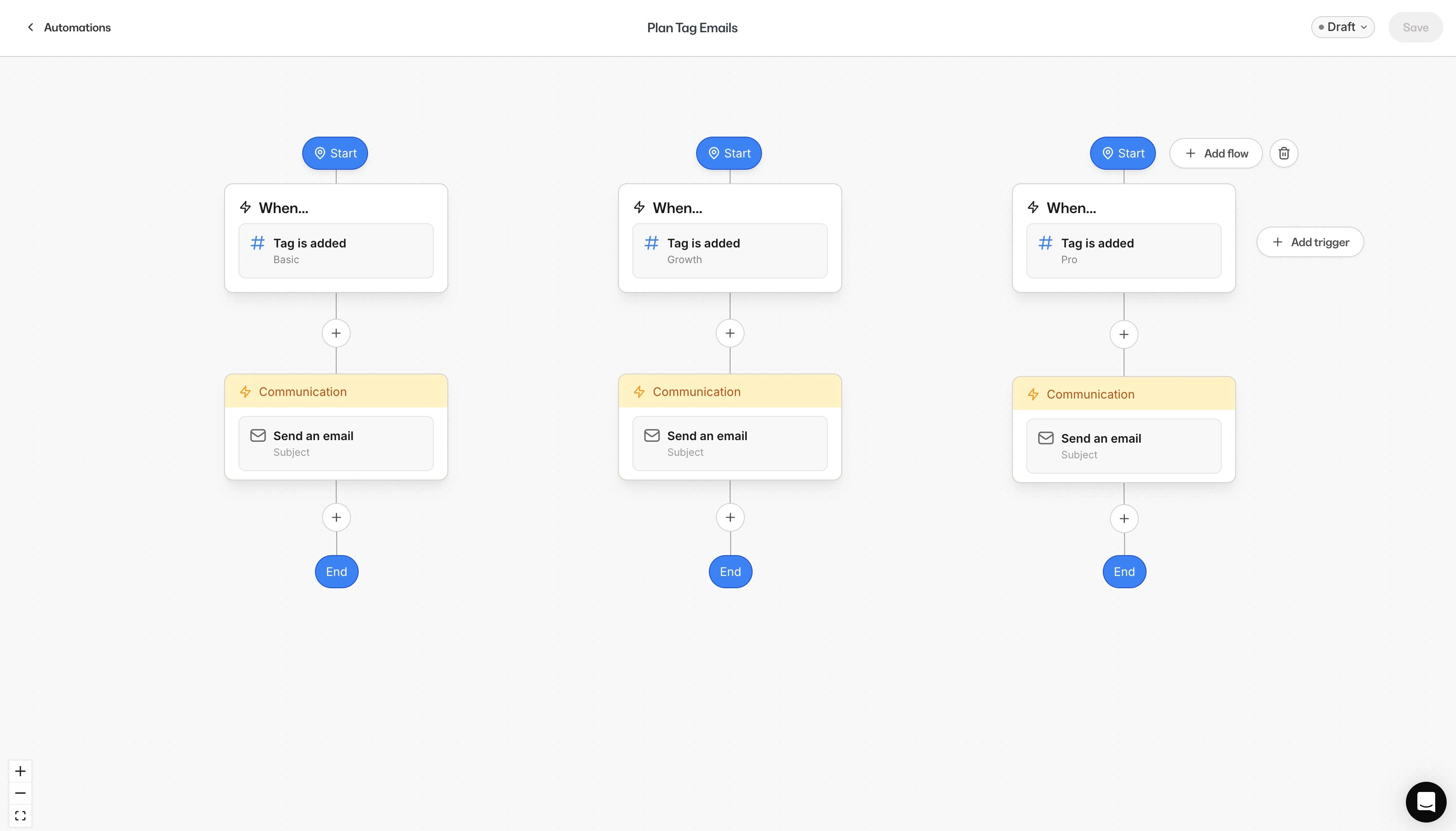 **Important:** Each Automation can contain up to a maximum of 10 individual flows and/or triggers.
## Add branching logic and wait nodes
After defining the **Then** action, you can optionally add up to 5 **branches** to create conditional paths. You can also include [wait nodes](/articles/marketing/automations/how-to-use-a-wait-node-with-automations) as needed throughout the Automation.
### Example branching use case
For users who submitted multiple forms:
* **Branch 1:** Send Email 1 if they *have a specific tag* or *have purchased Offer A*
* **Branch 2:** Send Email 2 if they *do not meet those conditions*
\
FAQs
### I don't see the option to add another trigger. Where is it?
The option appears only **after saving your first trigger**.
### I'm on the Basic plan and I don't have access to the Automations tab. Can I use this feature?
No. This update is only available with Advanced Automations, included in Kajabi Growth and up.
### Can I still use filters and branching?
Yes. Filters, branching logic, and waiting steps all work as usual with multiple triggers.
### How many triggers can I add to a single Automation?
There is a maximum of 10 triggers that can be added to a single Automation.
**Important:** Each Automation can contain up to a maximum of 10 individual flows and/or triggers.
## Add branching logic and wait nodes
After defining the **Then** action, you can optionally add up to 5 **branches** to create conditional paths. You can also include [wait nodes](/articles/marketing/automations/how-to-use-a-wait-node-with-automations) as needed throughout the Automation.
### Example branching use case
For users who submitted multiple forms:
* **Branch 1:** Send Email 1 if they *have a specific tag* or *have purchased Offer A*
* **Branch 2:** Send Email 2 if they *do not meet those conditions*
\
FAQs
### I don't see the option to add another trigger. Where is it?
The option appears only **after saving your first trigger**.
### I'm on the Basic plan and I don't have access to the Automations tab. Can I use this feature?
No. This update is only available with Advanced Automations, included in Kajabi Growth and up.
### Can I still use filters and branching?
Yes. Filters, branching logic, and waiting steps all work as usual with multiple triggers.
### How many triggers can I add to a single Automation?
There is a maximum of 10 triggers that can be added to a single Automation.