> ## Documentation Index
> Fetch the complete documentation index at: https://help.kajabi.com/llms.txt
> Use this file to discover all available pages before exploring further.
# Understand Automation components
> Get to know the building blocks of Automations, including triggers, actions, and conditional filters.
**Automations** are powerful tools in Kajabi that use **conditional logic** to help you streamline processes by automating actions for your business.
Each Automation is built around two required parts — what starts it **(When)** and what happens as a result **(Then)** — with an optional conditional filter you can add to narrow down when it applies **(Only if)**.
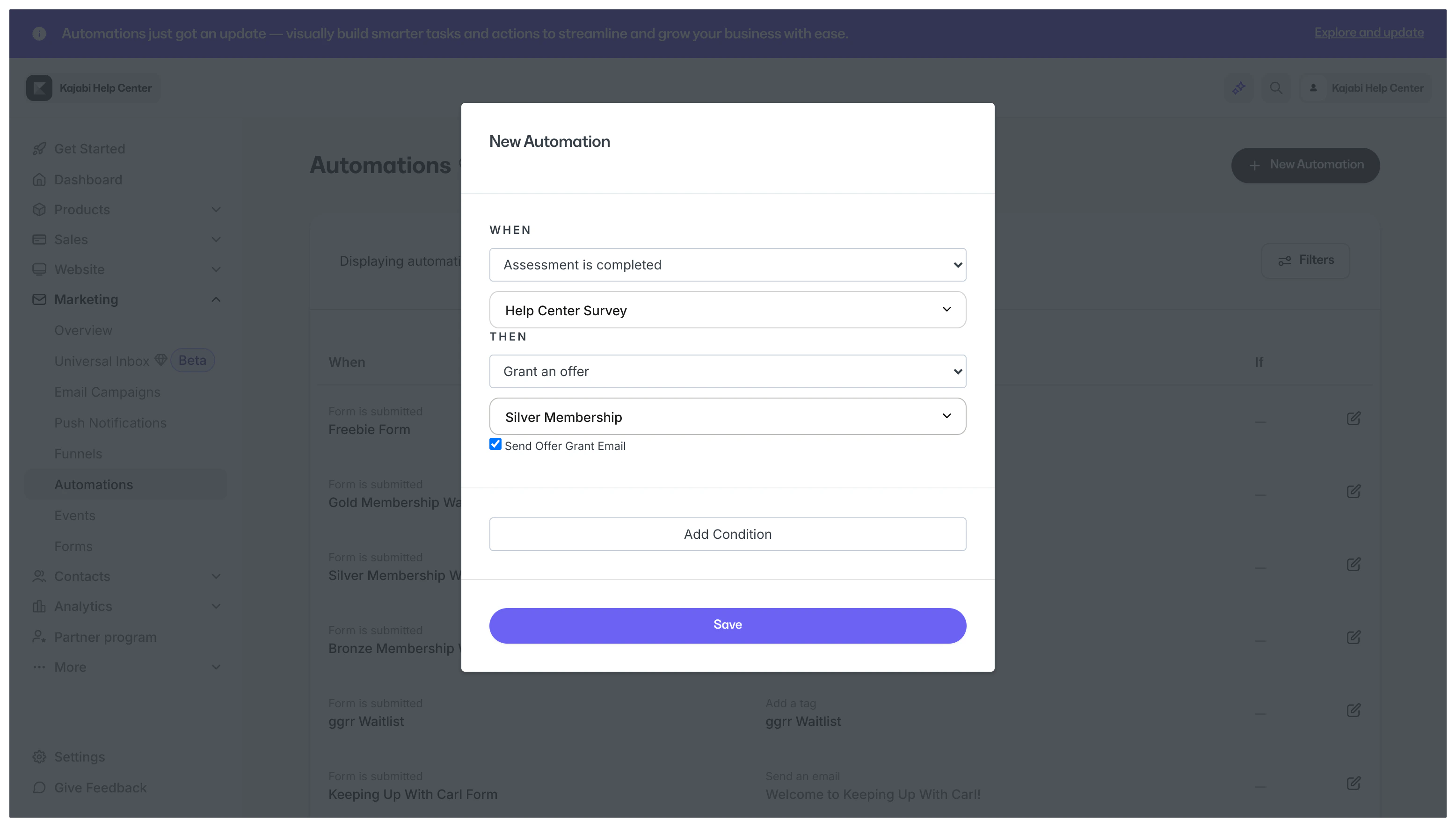
For example, an Automation can take over the process of registering customers for an event.
When the *Graphic Design for Beginners* **Offer** is purchased in the example below, the customer is registered for the *Virtual Summit* **Event**:
 **Note:** If you are on the Basic Plan, you have a number of **Basic Automations** available to you. If you are on the Growth or Pro Plan, you may use **Advanced Automations**.
[Learn more about the difference between Basic Automations and Advanced Automations](/articles/marketing/automations/basic-vs-advanced-automations)
## When triggers - What starts an Automation
**When** components are **triggers** that kick off Automations. **When** logic specifies that an event must occur to start an action (the **Then** component).
**Note:** If you are on the Basic Plan, you have a number of **Basic Automations** available to you. If you are on the Growth or Pro Plan, you may use **Advanced Automations**.
[Learn more about the difference between Basic Automations and Advanced Automations](/articles/marketing/automations/basic-vs-advanced-automations)
## When triggers - What starts an Automation
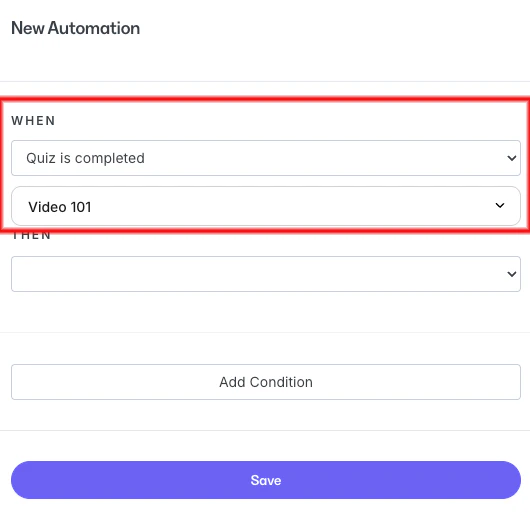
**When** components are **triggers** that kick off Automations. **When** logic specifies that an event must occur to start an action (the **Then** component).
 ## When trigger components
### Offers
* **Offer is purchased** - Trigger an Automation after a customer purchases your specified Offer
* **Offer is purchased as a gift** - Trigger an Automation after a customer purchases your specified Offer as a gift. [Learn how to create and manage gift Offers](../../sales/offers/how-to-create-and-manage-gift-offers)
* **Gift is redeemed** - Trigger an Automation when a customer redeems a gifted Offer
* **Offer is granted** - Trigger an Automation when an Offer is granted. [Learn how to grant an Offer](../../sales/offers/how-to-grant-an-offer)
**Note:** Granting an Offer is similar, but not the same as, a [Free Offer](../../sales/offers/how-to-create-a-free-offer) purchase. If the Automation is set to start after the purchase of a Free Offer, granting that Offer does not trigger it, because a Free Offer requires the customer to go through the [checkout process](../../sales/offers/what-happens-when-a-customer-purchases-my-offer).
* **Recurring payments cancelation initiated/completed** - Trigger an Automation anytime a subscription or payment plan cancelation is initiated or completed (by you or your customer), or when all payments of a plan have been paid
**Note:** This trigger was previously named "Offer is deactivated."
### Assessments
* **Assessment is completed** - When an Assessment is completed, its final Question (when it is attached to a Lesson) or Contact information (when it is an [Assessment embedded on a page](../../website/pages/how-to-add-an-assessment-block)) must be submitted
### Certificate
* **Certificate is sent** - Trigger an Automation when a Certificate of Completion is sent to a Course customer
[Learn about Certificates of Completion](../../products/courses/course-completion-certificates)
### Tags
* **Tag is added** - Trigger an Automation when a Tag is added to a Contact (manually or by another Automation)
* **Tag is removed** - Trigger an Automation when a Tag is removed from a Contact (manually or by another Automation)
[Learn about using Tags](../../contacts/manage-your-contacts/tags-overview)
### Email Broadcasts
* **Email broadcast is opened** - Trigger an Automation when a broadcast email is opened by a recipient
* **Link in email broadcast is clicked** - Trigger an Automation when a recipient clicks a link from the selected Email Broadcast
[Learn about Email Broadcasts](../../marketing/email-campaigns/email-campaigns-overview)
**Note:** The **View in web browser** and **Unsubscribe** buttons within an Email Broadcast are not recognized as links for the **Link in email broadcast is clicked** trigger.
### Email Sequences
* **Email sequence is completed** - Trigger an Automation after the final email in your Email Sequence is sent
[Learn about Email Sequences](../../marketing/email-campaigns/email-campaigns-overview#email-sequence)
### Email Sequence Emails
* **Email sequence email is sent** - Trigger an Automation when a specific email in an Email Sequence is sent to recipients
* **Email sequence email is opened** - Trigger an Automation when a specific email in an Email Sequence is opened by a recipient
* **Email sequence email is clicked** - Trigger an Automation when a recipient clicks a link in a specific email in an Email Sequence
### Events
* **Event is registered** - Trigger an Automation when a Contact registers for a specified Event on Kajabi
[Learn about Events](../../marketing/events/event-overview)
### Forms
* **Form is submitted** - Trigger an Automation to complete an action after the selected Form is submitted
[Learn about Forms](../../marketing/forms/create-and-build-your-form)
### Activity
Trigger an Automation based on activity:
* **Person has been inactive for 7 days**
* **Person has been inactive for 30 days**
* **Person has been inactive for 60 days**
* **Person has been inactive for 90 days**
[Learn how to define customer activity](../../contacts/manage-your-contacts/how-to-define-customer-activity)
### Lessons
* **Lesson is completed** - Trigger an Automation after a Course Lesson is marked as complete
### Quizzes
Trigger Automations that kick off **Then** actions after a Quiz is completed or graded:
* **Quiz is completed**
* **Quiz is failed**
* **Quiz is passed**
[Learn about Quizzes](../../products/courses/course-quizzes)
### Social Media
Trigger an Automation after a comment is received on a Facebook or Instagram post or any comment is received on those social media accounts:
* **Instagram comment is received**
* **Any Instagram comment received**
* **Facebook comment received**
* **Any Facebook comment received**
[Learn about Universal Inbox / Comment-to-DM](../../marketing/universal-inbox-comment-to-dm/universal-inbox-comment-to-dm)
### Coaching
* **Coaching session completed** - Trigger an Automation after a Coaching session is completed by a customer
* **All coaching sessions completed** - Trigger an Automation after all Coaching sessions are completed by a customer
* **Coaching sessions remaining** - Trigger an Automation when a specific number of Coaching sessions are remaining for a customer
* **Additional coaching sessions purchased** - Trigger an Automation when additional Coaching sessions are purchased by a customer
* **Coaching upcoming invoice due date** - Trigger an Automation to send something ahead of a Coaching customer's invoice due date
* **Coaching invoice overdue** - Trigger an Automation when a customer's Coaching invoice payment is overdue
[Learn more about Coaching](../../products/coaching/coaching-product-overview)
## Then actions - What an Automation does
**Then** components define the action to occur in response to a **When** event trigger.
## When trigger components
### Offers
* **Offer is purchased** - Trigger an Automation after a customer purchases your specified Offer
* **Offer is purchased as a gift** - Trigger an Automation after a customer purchases your specified Offer as a gift. [Learn how to create and manage gift Offers](../../sales/offers/how-to-create-and-manage-gift-offers)
* **Gift is redeemed** - Trigger an Automation when a customer redeems a gifted Offer
* **Offer is granted** - Trigger an Automation when an Offer is granted. [Learn how to grant an Offer](../../sales/offers/how-to-grant-an-offer)
**Note:** Granting an Offer is similar, but not the same as, a [Free Offer](../../sales/offers/how-to-create-a-free-offer) purchase. If the Automation is set to start after the purchase of a Free Offer, granting that Offer does not trigger it, because a Free Offer requires the customer to go through the [checkout process](../../sales/offers/what-happens-when-a-customer-purchases-my-offer).
* **Recurring payments cancelation initiated/completed** - Trigger an Automation anytime a subscription or payment plan cancelation is initiated or completed (by you or your customer), or when all payments of a plan have been paid
**Note:** This trigger was previously named "Offer is deactivated."
### Assessments
* **Assessment is completed** - When an Assessment is completed, its final Question (when it is attached to a Lesson) or Contact information (when it is an [Assessment embedded on a page](../../website/pages/how-to-add-an-assessment-block)) must be submitted
### Certificate
* **Certificate is sent** - Trigger an Automation when a Certificate of Completion is sent to a Course customer
[Learn about Certificates of Completion](../../products/courses/course-completion-certificates)
### Tags
* **Tag is added** - Trigger an Automation when a Tag is added to a Contact (manually or by another Automation)
* **Tag is removed** - Trigger an Automation when a Tag is removed from a Contact (manually or by another Automation)
[Learn about using Tags](../../contacts/manage-your-contacts/tags-overview)
### Email Broadcasts
* **Email broadcast is opened** - Trigger an Automation when a broadcast email is opened by a recipient
* **Link in email broadcast is clicked** - Trigger an Automation when a recipient clicks a link from the selected Email Broadcast
[Learn about Email Broadcasts](../../marketing/email-campaigns/email-campaigns-overview)
**Note:** The **View in web browser** and **Unsubscribe** buttons within an Email Broadcast are not recognized as links for the **Link in email broadcast is clicked** trigger.
### Email Sequences
* **Email sequence is completed** - Trigger an Automation after the final email in your Email Sequence is sent
[Learn about Email Sequences](../../marketing/email-campaigns/email-campaigns-overview#email-sequence)
### Email Sequence Emails
* **Email sequence email is sent** - Trigger an Automation when a specific email in an Email Sequence is sent to recipients
* **Email sequence email is opened** - Trigger an Automation when a specific email in an Email Sequence is opened by a recipient
* **Email sequence email is clicked** - Trigger an Automation when a recipient clicks a link in a specific email in an Email Sequence
### Events
* **Event is registered** - Trigger an Automation when a Contact registers for a specified Event on Kajabi
[Learn about Events](../../marketing/events/event-overview)
### Forms
* **Form is submitted** - Trigger an Automation to complete an action after the selected Form is submitted
[Learn about Forms](../../marketing/forms/create-and-build-your-form)
### Activity
Trigger an Automation based on activity:
* **Person has been inactive for 7 days**
* **Person has been inactive for 30 days**
* **Person has been inactive for 60 days**
* **Person has been inactive for 90 days**
[Learn how to define customer activity](../../contacts/manage-your-contacts/how-to-define-customer-activity)
### Lessons
* **Lesson is completed** - Trigger an Automation after a Course Lesson is marked as complete
### Quizzes
Trigger Automations that kick off **Then** actions after a Quiz is completed or graded:
* **Quiz is completed**
* **Quiz is failed**
* **Quiz is passed**
[Learn about Quizzes](../../products/courses/course-quizzes)
### Social Media
Trigger an Automation after a comment is received on a Facebook or Instagram post or any comment is received on those social media accounts:
* **Instagram comment is received**
* **Any Instagram comment received**
* **Facebook comment received**
* **Any Facebook comment received**
[Learn about Universal Inbox / Comment-to-DM](../../marketing/universal-inbox-comment-to-dm/universal-inbox-comment-to-dm)
### Coaching
* **Coaching session completed** - Trigger an Automation after a Coaching session is completed by a customer
* **All coaching sessions completed** - Trigger an Automation after all Coaching sessions are completed by a customer
* **Coaching sessions remaining** - Trigger an Automation when a specific number of Coaching sessions are remaining for a customer
* **Additional coaching sessions purchased** - Trigger an Automation when additional Coaching sessions are purchased by a customer
* **Coaching upcoming invoice due date** - Trigger an Automation to send something ahead of a Coaching customer's invoice due date
* **Coaching invoice overdue** - Trigger an Automation when a customer's Coaching invoice payment is overdue
[Learn more about Coaching](../../products/coaching/coaching-product-overview)
## Then actions - What an Automation does
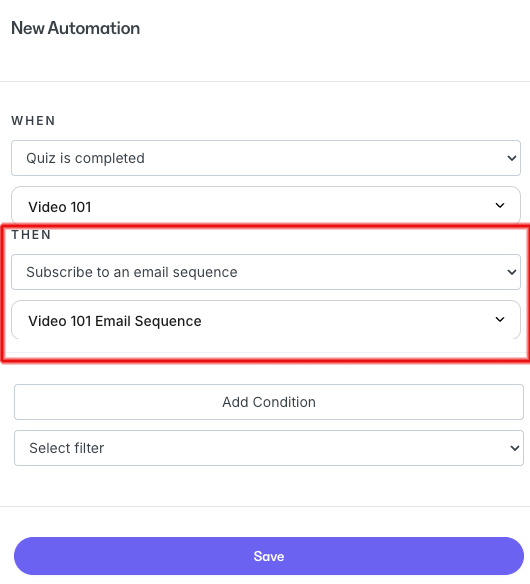
**Then** components define the action to occur in response to a **When** event trigger.
 ### Offers
* **Grant an offer** - An Automation that grants a specific Offer after a triggered event occurs
* **Revoke an offer** - An Automation that revokes access for a specific Offer after a triggered event occurs
* **Deactivate from offer** (discontinues payment and access) - An Automation that revokes access to a specific Offer and stops future payments after a triggered event occurs
* **Send an offer** - An Automation that sends an Offer to specific Contacts
* **Action by pricing option** - An Automation that performs an action based on which **Pricing option** is purchased, including:
* Revoke an offer
* Deactivate from offer
### Offers
* **Grant an offer** - An Automation that grants a specific Offer after a triggered event occurs
* **Revoke an offer** - An Automation that revokes access for a specific Offer after a triggered event occurs
* **Deactivate from offer** (discontinues payment and access) - An Automation that revokes access to a specific Offer and stops future payments after a triggered event occurs
* **Send an offer** - An Automation that sends an Offer to specific Contacts
* **Action by pricing option** - An Automation that performs an action based on which **Pricing option** is purchased, including:
* Revoke an offer
* Deactivate from offer
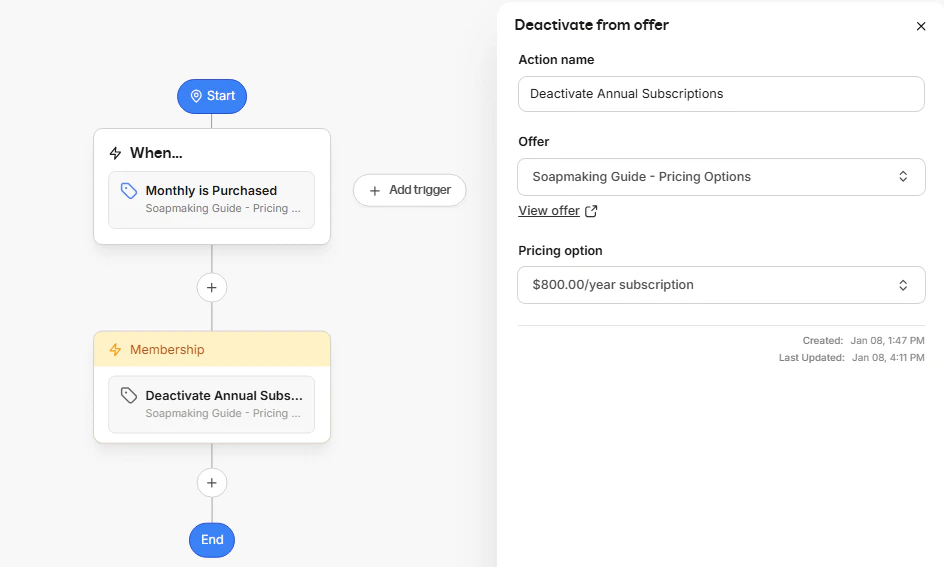 **Tip:** You can use Automations to manage billing changes between **Pricing options**. For example, trigger an Automation to deactivate an annual subscription when a customer purchases the monthly Pricing option for the same Offer.
### Email Sequences
An Automation that subscribes or unsubscribes Contacts from a specific Email Sequence after a triggered event occurs:
* **Subscribe to an email sequence**
* **Unsubscribe from an email sequence**
[Learn about Email Sequences](../../marketing/email-campaigns/email-campaigns-overview#email-sequence)
### Events
Automations that register or deregister Contacts to or from an Event after a trigger occurs:
* **Register to an event**
* **Deregister from an event**
[Learn about Events](../../marketing/events/event-overview)
### Tags
Automations that add or remove a Tag after a triggered event occurs:
* **Add a tag**
* **Remove a tag**
[Learn to use Tags](../../contacts/manage-your-contacts/tags-overview)
### Emails
Send a custom, [transactional email](../../marketing/email-campaigns/what-are-marketing-and-transactional-emails#h_10792cbc-adb4-4a78-9c53-cb8724f78408) to a Contact or your team after a triggered event occurs:
* **Send an email**
**Important:** By default, the **Send an email** action within Automations includes the following placeholder text. Be sure to update this.
**Subject:** `Subject`
**Email body:**
```text wrap theme={null}
Hello {{ first_name }},
Use this action to congratulate a user on reaching a milestone, send a quick product update, or leave a notification for your users.
Include images or links to create a fun, personal message for your recipients.
Thanks,
Kajabi Product Team
```
### Coupons
Send a unique, single-use **Coupon code** with a custom email after a triggered event occurs:
* **Send a single-use coupon**
[Learn about single-use coupon codes](../../sales/coupons/how-to-use-single-use-coupon-automations)
### Certificates
Send a customer a customized Certificate of Completion for a Course after a triggered event occurs:
* **Send a certificate**
[Learn about Course Certificates of Completion](../../products/courses/course-completion-certificates)
### Social Media
Send a Contact an Instagram or Facebook message or reply after a triggered event occurs:
* **Send an Instagram direct message**
* **Send an Instagram reply**
* **Send a Facebook direct message**
* **Send a Facebook reply**
[Learn about Universal Inbox / Comment-to-DM](../../marketing/universal-inbox-comment-to-dm/universal-inbox-comment-to-dm)
### Coaching
* **Cancel coaching sessions** - Cancel a single Coaching session or all upcoming Coaching sessions after a specific triggered event occurs
* **Remove coaching sessions** - Remove all upcoming Coaching sessions for customers with an unpaid invoice
* **Send coaching invoice reminder** - Send a reminder to specific customers that they have an unpaid or overdue invoice for Coaching
* **Send coaching session survey** - Send a survey to customers after a Coaching session concludes
* **Send coaching program survey** - Send a survey to customers after a Coaching program concludes
[Learn about Coaching](../../products/coaching/coaching-product-overview)
### Community
* **Send Community DM** - Send a direct message to a specific member or a group of members of your Community after a triggered event occurs
* **Add a member to a private channel** - Add a member to a private channel in your Community after a triggered event occurs
* **Remove a member from private channel** - Remove a member from a private channel in your Community after a triggered event occurs
* **Post in channel** - Add a post in a specific Channel in your Community after a triggered event occurs
[Learn about Communities](../../products/community/build-kajabi-communities)
## Only if filters - Conditional logic
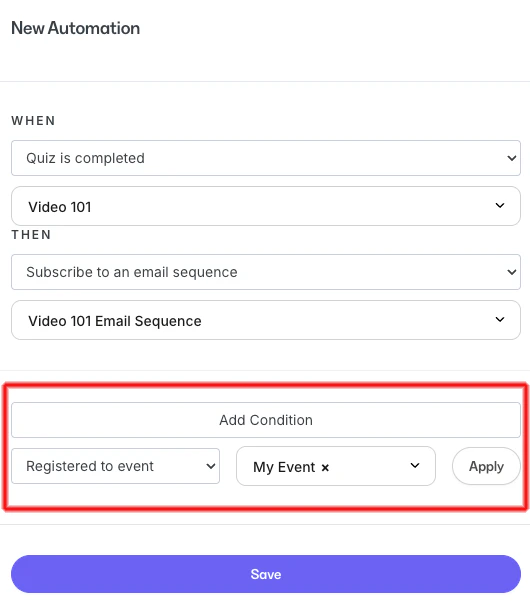
Filters let you create an Automation that subscribes Contacts to an Email Sequence after they've completed a Quiz, and then registers them for a specific Event:
**Tip:** You can use Automations to manage billing changes between **Pricing options**. For example, trigger an Automation to deactivate an annual subscription when a customer purchases the monthly Pricing option for the same Offer.
### Email Sequences
An Automation that subscribes or unsubscribes Contacts from a specific Email Sequence after a triggered event occurs:
* **Subscribe to an email sequence**
* **Unsubscribe from an email sequence**
[Learn about Email Sequences](../../marketing/email-campaigns/email-campaigns-overview#email-sequence)
### Events
Automations that register or deregister Contacts to or from an Event after a trigger occurs:
* **Register to an event**
* **Deregister from an event**
[Learn about Events](../../marketing/events/event-overview)
### Tags
Automations that add or remove a Tag after a triggered event occurs:
* **Add a tag**
* **Remove a tag**
[Learn to use Tags](../../contacts/manage-your-contacts/tags-overview)
### Emails
Send a custom, [transactional email](../../marketing/email-campaigns/what-are-marketing-and-transactional-emails#h_10792cbc-adb4-4a78-9c53-cb8724f78408) to a Contact or your team after a triggered event occurs:
* **Send an email**
**Important:** By default, the **Send an email** action within Automations includes the following placeholder text. Be sure to update this.
**Subject:** `Subject`
**Email body:**
```text wrap theme={null}
Hello {{ first_name }},
Use this action to congratulate a user on reaching a milestone, send a quick product update, or leave a notification for your users.
Include images or links to create a fun, personal message for your recipients.
Thanks,
Kajabi Product Team
```
### Coupons
Send a unique, single-use **Coupon code** with a custom email after a triggered event occurs:
* **Send a single-use coupon**
[Learn about single-use coupon codes](../../sales/coupons/how-to-use-single-use-coupon-automations)
### Certificates
Send a customer a customized Certificate of Completion for a Course after a triggered event occurs:
* **Send a certificate**
[Learn about Course Certificates of Completion](../../products/courses/course-completion-certificates)
### Social Media
Send a Contact an Instagram or Facebook message or reply after a triggered event occurs:
* **Send an Instagram direct message**
* **Send an Instagram reply**
* **Send a Facebook direct message**
* **Send a Facebook reply**
[Learn about Universal Inbox / Comment-to-DM](../../marketing/universal-inbox-comment-to-dm/universal-inbox-comment-to-dm)
### Coaching
* **Cancel coaching sessions** - Cancel a single Coaching session or all upcoming Coaching sessions after a specific triggered event occurs
* **Remove coaching sessions** - Remove all upcoming Coaching sessions for customers with an unpaid invoice
* **Send coaching invoice reminder** - Send a reminder to specific customers that they have an unpaid or overdue invoice for Coaching
* **Send coaching session survey** - Send a survey to customers after a Coaching session concludes
* **Send coaching program survey** - Send a survey to customers after a Coaching program concludes
[Learn about Coaching](../../products/coaching/coaching-product-overview)
### Community
* **Send Community DM** - Send a direct message to a specific member or a group of members of your Community after a triggered event occurs
* **Add a member to a private channel** - Add a member to a private channel in your Community after a triggered event occurs
* **Remove a member from private channel** - Remove a member from a private channel in your Community after a triggered event occurs
* **Post in channel** - Add a post in a specific Channel in your Community after a triggered event occurs
[Learn about Communities](../../products/community/build-kajabi-communities)
## Only if filters - Conditional logic
Filters let you create an Automation that subscribes Contacts to an Email Sequence after they've completed a Quiz, and then registers them for a specific Event:
 **Note:** The **Only if** filter must match the collected data. A specific value is based on "contains" rather than an "exact match."
### Contact filters
* **Is subscribed** - Add a condition that says the customer must be subscribed to receive your marketing emails
* **Is a Customer** - Add a condition that says the Contact must be a customer of your site. [Learn about customers, Contacts, and subscribers](../../contacts/manage-your-contacts/what-is-the-difference-between-a-customer-contact-and-a-subscriber)
* **Is hidden** - Add a condition that says the Contact must be hidden in your list. [Learn about hiding Contacts](../../contacts/manage-your-contacts/hiding-your-contacts)
* **Has a hard-bounced delivery** - Add a condition that says the Contact's email address has hard-bounced. [Learn about hard-bounced Contacts](../../marketing/email-campaigns/email-metrics-overview#bounced)
* **Excluded from mailing** - Add a condition that says the Contact must be excluded from your mailing list for being high-risk inactive and not engaging with 25 or more emails
### Contact activity filters
* **Contact added in the last** - Add a condition that says the Contact was added to your site during a specific time period
* **Contact added before the last** - Add a condition that says the Contact was added to your site before a specific time period
[Learn about customers, Contacts, and subscribers](../../contacts/manage-your-contacts/what-is-the-difference-between-a-customer-contact-and-a-subscriber)
### Customer activity filters
* **Customer joined in the last** - Add a condition that says the customer joined your site during a specific time period
* **Customer visited a page on your site in the last** - Add a condition that says the customer visited a specific page on your site during a specific time period
* **Customer has not visited a page on your site in the last** - Add a condition that says the customer did not visit a specific page on your site during a specific time period
[Learn about customers, Contacts, and subscribers](../../contacts/manage-your-contacts/what-is-the-difference-between-a-customer-contact-and-a-subscriber)
### Email engagement filters
* **Healthy contacts (engaged 0-90 days ago)** - Add a condition that says the Contact engaged with your marketing emails within the past 90 days
* **Passive contacts (engaged 91-180 days ago)** - Add a condition that says the Contact engaged with your marketing emails between 91 and 180 days ago
* **Unengaged contacts (engaged 181-270 days ago)** - Add a condition that says the Contact engaged with your marketing emails between 181 and 270 days ago
* **Inactive contacts (engaged 270+ days ago)** - Add a condition that says the Contact last engaged with your marketing emails more than 270 days ago
[Learn about Email Campaigns](../../marketing/email-campaigns/email-campaigns-overview)
### Email activity filters
* **Delivered an email in last** - Add a condition that says the Contact received a marketing email from your site during a specific time period
* **Hasn't been delivered an email in last** - Add a condition that says the Contact did not receive a marketing email from your site during a specific time period
* **Opened an email in last** - Add a condition that says the Contact opened a marketing email from your site during a specific time period
* **Hasn't opened an email in last** - Add a condition that says the Contact has not opened a marketing email from your site during a specific time period
* **Hasn't clicked an email in last** - Add a condition that says the Contact has not clicked a link in a marketing email from your site during a specific time period
* **Clicked an email in last** - Add a condition that says the Contact clicked a link in a marketing email from your site during a specific time period
[Learn about Email Metrics](../../marketing/email-campaigns/email-metrics-overview)
### Form filters
* **Submitted any of these form(s)** - Add a condition that says the Contact has submitted a specific form or forms (multiple forms can be selected)
* **Has not submitted form(s)** - Add a condition that says the Contact has not submitted a specific form or forms (multiple forms can be selected)
[Learn about Forms](../../marketing/forms/create-and-build-your-form)
### Assessment filters
* **Completed any of these assessment(s)** - Add a condition that says the Contact has completed a specific assessment or assessments (multiple assessments can be selected)
* **Passed any of these assessment(s)** - Add a condition that says the Contact has passed a specific assessment or assessments (multiple assessments can be selected)
* **Failed any of these assessment(s)** - Add a condition that says the Contact has failed a specific assessment or assessments (multiple assessments can be selected)
[Learn about Assessments](../../contacts/create-manage-and-share-assessments/create-and-customize-assessments)
### Product filters
* **Owns any of these product(s)** - Add a condition that says the customer has a specific product or products (multiple products can be selected)
* **Does not own product(s)** - Add a condition that says the customer does not have a specific product or products (multiple products can be selected)
* **Previously owned product(s)** - Add a condition that says the customer used to own a specific product or products (multiple products can be selected)
[Learn about Products](../../products/courses/courses-overview)
### Offer filters
* **Has any of these offer(s)** - Add a condition that says the customer must have a specific offer or offers (multiple offers can be selected)
* **Does not have offer(s)** - Add a condition that says the customer does not have a specific offer or offers (multiple offers can be selected)
* **Previously owned offer(s)** - Add a condition that says the customer used to have a specific offer or offers (multiple offers can be selected)
* **Canceling offer(s)** - Add a condition that says the customer has begun the cancellation process for a subscription offer (multiple offers can be selected)
[Learn about Offers on Kajabi](../../sales/offers/offers-overview)
### Coupon filters
* **Used any of these coupon code(s)** - Add a condition that says the customer used a specific coupon code or codes (multiple coupon codes can be selected)
[Learn about Coupons on Kajabi](../../sales/coupons/how-to-create-a-coupon)
### Email Broadcast filters
* **Sent email broadcast** - Add a condition that says the Contact was sent a specific email broadcast
* **Was not sent email broadcast** - Add a condition that says the Contact was not sent a specific email broadcast
* **Opened email broadcast** - Add a condition that says the Contact opened a specific email broadcast
* **Has not opened email broadcast** - Add a condition that says the Contact has not opened a specific email broadcast
* **Clicked email broadcast** - Add a condition that says the Contact clicked a link in a specific email broadcast
* **Has not clicked email broadcast** - Add a condition that says the Contact has not clicked a link in a specific email broadcast
* **Email broadcast bounced** - Add a condition that says the delivery of a specific email broadcast to the Contact bounced (was refused by the recipient's email server)
* **Email broadcast did not bounce** - Add a condition that says the delivery of a specific email broadcast to the Contact did not bounce
* **Email broadcast dropped** - Add a condition that says the delivery of a specific email broadcast to the Contact was dropped (not sent due to a reason such as previous bounces or the Contact unsubscribed)
* **Email broadcast was not dropped** - Add a condition that says the delivery of a specific email broadcast to the Contact was not dropped
[Learn about Email Broadcasts](../../marketing/email-campaigns/email-campaigns-overview)
### Email Sequence filters
* **Subscribed to email sequence** - Add a condition that says a Contact must be subscribed to a specific email sequence
* **Is not subscribed to email sequence** - Add a condition that says a Contact must not be subscribed to your specific email sequence
[Learn about Email Sequences](../../marketing/email-campaigns/create-an-email-sequence)
### Event filters
* **Registered to event** - Add a condition that says a Contact must be registered for a specific event
* **Is not registered to event** - Add a condition that says a Contact must not be registered for a specific event
[Learn about Events on Kajabi](../../marketing/events/event-overview)
### Tag filters
* **Has any of these tag(s)** - Add a condition that says a Contact must have any of the specified tags (multiple tags can be selected)
* **Has all of these tag(s)** - Add a condition that says a Contact must have all of the specified tags (multiple tags can be selected)
* **Does not have tag(s)** - Add a condition that says a Contact does not have any of the specified tags (multiple tags can be selected)
[Learn to use Tags](../../contacts/manage-your-contacts/tags-overview)
### Default field filters
* **Name contains** - Add a condition that says a Contact's Name must contain a specific value
* **Email contains** - Add a condition that says a Contact's Email must contain a specific value
* **Phone Number contains** - Add a condition that says a Contact's Phone Number must contain a specific value
* **Address contains** - Add a condition that says a Contact's Address must contain a specific value
* **Address Line 2 contains** - Add a condition that says a Contact's Address Line 2 must contain a specific value
* **City contains** - Add a condition that says a Contact's City must contain a specific value
* **State contains** - Add a condition that says a Contact's State must contain a specific value
* **Country contains** - Add a condition that says a Contact's Country must contain a specific value
* **Zip Code contains** - Add a condition that says a Contact's Zip Code must contain a specific value
* **Business Number contains** - Add a condition that says a Contact's Business Number must contain a specific value
[Learn to add and edit Contacts](../../contacts/manage-your-contacts/how-to-edit-your-contacts-information)
### Custom field filters
Add a condition that applies to one of the custom fields you've created for your Forms. Which ones appear are unique to your site.
[Learn to add and edit Form fields](../../marketing/forms/how-to-add-and-edit-fields-on-a-form)
**Note:** The **Only if** filter must match the collected data. A specific value is based on "contains" rather than an "exact match."
### Contact filters
* **Is subscribed** - Add a condition that says the customer must be subscribed to receive your marketing emails
* **Is a Customer** - Add a condition that says the Contact must be a customer of your site. [Learn about customers, Contacts, and subscribers](../../contacts/manage-your-contacts/what-is-the-difference-between-a-customer-contact-and-a-subscriber)
* **Is hidden** - Add a condition that says the Contact must be hidden in your list. [Learn about hiding Contacts](../../contacts/manage-your-contacts/hiding-your-contacts)
* **Has a hard-bounced delivery** - Add a condition that says the Contact's email address has hard-bounced. [Learn about hard-bounced Contacts](../../marketing/email-campaigns/email-metrics-overview#bounced)
* **Excluded from mailing** - Add a condition that says the Contact must be excluded from your mailing list for being high-risk inactive and not engaging with 25 or more emails
### Contact activity filters
* **Contact added in the last** - Add a condition that says the Contact was added to your site during a specific time period
* **Contact added before the last** - Add a condition that says the Contact was added to your site before a specific time period
[Learn about customers, Contacts, and subscribers](../../contacts/manage-your-contacts/what-is-the-difference-between-a-customer-contact-and-a-subscriber)
### Customer activity filters
* **Customer joined in the last** - Add a condition that says the customer joined your site during a specific time period
* **Customer visited a page on your site in the last** - Add a condition that says the customer visited a specific page on your site during a specific time period
* **Customer has not visited a page on your site in the last** - Add a condition that says the customer did not visit a specific page on your site during a specific time period
[Learn about customers, Contacts, and subscribers](../../contacts/manage-your-contacts/what-is-the-difference-between-a-customer-contact-and-a-subscriber)
### Email engagement filters
* **Healthy contacts (engaged 0-90 days ago)** - Add a condition that says the Contact engaged with your marketing emails within the past 90 days
* **Passive contacts (engaged 91-180 days ago)** - Add a condition that says the Contact engaged with your marketing emails between 91 and 180 days ago
* **Unengaged contacts (engaged 181-270 days ago)** - Add a condition that says the Contact engaged with your marketing emails between 181 and 270 days ago
* **Inactive contacts (engaged 270+ days ago)** - Add a condition that says the Contact last engaged with your marketing emails more than 270 days ago
[Learn about Email Campaigns](../../marketing/email-campaigns/email-campaigns-overview)
### Email activity filters
* **Delivered an email in last** - Add a condition that says the Contact received a marketing email from your site during a specific time period
* **Hasn't been delivered an email in last** - Add a condition that says the Contact did not receive a marketing email from your site during a specific time period
* **Opened an email in last** - Add a condition that says the Contact opened a marketing email from your site during a specific time period
* **Hasn't opened an email in last** - Add a condition that says the Contact has not opened a marketing email from your site during a specific time period
* **Hasn't clicked an email in last** - Add a condition that says the Contact has not clicked a link in a marketing email from your site during a specific time period
* **Clicked an email in last** - Add a condition that says the Contact clicked a link in a marketing email from your site during a specific time period
[Learn about Email Metrics](../../marketing/email-campaigns/email-metrics-overview)
### Form filters
* **Submitted any of these form(s)** - Add a condition that says the Contact has submitted a specific form or forms (multiple forms can be selected)
* **Has not submitted form(s)** - Add a condition that says the Contact has not submitted a specific form or forms (multiple forms can be selected)
[Learn about Forms](../../marketing/forms/create-and-build-your-form)
### Assessment filters
* **Completed any of these assessment(s)** - Add a condition that says the Contact has completed a specific assessment or assessments (multiple assessments can be selected)
* **Passed any of these assessment(s)** - Add a condition that says the Contact has passed a specific assessment or assessments (multiple assessments can be selected)
* **Failed any of these assessment(s)** - Add a condition that says the Contact has failed a specific assessment or assessments (multiple assessments can be selected)
[Learn about Assessments](../../contacts/create-manage-and-share-assessments/create-and-customize-assessments)
### Product filters
* **Owns any of these product(s)** - Add a condition that says the customer has a specific product or products (multiple products can be selected)
* **Does not own product(s)** - Add a condition that says the customer does not have a specific product or products (multiple products can be selected)
* **Previously owned product(s)** - Add a condition that says the customer used to own a specific product or products (multiple products can be selected)
[Learn about Products](../../products/courses/courses-overview)
### Offer filters
* **Has any of these offer(s)** - Add a condition that says the customer must have a specific offer or offers (multiple offers can be selected)
* **Does not have offer(s)** - Add a condition that says the customer does not have a specific offer or offers (multiple offers can be selected)
* **Previously owned offer(s)** - Add a condition that says the customer used to have a specific offer or offers (multiple offers can be selected)
* **Canceling offer(s)** - Add a condition that says the customer has begun the cancellation process for a subscription offer (multiple offers can be selected)
[Learn about Offers on Kajabi](../../sales/offers/offers-overview)
### Coupon filters
* **Used any of these coupon code(s)** - Add a condition that says the customer used a specific coupon code or codes (multiple coupon codes can be selected)
[Learn about Coupons on Kajabi](../../sales/coupons/how-to-create-a-coupon)
### Email Broadcast filters
* **Sent email broadcast** - Add a condition that says the Contact was sent a specific email broadcast
* **Was not sent email broadcast** - Add a condition that says the Contact was not sent a specific email broadcast
* **Opened email broadcast** - Add a condition that says the Contact opened a specific email broadcast
* **Has not opened email broadcast** - Add a condition that says the Contact has not opened a specific email broadcast
* **Clicked email broadcast** - Add a condition that says the Contact clicked a link in a specific email broadcast
* **Has not clicked email broadcast** - Add a condition that says the Contact has not clicked a link in a specific email broadcast
* **Email broadcast bounced** - Add a condition that says the delivery of a specific email broadcast to the Contact bounced (was refused by the recipient's email server)
* **Email broadcast did not bounce** - Add a condition that says the delivery of a specific email broadcast to the Contact did not bounce
* **Email broadcast dropped** - Add a condition that says the delivery of a specific email broadcast to the Contact was dropped (not sent due to a reason such as previous bounces or the Contact unsubscribed)
* **Email broadcast was not dropped** - Add a condition that says the delivery of a specific email broadcast to the Contact was not dropped
[Learn about Email Broadcasts](../../marketing/email-campaigns/email-campaigns-overview)
### Email Sequence filters
* **Subscribed to email sequence** - Add a condition that says a Contact must be subscribed to a specific email sequence
* **Is not subscribed to email sequence** - Add a condition that says a Contact must not be subscribed to your specific email sequence
[Learn about Email Sequences](../../marketing/email-campaigns/create-an-email-sequence)
### Event filters
* **Registered to event** - Add a condition that says a Contact must be registered for a specific event
* **Is not registered to event** - Add a condition that says a Contact must not be registered for a specific event
[Learn about Events on Kajabi](../../marketing/events/event-overview)
### Tag filters
* **Has any of these tag(s)** - Add a condition that says a Contact must have any of the specified tags (multiple tags can be selected)
* **Has all of these tag(s)** - Add a condition that says a Contact must have all of the specified tags (multiple tags can be selected)
* **Does not have tag(s)** - Add a condition that says a Contact does not have any of the specified tags (multiple tags can be selected)
[Learn to use Tags](../../contacts/manage-your-contacts/tags-overview)
### Default field filters
* **Name contains** - Add a condition that says a Contact's Name must contain a specific value
* **Email contains** - Add a condition that says a Contact's Email must contain a specific value
* **Phone Number contains** - Add a condition that says a Contact's Phone Number must contain a specific value
* **Address contains** - Add a condition that says a Contact's Address must contain a specific value
* **Address Line 2 contains** - Add a condition that says a Contact's Address Line 2 must contain a specific value
* **City contains** - Add a condition that says a Contact's City must contain a specific value
* **State contains** - Add a condition that says a Contact's State must contain a specific value
* **Country contains** - Add a condition that says a Contact's Country must contain a specific value
* **Zip Code contains** - Add a condition that says a Contact's Zip Code must contain a specific value
* **Business Number contains** - Add a condition that says a Contact's Business Number must contain a specific value
[Learn to add and edit Contacts](../../contacts/manage-your-contacts/how-to-edit-your-contacts-information)
### Custom field filters
Add a condition that applies to one of the custom fields you've created for your Forms. Which ones appear are unique to your site.
[Learn to add and edit Form fields](../../marketing/forms/how-to-add-and-edit-fields-on-a-form)