> ## Documentation Index
> Fetch the complete documentation index at: https://help.kajabi.com/llms.txt
> Use this file to discover all available pages before exploring further.

<AgentInstructions>

## Submitting Feedback

If you encounter incorrect, outdated, or confusing documentation on this page, submit feedback:

POST https://help.kajabi.com/feedback

```json
{
  "path": "/articles/marketing/automations/using-the-enhanced-search-filter-features-with-automations",
  "feedback": "Description of the issue"
}
```

Only submit feedback when you have something specific and actionable to report.

</AgentInstructions>

# Use search and filter features with Automations

> Locate and manage your workflows using the redesigned search and filter experience in the visual Automation Builder.

Kajabi's [visual Automation Builder](/articles/marketing/automations/whats-new-with-kajabi-automations) includes a redesigned **search and filter** experience that makes it faster and easier to locate and manage your workflows.

<Note>
  **Note:** This feature is available only if you have upgraded to the [visual Automation Builder](/articles/marketing/automations/whats-new-with-kajabi-automations).
</Note>

## Add and use filters

You can filter Automations by **Trigger** or **Action** type.

### Add a trigger or action filter

1. From the Kajabi Dashboard, select **Marketing** > **Automations**.
2. On the Automations index page, choose **Trigger** or **Action** at the top of the dropdown.
3. Select a **Trigger** or **Action**.
4. (Optional) Select an **Operator** and/or **Value**.

<div className="w-full aspect-video">
  <iframe src="https://fast.wistia.net/embed/iframe/9dhewt1y5k" allow="autoplay; fullscreen" allowFullScreen className="w-full h-full" />
</div>

## Use multi-select

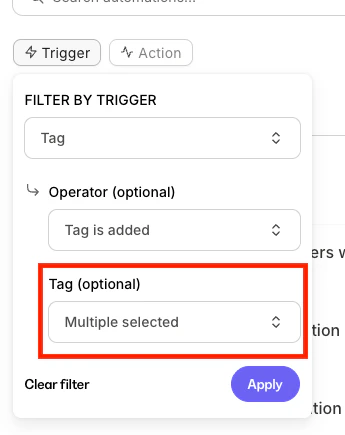
* Any dropdown (Trigger or Action) supports **multi-select**
* When multiple items are chosen, the dropdown displays **"Multiple selected."**

<img src="https://mintcdn.com/kajabi-support/YUgT0sTx06doKTBl/articles/images/692cb9bc_9b1761d1-7172-4dde-8525-4ea8c9c003db.png?fit=max&auto=format&n=YUgT0sTx06doKTBl&q=85&s=0870297ced6d63bc1b4951dffb0a01c4" alt="Multi-select" width="345" height="435" data-path="articles/images/692cb9bc_9b1761d1-7172-4dde-8525-4ea8c9c003db.png" />

## Edit and remove filters

* Click an active filter to edit its selections
* Click **Clear Filter** to remove it
* Use **Clear All** to remove every applied filter
<div className="w-full aspect-video">
  <iframe src="https://fast.wistia.net/embed/iframe/nzah0r62b9" allow="autoplay; fullscreen" allowFullScreen className="w-full h-full" />
</div>

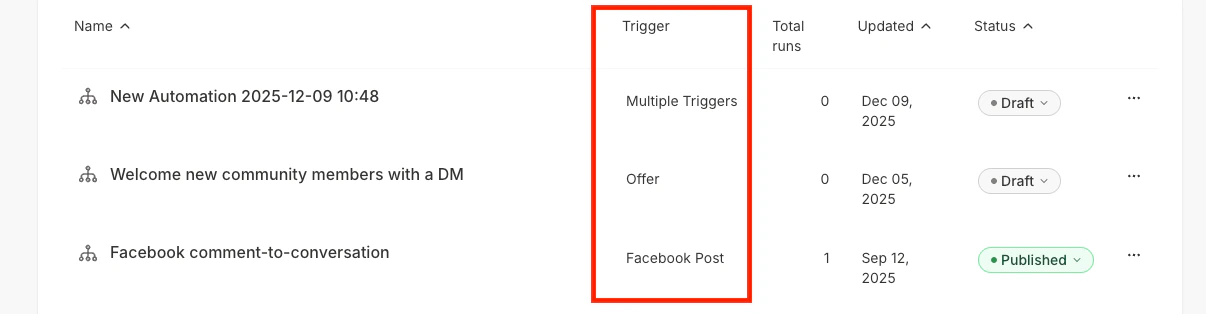
## Trigger type column

The **Trigger Type** column displays an at-a-glance view of the Automation's triggers from the main **Automations** page.

### How it displays

* If the Automation has **multiple triggers**, the column displays: **"Multiple Triggers"**
* If the Automation has **one trigger**, it displays the specific **Trigger Type**

<img src="https://mintcdn.com/kajabi-support/3C7Vui-NnfT9lLL-/articles/images/d0c6725d_88188d7a-e492-4d08-8f1c-43d7856e1dc9.png?fit=max&auto=format&n=3C7Vui-NnfT9lLL-&q=85&s=0641d9db9f2b57487afb0482e6a1e862" alt="Trigger type column" width="1206" height="314" data-path="articles/images/d0c6725d_88188d7a-e492-4d08-8f1c-43d7856e1dc9.png" />

## Automations panel: Offers, Forms, and more

The Automations Panel shows every Automation in which a specific item (such as an Offer or Form) appears as either a Trigger or an Action.

### How items display

**If the item appears as a Trigger:**

* It is shown under **When**
* The immediately following node appears under **Then**
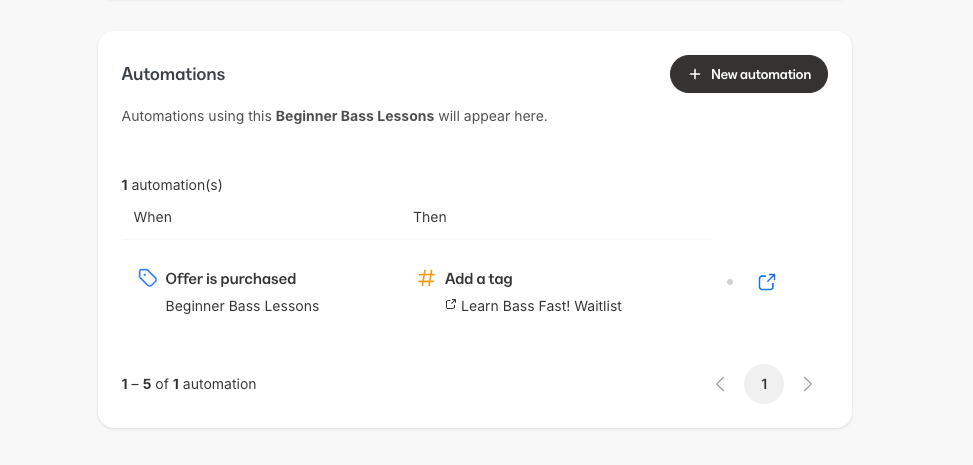
<img src="https://mintcdn.com/kajabi-support/nb-ZvvvD8AMIw1RF/articles/images/e2aeffdd_9c7095ee-a423-4caa-9f1c-73896812254f.png?fit=max&auto=format&n=nb-ZvvvD8AMIw1RF&q=85&s=9d394732e56cdf1fb5e8d00960269c27" alt="When display" width="973" height="465" data-path="articles/images/e2aeffdd_9c7095ee-a423-4caa-9f1c-73896812254f.png" />

**If it appears as an Action:**

* It is shown under **Then**
* The node immediately before it appears under **When**
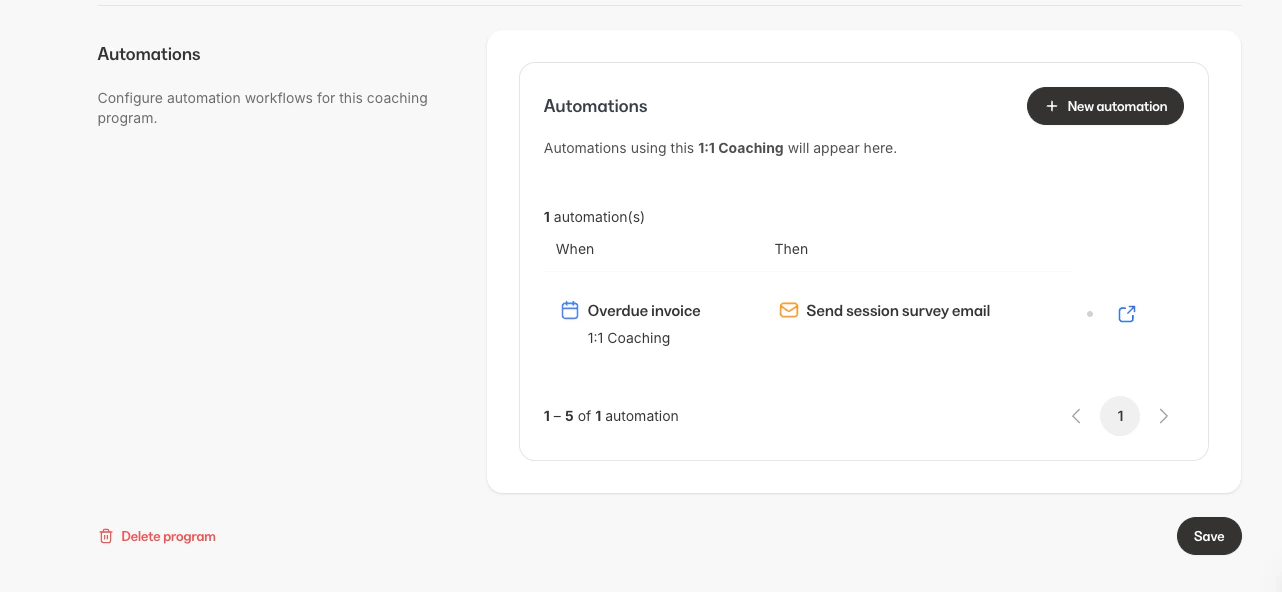
<img src="https://mintcdn.com/kajabi-support/tnn8jq8THgIpHwTP/articles/images/6216f4d4_1d11ff21-1cb9-45d3-ab39-8f4bb25e279e.png?fit=max&auto=format&n=tnn8jq8THgIpHwTP&q=85&s=302f23b2806ac9e88e8c91b7dfad0fd8" alt="Then display" width="1282" height="592" data-path="articles/images/6216f4d4_1d11ff21-1cb9-45d3-ab39-8f4bb25e279e.png" />

**If multiple triggers are present:**

* Each trigger displays as its own **When** item
