> ## Documentation Index
> Fetch the complete documentation index at: https://help.kajabi.com/llms.txt
> Use this file to discover all available pages before exploring further.
# Email Visual Editor overview
> Use the Visual Editor to create sophisticated, highly branded email campaigns.
The **Visual Editor** lets you add rich design to your email campaigns, giving your audience a branded experience across Email Broadcasts, Email Sequences, and Event Emails.
## Email Visual Editor
### Templates
Choose from 15+ customizable templates or create your own to design your Email Broadcasts, Email Sequences, and Event Emails. Templates are available for every common email type, so you can focus on your content rather than starting from scratch.
**Tip:** Looking to edit an Email Sequence or apply a template to one? [Learn how to create and edit an Email Sequence](https://help.kajabi.com/articles/marketing/email-campaigns/create-an-email-sequence). To confirm a template was successfully applied, open the sequence email in the editor — the template's layout and design will appear in the visual editor canvas. [Learn how to manage Email Visual Editor templates](https://help.kajabi.com/articles/marketing/email-campaigns/email-visual-editor-templates).
### Customize
Customize color schemes, fonts, and layouts of images and text directly within your email campaigns, including Email Broadcasts, Email Sequences, and Event Emails. You can create professionally designed emails without writing any code.
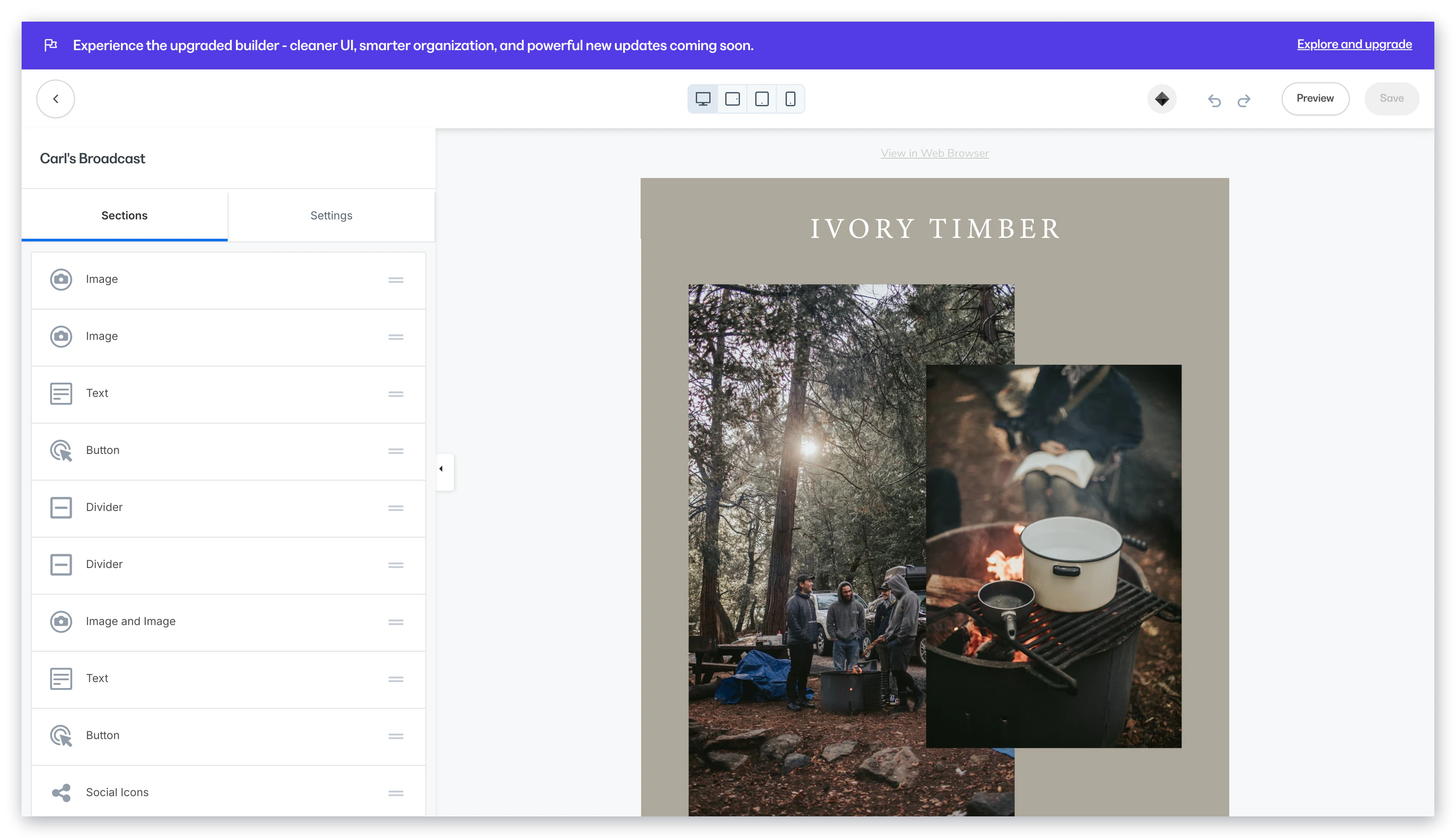 ### Mobile vs desktop layouts
In our responsive editor, you'll see how your emails automatically adjust for mobile.
This means every one of your subscribers can have a great experience, regardless of whether they are viewing your emails on a computer or on a mobile device.
Customize how sections look on desktop versus mobile, making it easier than ever to control how your emails look on any device:
### Mobile vs desktop layouts
In our responsive editor, you'll see how your emails automatically adjust for mobile.
This means every one of your subscribers can have a great experience, regardless of whether they are viewing your emails on a computer or on a mobile device.
Customize how sections look on desktop versus mobile, making it easier than ever to control how your emails look on any device:
## Section types within the Visual Editor
**Text:** Communicate with your contacts and say exactly what you want to say by adding a customizable Text section. Read [Add and customize a Text section in Email Campaigns](/articles/marketing/email-campaigns/how-to-add-and-customize-a-text-section-in-email-campaigns) for details.
**Image:** Brand your email campaigns, set the tone for your emails, and show your personality with an Image section. Read [Add and customize an Image in Email Campaigns](/articles/marketing/email-campaigns/how-to-add-and-customize-your-image-in-email-campaigns) for details.
**Button:** Encourage your audience to open a separate page, purchase an offer, and more by simply clicking a button. Read [Add and customize a Button in Email Campaigns](/articles/marketing/email-campaigns/how-to-add-and-customize-your-button-in-email-campaigns) for details.
**Logo:** Determine your audience's first visual impression by adding your logo to your emails, setting the stage to showcase your brand. Read [Add and customize a Logo Image in Email Campaigns](/articles/marketing/email-campaigns/how-to-add-and-customize-a-logo-image-in-email-campaigns) for details.
**Video:** Adding video to your emails is an entertaining and impactful way to engage with your audience, quickly informing your contacts while further establishing your brand. Read [Add a Video in Email Campaigns](/articles/marketing/email-campaigns/how-to-add-a-video-section-in-email-campaigns) for details.
**Countdown Timer:** Add a dynamic countdown timer without relying on any outside tools. Just add it in and customize it with a few clicks. Read [Add and customize a Countdown Timer in Email Campaigns](/articles/marketing/email-campaigns/how-to-add-and-customize-a-countdown-timer-in-email-campaigns) for details.
**Social Icons:** Connect with your audience and effortlessly boost traffic by showcasing Social Media links inside your emails. Read [Add and customize Social Icons in Email Campaigns](/articles/marketing/email-campaigns/how-to-add-and-customize-social-icons-in-email-campaigns) for details.
**Divider:** Design your emails for the best user experience by breaking your content into easily consumable sections with a divider. Read [Add and customize a Divider section in Email Campaigns](/articles/marketing/email-campaigns/how-to-add-and-customize-a-divider-section-in-email-campaigns) for details.
**Announcement:** Send important information to your contacts with an announcement banner right from your Email Campaign. Read [Add and customize Announcements in Email Campaigns](/articles/marketing/email-campaigns/how-to-add-and-customize-announcements-in-email-campaigns) for details.
**2-Column Text and Image Layout:** Create beautifully organized layouts of text blocks and images within your emails with these 2-column style combinations:
* [Text and Text](/articles/marketing/email-campaigns/how-to-add-and-customize-your-text-and-text-section-in-email-campaigns)
* [Image and Text](/articles/marketing/email-campaigns/how-to-add-and-customize-your-image-and-text-section-in-email-campaigns)
* [Image and Image](/articles/marketing/email-campaigns/how-to-add-and-customize-your-image-and-image-section-in-email-campaigns)
Looking to change your email footer or the View in Browser button? [Learn to change the email footer language](/articles/marketing/email-campaigns/can-i-change-the-language-for-the-view-in-browser-button-and-address-in-the-footer-of-my-email).
## Supported email clients
The Email Visual Editor is designed to display your email to your recipients across a multitude of email clients. Read our list of [supported email clients](https://themes.kajabi.com/changelog/email-themes/encore#supported-email-clients) for details.
**Grades**
* A - Thoroughly tested. Email templates are fully supported in these email clients.
* B - Not thoroughly tested. Email templates are assumed to be functional in these email clients. Defects are investigated and fixed, if possible.
* F - Explicitly unsupported and untested email clients.