> ## Documentation Index
> Fetch the complete documentation index at: https://help.kajabi.com/llms.txt
> Use this file to discover all available pages before exploring further.
# Events overview
> Engage members and build anticipation for launches, webinars, and in-person gatherings.
With an **Event**, you can [add a countdown block](../../website/pages/how-to-add-a-countdown-block-to-your-page) to Pages and Email Broadcasts, [collect registrations](../../marketing/events/how-to-register-people-to-your-event) for virtual or in-person events, and send email notifications tied to a specific date. Members may add an Event to their preferred calendar using a link that is automatically included in the confirmation email.
Unlike [Email Sequences](../../marketing/email-campaigns/create-an-email-sequence), Event emails are scheduled around a date rather than a contact's behavior, making them the right tool for time-sensitive announcements. Performance tracking works the same way as other email types — open rates, click reports, and more are available from the Events page.
Use Events any time you need to build momentum around a moment that matters. See [Create an Event](../../marketing/events/how-to-create-an-event) to begin building excitement around your date.
 ## Key benefits
* **Automated email sequences** are tied to a specific date and time, rather than opt-in date
* **Countdown timers** on Website Pages, Landing Pages, and Email Broadcasts to build anticipation
* **Flexible scheduling** for one-time or recurring Events up to one year in advance
* **Self-registration** through Forms and Automations so contacts can sign up on their own
* **Detailed analytics** including metrics and click reports for all Event emails
**Note:** For repeat Events, registrants receive emails starting from the time they register, but only for that registration cycle. They won't automatically receive emails for future cycles unless they're removed from the event and re-registered.
## Key benefits
* **Automated email sequences** are tied to a specific date and time, rather than opt-in date
* **Countdown timers** on Website Pages, Landing Pages, and Email Broadcasts to build anticipation
* **Flexible scheduling** for one-time or recurring Events up to one year in advance
* **Self-registration** through Forms and Automations so contacts can sign up on their own
* **Detailed analytics** including metrics and click reports for all Event emails
**Note:** For repeat Events, registrants receive emails starting from the time they register, but only for that registration cycle. They won't automatically receive emails for future cycles unless they're removed from the event and re-registered.
## Register Contacts
Pair Events with [**Automations**](../../marketing/automations/automations-overview) to register Contacts automatically based on actions they take:
* [Completing a Form](../../marketing/forms/create-and-build-your-form)
* Purchasing an Offer
* Completing an Assessment
* Adding a Tag
Set up an Automation with your chosen trigger, and Kajabi handles registration automatically when a Contact meets the condition.
**Note:** Automation availability depends on your plan. Growth and Pro plan members can create Automations from the dedicated **Automations** tab. Basic plan members can access Automations directly within Products, Offers, Funnels, Email Campaigns, Events, and Forms — just open the relevant section and enter its editor.
Learn more about the [differences between Basic and Advanced Automations](../../marketing/automations/basic-vs-advanced-automations) in Kajabi.
## Add to Calendar
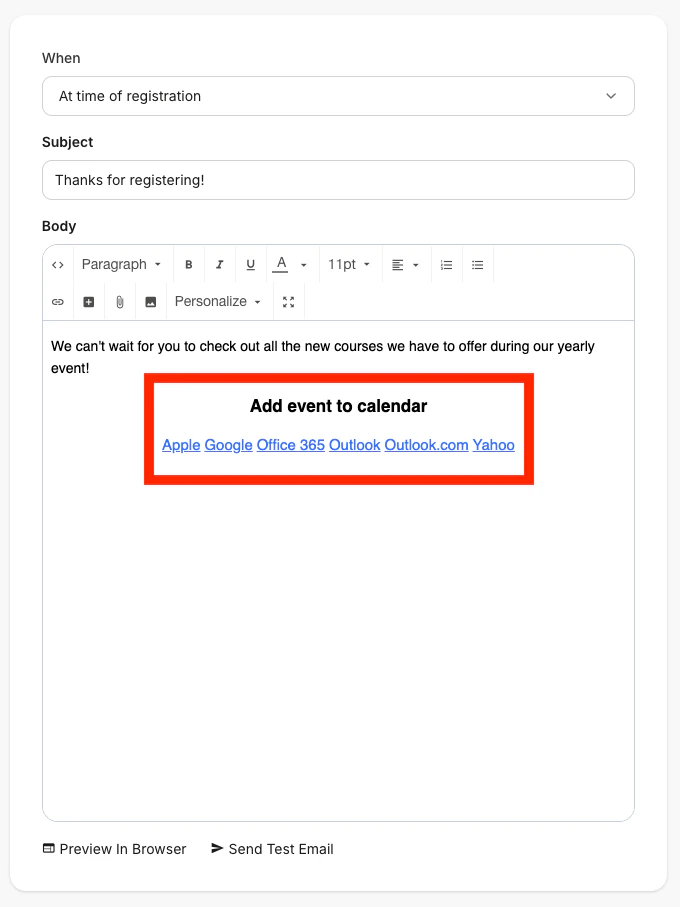
**Add to Calendar** lets members quickly save scheduled Events to their preferred calendar. These calendar links are automatically included in confirmation emails and appear on Event pages, making it easier for members to attend and stay organized.
Use Add to Calendar for any scheduled Event with a defined date and duration.
 ### Supported calendar providers
Multiple calendar providers are supported, each with slightly different behavior:
* **Apple Calendar** — Downloads an ICS file and supports full recurring Event series
* **Google Calendar** — Opens a direct link and supports full recurring Event series
* **Outlook (desktop)** — Downloads an ICS file and supports single Events only
* **Outlook.com** — Opens a direct link and supports single Events only
* **Office 365** — Opens a direct link and supports single Events only
* **Yahoo Calendar** — Opens a direct link and supports single Events only
### Calendar links
Members can access calendar links in the following places:
* **Event confirmation emails** — Add to the email body using the **Add to email** button
* **Member-facing Event pages** — Displayed on the **Event details** tab
### Manage calendar links on the Event page
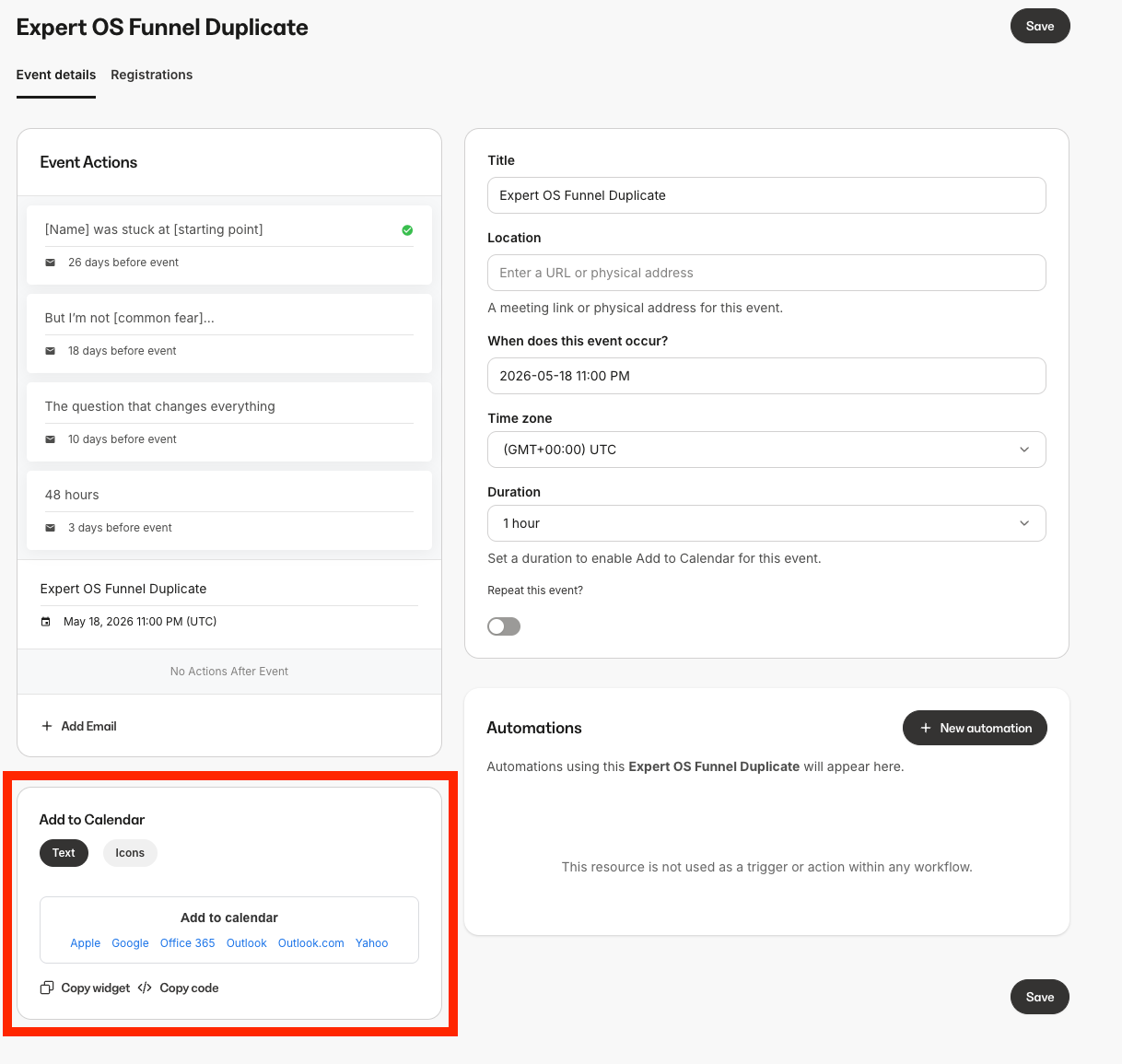
The Events page includes an **Add to Calendar** panel with tools to customize and share calendar links:
* **Text style** — Display provider names as text links (e.g., Google, Apple, Outlook)
* **Icon style** — Display provider logos as clickable icons
* **Copy widget** — Copy formatted calendar links for use in emails or landing pages
* **Copy code** — Copy raw HTML for custom templates or advanced use
* **Add to email** — Insert the calendar widget directly into the email editor
### Supported calendar providers
Multiple calendar providers are supported, each with slightly different behavior:
* **Apple Calendar** — Downloads an ICS file and supports full recurring Event series
* **Google Calendar** — Opens a direct link and supports full recurring Event series
* **Outlook (desktop)** — Downloads an ICS file and supports single Events only
* **Outlook.com** — Opens a direct link and supports single Events only
* **Office 365** — Opens a direct link and supports single Events only
* **Yahoo Calendar** — Opens a direct link and supports single Events only
### Calendar links
Members can access calendar links in the following places:
* **Event confirmation emails** — Add to the email body using the **Add to email** button
* **Member-facing Event pages** — Displayed on the **Event details** tab
### Manage calendar links on the Event page
The Events page includes an **Add to Calendar** panel with tools to customize and share calendar links:
* **Text style** — Display provider names as text links (e.g., Google, Apple, Outlook)
* **Icon style** — Display provider logos as clickable icons
* **Copy widget** — Copy formatted calendar links for use in emails or landing pages
* **Copy code** — Copy raw HTML for custom templates or advanced use
* **Add to email** — Insert the calendar widget directly into the email editor
 ### Calendar link behavior
Each calendar link includes a secure, time-limited token tied to a specific Event.
When a member clicks a link:
* **Google, Outlook.com, Office 365, Yahoo** — Opens the provider's event creation page with pre-filled details such as title, date, time, duration, and description
* **Apple and Outlook (desktop)** — Downloads an ICS file that the member opens to add the Event to their calendar
Calendar links expire one year after they are generated.
**Note:** When creating an Event, make sure it is fully configured so calendar links will appear. Set a **date and time** for the Event, and add a **duration (in minutes)**. Without both of these, calendar links will not display.
### Calendar link behavior
Each calendar link includes a secure, time-limited token tied to a specific Event.
When a member clicks a link:
* **Google, Outlook.com, Office 365, Yahoo** — Opens the provider's event creation page with pre-filled details such as title, date, time, duration, and description
* **Apple and Outlook (desktop)** — Downloads an ICS file that the member opens to add the Event to their calendar
Calendar links expire one year after they are generated.
**Note:** When creating an Event, make sure it is fully configured so calendar links will appear. Set a **date and time** for the Event, and add a **duration (in minutes)**. Without both of these, calendar links will not display.
## Troubleshooting
**Calendar links not appearing in email**
* **Cause:** Event has no duration set
* **Solution:** Add a **duration (in minutes)** in the Event settings
#### Calendar links not appearing
* **Cause:** Event is not scheduled
* **Solution:** Set a date and time for the Event
#### "Link expired" error
* **Cause:** Calendar link token is older than one year
* **Solution:** Request a new link from the Event page
#### Recurring event shows only one session
* **Cause:** Provider limitation
* **Solution:** Apple Calendar and Google Calendar support full series. Other providers add only a single event by design.\\
## FAQs
### Do calendar links support recurring events?
Yes, but only Apple Calendar and Google Calendar support adding the full event series. Other providers add a single occurrence.
### Why are calendar links missing from my Event?
Calendar links only appear when the Event has both a scheduled date/time and a duration set.
### How long do calendar links stay active?
Calendar links expire one year after they are generated.
### Can calendar links be added to custom emails or pages?
Yes. Use the **Copy widget** or **Copy code** options on the Events page to add calendar links to custom emails or landing pages.