> ## Documentation Index
> Fetch the complete documentation index at: https://help.kajabi.com/llms.txt
> Use this file to discover all available pages before exploring further.

<AgentInstructions>

## Submitting Feedback

If you encounter incorrect, outdated, or confusing documentation on this page, submit feedback:

POST https://help.kajabi.com/feedback

```json
{
  "path": "/articles/marketing/forms/how-to-export-information-from-a-form",
  "feedback": "Description of the issue"
}
```

Only submit feedback when you have something specific and actionable to report.

</AgentInstructions>

# Export information from a Form

> Export a CSV file of contacts who have opted in to a Form.

Export contact information from a Form submission to a CSV file. This is useful for tracking opt-ins, analyzing lead data, or importing contacts into external tools.

<div className="w-full aspect-video">
  <iframe src="https://fast.wistia.net/embed/iframe/bqhlecxmpg" allow="autoplay; fullscreen" allowFullScreen className="w-full h-full" />
</div>

## Export contacts from a Form

1. Open the **Marketing** tab from your Dashboard.
2. Select **Forms**.
3. Select the Form with the data you want to export.
4. Click **Submissions**.
5. Select **Export** in the top right corner:

<div className="w-full aspect-video">
  <iframe src="https://fast.wistia.net/embed/iframe/j4zstorcgs" allow="autoplay; fullscreen" allowFullScreen className="w-full h-full" />
</div>

## CSV file

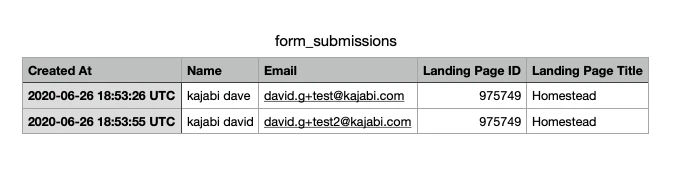
The information is sent to your email inbox as a CSV file that you can download. The file shows the time the Form was submitted, name, email, which Landing Page, and the landing page's ID number.
<img src="https://mintcdn.com/kajabi-support/p8xUcPoEbYtv-GgI/articles/images/aee5c769_form_submissions.png?fit=max&auto=format&n=p8xUcPoEbYtv-GgI&q=85&s=49ca3249f053ecbcfa69b4a5dcb1a122" alt="CSV file example" width="673" height="187" data-path="articles/images/aee5c769_form_submissions.png" />
