> ## Documentation Index
> Fetch the complete documentation index at: https://help.kajabi.com/llms.txt
> Use this file to discover all available pages before exploring further.
# Use Universal Inbox and Comment-to-DM
> Manage social media messages and automate DMs when customers comment on your Instagram or Facebook posts.
**Comment-to-DM** is an Automation that sends a direct message to anyone who comments on a specific Instagram or Facebook post. **Universal Inbox** is a centralized hub that brings together those Comment-to-DM messages alongside inbound and outbound customer messages from Instagram DMs and Facebook Messenger.
Together, these features help you engage with your audience directly from Kajabi — no need to switch between platforms.
**Note:** Universal Inbox and Comment-to-DM are only available with Growth and Pro plans. Check out [kajabi.com/pricing](https://kajabi.com/pricing) for more details. To use Comment-to-DM for Instagram, you must have an [Instagram Professional account](https://help.instagram.com/502981923235522?helpref=faq_content).
If you use additional third-party messaging platforms or integrations, they may interfere with Comment-to-DM Automations. We recommend using Kajabi exclusively to ensure the process completes correctly.
## Set up the Universal Inbox
To connect your Instagram DMs and Facebook Messenger chats with Universal Inbox:
1. Click **Marketing** > **Universal Inbox** from your Kajabi Dashboard.
2. Use the **All Channels** drop-down menu to select **Instagram** or **Facebook Messenger.**
3. Log in to your Instagram or Facebook account in the pop-up window.
4. Convert to an Instagram Professional account if prompted.
5. Allow **Kajabi Marketing Services** access to finish the integration.
## Set up Comment-to-DM
**Tip:** We are rolling out the ability to select **Any post** for Instagram or Facebook. You will no longer need to set up an Automation for each specific post. If you do not see this option, the feature has not been made available to your account yet.
Comment-to-DM uses [Kajabi Automations](../../marketing/automations/automations-overview). Setup is quick when you use the premade Instagram or Facebook Comment-To-Conversation Automation blueprint. You can also [start from scratch](../../marketing/automations/automations-overview) when creating a Comment-to-DM Automation.
**Note:** Trigger words are not case sensitive. For example, if your trigger word is `KAJABI`, a customer comment of `Kajabi` will still trigger the Automation.
To set up the Comment-to-DM Automation blueprint:
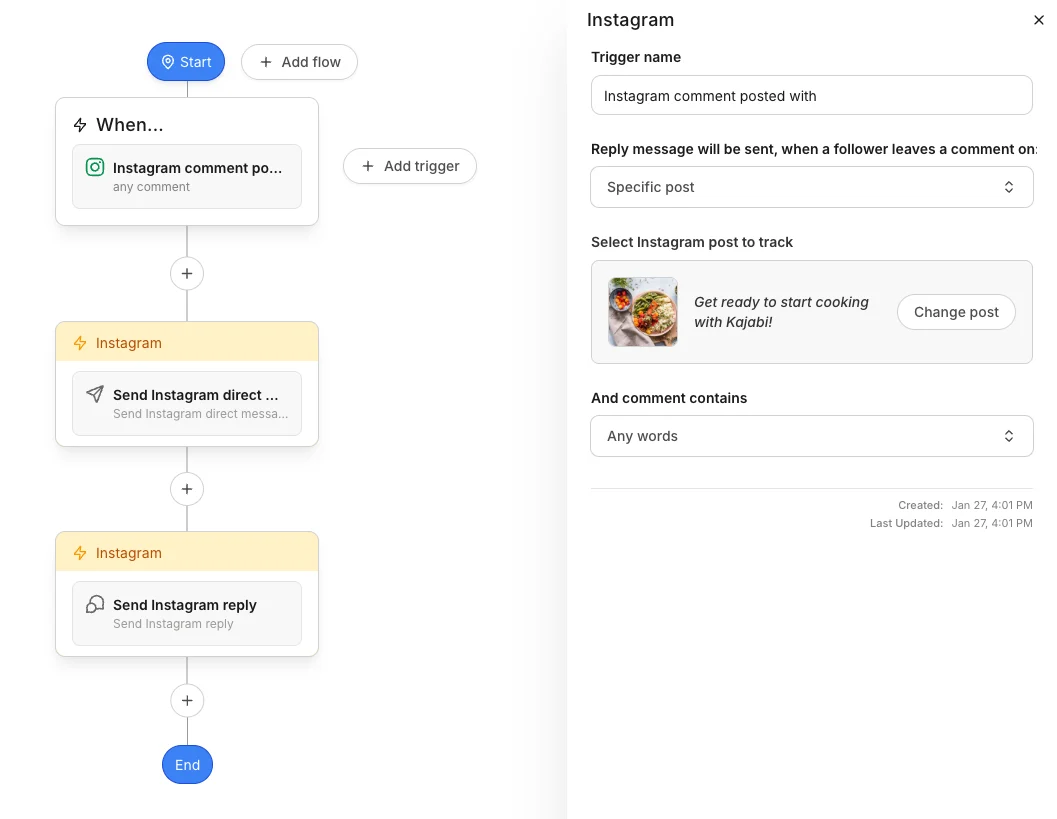
### Instagram
1. From the Kajabi Dashboard, select **Marketing** > **Automations.**
2. Click **+New Automation.**
3. Choose the **Instagram Comment-to-Conversation** blueprint.
4. For the **When** trigger, select a specific Instagram post or choose **Any post** to apply the Automation to any future Instagram posts.
5. Click **Save Trigger.**
6. Customize the automated direct message that will be sent when the post receives a comment.
7. (Optional) Customize an automatic Instagram reply to comments on the post.
8. Click **Save.**
 ### Facebook
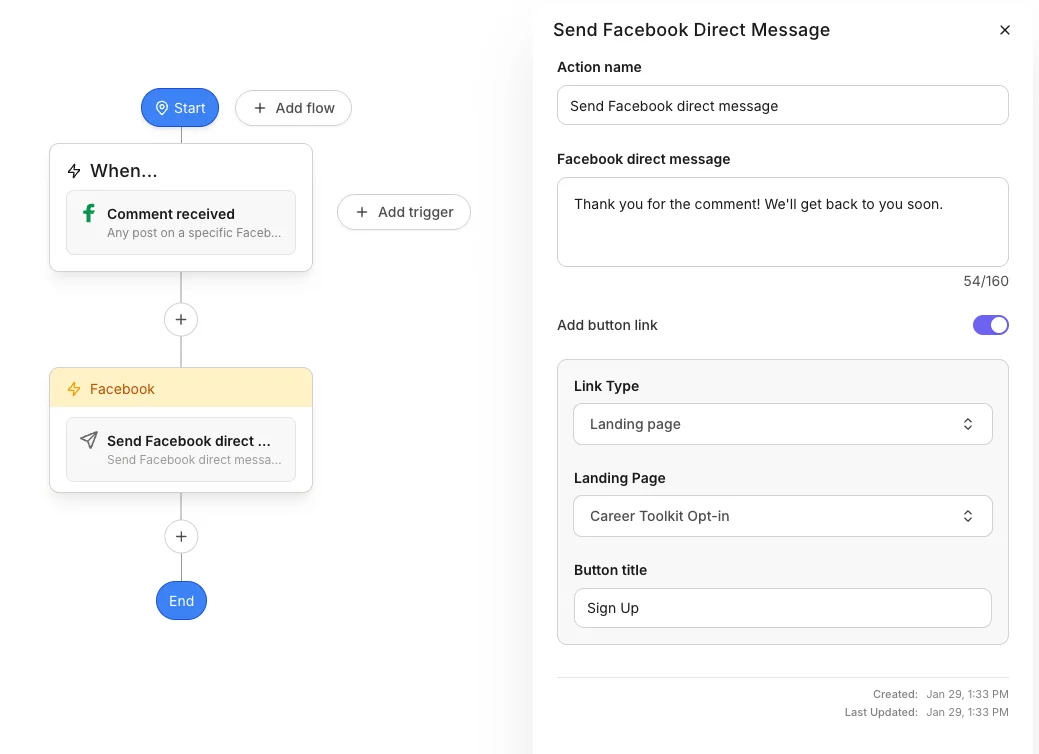
1. From the Kajabi Dashboard, select **Marketing** > **Automations**
2. Click **+New Automation**
3. Choose the **Facebook Comment-to-Conversation** blueprint
4. For the **When** trigger, select a specific Facebook Page or choose **Any page** to apply the Automation to all your Facebook Pages
* For specific Facebook Pages, select a specific Facebook post or choose **Any post** to apply the Automation to any future posts on the selected Page
5. Click **Save Trigger**
6. Customize the automated direct message that will be sent when the page receives a comment
7. (Optional) Customize an automatic Facebook reply to comments on the post
8. Click **Save**\\
### Facebook
1. From the Kajabi Dashboard, select **Marketing** > **Automations**
2. Click **+New Automation**
3. Choose the **Facebook Comment-to-Conversation** blueprint
4. For the **When** trigger, select a specific Facebook Page or choose **Any page** to apply the Automation to all your Facebook Pages
* For specific Facebook Pages, select a specific Facebook post or choose **Any post** to apply the Automation to any future posts on the selected Page
5. Click **Save Trigger**
6. Customize the automated direct message that will be sent when the page receives a comment
7. (Optional) Customize an automatic Facebook reply to comments on the post
8. Click **Save**\\
 **Important:** Facebook may temporarily block automated and manual comment replies when comment reply volume is high across posts (e.g., 250+ per day). If you expect high volume, consider skipping the comment reply action. Automated DMs are unaffected. Instagram comment replies are not subject to this limit.
## Comments and keyword guidelines
| Setting | Description | Details / Examples |
| ------------------------------ | ------------------------------------------------------------------------------------------------------------ | ------------------------------------------------------------------------------------------------------------------------------------------------------------------------------------------------------------------------------------------------------------------------------------------------------------------------------------------------------------ |
| **Any Comments** | Triggers on every comment received | Use for general welcome messages or broad engagement |
| **No Comments** | Disables the trigger | Use to temporarily pause Automations |
| **Specific Keywords** | Triggers only when comments match your keyword rules | See keyword matching rules below |
| **How keyword matching works** | Keywords are matched as individual words, not exact phrases. Case does not matter (`HELP` = `help` = `Help`) | **What works:** Single words: `help`, `pricing`, `info`. Numbers: `112`, `2024`. Emojis: ❤️, 👍, 🔥. Mixed lists: `help`, `pricing`, ❤️, `112`. Exact phrases: `how much`, `discount code`. **What does not work:** Phrases such as `how much` will match comments containing both "how" and "much" anywhere. Partial words: `help` will not match "helpful" |
| **Include Keywords** | Comment must contain at least one of these words | **Example keywords:**`pricing`, `cost`, `price`. **Matches:** "What's the pricing?" **Matches:** "This costs too much" (contains "cost") |
| **Exclude Keywords** | Comment must not contain any of these words | **Example keywords:**`spam`, `fake`, `bot`. **Blocks:** "This looks like spam" |
| **Combined Rules** | Both Include and Exclude rules must pass | **Example:** Include: `help`, `support`. Exclude: `never`, `don't`. **Matches:** "I need help". **Blocks:** "I don't need help" (contains "don't") |
## FAQs
### What happens if I have an existing Inbox Automation set up through Meta?
Both Automations will trigger. We recommend centralizing all your Automations in Kajabi or ensuring there are no overlapping triggers.
### Can I set up Comment-to-DM Automations on posts that are not yet live?
Yes. Once the post goes live and receives comments, the automated DMs will trigger.
### Are there post types where Automations are not supported?
Automations cannot be built from Facebook album posts because Meta does not support this capability.
### Create Contacts from Universal Inbox conversations
1. Click **Marketing** > **Universal Inbox** from your Kajabi Dashboard
2. Select the conversation with the person you want to make a Contact
3. Click the **i** icon on the right
4. Press **+Add Details**
5. Add the email address for that Contact
6. (Optional) Add any relevant Tags or notes
7. Click **Save** to create the Contact
**Important:** Facebook may temporarily block automated and manual comment replies when comment reply volume is high across posts (e.g., 250+ per day). If you expect high volume, consider skipping the comment reply action. Automated DMs are unaffected. Instagram comment replies are not subject to this limit.
## Comments and keyword guidelines
| Setting | Description | Details / Examples |
| ------------------------------ | ------------------------------------------------------------------------------------------------------------ | ------------------------------------------------------------------------------------------------------------------------------------------------------------------------------------------------------------------------------------------------------------------------------------------------------------------------------------------------------------ |
| **Any Comments** | Triggers on every comment received | Use for general welcome messages or broad engagement |
| **No Comments** | Disables the trigger | Use to temporarily pause Automations |
| **Specific Keywords** | Triggers only when comments match your keyword rules | See keyword matching rules below |
| **How keyword matching works** | Keywords are matched as individual words, not exact phrases. Case does not matter (`HELP` = `help` = `Help`) | **What works:** Single words: `help`, `pricing`, `info`. Numbers: `112`, `2024`. Emojis: ❤️, 👍, 🔥. Mixed lists: `help`, `pricing`, ❤️, `112`. Exact phrases: `how much`, `discount code`. **What does not work:** Phrases such as `how much` will match comments containing both "how" and "much" anywhere. Partial words: `help` will not match "helpful" |
| **Include Keywords** | Comment must contain at least one of these words | **Example keywords:**`pricing`, `cost`, `price`. **Matches:** "What's the pricing?" **Matches:** "This costs too much" (contains "cost") |
| **Exclude Keywords** | Comment must not contain any of these words | **Example keywords:**`spam`, `fake`, `bot`. **Blocks:** "This looks like spam" |
| **Combined Rules** | Both Include and Exclude rules must pass | **Example:** Include: `help`, `support`. Exclude: `never`, `don't`. **Matches:** "I need help". **Blocks:** "I don't need help" (contains "don't") |
## FAQs
### What happens if I have an existing Inbox Automation set up through Meta?
Both Automations will trigger. We recommend centralizing all your Automations in Kajabi or ensuring there are no overlapping triggers.
### Can I set up Comment-to-DM Automations on posts that are not yet live?
Yes. Once the post goes live and receives comments, the automated DMs will trigger.
### Are there post types where Automations are not supported?
Automations cannot be built from Facebook album posts because Meta does not support this capability.
### Create Contacts from Universal Inbox conversations
1. Click **Marketing** > **Universal Inbox** from your Kajabi Dashboard
2. Select the conversation with the person you want to make a Contact
3. Click the **i** icon on the right
4. Press **+Add Details**
5. Add the email address for that Contact
6. (Optional) Add any relevant Tags or notes
7. Click **Save** to create the Contact
### Disconnect an account
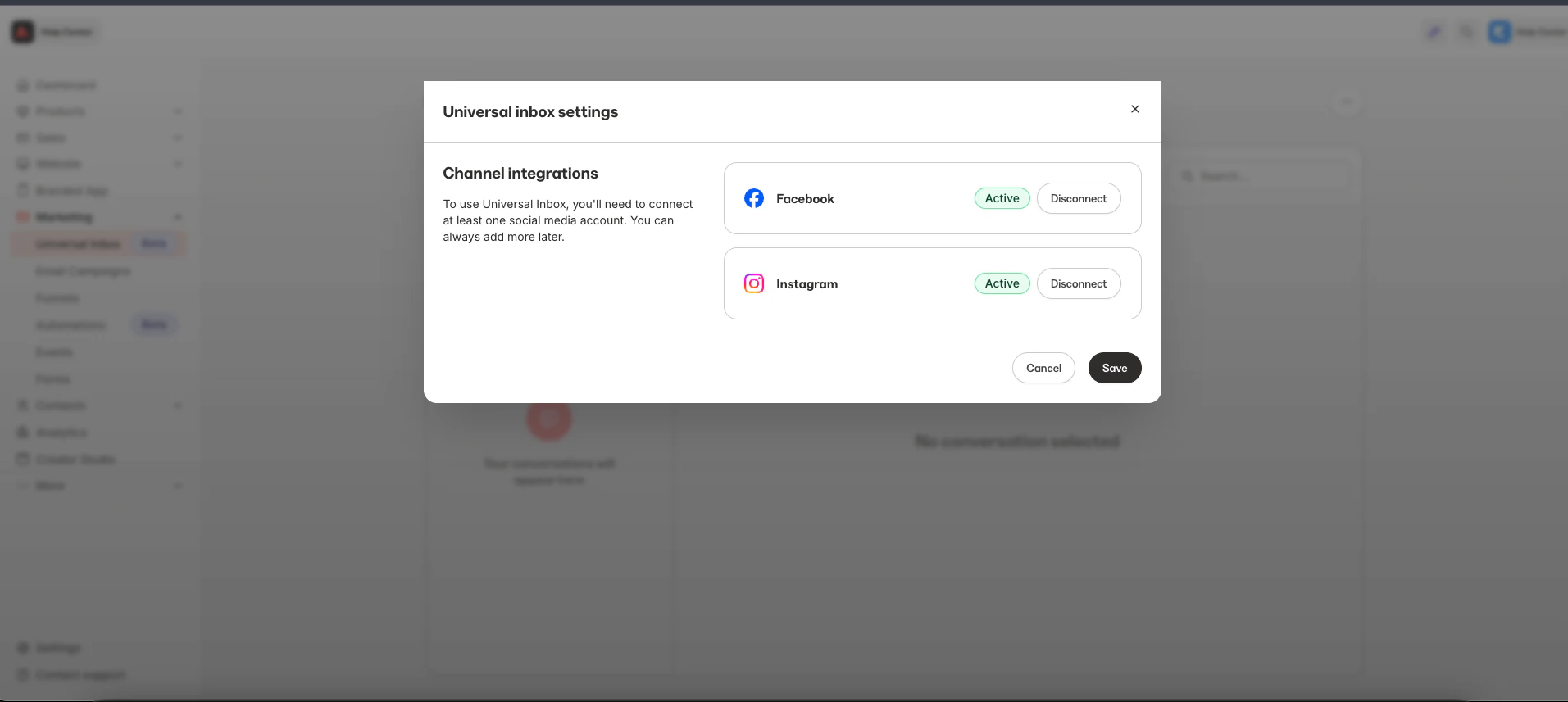
1. Click **Marketing** > **Universal Inbox** from your Kajabi Dashboard
2. Select the **...** drop-down menu
3. Click **Manage Integrations**
4. Press **Disconnect** for the integration you want to disconnect
 ### Which Kajabi plan includes this feature?
Comment-to-DM and Universal Inbox are available with Growth and Pro plans.
### Is there a maximum number of conversations in Universal Inbox?
No, there is currently no limit.
### What is the maximum file size a customer can upload?
The maximum file size is 8 MB for images (due to Meta restrictions) and 25 MB for all other file types (after encoding).
### Which Kajabi plan includes this feature?
Comment-to-DM and Universal Inbox are available with Growth and Pro plans.
### Is there a maximum number of conversations in Universal Inbox?
No, there is currently no limit.
### What is the maximum file size a customer can upload?
The maximum file size is 8 MB for images (due to Meta restrictions) and 25 MB for all other file types (after encoding).