> ## Documentation Index
> Fetch the complete documentation index at: https://help.kajabi.com/llms.txt
> Use this file to discover all available pages before exploring further.
# Manage messages in Universal Inbox
> Connect Instagram and Facebook, answer every social and in-app conversation from one screen, and turn a conversation into a Contact.
**Universal Inbox** is a single hub for the conversations happening across your Kajabi site and your connected social accounts. Instead of moving between Instagram, Facebook, and Kajabi, you answer everyone from one screen.
Universal Inbox is available on any plan, and it brings together these channels:
* **Instagram DMs**, including messages sent by [Comment-to-DM Automations](../../marketing/comment-to-dm/comment-to-dm)
* **Facebook Messenger** chats
* [**Backstage**](../../products/backstage/set-up-a-private-client-backstage) client messages
* [**Expert Agents**](../../products/products-overview/expert-agents-overview) conversations with members and visitors
 ## Connect Instagram or Facebook
1. From your Kajabi Dashboard, navigate to **Settings** > **Integrations & Webhooks**.
2. In the **Social media** section, select **Instagram** or **Facebook** and click **Connect.**
3. Log in to your Instagram or Facebook account in the pop-up window.
4. Convert to an Instagram Professional account if prompted.
5. Allow **Kajabi Marketing Services** access to finish the integration.
## Open Universal Inbox
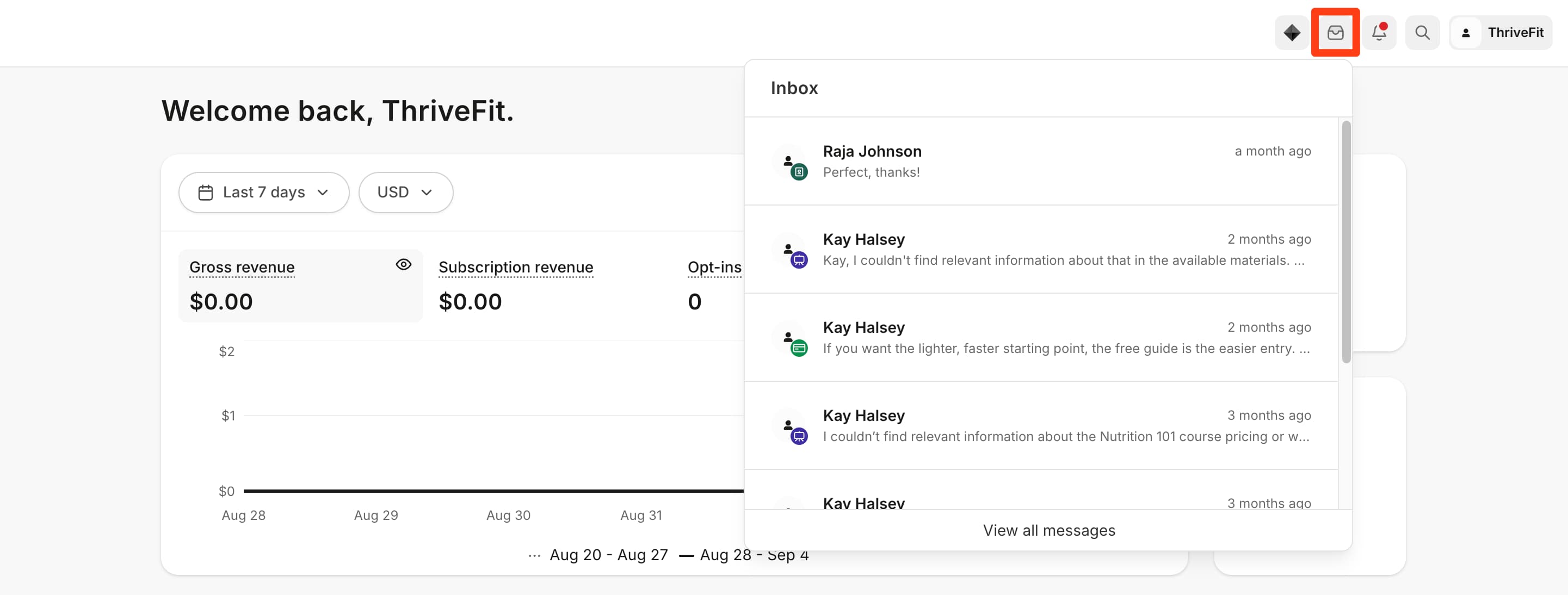
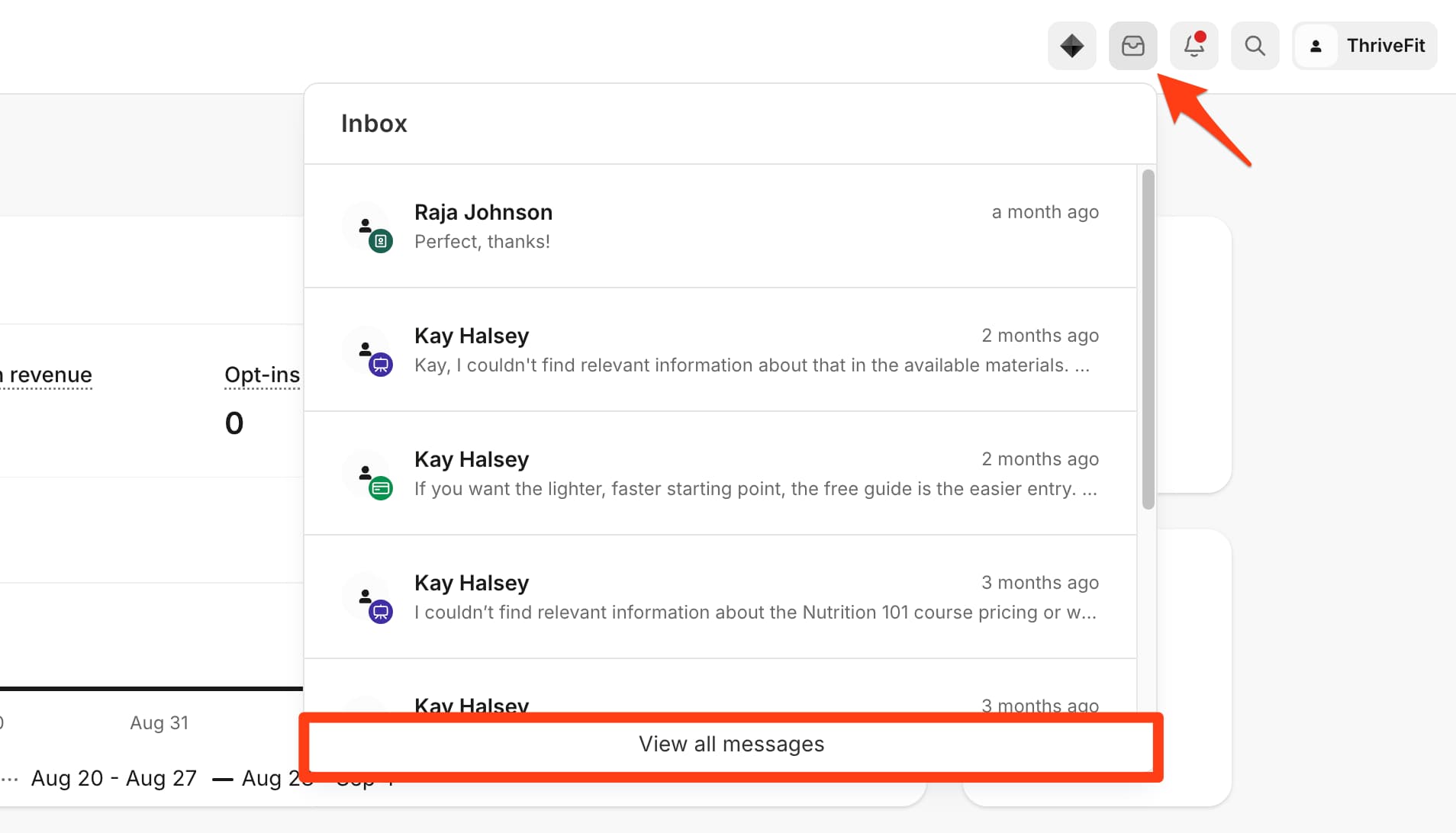
1. Click the **inbox icon** from your Kajabi Dashboard.
2. Select **View all messages.**
## Connect Instagram or Facebook
1. From your Kajabi Dashboard, navigate to **Settings** > **Integrations & Webhooks**.
2. In the **Social media** section, select **Instagram** or **Facebook** and click **Connect.**
3. Log in to your Instagram or Facebook account in the pop-up window.
4. Convert to an Instagram Professional account if prompted.
5. Allow **Kajabi Marketing Services** access to finish the integration.
## Open Universal Inbox
1. Click the **inbox icon** from your Kajabi Dashboard.
2. Select **View all messages.**
 ## Channels that connect automatically
Backstage and Expert Agents need no setup. Once either is in use on your site, its conversations appear in Universal Inbox on their own.
### Backstage client messages
[**Backstage**](../../products/backstage/set-up-a-private-client-backstage) is a private, branded space for each 1:1 client. Messages a client sends there arrive as their own channel in Universal Inbox, so client conversations sit beside your social ones.
## Channels that connect automatically
Backstage and Expert Agents need no setup. Once either is in use on your site, its conversations appear in Universal Inbox on their own.
### Backstage client messages
[**Backstage**](../../products/backstage/set-up-a-private-client-backstage) is a private, branded space for each 1:1 client. Messages a client sends there arrive as their own channel in Universal Inbox, so client conversations sit beside your social ones.
 ### Expert Agents conversations
[**Expert Agents**](../../products/products-overview/expert-agents-overview) are AI chat experiences that answer questions for members and site visitors. Their conversations appear in Universal Inbox, so you can step in when someone needs a person instead.
### Expert Agents conversations
[**Expert Agents**](../../products/products-overview/expert-agents-overview) are AI chat experiences that answer questions for members and site visitors. Their conversations appear in Universal Inbox, so you can step in when someone needs a person instead.
 ## Create a Contact from a conversation
Turning a conversation into a Contact lets you tag that person, keep notes on them, and reach them through the rest of your Kajabi marketing.
1. Open Universal Inbox, then select the conversation with the person you want to add.
2. Click the **(i) information** **icon** on the right.
3. Click **+Add Details.**
4. Add the email address for that Contact.
5. (Optional) Add any relevant Tags or notes.
6. Click **Save.**
## Create a Contact from a conversation
Turning a conversation into a Contact lets you tag that person, keep notes on them, and reach them through the rest of your Kajabi marketing.
1. Open Universal Inbox, then select the conversation with the person you want to add.
2. Click the **(i) information** **icon** on the right.
3. Click **+Add Details.**
4. Add the email address for that Contact.
5. (Optional) Add any relevant Tags or notes.
6. Click **Save.**
## Disconnect an account
1. Click **Settings** > **Integrations & Webhooks** from your Kajabi Dashboard.
2. In the **Social media** section, press **Disconnect** for the integration you want to remove.
 ## FAQs
### Is there a limit on how many conversations Universal Inbox holds?
No. There is currently no limit.
### What is the largest file a customer can send?
The maximum file size is 8 MB for images, due to Meta restrictions, and 25 MB for all other file types after encoding.
### Which Kajabi plan includes Universal Inbox?
Universal Inbox is available on any plan. Sending automated DMs with [Comment-to-DM](../../marketing/comment-to-dm/comment-to-dm) requires a Growth or Pro plan.
**Note:** If your account is on a **legacy plan** (for example, Growth Legacy), Universal Inbox's social features — connecting an Instagram or Facebook account — are not included, even though Universal Inbox itself appears in your dashboard. Connecting social accounts on a legacy plan requires switching to the current version of your plan. See [Manage subscription](../../account-settings/billing/manage-your-subscription) to compare your legacy plan against the current plan before switching, since this move can't be undone.
### Where do Comment-to-DM messages appear?
In the Instagram or Facebook channel for the account that sent them, in the same conversation list as your other messages from that account.
## FAQs
### Is there a limit on how many conversations Universal Inbox holds?
No. There is currently no limit.
### What is the largest file a customer can send?
The maximum file size is 8 MB for images, due to Meta restrictions, and 25 MB for all other file types after encoding.
### Which Kajabi plan includes Universal Inbox?
Universal Inbox is available on any plan. Sending automated DMs with [Comment-to-DM](../../marketing/comment-to-dm/comment-to-dm) requires a Growth or Pro plan.
**Note:** If your account is on a **legacy plan** (for example, Growth Legacy), Universal Inbox's social features — connecting an Instagram or Facebook account — are not included, even though Universal Inbox itself appears in your dashboard. Connecting social accounts on a legacy plan requires switching to the current version of your plan. See [Manage subscription](../../account-settings/billing/manage-your-subscription) to compare your legacy plan against the current plan before switching, since this move can't be undone.
### Where do Comment-to-DM messages appear?
In the Instagram or Facebook channel for the account that sent them, in the same conversation list as your other messages from that account.