> ## Documentation Index
> Fetch the complete documentation index at: https://help.kajabi.com/llms.txt
> Use this file to discover all available pages before exploring further.
# Add custom links to a Branded App
> Include a floating action button with a menu of custom page links in a Branded App.
The **floating action button** adds a round, clickable shortcut to the lower right corner of Branded App home, library, and custom screens. Tapping it opens a menu of up to five custom page links, giving members quick access to important pages, offers, or external content.
## What is the floating action button?
The floating action button is a round clickable button in the lower right corner of a Branded App home, library, and custom screens. The button uses the brand color selected in app settings:
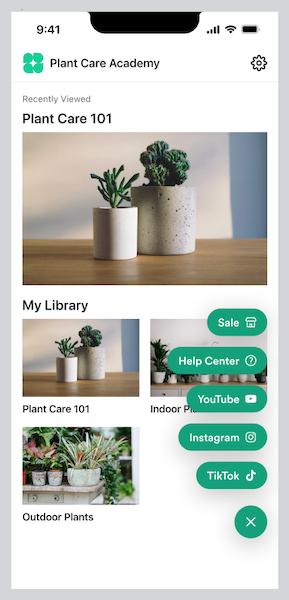
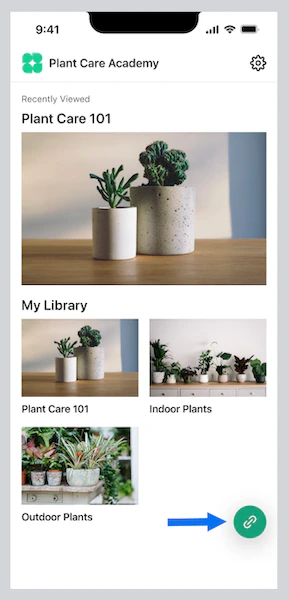 When a user clicks the button, a menu of up to five custom page links appears. For example, you can choose to link out to product offers or upsells, a blog, a podcast, or social media sites:
 ## Add a floating action button with custom links to the app
**Note:**
If you published your Branded App prior to December 20th, 2023 for iOS or January 12th, 2024 for Android and haven't updated your app since those dates, you'll need to update your app in order to add this feature. [Learn how to update your Branded App](/articles/mobile-apps/branded-app/how-to-update-your-branded-app-in-the-apple-app-store-and-google-play-store).
To add a floating action button with a menu of custom page links to a Branded App:
1. Select **Branded Mobile App** from your Kajabi dashboard
* If you've fully completed your [app setup](/articles/mobile-apps/branded-app/how-do-i-get-started-creating-my-own-branded-app), you should see your app Design settings
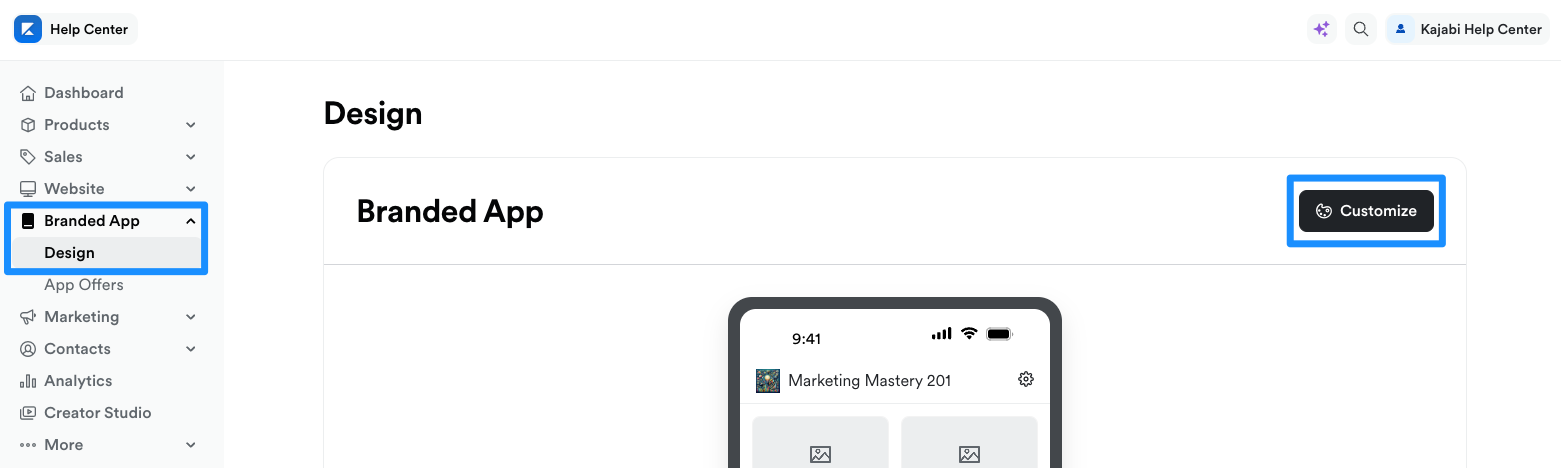
2. Select the **Design** tab
3. Click **Customize**:
## Add a floating action button with custom links to the app
**Note:**
If you published your Branded App prior to December 20th, 2023 for iOS or January 12th, 2024 for Android and haven't updated your app since those dates, you'll need to update your app in order to add this feature. [Learn how to update your Branded App](/articles/mobile-apps/branded-app/how-to-update-your-branded-app-in-the-apple-app-store-and-google-play-store).
To add a floating action button with a menu of custom page links to a Branded App:
1. Select **Branded Mobile App** from your Kajabi dashboard
* If you've fully completed your [app setup](/articles/mobile-apps/branded-app/how-do-i-get-started-creating-my-own-branded-app), you should see your app Design settings
2. Select the **Design** tab
3. Click **Customize**:
 4. Open the **phone icon**:
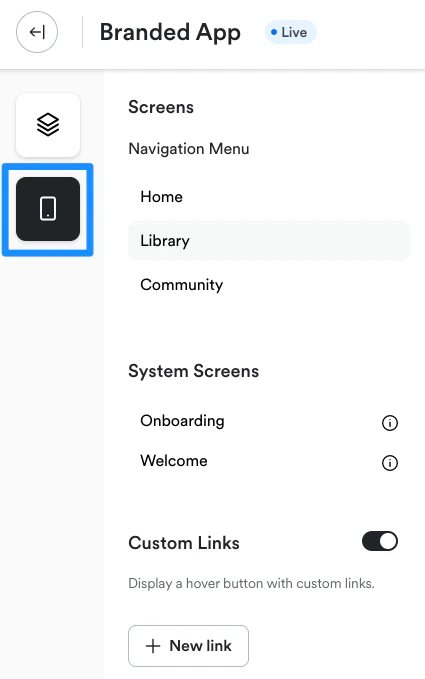 5. Toggle on **Custom Links**:
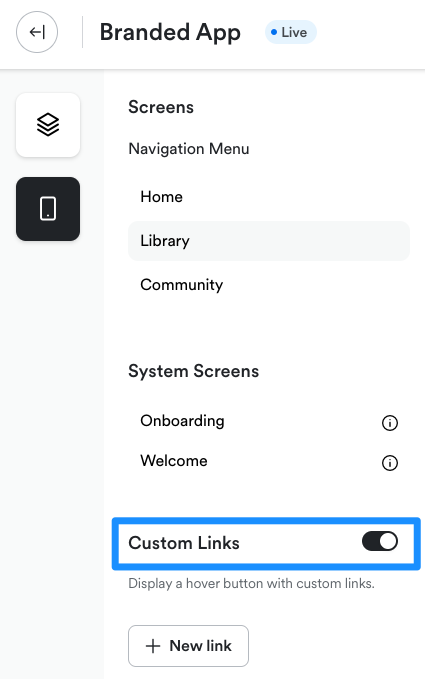 6. Then, click **+ New link**:
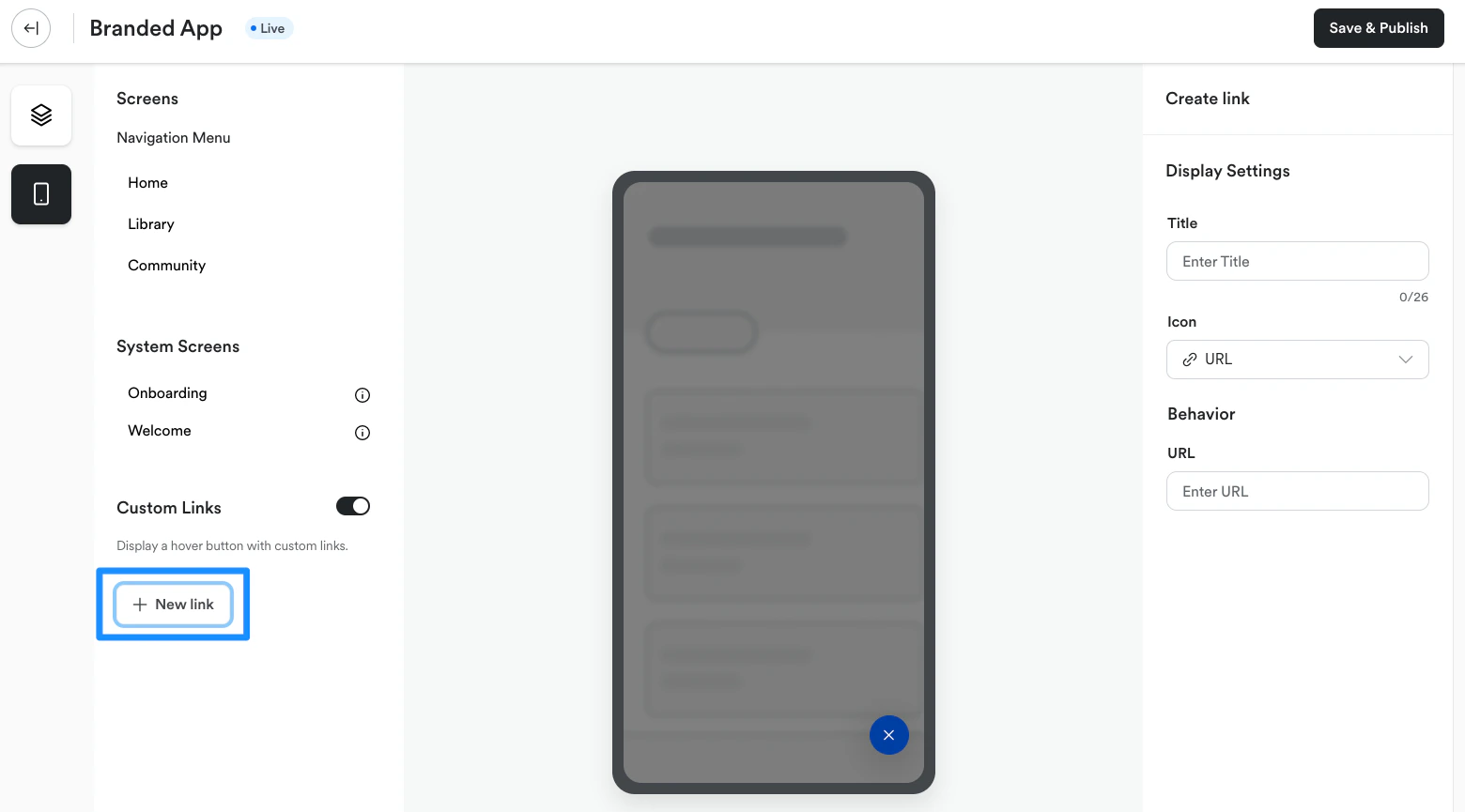 A link settings menu will appear on the right side of the page:
7. Enter a **Title** for the link
8. Next, click the URL dropdown menu and select an **icon** for the link
9. Enter the **URL address** for the link
10. Click **Save** to add the link to the floating action button in the app
## Update or delete button links
### Update a link
To update a page link in the floating action button menu:
1. Select **Branded Mobile App** from your Kajabi dashboard
* If you've fully completed your [app setup](/articles/mobile-apps/branded-app/how-do-i-get-started-creating-my-own-branded-app), you should see your app Design settings
2. Select the **Design** tab
3. Click **Customize**
4. Open the **phone icon**:
5. Navigate to **Custom Links**
6. Select the link you wish to update
A link settings popup menu will appear.
7. Edit the link **Title**, **icon** and/or **URL address** as desired
8. Click **Save** to apply changes to the floating action button in the app:
A link settings menu will appear on the right side of the page:
7. Enter a **Title** for the link
8. Next, click the URL dropdown menu and select an **icon** for the link
9. Enter the **URL address** for the link
10. Click **Save** to add the link to the floating action button in the app
## Update or delete button links
### Update a link
To update a page link in the floating action button menu:
1. Select **Branded Mobile App** from your Kajabi dashboard
* If you've fully completed your [app setup](/articles/mobile-apps/branded-app/how-do-i-get-started-creating-my-own-branded-app), you should see your app Design settings
2. Select the **Design** tab
3. Click **Customize**
4. Open the **phone icon**:
5. Navigate to **Custom Links**
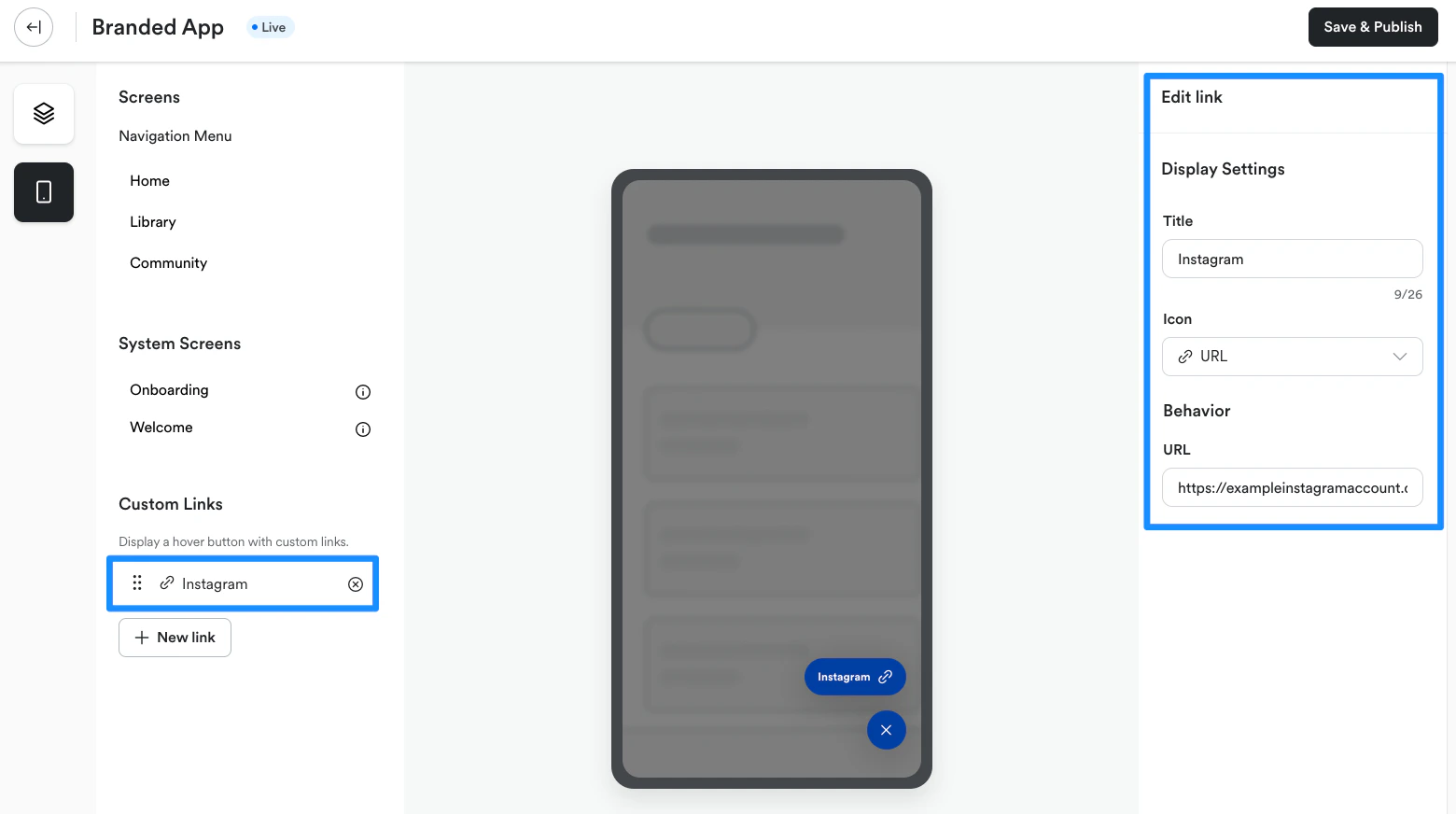
6. Select the link you wish to update
A link settings popup menu will appear.
7. Edit the link **Title**, **icon** and/or **URL address** as desired
8. Click **Save** to apply changes to the floating action button in the app:
 ### Delete a link
To delete a page link from the floating action button menu:
1. Select **Branded Mobile App** from your Kajabi dashboard
* If you've fully completed your [app setup](/articles/mobile-apps/branded-app/how-do-i-get-started-creating-my-own-branded-app), you should see your app Design settings
2. Select the **Design** tab
3. Click **Customize**
4. Open the **phone icon**:
5. Navigate to **Custom Links**
6. Click the **X icon** next to the link you wish to delete:
### Delete a link
To delete a page link from the floating action button menu:
1. Select **Branded Mobile App** from your Kajabi dashboard
* If you've fully completed your [app setup](/articles/mobile-apps/branded-app/how-do-i-get-started-creating-my-own-branded-app), you should see your app Design settings
2. Select the **Design** tab
3. Click **Customize**
4. Open the **phone icon**:
5. Navigate to **Custom Links**
6. Click the **X icon** next to the link you wish to delete:
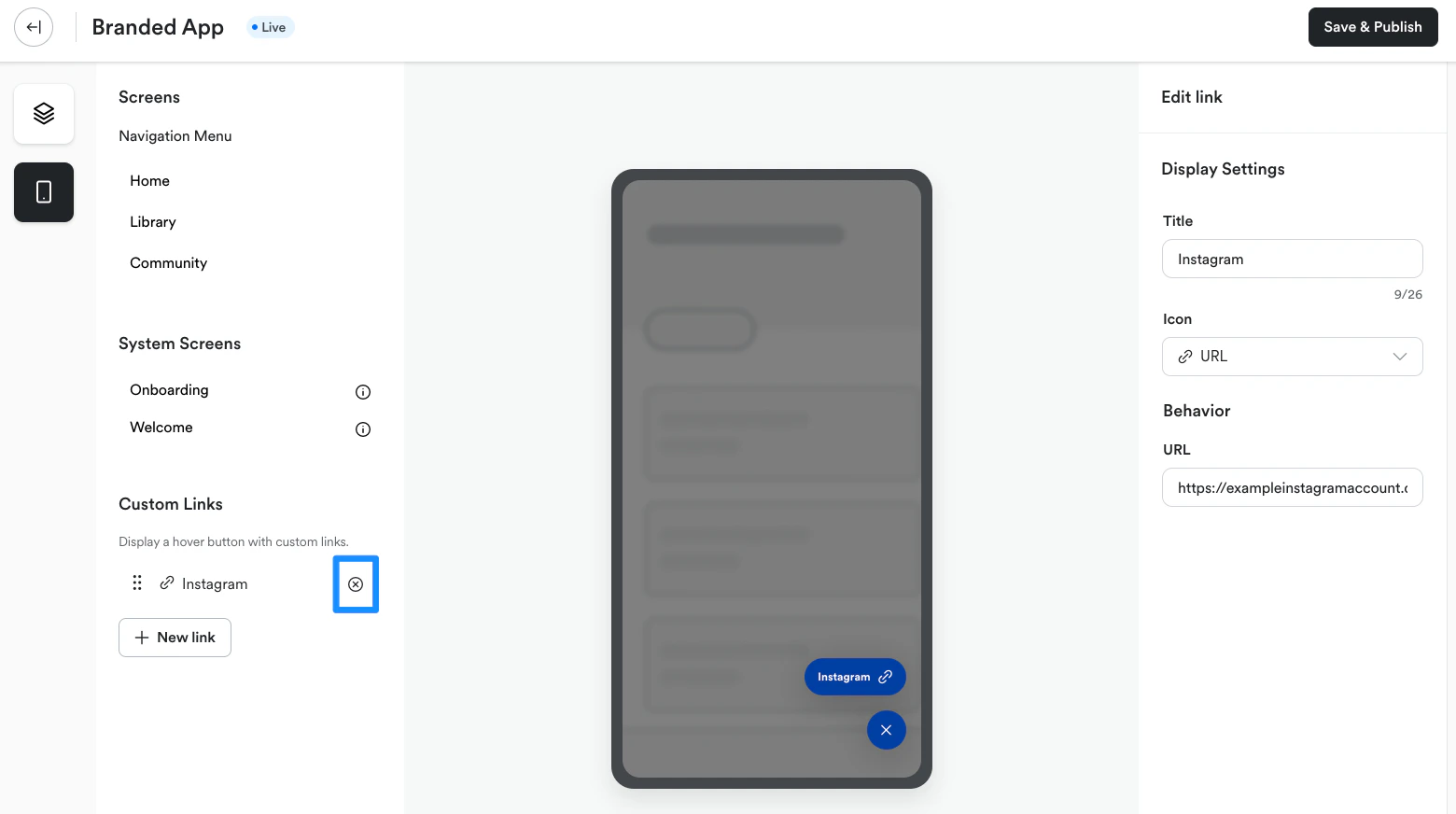 A confirmation popup will appear.
7. Click **Delete** to remove the link from the floating action button in the app
**Tip:**
Want to remove the floating action button from the app entirely? Delete all of the links from the button menu in the Custom Links settings. Once the link menu is empty, the button will no longer appear in the app.
A confirmation popup will appear.
7. Click **Delete** to remove the link from the floating action button in the app
**Tip:**
Want to remove the floating action button from the app entirely? Delete all of the links from the button menu in the Custom Links settings. Once the link menu is empty, the button will no longer appear in the app.