> ## Documentation Index
> Fetch the complete documentation index at: https://help.kajabi.com/llms.txt
> Use this file to discover all available pages before exploring further.
# Redirect users to download an app from the app store
> Add device-based app store redirection to a Kajabi Landing Page.
Create a **Landing Page** that automatically detects the visitor's device and redirects them to the appropriate app store. This ensures iOS users go to the Apple App Store, Android users go to Google Play, and desktop users are directed to a fallback page.
## Create a Landing Page
1. Log into the Kajabi Dashboard.
2. Navigate to **Website**.
3. Then, **Landing Pages**.
4. Click **New Landing Page**:
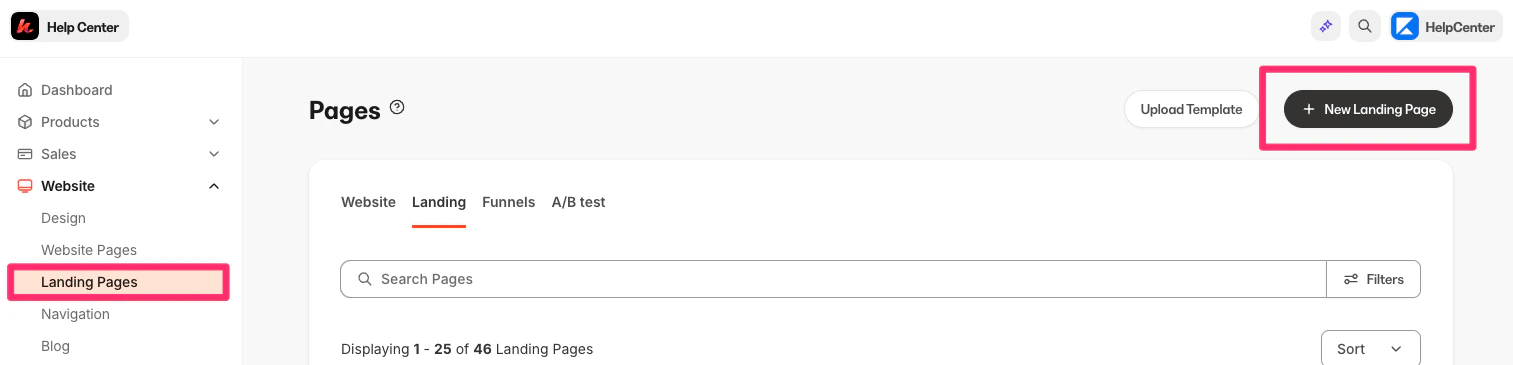 5. Select a template (a simple/blank template works best for redirect pages).
6. Name the page and click **Create**.
## Design the Landing Page
Tips for designing the Landing Page:
1. Keep the design minimal since users will be redirected quickly.
2. Add a simple heading (e.g., "Welcome")
3. Add a short message (e.g., "Preparing to redirect you to the appropriate destination...")
[Learn more about creating pages](../../website/pages/pages-explained).
## Add the redirect code
After designing the Landing Page, you will need to add the redirect code:
1. Click the **Settings** tab in the sidebar editor.
2. Select **Custom Code**:
5. Select a template (a simple/blank template works best for redirect pages).
6. Name the page and click **Create**.
## Design the Landing Page
Tips for designing the Landing Page:
1. Keep the design minimal since users will be redirected quickly.
2. Add a simple heading (e.g., "Welcome")
3. Add a short message (e.g., "Preparing to redirect you to the appropriate destination...")
[Learn more about creating pages](../../website/pages/pages-explained).
## Add the redirect code
After designing the Landing Page, you will need to add the redirect code:
1. Click the **Settings** tab in the sidebar editor.
2. Select **Custom Code**:
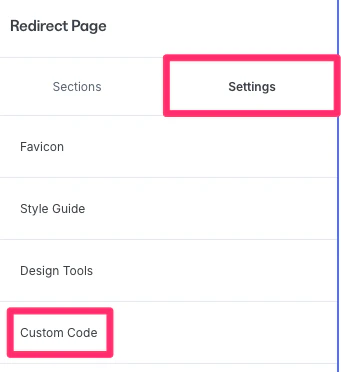 3. Locate the **Custom Javascript** section:
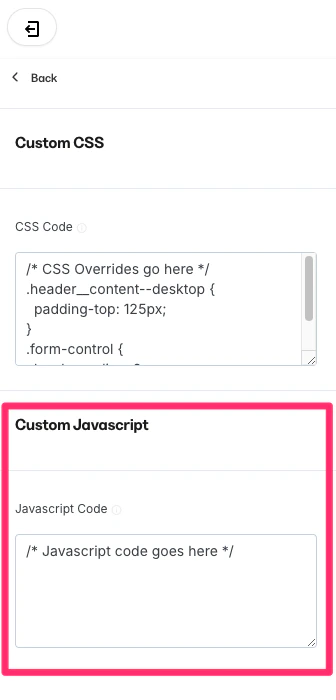 4. Copy and paste the following code block and replace the URLs with your own:
```javascript theme={null}
// Wait for the page to load
document.addEventListener('DOMContentLoaded', function() {
// Detect device
const userAgent = navigator.userAgent || navigator.vendor || window.opera;
// Set up the redirects
if (/iPhone|iPad|iPod/i.test(userAgent) && !window.MSStream) {
// iOS device
window.location.href = "https://apps.apple.com/gb/app/kajabi-branded-app/id6502643192";
} else if (/android/i.test(userAgent)) {
// Android device
window.location.href = "https://play.google.com/store/apps/details?id=com.kj2148083404.app&hl=en_US";
} else {
// Desktop or other devices
window.location.href = "https://kajabi.com/features/branded-app";
}
});
```
**Note:**
The example code above is built into this landing page and has the working code above, check it out [here](https://kajabibrandedapp.mykajabi.com/redirect-5979a06e-1d76-42e8-ba7c-ad16d826d3e5).
## Save and publish
1. Click **Save** to keep and apply the changes.
2. Click **Publish** to make the page live.
Now, this Landing Page link could be used behind a call to action like "Download my app" and it will redirect to the appropriate app store for app downloads.
4. Copy and paste the following code block and replace the URLs with your own:
```javascript theme={null}
// Wait for the page to load
document.addEventListener('DOMContentLoaded', function() {
// Detect device
const userAgent = navigator.userAgent || navigator.vendor || window.opera;
// Set up the redirects
if (/iPhone|iPad|iPod/i.test(userAgent) && !window.MSStream) {
// iOS device
window.location.href = "https://apps.apple.com/gb/app/kajabi-branded-app/id6502643192";
} else if (/android/i.test(userAgent)) {
// Android device
window.location.href = "https://play.google.com/store/apps/details?id=com.kj2148083404.app&hl=en_US";
} else {
// Desktop or other devices
window.location.href = "https://kajabi.com/features/branded-app";
}
});
```
**Note:**
The example code above is built into this landing page and has the working code above, check it out [here](https://kajabibrandedapp.mykajabi.com/redirect-5979a06e-1d76-42e8-ba7c-ad16d826d3e5).
## Save and publish
1. Click **Save** to keep and apply the changes.
2. Click **Publish** to make the page live.
Now, this Landing Page link could be used behind a call to action like "Download my app" and it will redirect to the appropriate app store for app downloads.