> ## Documentation Index
> Fetch the complete documentation index at: https://help.kajabi.com/llms.txt
> Use this file to discover all available pages before exploring further.
# Use universal links (deep links) in a Branded App
> Configure deep links so a Branded App opens directly to the correct screen from emails, texts, and other apps.
**Universal links** (also known as deep links) allow a Branded App to automatically open and navigate to the correct screen when a user taps a link from email, text messages, other apps, or a mobile web browser.
Kajabi's Branded App fully supports universal links for a wide range of Community, Course, and Product experiences. The following sections describe which deep links are supported and how to enable Associated Domains to ensure the app can use Universal Links.
## What types of deep links are supported?
### Community links
**Posts & Discussions**
* Direct links to individual community posts
* Links to posts within a specific channel
* Links to channel/circle pages
**Community Features**
* Community home page
* Meetups and events
* Individual meetup pages
* Resources
* Live events
* Leaderboards
* Challenges
**Email Notifications**
Links inside these emails will open directly in the app:
* Community mention notifications
* Reply notifications
* Direct message notifications
### Course & product links
Universal links are supported for:
* Direct links to specific courses or products in the user's library
* Direct links to individual lessons within a course
## Where universal links work
Universal links work across the following surfaces:
* Email clients (Gmail, Apple Mail, Outlook, etc.)
* SMS/text messages
* Other apps that render clickable URLs
* Safari and Chrome mobile browsers
* Push notifications (when the link is included in the payload)
## Enable universal links for an iOS Branded App
### Open Apple Developer identifiers
1. Log in to the Apple Developer account
2. Visit: [https://developer.apple.com/account/resources/identifiers/list](https://developer.apple.com/account/resources/identifiers/list)
3. You'll see a list of all app identifiers
### Select the app
1. Click the **Identifiers** tab
2. Select the app from the list to open its capability settings
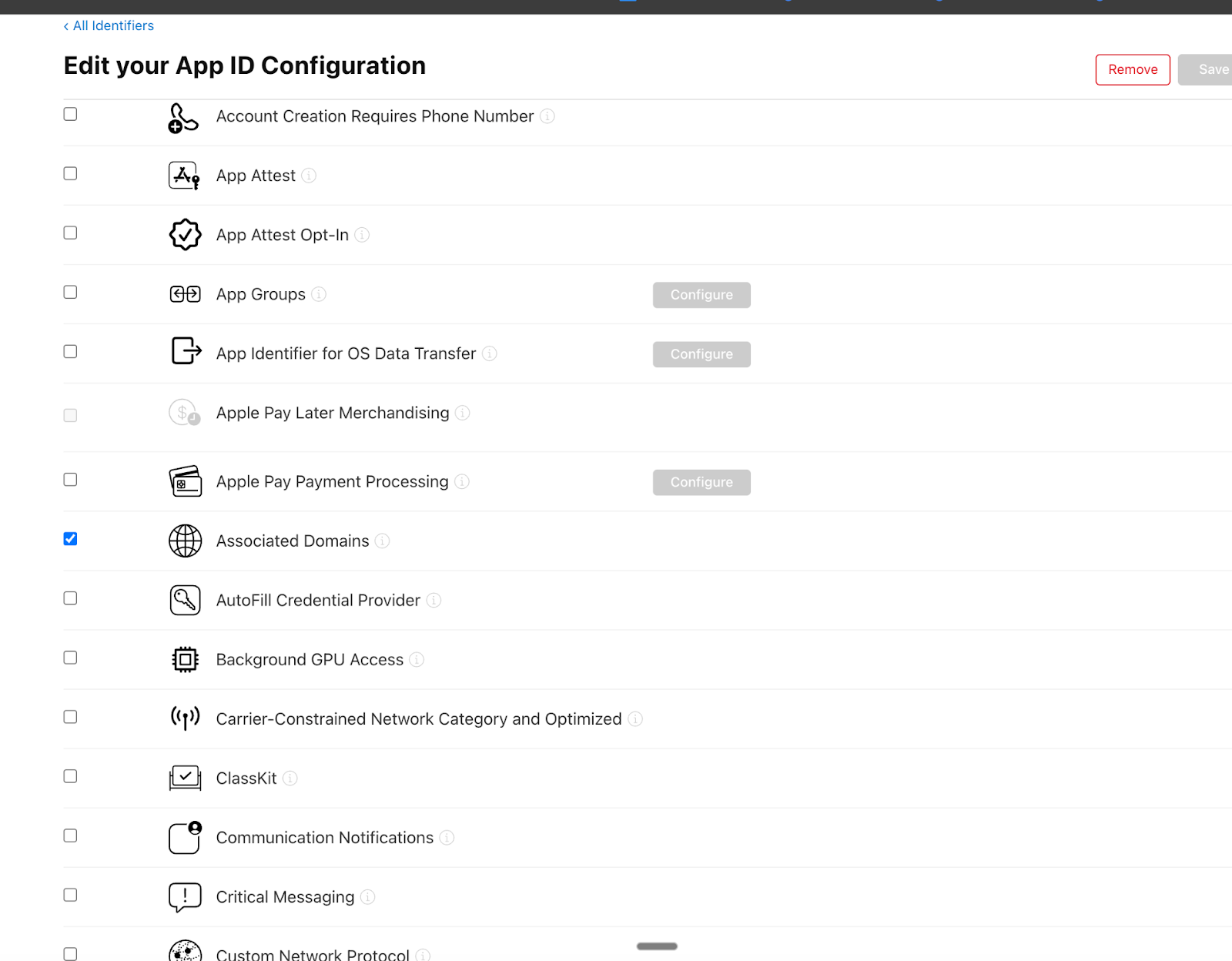
### Enable Associated Domains
1. Scroll through the list of capabilities
2. Locate **Associated Domains**
3. Toggle it **on**
4. Click **Save** to apply the changes
This enables the app to handle Universal Links:
 ### Update Kajabi Branded App settings
1. Return to the Kajabi dashboard
2. Go to **Settings** > **Branded App Settings**
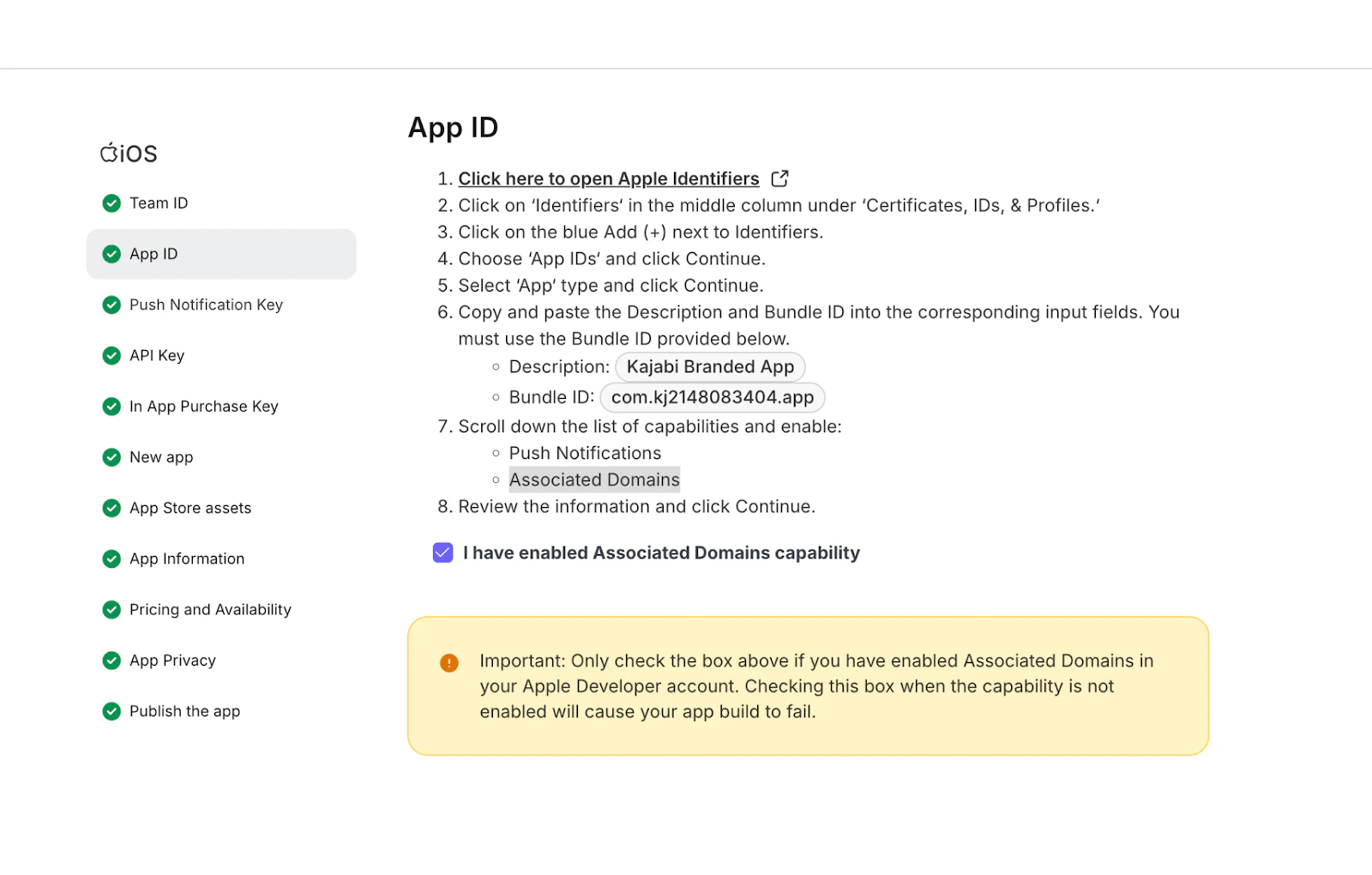
3. Click **Revisit Apple**, then navigate to the **App ID** section
### Update Kajabi Branded App settings
1. Return to the Kajabi dashboard
2. Go to **Settings** > **Branded App Settings**
3. Click **Revisit Apple**, then navigate to the **App ID** section
 ### Confirm the capability is enabled
1. Check the box confirming you have enabled the **Associated Domains** capability in Apple
2. Click **Continue** and save the changes throughout the flow
### Trigger a build update
After this has been enabled, you need to submit a build update to the respective app stores for approval. [Learn how to update the Branded App in the Apple App Store and Google Play Store](./how-to-update-your-branded-app-in-the-apple-app-store-and-google-play-store).
### **Use universal links in Email Campaigns (iOS)**
If you have a Branded Mobile App and include universal links in your Kajabi Email Campaigns, those links may open in Safari on iOS instead of deep-linking directly into your app. This breaks the experience for your members.
Follow the steps below to disable Kajabi’s click tracking and allow iOS to handle the link as a true universal link and open it in your Branded Mobile App.
**Important:** This workaround applies only to Heroes with a Branded Mobile App who include universal links in Email Campaigns and it only affects iOS.
Applying **disable-tracking="true"** will disable click tracking for any link where it is used.
**Add disable-tracking to a link in an Email Campaign**
1. Open the Marketing tab and click Email Campaigns from the Dashboard.
2. Select the email you would like to edit.
3. Navigate to the email’s text field.
4. Click the Source Code button inside the toolbar.
5. Locate the \ tag for the universal link. It will look similar to:
```text theme={null}
Link text
```
6. Add disable-tracking="true" inside the \ tag, like this:
```text theme={null}
Link text
```
7. Click Ok to save your changes.
## Enable universal links for an Android Branded App
There are no additional steps required to support universal links in an Android Branded App. You just need to make sure the app is on the latest version.
### Confirm the capability is enabled
1. Check the box confirming you have enabled the **Associated Domains** capability in Apple
2. Click **Continue** and save the changes throughout the flow
### Trigger a build update
After this has been enabled, you need to submit a build update to the respective app stores for approval. [Learn how to update the Branded App in the Apple App Store and Google Play Store](./how-to-update-your-branded-app-in-the-apple-app-store-and-google-play-store).
### **Use universal links in Email Campaigns (iOS)**
If you have a Branded Mobile App and include universal links in your Kajabi Email Campaigns, those links may open in Safari on iOS instead of deep-linking directly into your app. This breaks the experience for your members.
Follow the steps below to disable Kajabi’s click tracking and allow iOS to handle the link as a true universal link and open it in your Branded Mobile App.
**Important:** This workaround applies only to Heroes with a Branded Mobile App who include universal links in Email Campaigns and it only affects iOS.
Applying **disable-tracking="true"** will disable click tracking for any link where it is used.
**Add disable-tracking to a link in an Email Campaign**
1. Open the Marketing tab and click Email Campaigns from the Dashboard.
2. Select the email you would like to edit.
3. Navigate to the email’s text field.
4. Click the Source Code button inside the toolbar.
5. Locate the \ tag for the universal link. It will look similar to:
```text theme={null}
Link text
```
6. Add disable-tracking="true" inside the \ tag, like this:
```text theme={null}
Link text
```
7. Click Ok to save your changes.
## Enable universal links for an Android Branded App
There are no additional steps required to support universal links in an Android Branded App. You just need to make sure the app is on the latest version.