> ## Documentation Index
> Fetch the complete documentation index at: https://help.kajabi.com/llms.txt
> Use this file to discover all available pages before exploring further.
# Update Kajabi settings for an iOS app transfer
> Update Team ID, App ID, Push Notification Key, and API Key in Kajabi after transferring an iOS app.
After completing the [**iOS app** transfer process](/articles/mobile-apps/branded-app/how-to-complete-the-ios-app-transfer-process) to an Apple Developer account, the following Kajabi settings need to be updated.
## Update the Team ID
First, update the Team ID in the Branded App iOS settings.
**To open the Branded App iOS settings:**
1. Log into the [Kajabi account](https://app.kajabi.com/login)
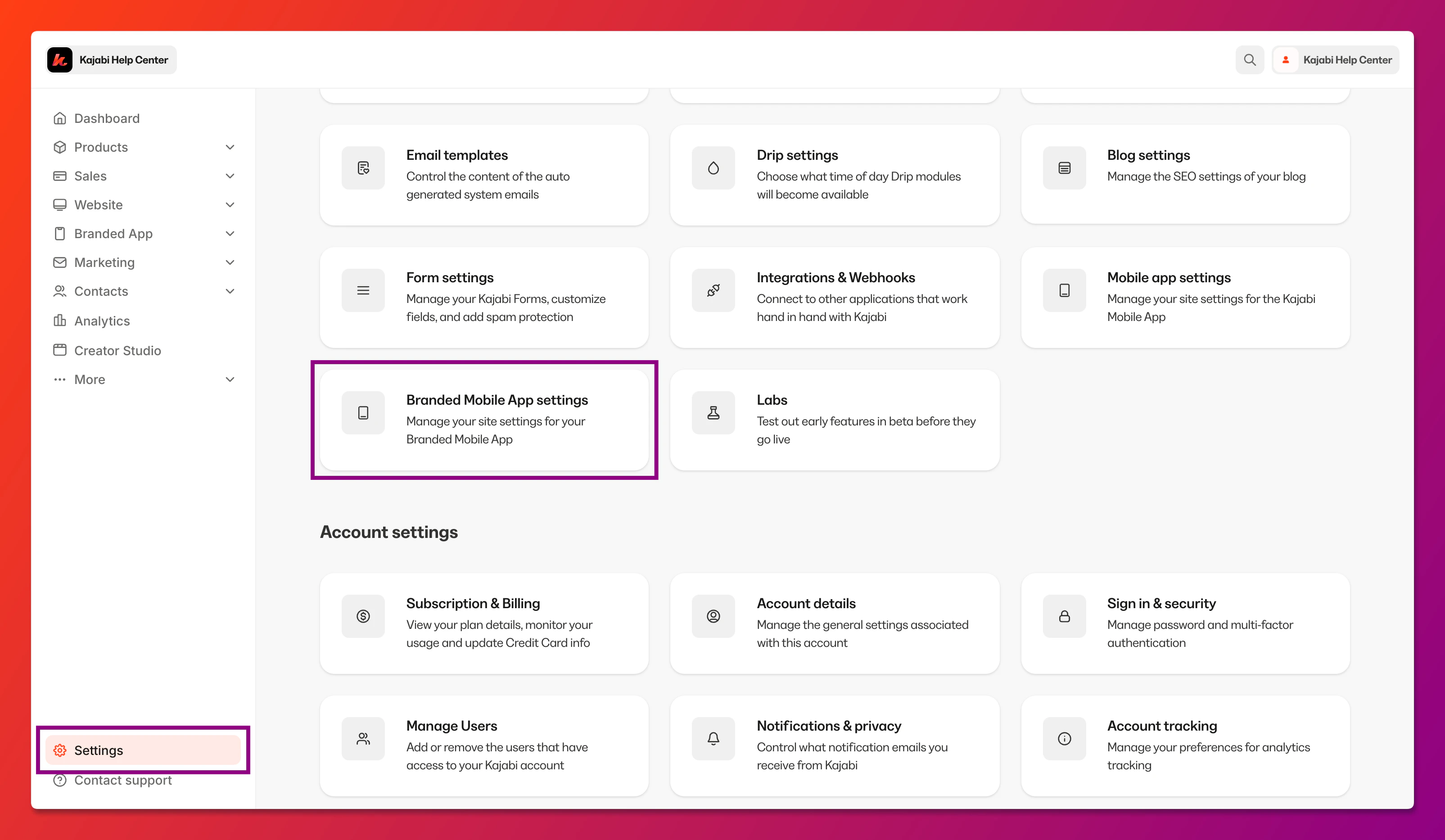
2. Select **Settings** at the lower left corner of the Kajabi dashboard
3. Then, select **Branded Mobile App Settings**:
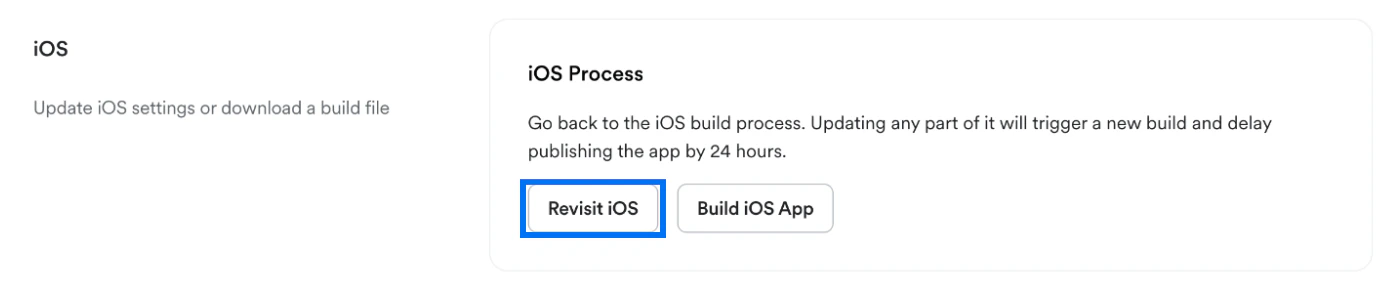
 4. Navigate to iOS and click **Revisit iOS**:
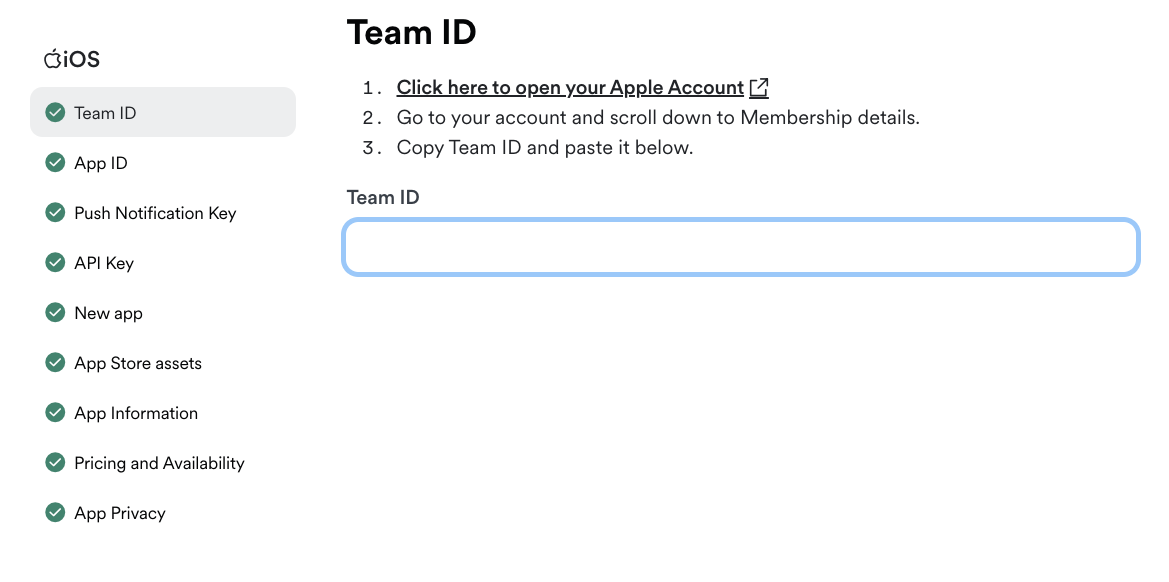
 5. Select **Team ID** from the left navigation menu
6. Then, log into [The Apple Developer Site](https://developer.apple.com/account) in a different browser tab (keep this tab open)
7. Scroll down the page to "Membership details"
8. Copy the Team ID and paste it into the **Team ID** field in Kajabi:
5. Select **Team ID** from the left navigation menu
6. Then, log into [The Apple Developer Site](https://developer.apple.com/account) in a different browser tab (keep this tab open)
7. Scroll down the page to "Membership details"
8. Copy the Team ID and paste it into the **Team ID** field in Kajabi:
 ## Update the App ID
Next, add an identifier and add the bundle ID:
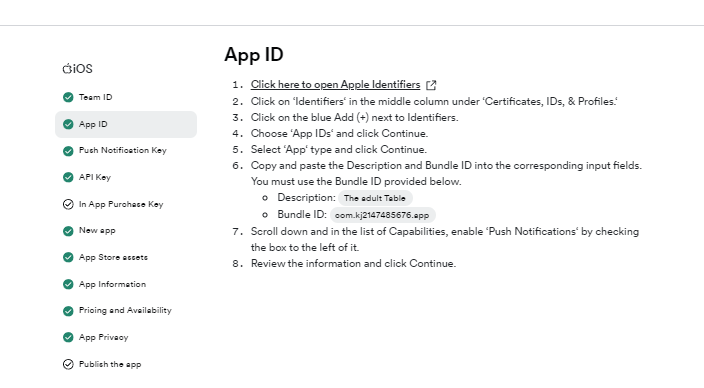
1. Select **App ID** from the left navigation menu
2. Then, [log into Apple Identifier](https://developer.apple.com/account/resources/identifiers/list) using a different browser tab (keep this tab open)
3. Click on **Identifiers** in the middle column under **Certificates, IDs, & Profiles**
4. Follow the steps on the screen to create the identifier
**Note:**
Description: The App name. Bundle ID: you should have the unique ID on the screen.
## Update the App ID
Next, add an identifier and add the bundle ID:
1. Select **App ID** from the left navigation menu
2. Then, [log into Apple Identifier](https://developer.apple.com/account/resources/identifiers/list) using a different browser tab (keep this tab open)
3. Click on **Identifiers** in the middle column under **Certificates, IDs, & Profiles**
4. Follow the steps on the screen to create the identifier
**Note:**
Description: The App name. Bundle ID: you should have the unique ID on the screen.
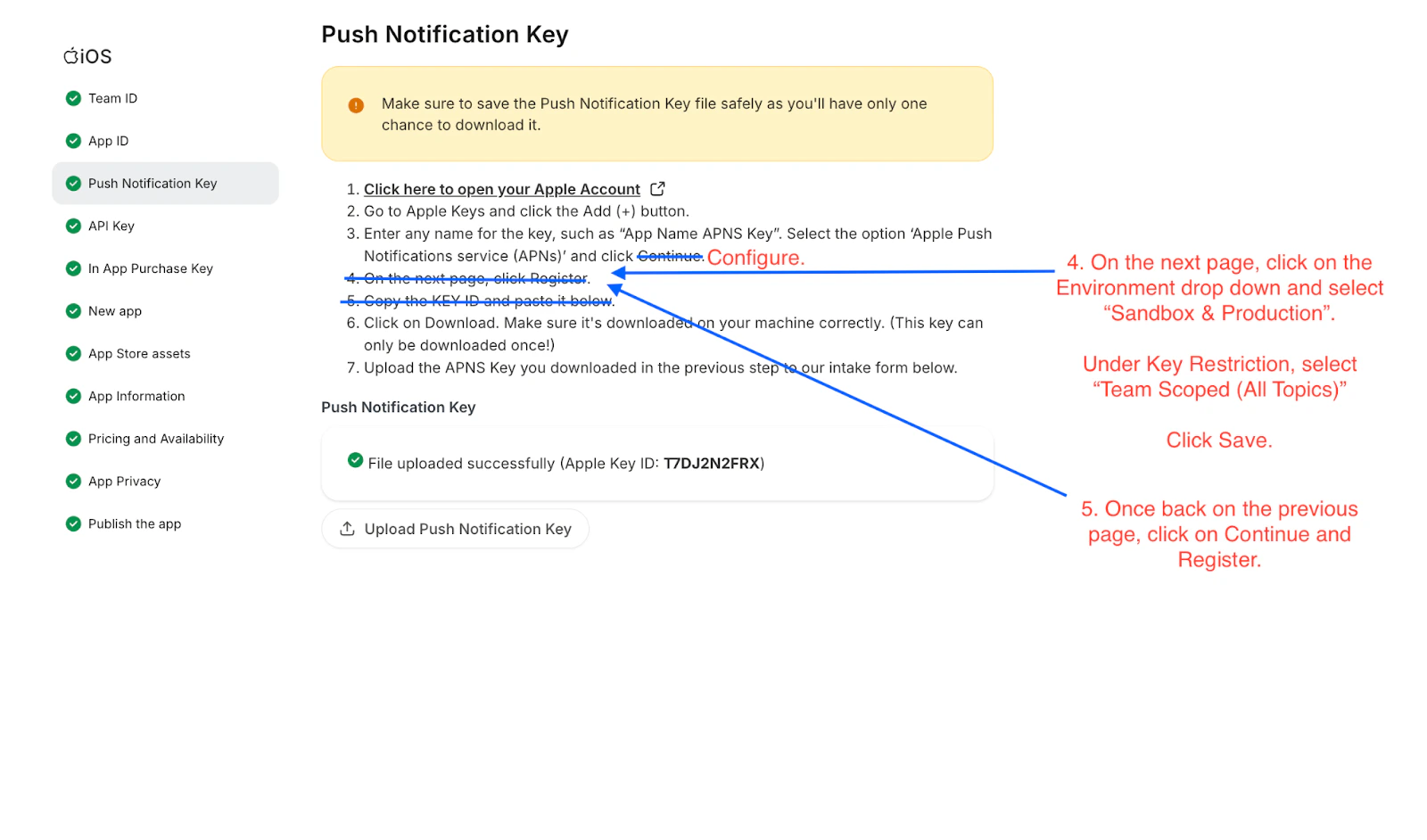
 ## Update the Push Notification Key
Next, add a Push Notification Key and upload the Push Notification Key file:
1. Select **Push Notification Key** from the left navigation menu in Kajabi
2. Follow the steps on the screen to create and download the key file in App Store Connect
3. Then, click **Upload Push Notification Key** and select the APNS Key file:
## Update the Push Notification Key
Next, add a Push Notification Key and upload the Push Notification Key file:
1. Select **Push Notification Key** from the left navigation menu in Kajabi
2. Follow the steps on the screen to create and download the key file in App Store Connect
3. Then, click **Upload Push Notification Key** and select the APNS Key file:
 ## Update the API Key
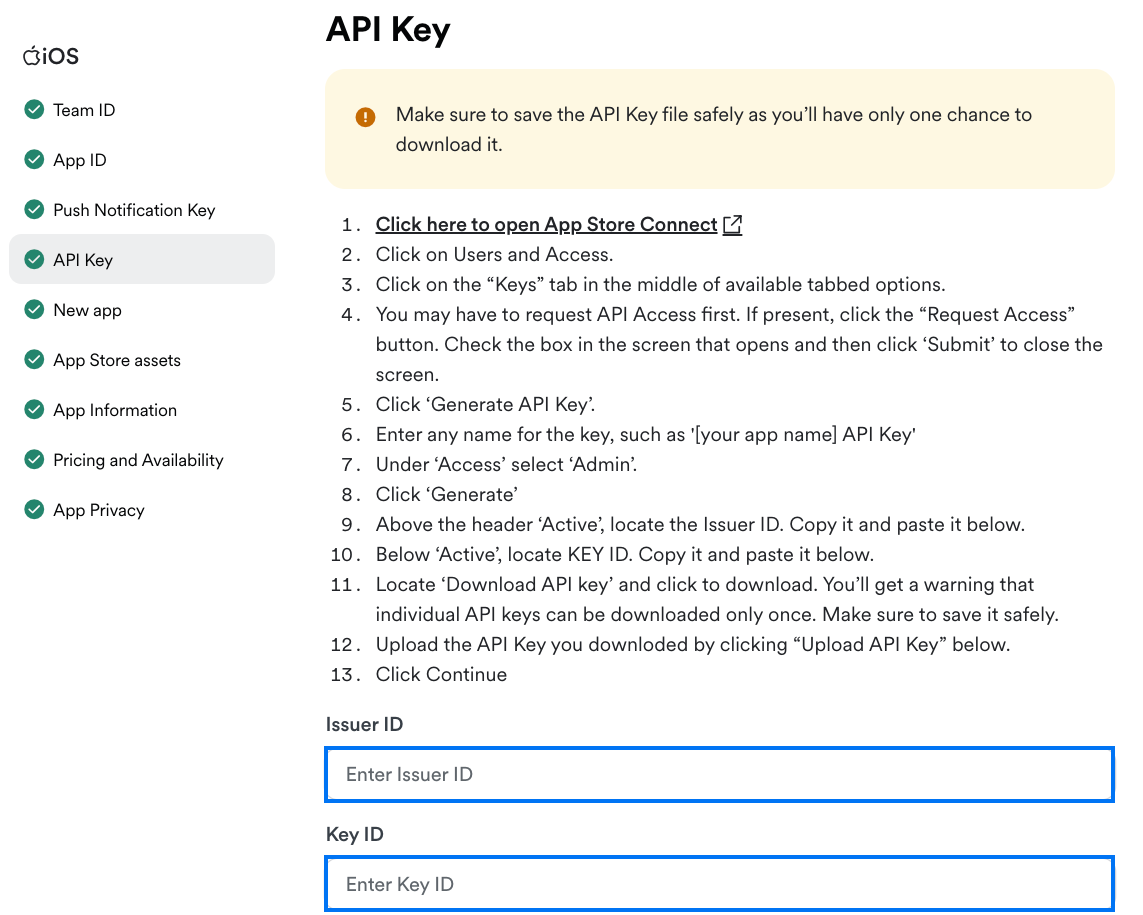
Update the API Key ID and Issuer ID, and upload the API Key:
1. Select **API Key** from the left navigation menu in Kajabi
2. Follow the steps on the screen to create and download the key in App Store Connect
3. Copy the Issuer ID and paste it into the **Issuer ID** field in Kajabi
4. Then, copy the Key ID and paste it into the **Key ID** field in Kajabi
5. Finally, click **Upload API Key** and select the API Key file:
## Update the API Key
Update the API Key ID and Issuer ID, and upload the API Key:
1. Select **API Key** from the left navigation menu in Kajabi
2. Follow the steps on the screen to create and download the key in App Store Connect
3. Copy the Issuer ID and paste it into the **Issuer ID** field in Kajabi
4. Then, copy the Key ID and paste it into the **Key ID** field in Kajabi
5. Finally, click **Upload API Key** and select the API Key file:
 ## Add the In-App Purchase API Key
Finally, you'll also need to upload an In-App Purchase API Key for the app.
**To create the In-App Purchase API Key:**
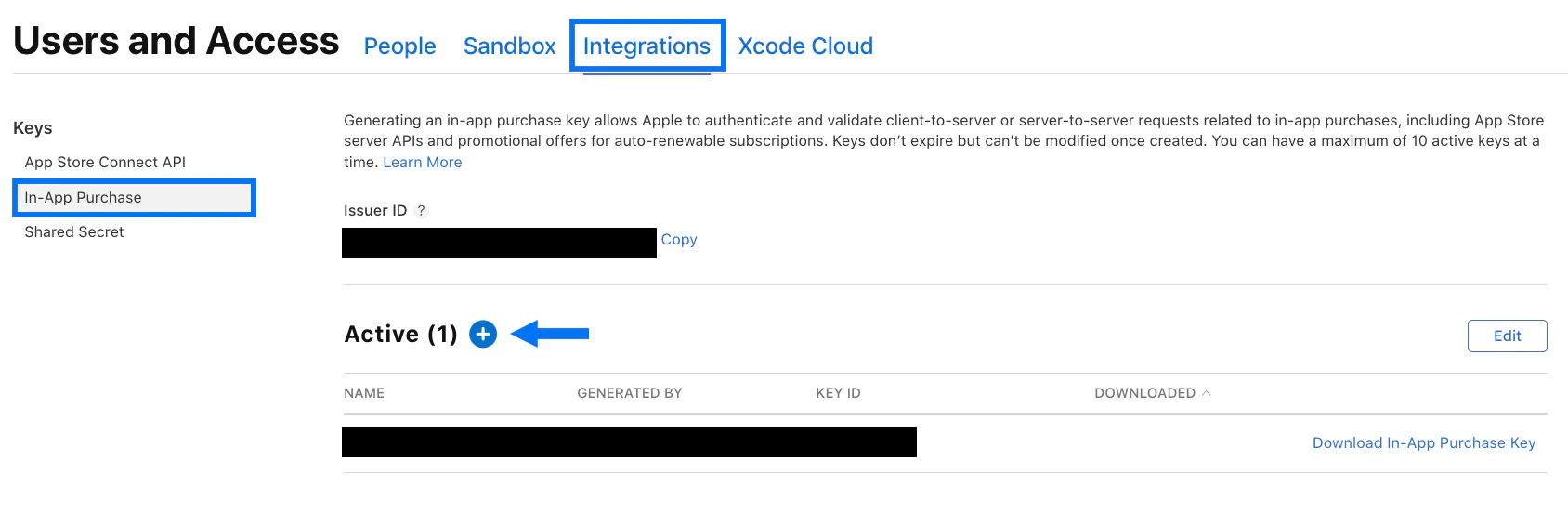
1. Log into the [App Store Connect](https://appstoreconnect.apple.com/) dashboard in a separate browser tab
2. Select **Users and Access**
3. Select **Integrations**
4. Select **In-App Purchase**
5. Click the blue "+" sign to create an API Key:
## Add the In-App Purchase API Key
Finally, you'll also need to upload an In-App Purchase API Key for the app.
**To create the In-App Purchase API Key:**
1. Log into the [App Store Connect](https://appstoreconnect.apple.com/) dashboard in a separate browser tab
2. Select **Users and Access**
3. Select **Integrations**
4. Select **In-App Purchase**
5. Click the blue "+" sign to create an API Key:
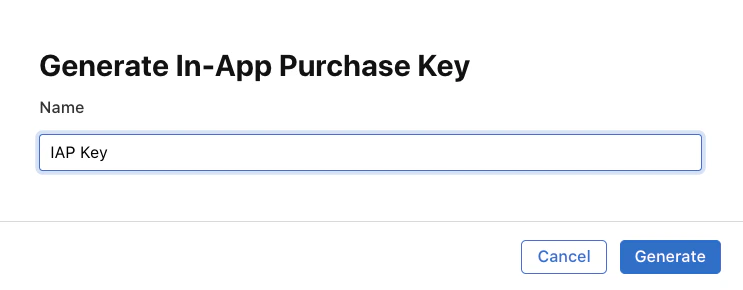
 6. Enter any **Name** for the key, then click **Generate**:
 7. Next, click **Download In-App Purchase Key** to download the key:
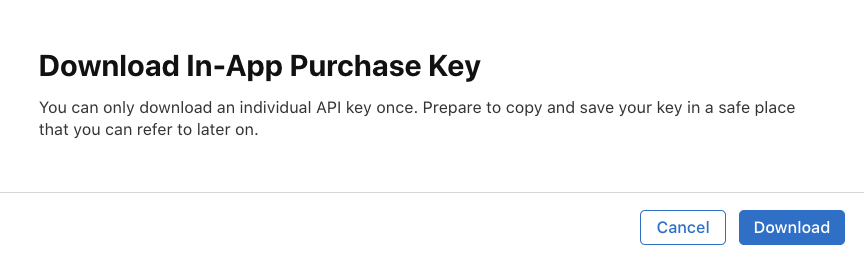
 8. Click **Download** again to confirm. You can only download the key once, so make sure to store it in a secure location:
 9. Navigate back to the Kajabi Branded App settings
10. Select **In App Purchase Key** from the left navigation menu
11. Copy the Issuer ID and paste it into the **Issuer ID** field
12. Copy the Key ID and paste it into the **Key ID** field
13. Click **Upload In-App Purchase Key** and select the key file
9. Navigate back to the Kajabi Branded App settings
10. Select **In App Purchase Key** from the left navigation menu
11. Copy the Issuer ID and paste it into the **Issuer ID** field
12. Copy the Key ID and paste it into the **Key ID** field
13. Click **Upload In-App Purchase Key** and select the key file