> ## Documentation Index
> Fetch the complete documentation index at: https://help.kajabi.com/llms.txt
> Use this file to discover all available pages before exploring further.
# Update the Kajabi Mobile App
> Keep the Kajabi Mobile App current with the latest version on iOS and Android.
Keeping the **Kajabi Mobile App** updated ensures you have access to the latest features and bug fixes. Use this guide to update the app on both iOS and Android devices.
## Manually update the app on an Apple device
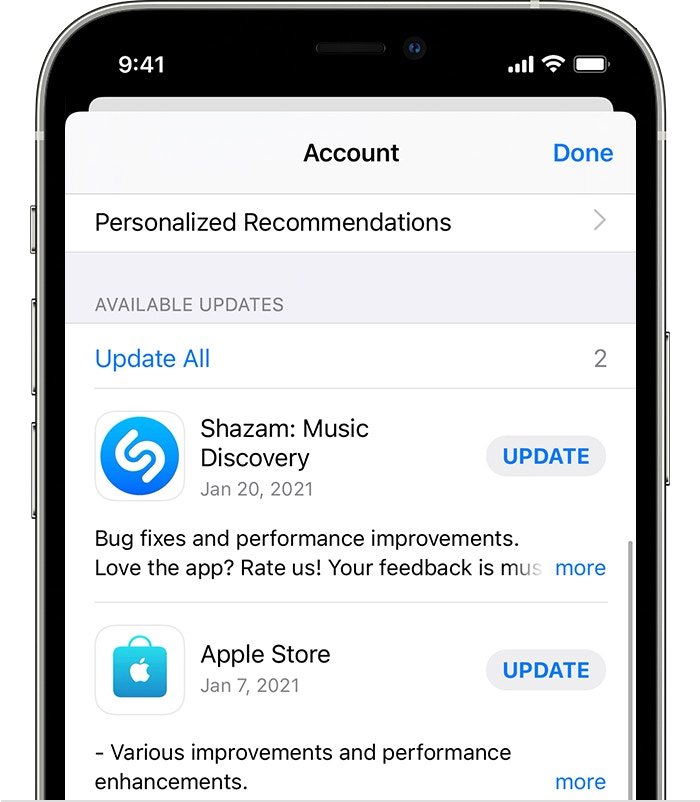
To update the Kajabi Mobile App manually on an iOS device:
1. Open the **App Store**
2. Tap your **profile icon** at the top of the screen
3. Pull down to refresh this page
4. Scroll to see the pending Kajabi app update. Tap **Update** next to the Kajabi app to update the app
 ## Manually update the app on an Android device
Depending on mobile device settings, apps may update automatically or can be updated manually.
To update the Kajabi Mobile App manually on an Android device:
1. Open the Google Play Store app
2. Open the **Menu**
3. Select **My apps & games**
4. Locate the Kajabi application under the "Updates pending" section
5. Click **Update**:
## Manually update the app on an Android device
Depending on mobile device settings, apps may update automatically or can be updated manually.
To update the Kajabi Mobile App manually on an Android device:
1. Open the Google Play Store app
2. Open the **Menu**
3. Select **My apps & games**
4. Locate the Kajabi application under the "Updates pending" section
5. Click **Update**:
**Note:**
If you do not see the Kajabi Mobile App in the list of updates pending, you may have the latest version installed and may not require an update.