> ## Documentation Index
> Fetch the complete documentation index at: https://help.kajabi.com/llms.txt
> Use this file to discover all available pages before exploring further.
# Explore the Kajabi Creator mobile app
> Manage your Kajabi site from anywhere — track performance, review transactions, manage contacts, and create content on the go.
The **Creator mobile app** lets you manage your site from anywhere. As long as you have your mobile device, you can track performance, review recent transactions, manage contacts, update your account, add a video to a lesson, and more.
## Dashboard
### Analytics
When you log into the Creator mobile app, you see an overview of the following analytics to easily track site performance:
* **Offers sold** — The number of Offers sold during your selected time frame
* **Net revenue** — The total amount of money generated by your business after refunds and discounts have been deducted
* **New customers** — The number of customers on your site within your selected date range
* **Opt-ins** — The number of people who opted into receiving communications from you within your filtered time frame
* **Total views** — The total number of times your site has been viewed within your filtered time frame
* **Unique views** — The total number of times your site has been viewed by a unique user during your filtered time frame
Filter your date range to view analytics based on your selected time frame (e.g., the last 30 days).
### Transactions
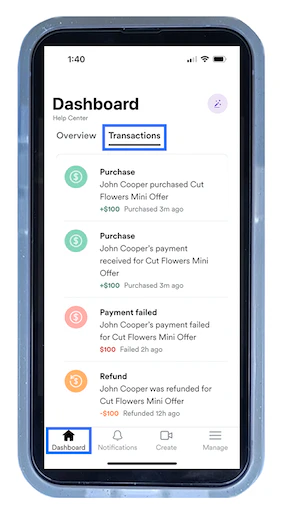
View information about your site's recent transactions by tapping **Transactions** from the Creator mobile app Dashboard:
 ## Notifications
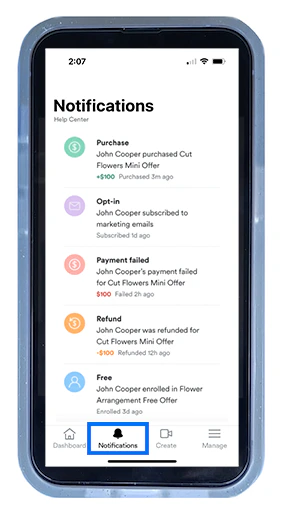
Open **Notifications** to view your recent notifications. You may be notified of the following actions:
* A purchase has been processed
* A payment has been received
* A payment has failed
* A payment has been refunded
* A contact has opted-in (or subscribed) to receive your marketing emails
* A customer has enrolled to your Offer
## Notifications
Open **Notifications** to view your recent notifications. You may be notified of the following actions:
* A purchase has been processed
* A payment has been received
* A payment has failed
* A payment has been refunded
* A contact has opted-in (or subscribed) to receive your marketing emails
* A customer has enrolled to your Offer
 ## Create content
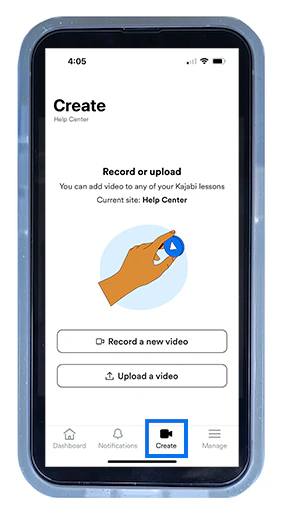
Use the **Create** feature to record or upload a video and add it to a lesson. Create Course material on the go with this mobile experience. [Learn how to add a video to a lesson](/articles/mobile-apps/kajabi-creator-app/how-to-add-a-video-to-a-lesson-with-the-kajabi-creator-app)
To add your video, open the **Create** tab:
## Create content
Use the **Create** feature to record or upload a video and add it to a lesson. Create Course material on the go with this mobile experience. [Learn how to add a video to a lesson](/articles/mobile-apps/kajabi-creator-app/how-to-add-a-video-to-a-lesson-with-the-kajabi-creator-app)
To add your video, open the **Create** tab:
 ## Account management
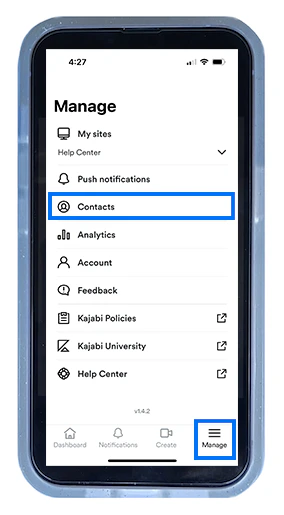
Open **Manage** to switch to another website connected to your account (only available if you have more than one website), configure push notifications, manage contacts, view additional analytics, adjust account information, view Kajabi's Policies, and visit Kajabi University or the Help Center.
### Push notifications
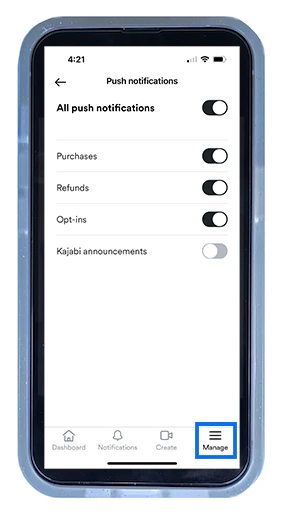
Control your push notifications (i.e., pop-up banner notifications) by toggling on the actions you want to be notified about and toggling off the notifications you wish to ignore or pause:
## Account management
Open **Manage** to switch to another website connected to your account (only available if you have more than one website), configure push notifications, manage contacts, view additional analytics, adjust account information, view Kajabi's Policies, and visit Kajabi University or the Help Center.
### Push notifications
Control your push notifications (i.e., pop-up banner notifications) by toggling on the actions you want to be notified about and toggling off the notifications you wish to ignore or pause:
 ### Contacts
Within the **Manage** tab, you can create, view, and edit a contact's information.
Open **Contacts** to view, filter, and sort your list. Locate a contact and update their contact information, add notes, create tags, and grant or revoke Offers:
### Contacts
Within the **Manage** tab, you can create, view, and edit a contact's information.
Open **Contacts** to view, filter, and sort your list. Locate a contact and update their contact information, add notes, create tags, and grant or revoke Offers:
 ## Download the Kajabi Creator app
No matter where you are, you can access your site as long as you have your mobile device. Download the Creator mobile app and build your business from anywhere.
[
## Download the Kajabi Creator app
No matter where you are, you can access your site as long as you have your mobile device. Download the Creator mobile app and build your business from anywhere.
[ ](https://apps.apple.com/vc/app/kajabi-creator/id1636547076)
[
](https://apps.apple.com/vc/app/kajabi-creator/id1636547076)
[ ](https://play.google.com/store/apps/details?id=com.kajabi.creator)