> ## Documentation Index
> Fetch the complete documentation index at: https://help.kajabi.com/llms.txt
> Use this file to discover all available pages before exploring further.
# Create a Community Announcement
> Share important news, updates, and resources with your Community members through Announcements.
**Announcements** let you broadcast important updates to your Community members. You can pin them to your homepage or to a specific Channel, and manage them directly from the Community web app.
## Create an Announcement
#### To post your Announcement using the Community web app:
1. In the left sidebar, click the **ellipsis** icon beside the search bar.
2. Select **Community Settings.**
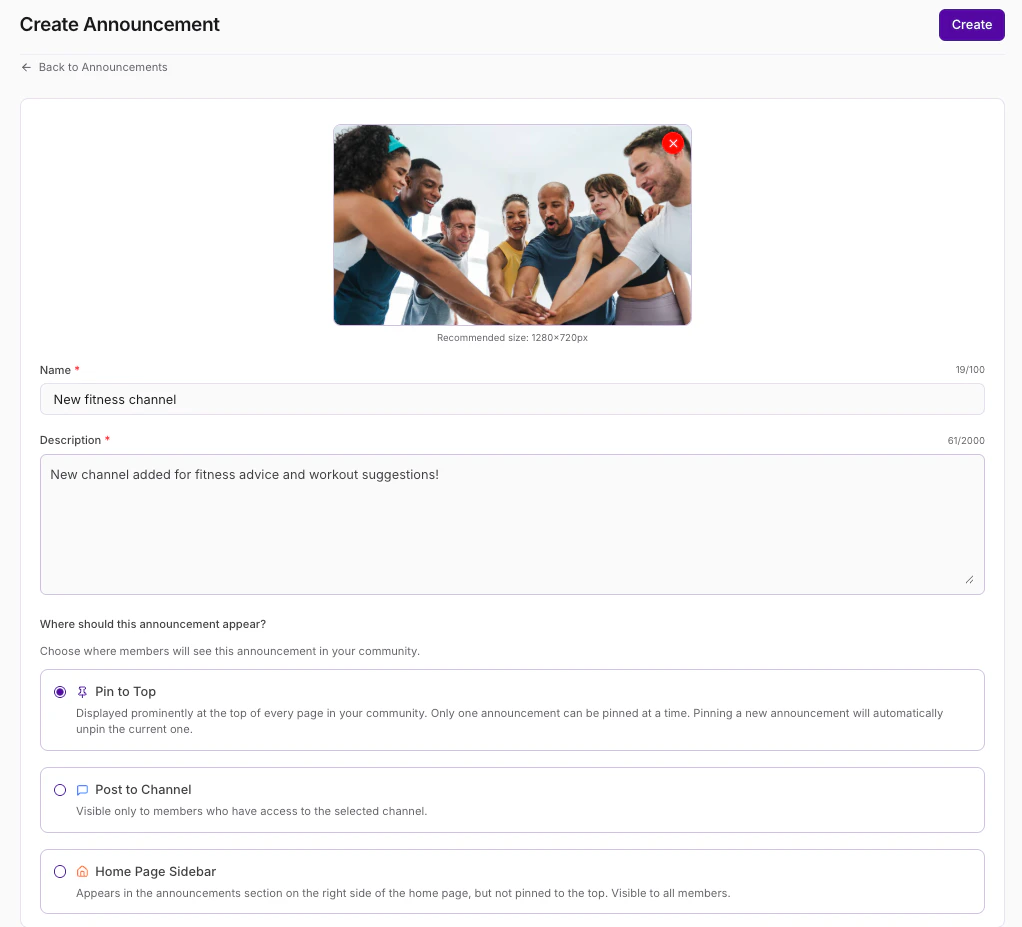
3. Navigate to **Announcement** then select **+New announcement**.
4. Enter a **Title** and **Description** for your Announcement.
5. (Optional) Click the **Upload** button to add a photo if desired (max file size is 40 MB).
6. Choose from the following:
1. Click the first toggle "on" to **Pin this announcement** to your homepage, or
2. Click the second toggle "on" if **This is a Channel announcement only**. If you choose to pin your Announcement only to a specific Channel, select your desired Channel from the dropdown menu.
7. Click **Save** to post your Announcement.
 ## Edit or delete an Announcement
#### To edit or delete your Announcement using the Community web app:
1. In the left sidebar, click the **ellipsis ... icon** beside the search bar.
2. Select **Settings**:
3. Select **Announcements**.
4. Place your cursor over the **Announcement** you wish to edit.
5. Click the **ellipsis ... icon** on the right.
6. Select **Edit announcement.**
7. Update as desired and click **Save** (or click **Delete Announcement** to delete your Announcement):
## Edit or delete an Announcement
#### To edit or delete your Announcement using the Community web app:
1. In the left sidebar, click the **ellipsis ... icon** beside the search bar.
2. Select **Settings**:
3. Select **Announcements**.
4. Place your cursor over the **Announcement** you wish to edit.
5. Click the **ellipsis ... icon** on the right.
6. Select **Edit announcement.**
7. Update as desired and click **Save** (or click **Delete Announcement** to delete your Announcement):
