> ## Documentation Index
> Fetch the complete documentation index at: https://help.kajabi.com/llms.txt
> Use this file to discover all available pages before exploring further.
# Create guidelines for Community members
> Set up guidelines that members must accept before joining your Community.
**Member guidelines** let you greet incoming Community members with a welcome message, outline your Community's rules, or both — all in one section that members must review and agree to before they can join.
## Add a welcome message and guidelines
1. Click the profile icon in the top right corner of your **Community.**
2. Click **Community settings**:
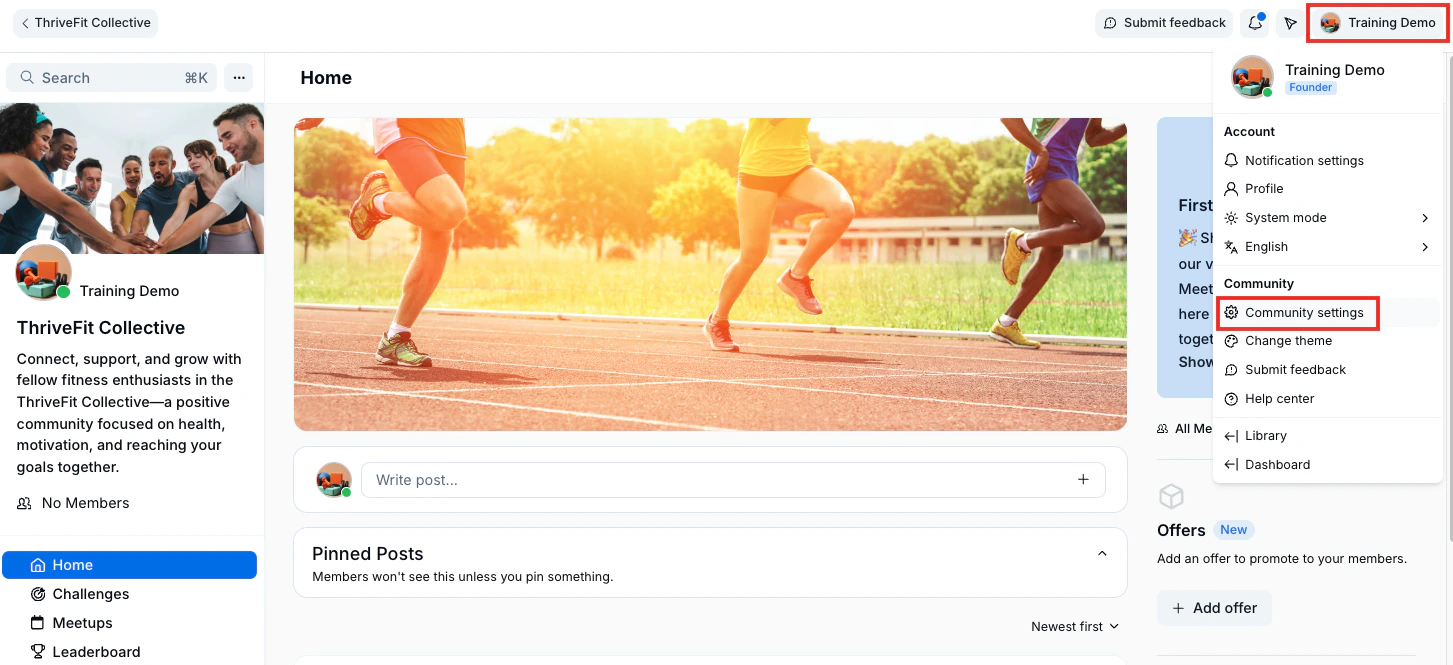 3. Then, in the left sidebar, select **Details**.
4. Scroll down to the **Community Guidelines** section.
5. Click **Add guidelines.**
6. Add a **Title**, **Image**, and **Description** for your guideline.
7. Click **Save**.
8. Click **Back to community** to view your guideline pop-up.
**Note:** The created guideline will also appear in the left sidebar.
3. Then, in the left sidebar, select **Details**.
4. Scroll down to the **Community Guidelines** section.
5. Click **Add guidelines.**
6. Add a **Title**, **Image**, and **Description** for your guideline.
7. Click **Save**.
8. Click **Back to community** to view your guideline pop-up.
**Note:** The created guideline will also appear in the left sidebar.