> ## Documentation Index
> Fetch the complete documentation index at: https://help.kajabi.com/llms.txt
> Use this file to discover all available pages before exploring further.
# Migrate from the Legacy Community to Kajabi Communities
> Migrate from the Legacy Community to access enhanced features in Kajabi Communities.
**Kajabi Communities** offers enhanced engagement tools and features compared to the Legacy Community. This guide walks you through migrating your existing community content and members to Kajabi Communities.
## Kajabi Communities features
Kajabi Communities includes:
* [Global feed and sidebar](/articles/products/community/community-global-feed-and-sidebar)
* [Live Rooms and events](/articles/products/community/host-live-rooms-and-events-in-your-community)
* [Gamification and progress tracking](/articles/products/community/communities-gamification)
* [Challenges](/articles/products/community/create-a-community-challenge)
* [Meetups](/articles/products/community/create-a-community-meetup)
* [Moderation tools](/articles/products/community/community-moderation-tools)
* [Leaderboard](/articles/products/community/what-is-the-community-leaderboard)
## What happens to the community?
After the migration process, your community members and content appear in Kajabi Communities.
Topics from the Legacy Community become Channels in your Kajabi Community.
**Note:** All uncategorized posts will live in a Channel titled, "default topic". You are unable to move the posts after migration, so ensure that all posts are tagged with the right topic before migration.
## Migrate and activate the Community
Follow these steps to migrate your Legacy Community to Kajabi Communities.
### Begin the migration process
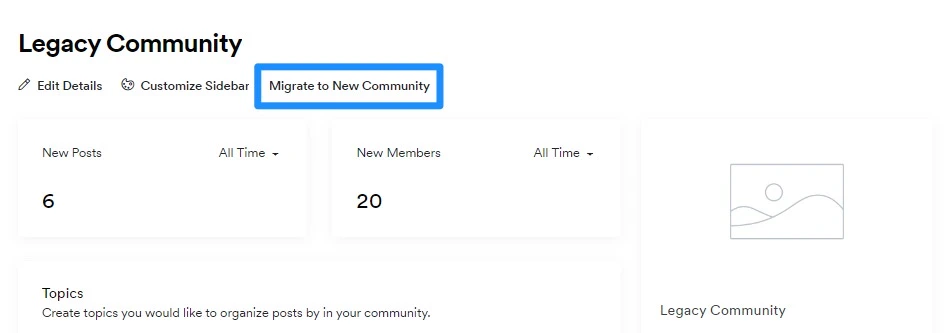
Click **Migrate to New Community** from your Community tab:
 **Note:** If you have multiple legacy communities, each legacy community will be migrated as separate access groups under your Community.
### Wait for Kajabi to migrate the community
Migration may take up to 24 hours. If it takes longer, [contact our support team](/articles/resources/support/how-to-contact-kajabi-support).
**Note:** Migrating the community will lock existing customers out of the community until you are ready to activate. If a customer attempts to access the community while it is locked, they will be redirected to their main member library page.
### Review the community
After the migration is complete, review your Community. Add announcements, build Channels, schedule events and meetups, and explore the available features.
If you have more than one site on your account, you can only migrate one at a time. Each community must be activated before another can be migrated.
### Activate the community
After reviewing and updating your community, activate it. Activation:
* Restores access for existing community members
* Allows attached Offers to be purchased
* Enables members to interact within the community
Prepare your marketing campaigns and community announcements before activation.
**Important:** You cannot revert back to the Legacy Community after activating Kajabi Communities.
**Note:** If you have multiple legacy communities, each legacy community will be migrated as separate access groups under your Community.
### Wait for Kajabi to migrate the community
Migration may take up to 24 hours. If it takes longer, [contact our support team](/articles/resources/support/how-to-contact-kajabi-support).
**Note:** Migrating the community will lock existing customers out of the community until you are ready to activate. If a customer attempts to access the community while it is locked, they will be redirected to their main member library page.
### Review the community
After the migration is complete, review your Community. Add announcements, build Channels, schedule events and meetups, and explore the available features.
If you have more than one site on your account, you can only migrate one at a time. Each community must be activated before another can be migrated.
### Activate the community
After reviewing and updating your community, activate it. Activation:
* Restores access for existing community members
* Allows attached Offers to be purchased
* Enables members to interact within the community
Prepare your marketing campaigns and community announcements before activation.
**Important:** You cannot revert back to the Legacy Community after activating Kajabi Communities.