> ## Documentation Index
> Fetch the complete documentation index at: https://help.kajabi.com/llms.txt
> Use this file to discover all available pages before exploring further.
# Download videos from Courses or Pages
> Download videos uploaded to Kajabi to store and easily access them.
You can **download videos** you've uploaded to Kajabi to store them on your computer or another drive. This ensures you always have access to your original video files.
**Note:** This article shows how to download videos to your hard drive as an administrator. See this article if you want to [allow customers to download videos from your Products](/articles/products/courses/how-to-allow-your-video-content-to-be-downloadable-in-a-product-post).
## Download videos from a Course
1. Open the **Products** tab from your Dashboard.
2. Select the **Course** containing the video you wish to download.
3. Click the **Course Title**, then the **Lesson** containing the video.
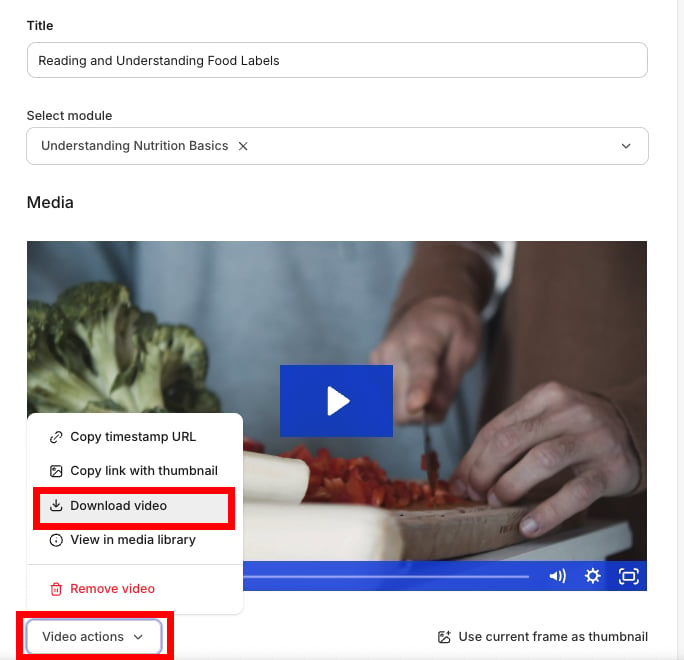
4. Open the **Video Actions** dropdown menu under the video player.
5. Click **Download Video:**
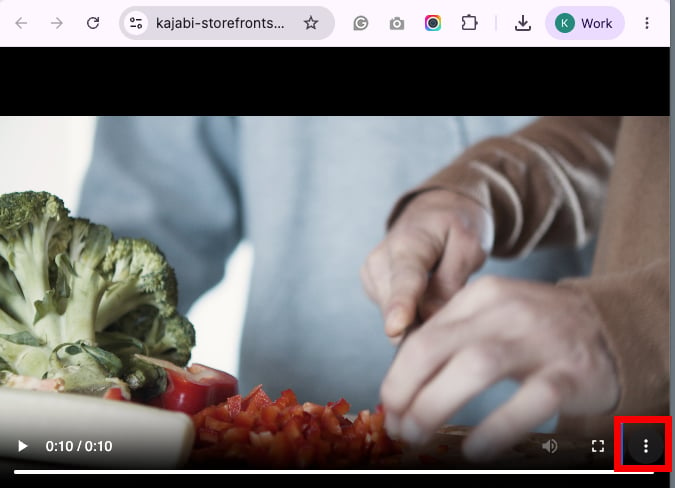
 6. After selecting **Download Video,** your web browser will open a tab containing your video
7. Click the **more** **icon** in the bottom right corner of the video and select **Download** to download it to your computer or another drive:
6. After selecting **Download Video,** your web browser will open a tab containing your video
7. Click the **more** **icon** in the bottom right corner of the video and select **Download** to download it to your computer or another drive:
 ## Download videos from Landing Pages or Website Pages
1. Open the **Website** tab from your Dashboard.
2. Select either **Landing Pages** or **Website Pages.**
3. Click the **Title** of the **Page** containing the video you wish to download.
4. Select the **Section** containing the **Video Block** and click **Edit.**
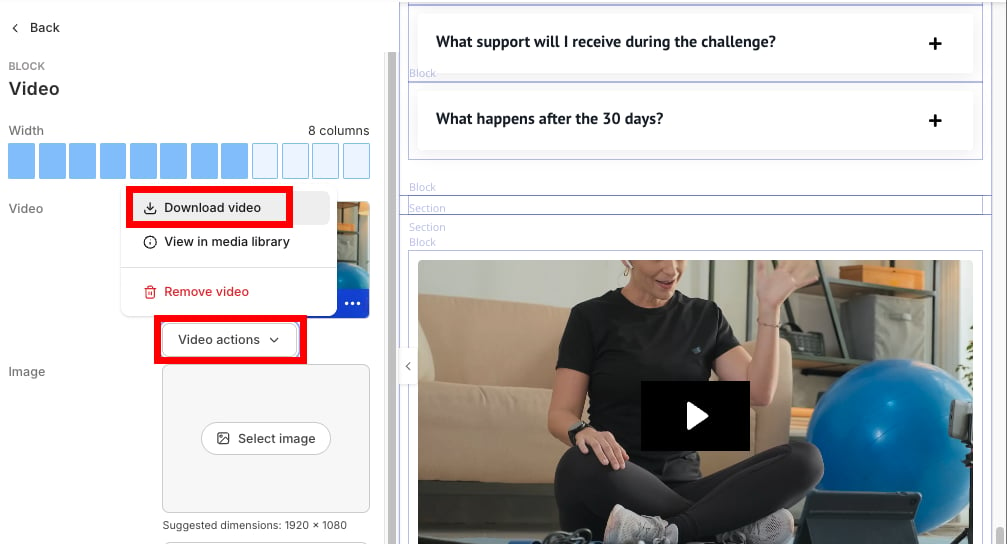
5. Click **Video Actions** in the sidebar editor.
6. Select **Download Video:**
## Download videos from Landing Pages or Website Pages
1. Open the **Website** tab from your Dashboard.
2. Select either **Landing Pages** or **Website Pages.**
3. Click the **Title** of the **Page** containing the video you wish to download.
4. Select the **Section** containing the **Video Block** and click **Edit.**
5. Click **Video Actions** in the sidebar editor.
6. Select **Download Video:**
 7. After selecting **Download Video** your web browser will open a tab containing your video
8. Click the **more** **icon** in the bottom right corner of the video and select **Download** to download it to your computer or another drive.
7. After selecting **Download Video** your web browser will open a tab containing your video
8. Click the **more** **icon** in the bottom right corner of the video and select **Download** to download it to your computer or another drive.