> ## Documentation Index
> Fetch the complete documentation index at: https://help.kajabi.com/llms.txt
> Use this file to discover all available pages before exploring further.
# Import a Course lesson or quiz
> Add a course lesson or quiz from an existing Course to save time.
If you've already built a lesson or quiz in another Course, you don't have to recreate it from scratch, you can import it into the Course you're working in. Importing creates an independent copy, so any edits you make later won't affect the original.
\*\* To import a lesson or quiz from an existing course:\*\*
1. From your Dashboard, click **Products** in the left sidebar.
2. Click **Courses**.
3. Click a **Title** to open the existing Course you wish to update.
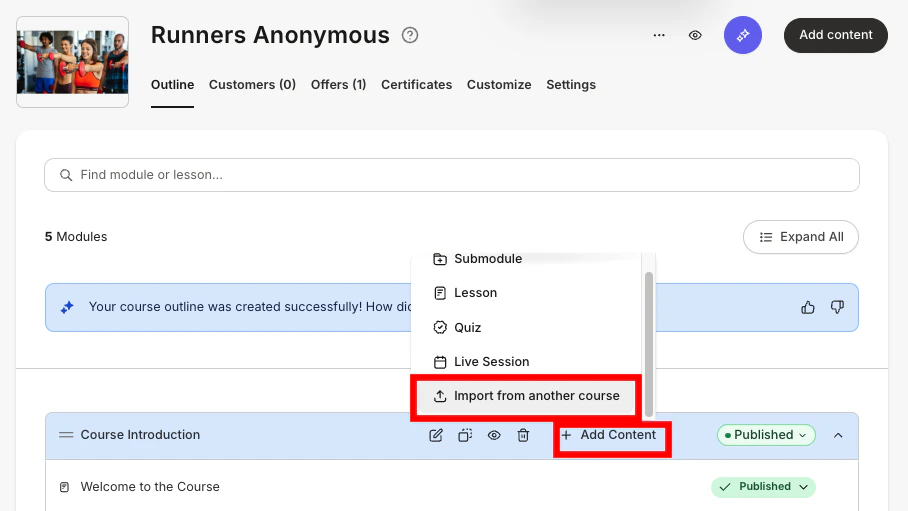
4. In the **Course Outline**, click **+ Add Content** in a module.
5. Select **Import from another course**.
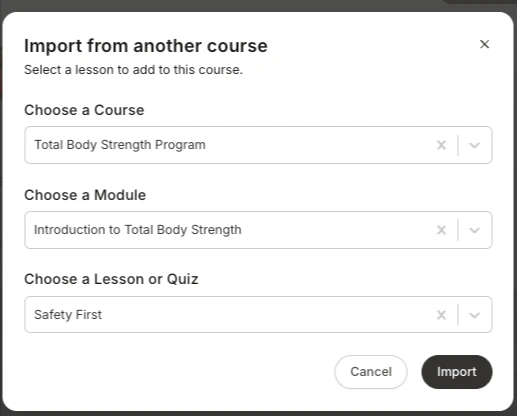
 6. Select the source **Course**, the **module** it lives in, and the specific **lesson or quiz** you want to bring over.
7. Then, click **Import**.
6. Select the source **Course**, the **module** it lives in, and the specific **lesson or quiz** you want to bring over.
7. Then, click **Import**.
 **Note:** \
Keep in mind that imported lessons and quizzes are duplicates, not links — they live independently in their new Course. That makes them safe to customize without worrying about overwriting the original.
**Note:** \
Keep in mind that imported lessons and quizzes are duplicates, not links — they live independently in their new Course. That makes them safe to customize without worrying about overwriting the original.