> ## Documentation Index
> Fetch the complete documentation index at: https://help.kajabi.com/llms.txt
> Use this file to discover all available pages before exploring further.
# Kajabi Transcripts, Translations, and Dubbing
> Make video content more accessible and reach global audiences with transcripts, translations, and dubbing.
**Kajabi Transcripts, Translations, and Dubbing** tools make your video content more accessible and help you reach audiences across the globe.
Transcriptions, Translations, and Dubbing features allow you to:
* Automatically generate transcripts for any uploaded video
* Edit transcripts in the interactive editor
* Instantly translate your transcription from 30+ source languages into 70+ languages
* Download and edit SRT files
* Add dubbed voice-over in multiple languages
Repurpose your content for global audiences, enhance accessibility, and make your courses and marketing materials more engaging and inclusive.
Wistia currently supports 70+ languages for translation. To view the list of available languages, visit [Wistia's transcription languages page](https://docs.wistia.com/page/transcription-languages#/).
## AI credits
[AI credits](../../products/ai-credits) power the Transcriptions and Translations feature. Growth and Pro plan users receive a monthly credit allotment. Additional credits are available for purchase on any plan.
Learn more about [AI credits](../../products/ai-credits).
## Use Transcriptions, Translations, and Dubbing
Transcriptions, Translations & Dubbing can be used with any video already uploaded to your Course lesson, course live video, website editor, coaching session, or anywhere else you use a video in Kajabi, as well as with uploaded videos.
1. [Upload a video](../../products/courses/how-to-bulk-upload-videos-in-a-product) or choose an already uploaded video.
2. Once the video has finished uploading, click **Video Actions**.
3. Select **View in media library**.
4. Select the specific video inside the Media Library.
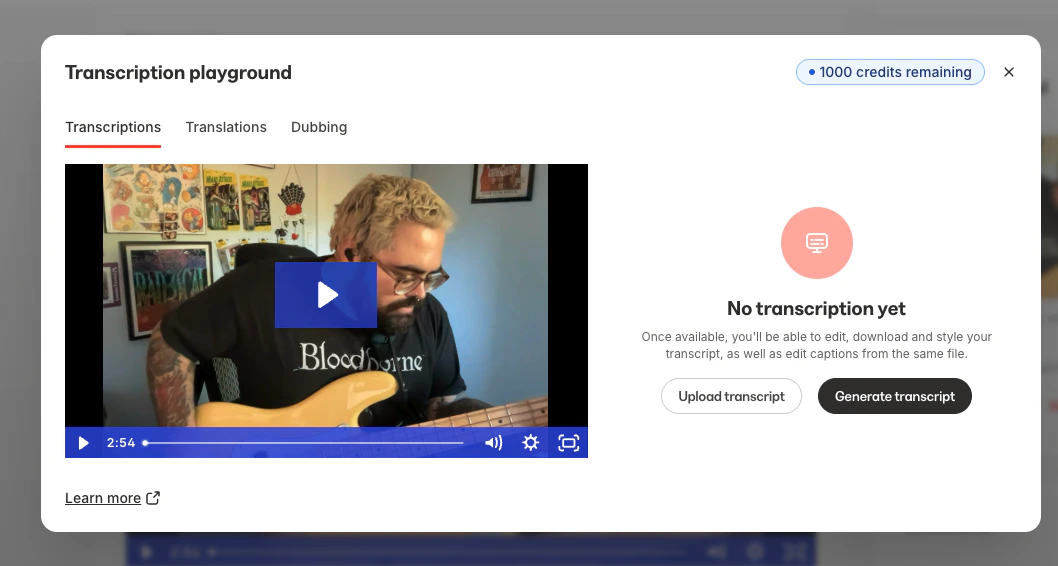
5. Under **Transcriptions**, use the **Transcriptions** tool to **upload a transcription** or **generate a transcript**:
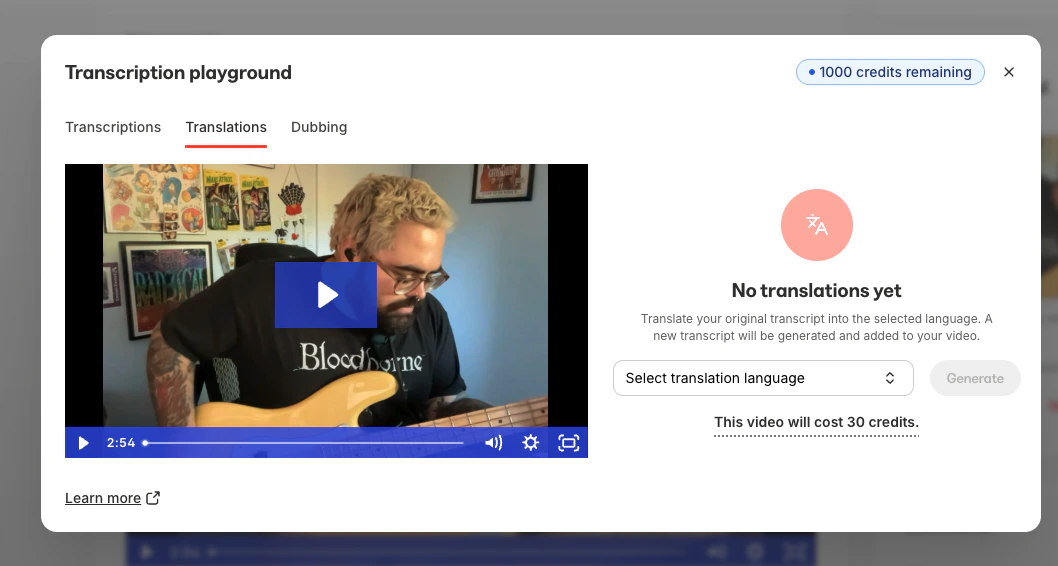
 6. Under **Translations**, use the **Translations** tool to translate your video to a different language once a transcription has been created:
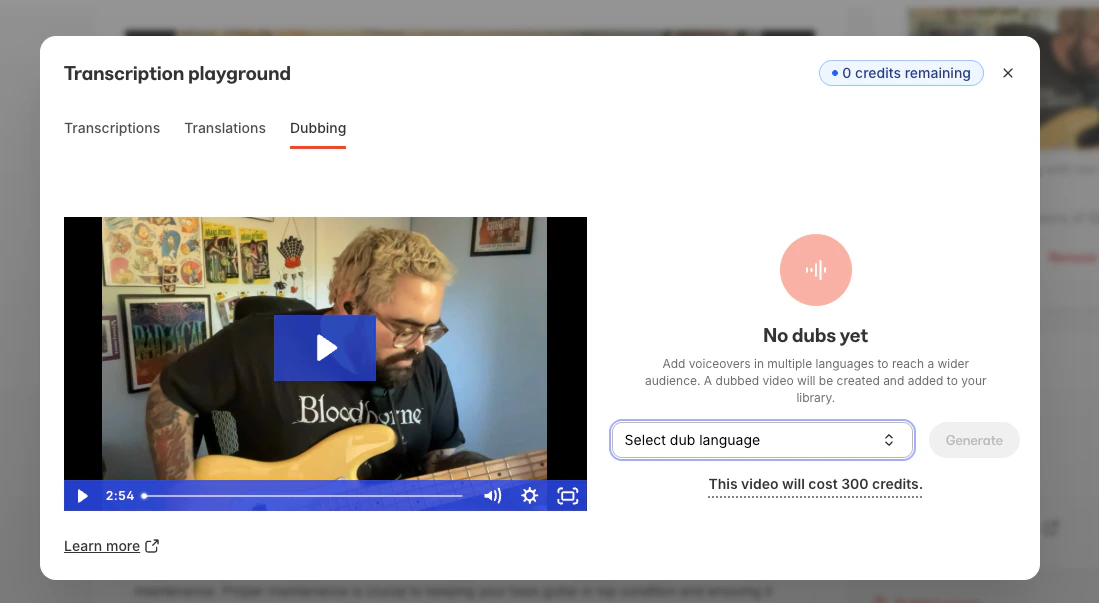
 7. Alternatively, use the **Dubbing** tool to generate a video featuring a dubbed voiceover in another language:
 ## Important notes
**Note:**
* To use the Translations or Dubbing feature, a transcription must be uploaded or created first.
* Coaching live sessions and Cohort live sessions can be used with Transcriptions and Translations, but the Dubbing feature does not currently support Coaching & Cohort live sessions.
* The Dubbing feature may take a few minutes to process. You can safely navigate away after submitting your video, and you'll receive an email notification once the dubbed video is ready.
* Transcriptions, Translations, & Dubbing all require AI credits. Learn more about [AI credits](../../products/ai-credits).
* Wistia currently supports 70+ languages for translation. To view the list of available languages, visit [Wistia's transcription languages page](https://docs.wistia.com/page/transcription-languages#/).
## Important notes
**Note:**
* To use the Translations or Dubbing feature, a transcription must be uploaded or created first.
* Coaching live sessions and Cohort live sessions can be used with Transcriptions and Translations, but the Dubbing feature does not currently support Coaching & Cohort live sessions.
* The Dubbing feature may take a few minutes to process. You can safely navigate away after submitting your video, and you'll receive an email notification once the dubbed video is ready.
* Transcriptions, Translations, & Dubbing all require AI credits. Learn more about [AI credits](../../products/ai-credits).
* Wistia currently supports 70+ languages for translation. To view the list of available languages, visit [Wistia's transcription languages page](https://docs.wistia.com/page/transcription-languages#/).