> ## Documentation Index
> Fetch the complete documentation index at: https://help.kajabi.com/llms.txt
> Use this file to discover all available pages before exploring further.
# Kajabi Transcripts, Translations, and Dubbing
> Make video content more accessible and reach global audiences with transcripts, translations, and dubbing.
**Kajabi Transcripts, Translations, and Dubbing** tools make your video content more accessible and help you reach audiences across the globe.
Transcriptions, Translations, and Dubbing features allow you to:
* Automatically generate transcripts for any uploaded video
* Edit transcripts in the interactive editor
* Instantly translate your transcription from 30+ source languages into 70+ languages
* Download and edit SRT files
* Add dubbed voice-over in multiple languages
Repurpose your content for global audiences, enhance accessibility, and make your courses and marketing materials more engaging and inclusive.
Wistia currently supports 70+ languages for translation. To view the list of available languages, visit [Wistia's transcription languages page](https://docs.wistia.com/page/transcription-languages#/).
## AI credits
[AI credits](../../products/ai-credits) power the Transcriptions and Translations feature. Growth and Pro plan users receive a monthly credit allotment. Additional credits are available for purchase on any plan.
Learn more about [AI credits](../../products/ai-credits).
## Use Transcriptions, Translations, and Dubbing
Transcriptions, Translations & Dubbing can be used with any video already uploaded to your Course lesson, course live video, website editor, coaching session, or anywhere else you use a video in Kajabi, as well as with uploaded videos.
**Note:** A transcription, translation, or dub is attached to the video itself in your Media Library — not to a specific lesson, page, or session. Once you add one to a video, it appears everywhere that video is used.
1. [Upload a video](../../products/courses/how-to-bulk-upload-videos-in-a-product) or choose an already uploaded video.
2. Once the video has finished uploading, click **Video Actions**.
3. Select **View in media library**.
4. Select the specific video inside the Media Library.
### Add a transcription
A transcription must exist before you can translate or dub a video. Under **Transcriptions**, choose one of two options.
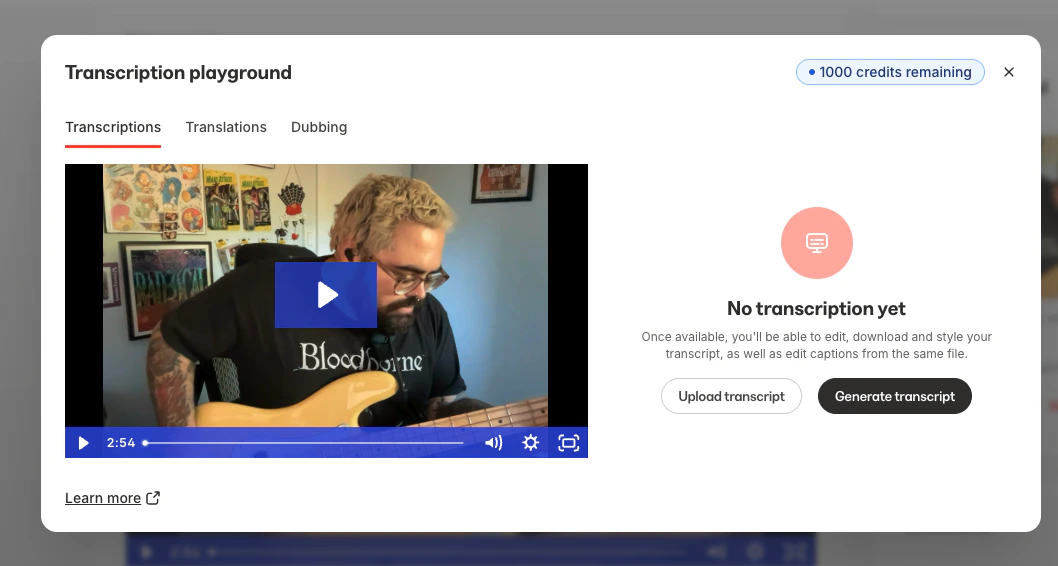 **Generate a transcript automatically**
1. Click **Generate a transcript**.
2. Select the source language spoken in the video.
3. Kajabi generates the transcript and attaches it to this video. **Upload your own transcription file**
An SRT (SubRip Subtitle) file is a plain-text captions file that pairs blocks of dialogue with timestamps. If you already have a transcript or captions file — exported from a video editor, an external captioning service, or elsewhere — you can upload it directly instead of generating one.
1. Click **Upload a transcription**.
2. Select your `.srt` file from your computer. Already generated a transcript and want to fine-tune it? Download it as an SRT file, edit the text or timing in any text editor or captioning tool, then upload the edited file using the steps above to replace it.
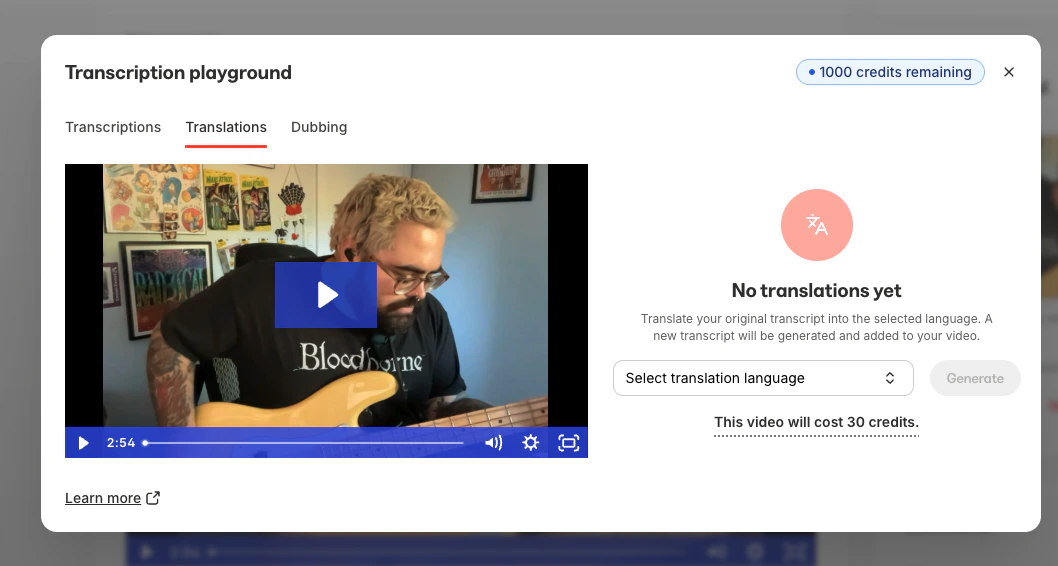
### Translate a video
Once a transcription exists, under **Translations**, use the **Translations** tool to translate your video to a different language:
**Generate a transcript automatically**
1. Click **Generate a transcript**.
2. Select the source language spoken in the video.
3. Kajabi generates the transcript and attaches it to this video. **Upload your own transcription file**
An SRT (SubRip Subtitle) file is a plain-text captions file that pairs blocks of dialogue with timestamps. If you already have a transcript or captions file — exported from a video editor, an external captioning service, or elsewhere — you can upload it directly instead of generating one.
1. Click **Upload a transcription**.
2. Select your `.srt` file from your computer. Already generated a transcript and want to fine-tune it? Download it as an SRT file, edit the text or timing in any text editor or captioning tool, then upload the edited file using the steps above to replace it.
### Translate a video
Once a transcription exists, under **Translations**, use the **Translations** tool to translate your video to a different language:
 ### Dub a video
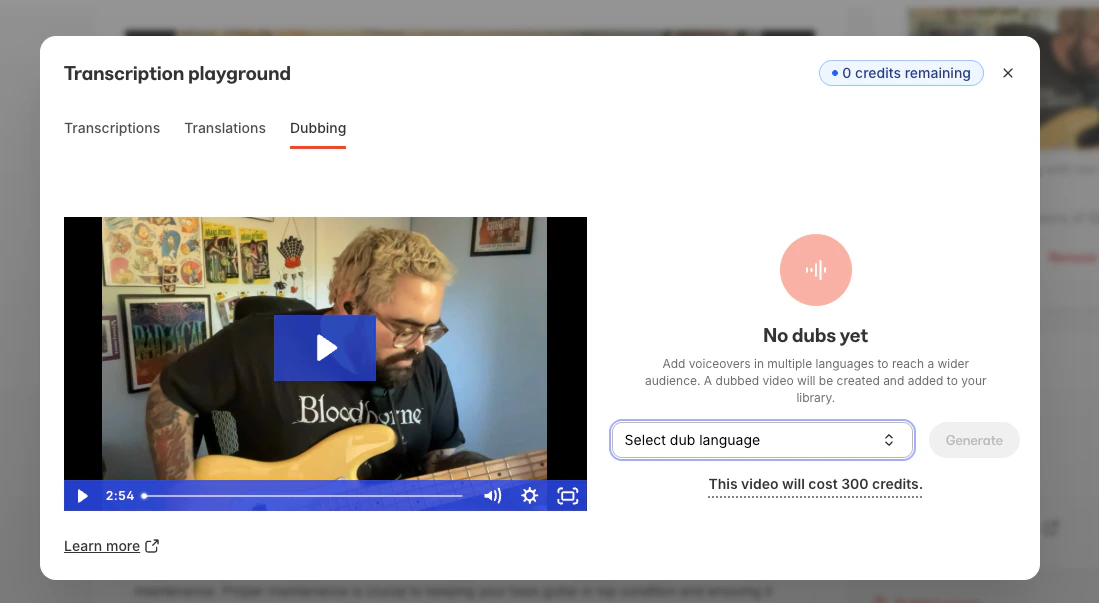
Alternatively, under **Dubbing**, use the **Dubbing** tool to generate a video featuring a dubbed voiceover in another language:
### Dub a video
Alternatively, under **Dubbing**, use the **Dubbing** tool to generate a video featuring a dubbed voiceover in another language:
 ## Important notes
**Note:**
* To use the Translations or Dubbing feature, a transcription must be uploaded or created first.
* Coaching live sessions and Cohort live sessions can be used with Transcriptions and Translations, but the Dubbing feature does not currently support Coaching & Cohort live sessions.
* The Dubbing feature may take a few minutes to process. You can safely navigate away after submitting your video, and you'll receive an email notification once the dubbed video is ready.
* Transcriptions, Translations, & Dubbing all require AI credits. Learn more about [AI credits](../../products/ai-credits).
* Wistia currently supports 70+ languages for translation. To view the list of available languages, visit [Wistia's transcription languages page](https://docs.wistia.com/page/transcription-languages#/).
## Important notes
**Note:**
* To use the Translations or Dubbing feature, a transcription must be uploaded or created first.
* Coaching live sessions and Cohort live sessions can be used with Transcriptions and Translations, but the Dubbing feature does not currently support Coaching & Cohort live sessions.
* The Dubbing feature may take a few minutes to process. You can safely navigate away after submitting your video, and you'll receive an email notification once the dubbed video is ready.
* Transcriptions, Translations, & Dubbing all require AI credits. Learn more about [AI credits](../../products/ai-credits).
* Wistia currently supports 70+ languages for translation. To view the list of available languages, visit [Wistia's transcription languages page](https://docs.wistia.com/page/transcription-languages#/).