> ## Documentation Index
> Fetch the complete documentation index at: https://help.kajabi.com/llms.txt
> Use this file to discover all available pages before exploring further.
# Get started with SEO
> Learn the basics of search engine optimization to improve your site's visibility and attract more visitors.
## Overview
SEO (Search Engine Optimization) helps put your business at the forefront of search engines like Google. Optimizing your website can help you rank higher in search results for keywords related to your business, increasing traffic and visibility.
## What is SEO?
SEO stands for Search Engine Optimization—the practice of optimizing your website to rank higher in search engine results.
When users search for a keyword, search engines display a series of results. Each result typically contains:
* URL
* Page title
* Description
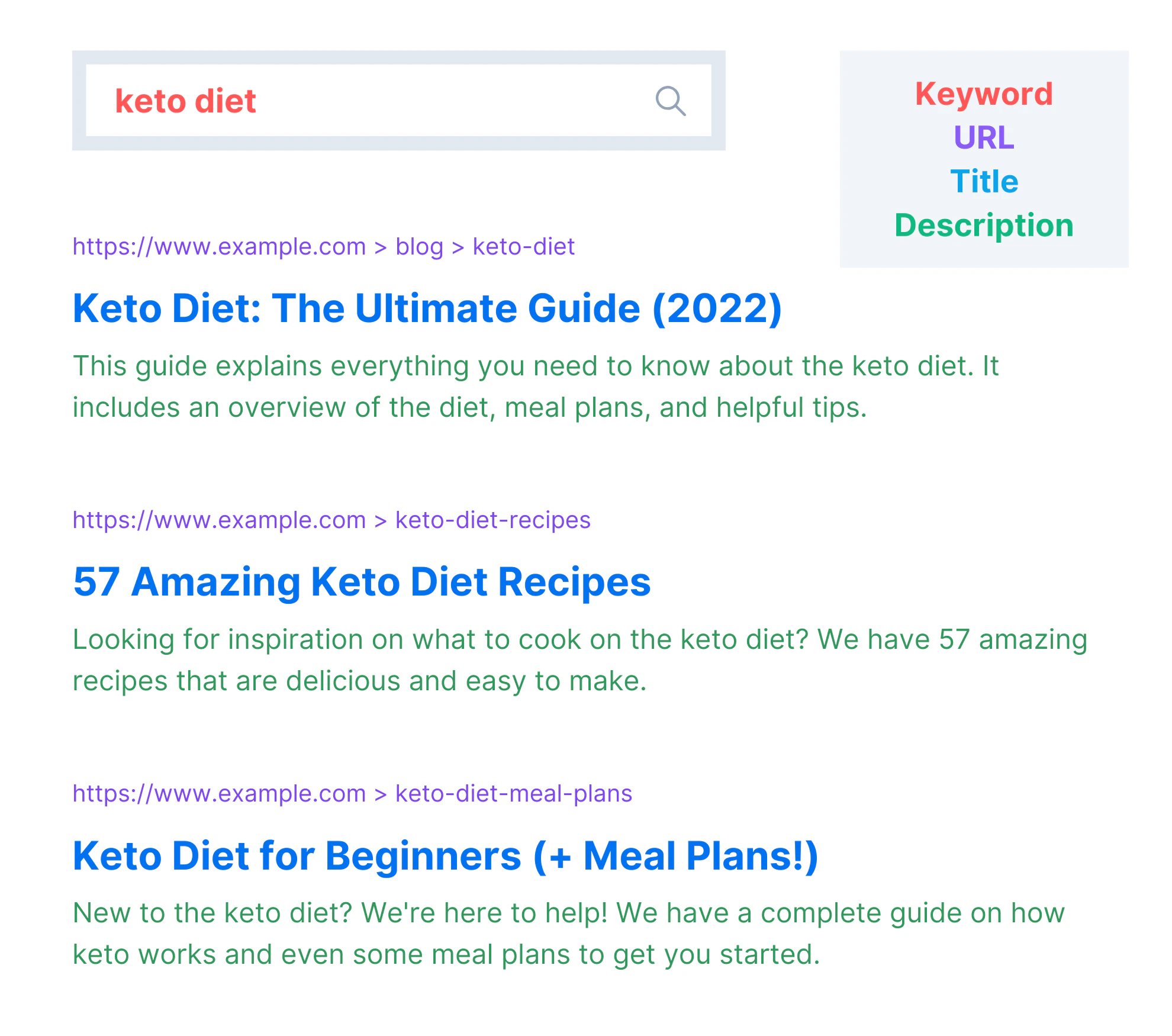 **Note:** Search engine results pages may also include paid ads at the top or bottom of the results.
The higher you rank in search results, the more likely someone will click through to your website. SEO helps you optimize your content to achieve better rankings for keywords relevant to your business.
Every page and blog post on your Kajabi site has an SEO and Sharing section where you can set a page title, description, and image.
## Page title
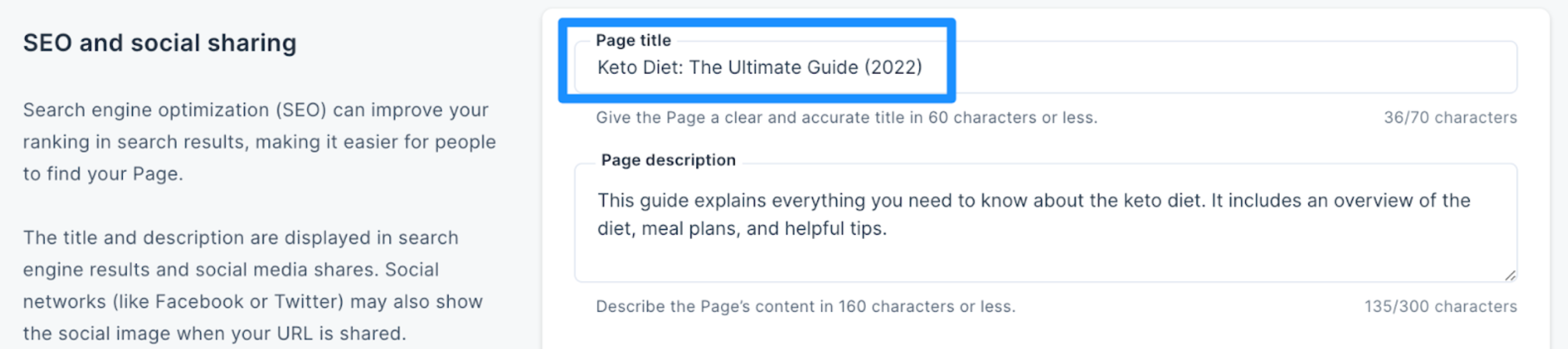
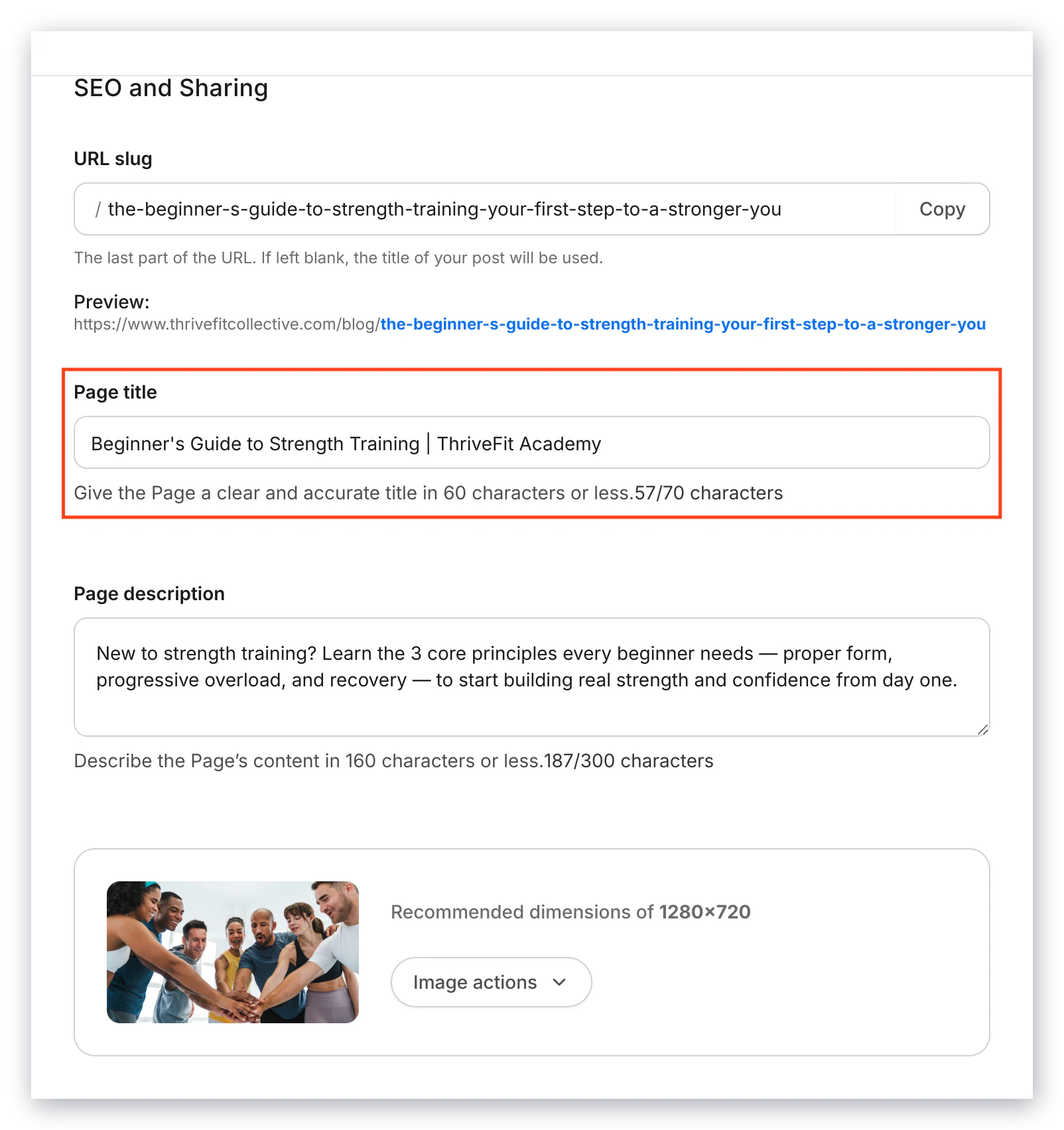
You can set a page title in the SEO and Sharing section of any page or blog post. Depending on the search engine, your page title may display below the URL breadcrumb on results pages and on browser tabs.
**Note:** Search engines may display relevant text from your page instead of your custom title.
### Improve page titles for SEO
* Describe your page content in less than 70 characters
* Include a relevant keyword when it makes sense
* Use unique titles for each page
### Pages
**Note:** Search engine results pages may also include paid ads at the top or bottom of the results.
The higher you rank in search results, the more likely someone will click through to your website. SEO helps you optimize your content to achieve better rankings for keywords relevant to your business.
Every page and blog post on your Kajabi site has an SEO and Sharing section where you can set a page title, description, and image.
## Page title
You can set a page title in the SEO and Sharing section of any page or blog post. Depending on the search engine, your page title may display below the URL breadcrumb on results pages and on browser tabs.
**Note:** Search engines may display relevant text from your page instead of your custom title.
### Improve page titles for SEO
* Describe your page content in less than 70 characters
* Include a relevant keyword when it makes sense
* Use unique titles for each page
### Pages
 ### Blog
 ## Page description
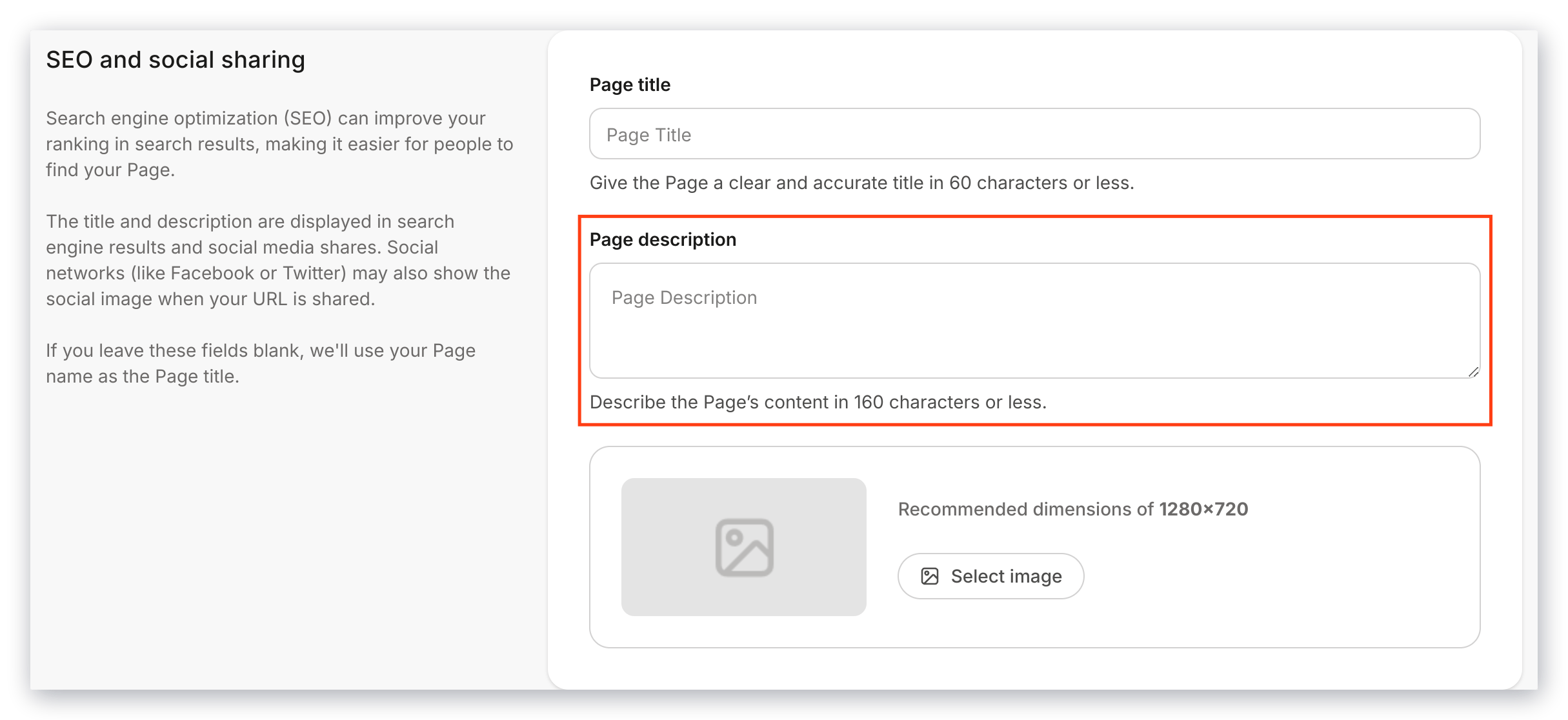
Set a page description in the SEO and Sharing section of a page or blog post.
**Note:** Search engines may display relevant text from your page instead of your custom description.
### Improve page descriptions for SEO
* Summarize your page content in 1-2 sentences
* Include a relevant keyword
* Use unique descriptions for each page
### Pages
## Page description
Set a page description in the SEO and Sharing section of a page or blog post.
**Note:** Search engines may display relevant text from your page instead of your custom description.
### Improve page descriptions for SEO
* Summarize your page content in 1-2 sentences
* Include a relevant keyword
* Use unique descriptions for each page
### Pages
 ### Blog
 ## Page URL
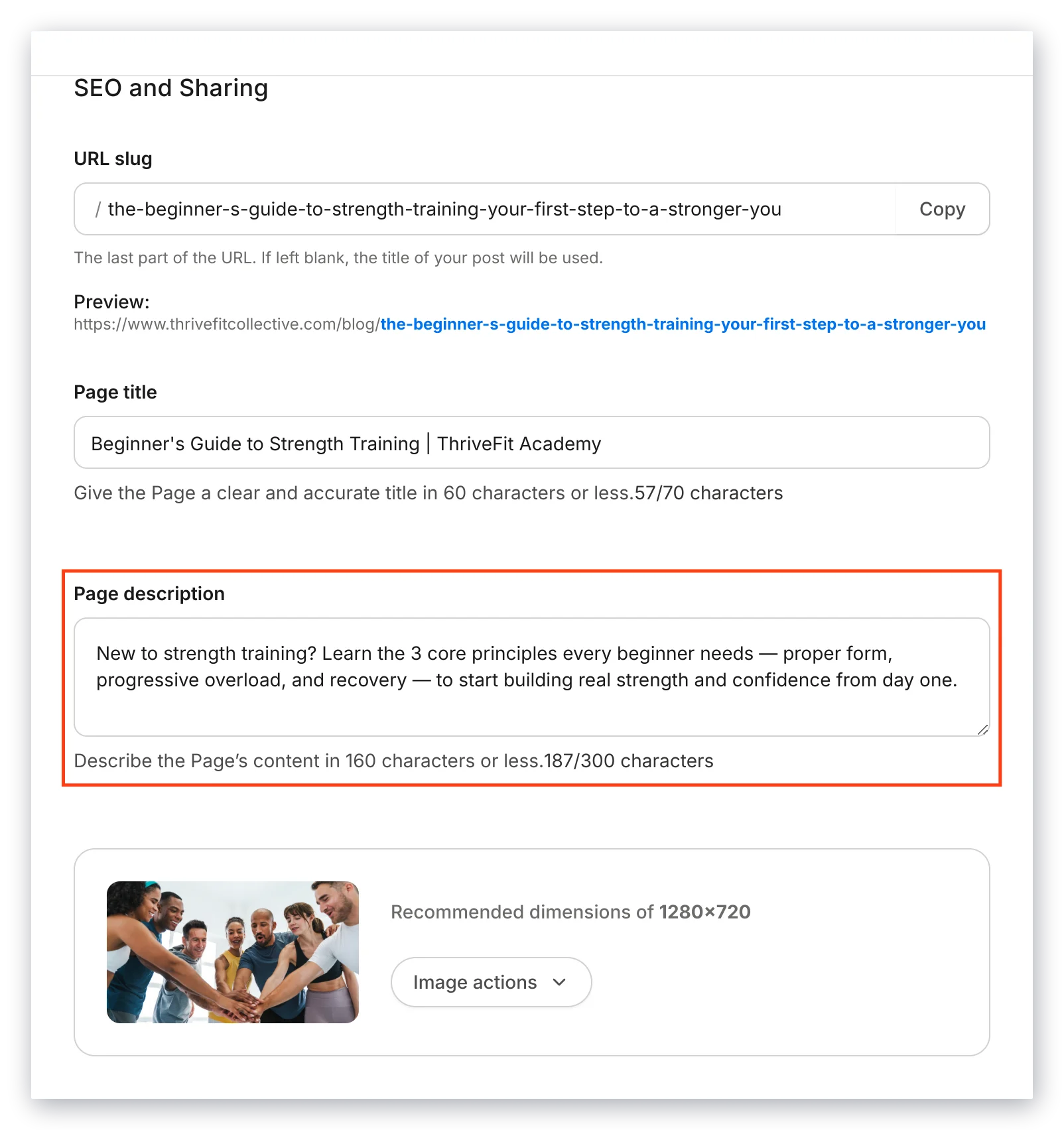
Set a page URL in the General section of a page or the SEO and Sharing section of a blog post. This URL displays in search results and is the link users click to access your page.
### Improve page URLs for SEO
* Keep it short
* Avoid vague URLs (e.g., page-123)—briefly describe the page instead
* Use hyphens to separate words, not underscores
* Use lowercase letters
* Include a relevant keyword when appropriate
### Pages
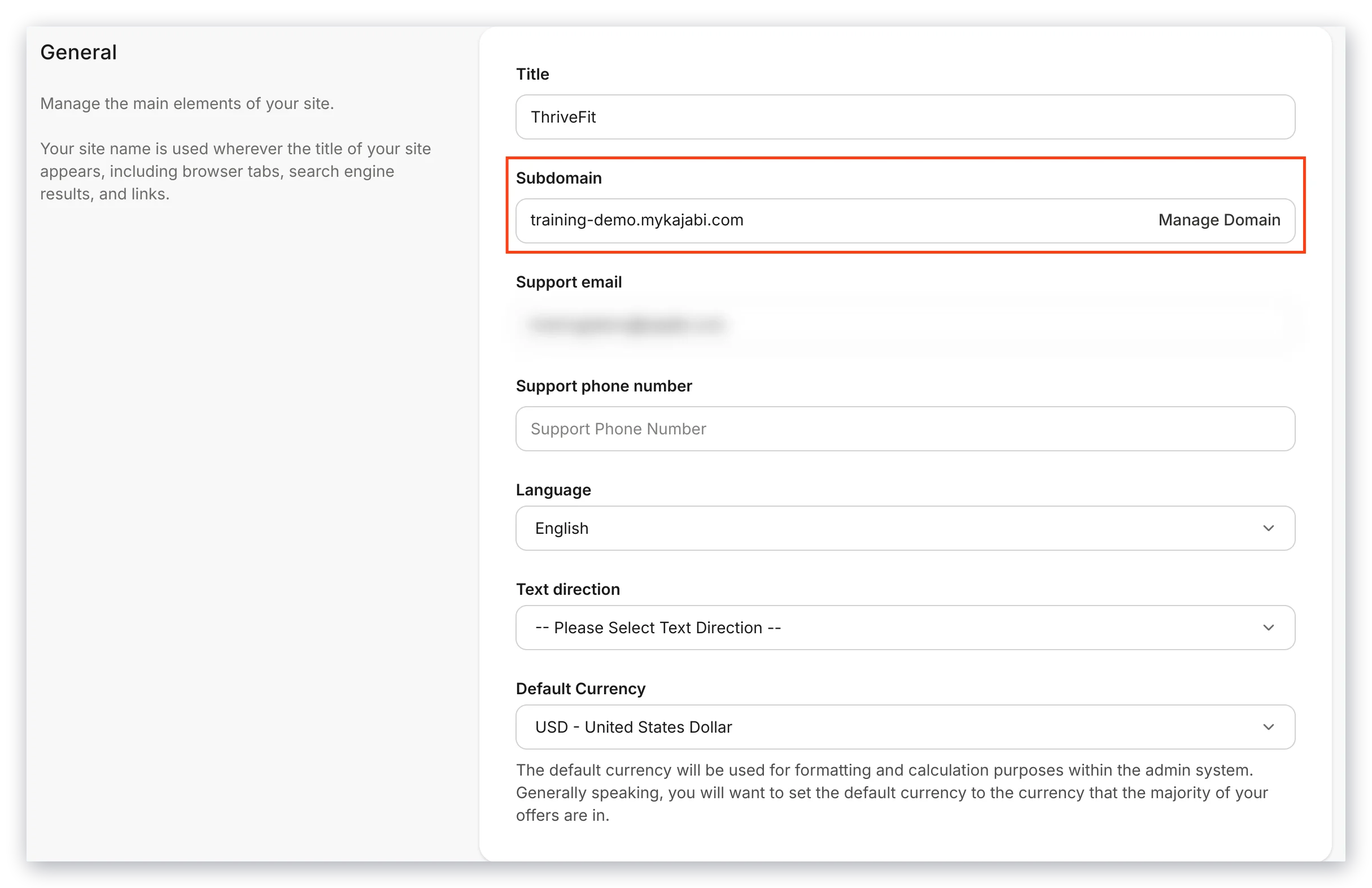
## Page URL
Set a page URL in the General section of a page or the SEO and Sharing section of a blog post. This URL displays in search results and is the link users click to access your page.
### Improve page URLs for SEO
* Keep it short
* Avoid vague URLs (e.g., page-123)—briefly describe the page instead
* Use hyphens to separate words, not underscores
* Use lowercase letters
* Include a relevant keyword when appropriate
### Pages
 ### Blog
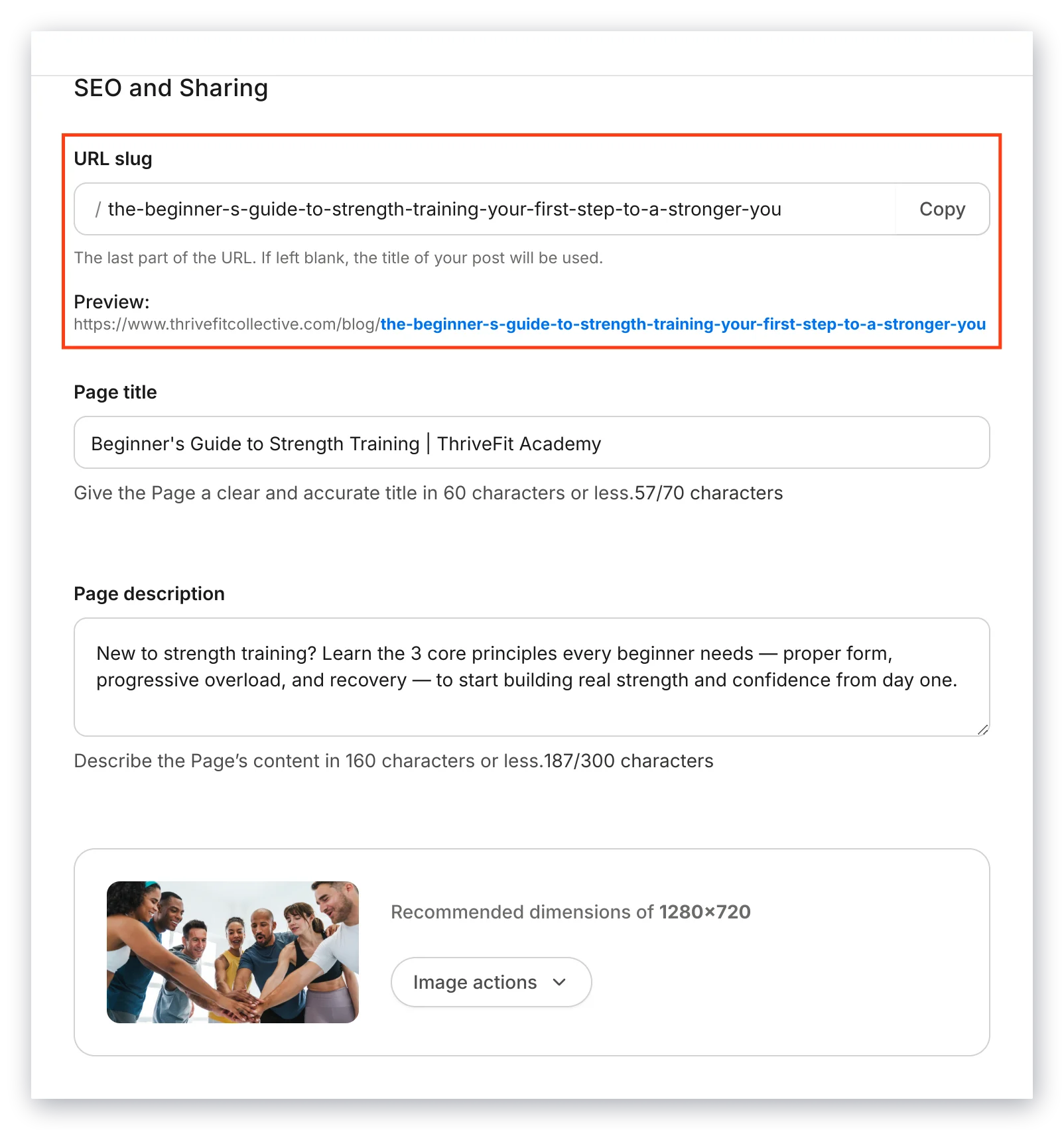 The title in the General section is an internal title, while the Page Title in the SEO and Sharing section is visible to users. The same applies to blog posts. [Learn more about the SEO and Sharing section](../../website/pages/seo-and-sharing).
## Header tags
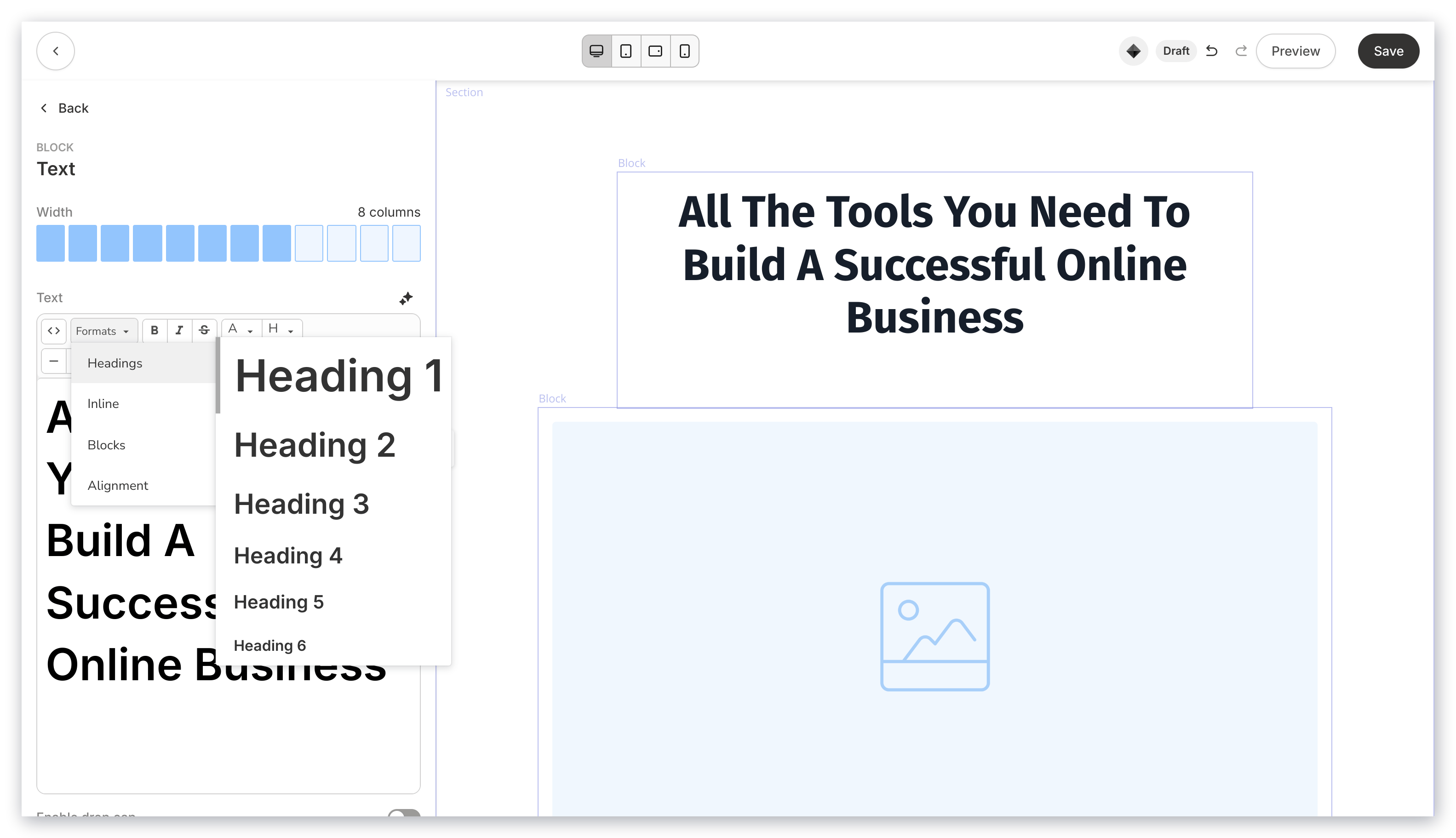
Header tags structure your page content for both users and search engines. Use Kajabi's text editors to select heading tags that organize your content.
### To view header tag options
1. Open the **text editor** for your desired text section
2. Click **Formats**
3. Select **Heading**
The title in the General section is an internal title, while the Page Title in the SEO and Sharing section is visible to users. The same applies to blog posts. [Learn more about the SEO and Sharing section](../../website/pages/seo-and-sharing).
## Header tags
Header tags structure your page content for both users and search engines. Use Kajabi's text editors to select heading tags that organize your content.
### To view header tag options
1. Open the **text editor** for your desired text section
2. Click **Formats**
3. Select **Heading**
### Heading hierarchy
* **Heading 1:** The title of your page
* **Heading 2:** Subheadings
* **Heading 3-6:** Further subheadings for your content
### Improve headings for SEO
* Use only one H1 tag per page
* Include a relevant keyword in your H1 tag
* Add keywords to other header tags when appropriate
 ## Images
Good filenames and alt text for images improve your SEO. Alt text describes an image for screen readers and search engines. You can find this field in the Image Block in the website or page builder.
### Improve images for SEO
* Avoid vague filenames (e.g., image123.png)—briefly describe the image instead
* Use hyphens to separate words in filenames, not underscores
* Reduce image file size using tools like [Squoosh](https://squoosh.app/)
* Add alt text that briefly describes each image
* Include relevant keywords in filenames and alt text when appropriate
## Images
Good filenames and alt text for images improve your SEO. Alt text describes an image for screen readers and search engines. You can find this field in the Image Block in the website or page builder.
### Improve images for SEO
* Avoid vague filenames (e.g., image123.png)—briefly describe the image instead
* Use hyphens to separate words in filenames, not underscores
* Reduce image file size using tools like [Squoosh](https://squoosh.app/)
* Add alt text that briefly describes each image
* Include relevant keywords in filenames and alt text when appropriate
 ## Text
Quality written content on your pages and blog posts supports better SEO performance.
**Note:** AI-powered search tools like ChatGPT, Perplexity, and Google AI Overviews rely on readable text content to surface your pages. Text written directly on your pages is more accessible to both search engines and AI tools than text embedded in images. For best results, avoid placing important content inside images.
### Improve text for SEO
* Write longer content (over 2,000 words) when appropriate
* Include relevant keywords throughout your content, but don't overdo it
* Use descriptive link text instead of phrases like "click here"
## Sitemap
A sitemap helps search engines index the pages on your website. While not required to get listed on search engines, submitting your sitemap to Google and Bing can be helpful.
Submitting your sitemap to Bing also submits it to Yahoo. DuckDuckGo references Bing's search results. Depending on your location, you may also want to submit to Yandex or Baidu.
### Google
#### Submit a sitemap to Google
1. Log in to [Google Search Console](https://search.google.com/search-console/welcome) (requires a Google account)
2. In the **URL Prefix** field, enter your full domain name (e.g., [https://www.example.com](https://www.example.com))
3. Click **Continue**
## Text
Quality written content on your pages and blog posts supports better SEO performance.
**Note:** AI-powered search tools like ChatGPT, Perplexity, and Google AI Overviews rely on readable text content to surface your pages. Text written directly on your pages is more accessible to both search engines and AI tools than text embedded in images. For best results, avoid placing important content inside images.
### Improve text for SEO
* Write longer content (over 2,000 words) when appropriate
* Include relevant keywords throughout your content, but don't overdo it
* Use descriptive link text instead of phrases like "click here"
## Sitemap
A sitemap helps search engines index the pages on your website. While not required to get listed on search engines, submitting your sitemap to Google and Bing can be helpful.
Submitting your sitemap to Bing also submits it to Yahoo. DuckDuckGo references Bing's search results. Depending on your location, you may also want to submit to Yandex or Baidu.
### Google
#### Submit a sitemap to Google
1. Log in to [Google Search Console](https://search.google.com/search-console/welcome) (requires a Google account)
2. In the **URL Prefix** field, enter your full domain name (e.g., [https://www.example.com](https://www.example.com))
3. Click **Continue**
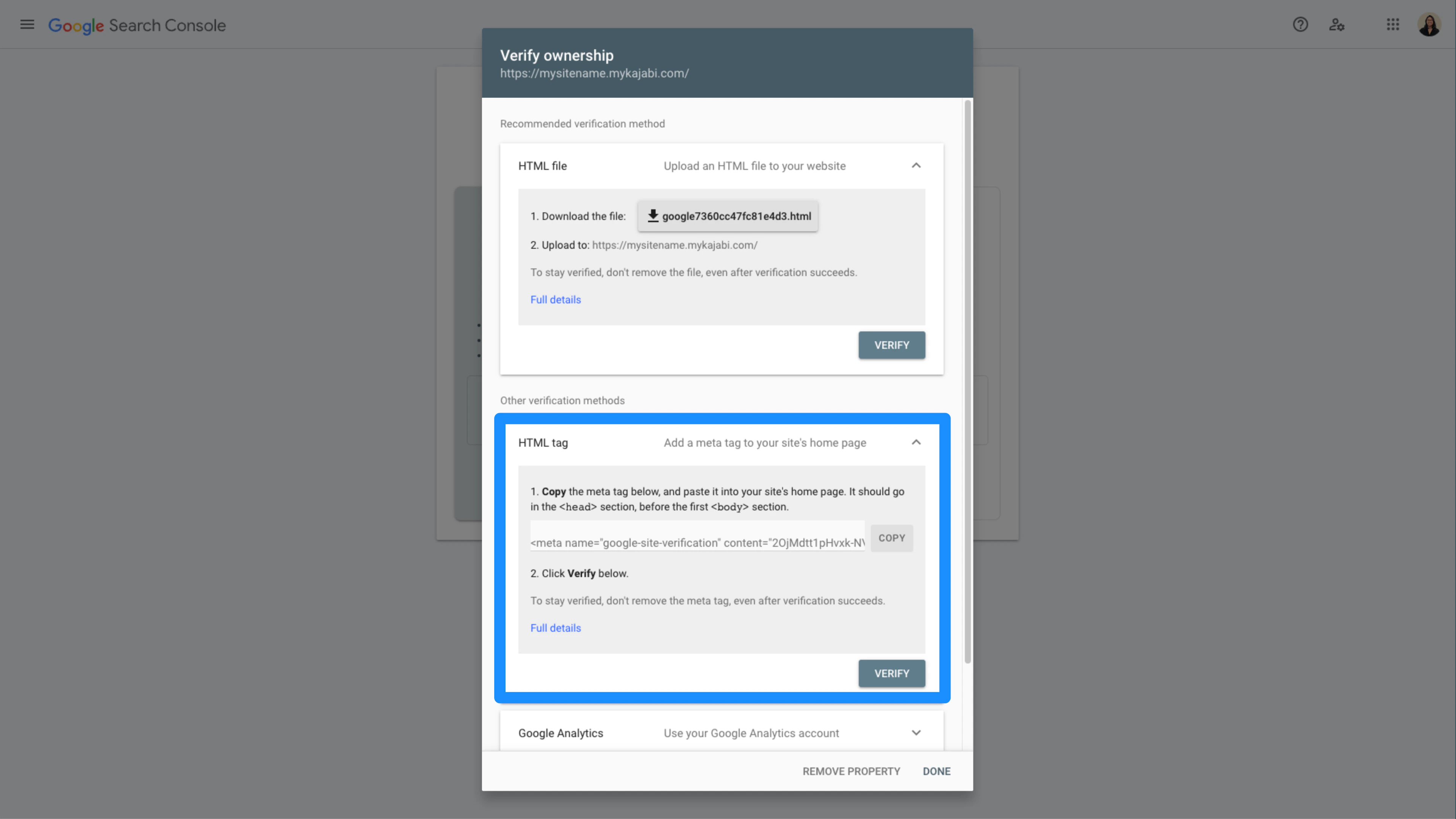
There are several ways to verify your domain. This example uses the HTML tag method.
#### To use the HTML tag method
1. Click **HTML tag**
2. Copy the Meta tag provided
 Open a separate browser tab and navigate to your Kajabi account.
#### To add the Meta tag in Kajabi
1. Open the **Settings** tab from your Dashboard
2. Click **Site Details**
3. Scroll to **Page scripts**
4. Paste in your copied Meta tag
5. Click **Save**
Open a separate browser tab and navigate to your Kajabi account.
#### To add the Meta tag in Kajabi
1. Open the **Settings** tab from your Dashboard
2. Click **Site Details**
3. Scroll to **Page scripts**
4. Paste in your copied Meta tag
5. Click **Save**
#### To complete verification in Google Search Console
1. Click **Verify**
2. Click **Go to Property**
3. Select **Sitemaps**
4. Enter **sitemap.xml** in the text field
5. Click **Submit**
### Bing
#### Submit a sitemap to Bing
1. Open [Bing Webmasters Tools](https://www.bing.com/webmasters)
2. Click **Get started** or **Login** (requires a Microsoft, Google, or Facebook account)
3. In the "Add your site manually" field, enter your full domain name (e.g., [https://www.example.com](https://www.example.com))
4. Click **Add**
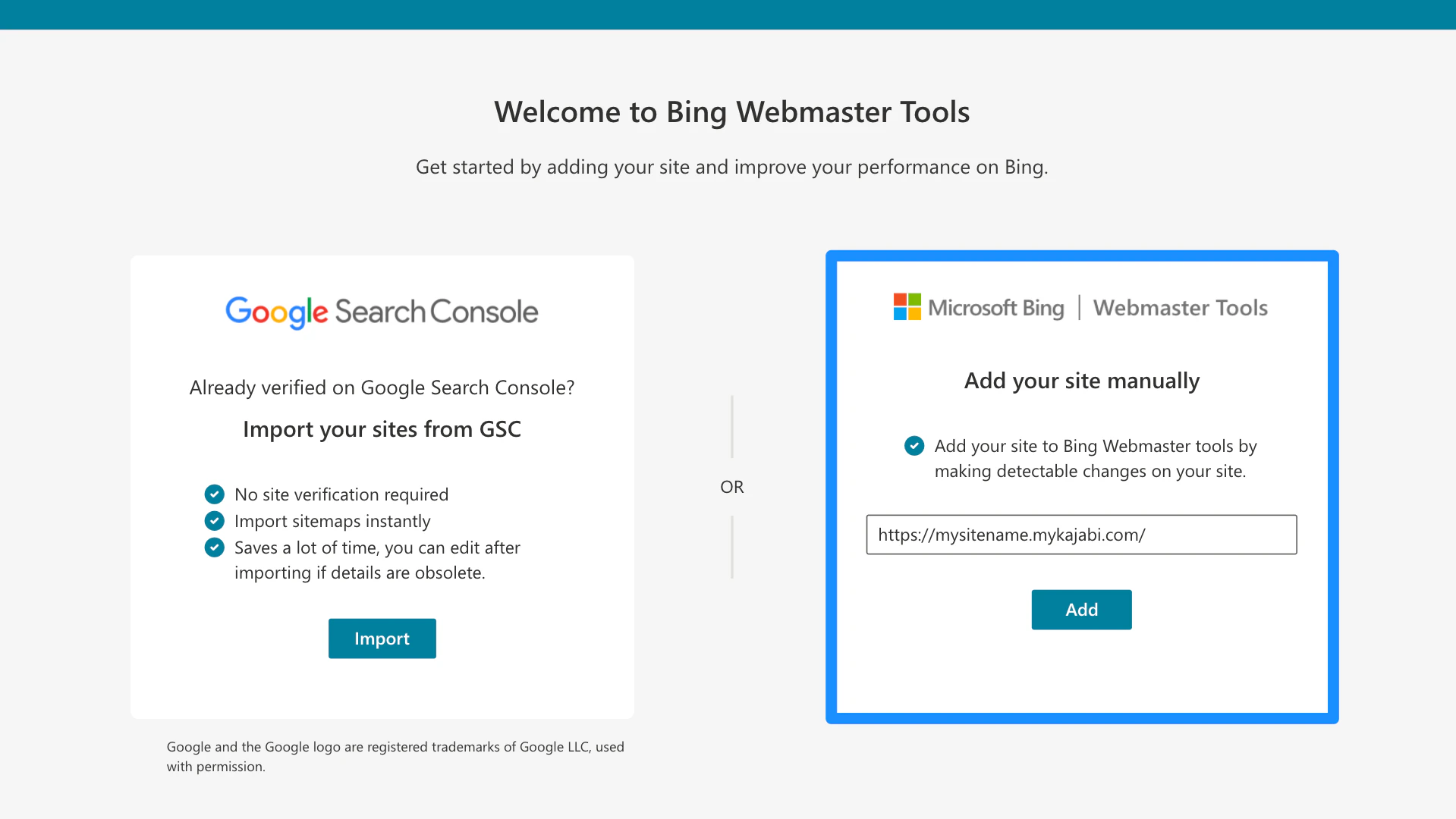 You can import your site from Google Search Console, but this example covers manual setup using the HTML Meta Tag method.
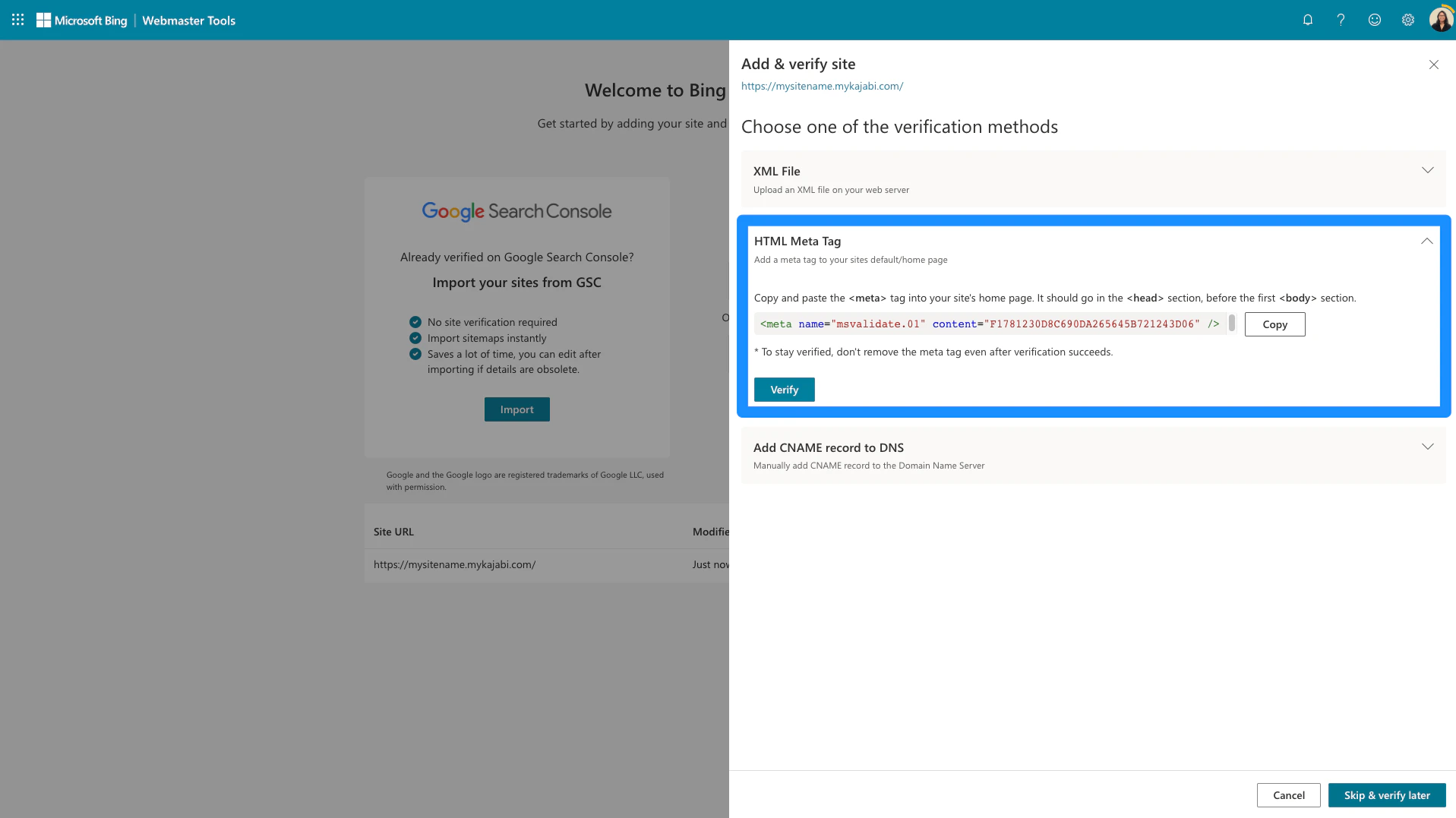
#### To use the HTML Meta Tag method
1. Click **HTML Meta Tag**
2. Copy the Meta tag provided
You can import your site from Google Search Console, but this example covers manual setup using the HTML Meta Tag method.
#### To use the HTML Meta Tag method
1. Click **HTML Meta Tag**
2. Copy the Meta tag provided
 Open a separate browser tab and navigate to your Kajabi account.
#### To add the Meta tag in Kajabi
1. From the Dashboard, open the **Settings** tab
2. Click **Site Details**
3. Scroll to **Page scripts**
4. Paste the Meta tag into the Header Page Scripts field
5. Click **Save**
Open a separate browser tab and navigate to your Kajabi account.
#### To add the Meta tag in Kajabi
1. From the Dashboard, open the **Settings** tab
2. Click **Site Details**
3. Scroll to **Page scripts**
4. Paste the Meta tag into the Header Page Scripts field
5. Click **Save**
#### To complete verification in Bing Webmaster Tools
1. Click **Verify**
2. When "Site addition successful" appears, click **Done**
3. Click **Sitemaps** in the left sidebar
4. Click **Submit sitemap**
5. Enter your full domain name with **/sitemap.xml** at the end (e.g., [https://www.example.com/sitemap.xml](https://www.example.com/sitemap.xml))
6. Click **Submit**