> ## Documentation Index
> Fetch the complete documentation index at: https://help.kajabi.com/llms.txt
> Use this file to discover all available pages before exploring further.
# Partner Payout Report and Partner Transaction Report
> Track monthly earnings and understand payout statuses using the Partner Payout and Transaction Reports.
The **Partner Payout Report** and **Partner Transaction Report** give you complete transparency into your Partner earnings. Use them to review monthly payout summaries and drill down into the details of individual transactions.
## Payout Report overview
There are 2 reports related to your Partner payout information:
1. **Payout Report:** Provides a summary of monthly earnings, including payout dates and the status of each month's earnings.
2. **Transaction Report:** Offers a detailed view of all successful transactions for a specific month.
These reports are designed to help you track your progress, understand the status of each payout, and build confidence in the payout process.
## Access the Payout Reports
1. Log in to your Kajabi Partner account.
2. If you do not have a Kajabi account, log in [here](https://kajabi.com/partnerprogram)
3. Select **Payouts** from the main navigation menu.
Within the Payouts section, you'll find:
* The **Payout Report** with summary tiles and a monthly summary table.
* By clicking into a specific month you will see the **Transaction Report**.
Each report is designed for ease-of-use, with tooltips providing additional context for each statistic (e.g., "Next Payout" explains that payouts are issued on the 25th of each month for transactions from two months prior).
## Payout Report
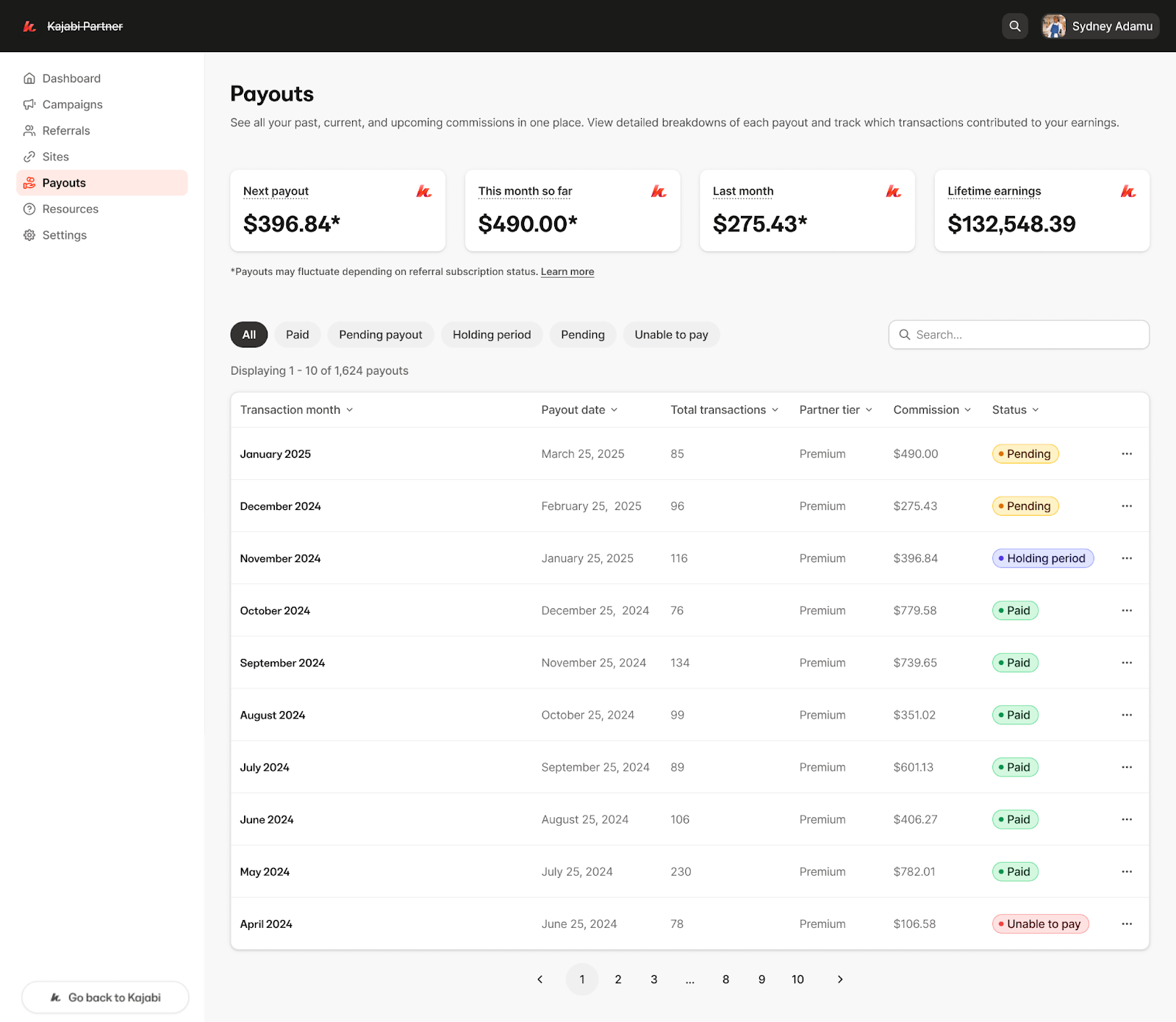
The Partner Payout Report summarizes your monthly earnings and payout statuses in an easy-to-read format.
**Note:**
The Payouts tab only shows reports from February 2025 onward.
 ### What it shows
The summary tiles include:
* **Next payout** – Your next payout will be on \[Month] 25th for transactions from \[Month]. Payouts are paid 2 months in arrears. See terms for more details.
* **This month so far** – The sum of your earnings for \[current month] that are yet to be finalized. Earnings are paid out 2 months in arrears.
* **Last month** – The sum of your earnings from \[month] that are yet to be finalized. Earnings are paid out 2 months in arrears.
* **Lifetime earnings** – The total amount of earnings you have been paid out for by Kajabi.
Each month's summary includes:
* **Transaction Month:** The month during which the transactions occurred.
* **Payout Date:** The scheduled date when payouts are processed (typically the 25th of the month).
* **Total Transactions:** The number of qualifying transactions for that month.
* **Tier & Commission:** Your current tier and the total commission earned.
* **Status:** The payout status for the month.
### Status definitions
The status of each month's earnings can be one of the following:
* **Pending:** Transactions are still in the mandatory waiting period and have not finalized.
* **Holding Period:** Your Partner tier is locked, but the transaction waiting period hasn't yet elapsed.
* **Pending Payout:** The waiting period has cleared, and the payout is finalized but awaiting processing.
* **Paid:** The payout has been successfully processed and sent.
## Transaction Report
### What it shows
For each transaction in a selected month, the report displays:
* **Referral Name:** The name of the person who made the purchase.
* **Transaction Date:** When the transaction occurred.
* **Subscription Cost:** The cost of the referral's subscription.
* **Commission %:** Your commission percentage.
* Note that the commission percent is tied to your partner tier for the month that the transaction occurred.
* **Commission Amount:** The dollar amount earned for that transaction.
* **Status:** The current status of the transaction, which may be:
* **Pending:** The transaction is still within the mandatory waiting period.
* **Approved:** The waiting period has passed and the commission is confirmed.
* **Refunded:** The referral has received a full or partial refund.
**Note:**
The report only includes successful, paid transactions from referrals who were active during that month. It does not display parked transactions or purchase amounts of Add-ons or Feature Limit Increases.
### What it shows
The summary tiles include:
* **Next payout** – Your next payout will be on \[Month] 25th for transactions from \[Month]. Payouts are paid 2 months in arrears. See terms for more details.
* **This month so far** – The sum of your earnings for \[current month] that are yet to be finalized. Earnings are paid out 2 months in arrears.
* **Last month** – The sum of your earnings from \[month] that are yet to be finalized. Earnings are paid out 2 months in arrears.
* **Lifetime earnings** – The total amount of earnings you have been paid out for by Kajabi.
Each month's summary includes:
* **Transaction Month:** The month during which the transactions occurred.
* **Payout Date:** The scheduled date when payouts are processed (typically the 25th of the month).
* **Total Transactions:** The number of qualifying transactions for that month.
* **Tier & Commission:** Your current tier and the total commission earned.
* **Status:** The payout status for the month.
### Status definitions
The status of each month's earnings can be one of the following:
* **Pending:** Transactions are still in the mandatory waiting period and have not finalized.
* **Holding Period:** Your Partner tier is locked, but the transaction waiting period hasn't yet elapsed.
* **Pending Payout:** The waiting period has cleared, and the payout is finalized but awaiting processing.
* **Paid:** The payout has been successfully processed and sent.
## Transaction Report
### What it shows
For each transaction in a selected month, the report displays:
* **Referral Name:** The name of the person who made the purchase.
* **Transaction Date:** When the transaction occurred.
* **Subscription Cost:** The cost of the referral's subscription.
* **Commission %:** Your commission percentage.
* Note that the commission percent is tied to your partner tier for the month that the transaction occurred.
* **Commission Amount:** The dollar amount earned for that transaction.
* **Status:** The current status of the transaction, which may be:
* **Pending:** The transaction is still within the mandatory waiting period.
* **Approved:** The waiting period has passed and the commission is confirmed.
* **Refunded:** The referral has received a full or partial refund.
**Note:**
The report only includes successful, paid transactions from referrals who were active during that month. It does not display parked transactions or purchase amounts of Add-ons or Feature Limit Increases.