> ## Documentation Index
> Fetch the complete documentation index at: https://help.kajabi.com/llms.txt
> Use this file to discover all available pages before exploring further.
# Check Kajabi service status and subscribe to updates
> Monitor Kajabi platform performance and get notified when an incident is created, updated, or resolved.
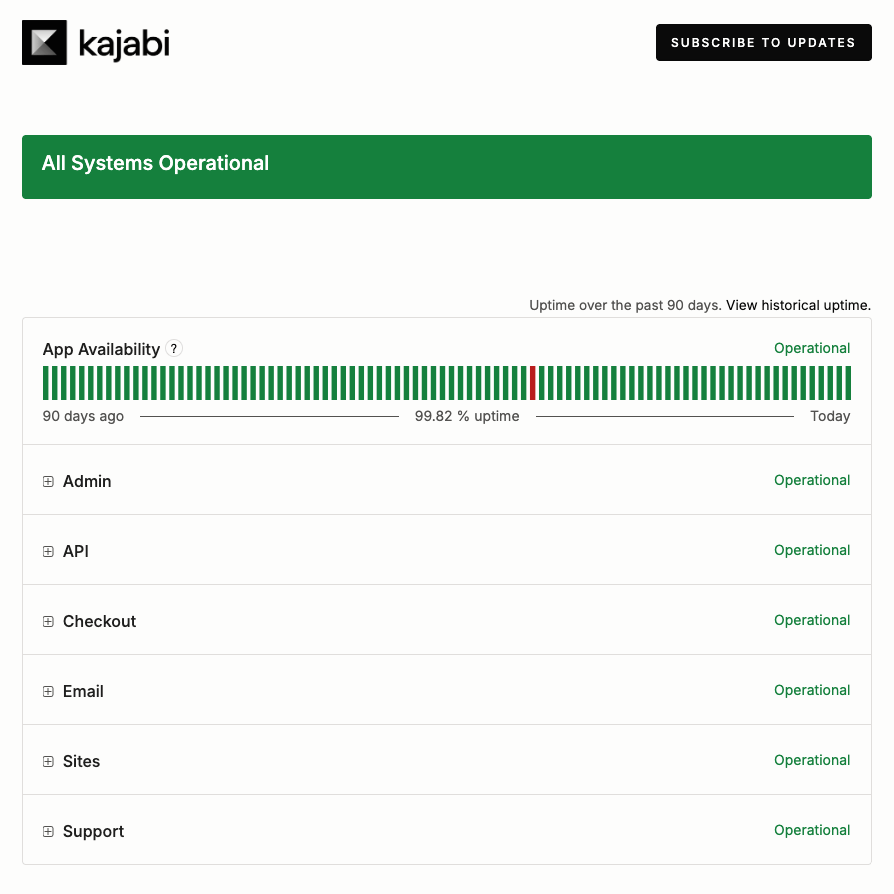
The **Kajabi Status Page** at [status.kajabi.com](https://status.kajabi.com/) is where Kajabi publishes real-time and historical data on system performance. When something is not working as you expect, such as a page that will not load or a checkout that will not complete, or you receive an error message, check the Status Page first to see whether Kajabi has already identified or is working on an issue.
Subscribing to updates means incident notifications reach you by email, text message, Slack, or webhook without needing to visit the Status Page. You choose which updates to subscribe to on the Status Page itself.
## System status and incident history
The top of the Status Page shows the current status of the platform as a whole, followed by the uptime recorded over the past 90 days. Click **View historical uptime** to see uptime beyond that window.
### Components
Status is reported for each part of the platform and its sub-components:
* **App Availability** — The general uptime of Kajabi, including the admin panel and access to product sites.
* **Admin** — Coupons
* **API** — Inbound Webhooks from external services used for granting Offers.
* **Checkout** — Offer Checkout, both multi-step and seamless Checkout and forms, Affiliate tracking, Upsells, Order bump, Coupon, and Webhooks
* **Email** — Automated Site Emails (Email Templates and delivery of automated messages), Custom Email Domain Setup (CEDS), Marketing Email Editing and Scheduling (Creating and editing of Email Broadcasts, Email Sequences, or Event Emails)
* **Sites** — Page rendering of customer sites and rich email content
* **Support** — Kajabi Signups
 ### Status indicators
Every component reports one of five states:
* **Operational** — The component is working as expected with no known issues.
* **Degraded Performance** — The component is functioning, but is slower or less reliable than normal.
* **Partial Outage** — A subset of the component is broken, whether that involves functionality, regions, or some percentage of accounts.
* **Major Outage** — The component is fully down for everyone.
* **Maintenance** — Planned, scheduled work is taking place for the component.
### Past Incidents
The **Past Incidents** section lists recent days and anything reported on them. Kajabi posts progressive updates inside an incident, and each update is labeled with its stage:
* **Investigating** — The issue has been reported and Kajabi is looking into it
* **Identified** — The cause is known and a fix is underway
* **Monitoring** — A fix has been applied and Kajabi is watching for stability
* **Resolved** — The incident is closed
Click **Incident History** to browse incidents older than the ones listed on the main page.
## Status Page notification channels
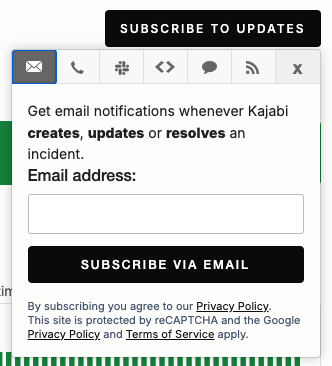
To open the subscription options, go to the **Kajabi Status Page** at [status.kajabi.com](https://status.kajabi.com/) and click **Subscribe to Updates**. Each channel covers a different set of events, so pick the one that matches how closely you need to follow an incident.
### Status indicators
Every component reports one of five states:
* **Operational** — The component is working as expected with no known issues.
* **Degraded Performance** — The component is functioning, but is slower or less reliable than normal.
* **Partial Outage** — A subset of the component is broken, whether that involves functionality, regions, or some percentage of accounts.
* **Major Outage** — The component is fully down for everyone.
* **Maintenance** — Planned, scheduled work is taking place for the component.
### Past Incidents
The **Past Incidents** section lists recent days and anything reported on them. Kajabi posts progressive updates inside an incident, and each update is labeled with its stage:
* **Investigating** — The issue has been reported and Kajabi is looking into it
* **Identified** — The cause is known and a fix is underway
* **Monitoring** — A fix has been applied and Kajabi is watching for stability
* **Resolved** — The incident is closed
Click **Incident History** to browse incidents older than the ones listed on the main page.
## Status Page notification channels
To open the subscription options, go to the **Kajabi Status Page** at [status.kajabi.com](https://status.kajabi.com/) and click **Subscribe to Updates**. Each channel covers a different set of events, so pick the one that matches how closely you need to follow an incident.
 ### Subscribe by email
Email notifications are sent whenever Kajabi creates, updates, or resolves an incident.
1. Select the **email icon**.
2. Enter your **Email address**.
3. Enter the **one-time passcode** sent to that address to confirm your subscription.
**Note:** A short countdown runs before a replacement code can be sent. If the passcode does not arrive, wait for the countdown to finish and then click **Resend OTP**.
### Subscribe by text message
Text message notifications are sent whenever Kajabi creates or resolves an incident. This is the narrowest option, since it skips the interim updates posted while an incident is being worked on.
1. Select the **text message icon**.
2. Choose your **Country code**.
3. Enter your **Phone number**.
4. Enter the **one-time passcode** sent to that number to confirm your subscription.
**Important:** Message and data rates may apply.
### Subscribe in Slack
Slack delivers incident updates and maintenance status messages into a channel in your workspace.
1. Select the **Slack icon**.
2. Click **Subscribe via Slack**.
3. Complete the authorization in Slack.
### Subscribe by webhook
Webhook notifications are sent whenever Kajabi creates, updates, or resolves an incident, or changes a component status. Use this option to feed status events into your own monitoring or alerting tools.
1. Select the **webhook icon**.
2. Enter the **Webhook URL** the notifications should be sent to.
3. Enter an **Email address**. Kajabi emails this address if your endpoint fails.
### Follow the Atom or RSS feed
The Status Page also publishes an [Atom feed](https://status.kajabi.com/history.atom) and an [RSS feed](https://status.kajabi.com/history.rss) you can add to a feed reader.
## FAQs
### Which channels include maintenance updates?
The Slack subscription covers incident updates and maintenance status messages. Email covers incidents that Kajabi creates, updates, or resolves. Text message covers incidents that Kajabi creates or resolves. Webhook covers all three incident events plus component status changes.
### Does unsubscribing from Kajabi marketing emails stop Status Page notifications?
No. Status Page notifications are managed on [status.kajabi.com](http://status.kajabi.com), separately from the marketing email preferences in your Kajabi account. Unsubscribing from marketing email under **Settings > Notifications & Privacy** does not cancel a Status Page subscription.
### Where can I find older incidents?
The main page lists only recent days. Click **Incident History** to browse past incidents, or **View historical uptime** to see uptime beyond the 90 days shown on the page.
### Subscribe by email
Email notifications are sent whenever Kajabi creates, updates, or resolves an incident.
1. Select the **email icon**.
2. Enter your **Email address**.
3. Enter the **one-time passcode** sent to that address to confirm your subscription.
**Note:** A short countdown runs before a replacement code can be sent. If the passcode does not arrive, wait for the countdown to finish and then click **Resend OTP**.
### Subscribe by text message
Text message notifications are sent whenever Kajabi creates or resolves an incident. This is the narrowest option, since it skips the interim updates posted while an incident is being worked on.
1. Select the **text message icon**.
2. Choose your **Country code**.
3. Enter your **Phone number**.
4. Enter the **one-time passcode** sent to that number to confirm your subscription.
**Important:** Message and data rates may apply.
### Subscribe in Slack
Slack delivers incident updates and maintenance status messages into a channel in your workspace.
1. Select the **Slack icon**.
2. Click **Subscribe via Slack**.
3. Complete the authorization in Slack.
### Subscribe by webhook
Webhook notifications are sent whenever Kajabi creates, updates, or resolves an incident, or changes a component status. Use this option to feed status events into your own monitoring or alerting tools.
1. Select the **webhook icon**.
2. Enter the **Webhook URL** the notifications should be sent to.
3. Enter an **Email address**. Kajabi emails this address if your endpoint fails.
### Follow the Atom or RSS feed
The Status Page also publishes an [Atom feed](https://status.kajabi.com/history.atom) and an [RSS feed](https://status.kajabi.com/history.rss) you can add to a feed reader.
## FAQs
### Which channels include maintenance updates?
The Slack subscription covers incident updates and maintenance status messages. Email covers incidents that Kajabi creates, updates, or resolves. Text message covers incidents that Kajabi creates or resolves. Webhook covers all three incident events plus component status changes.
### Does unsubscribing from Kajabi marketing emails stop Status Page notifications?
No. Status Page notifications are managed on [status.kajabi.com](http://status.kajabi.com), separately from the marketing email preferences in your Kajabi account. Unsubscribing from marketing email under **Settings > Notifications & Privacy** does not cancel a Status Page subscription.
### Where can I find older incidents?
The main page lists only recent days. Click **Incident History** to browse past incidents, or **View historical uptime** to see uptime beyond the 90 days shown on the page.