> ## Documentation Index
> Fetch the complete documentation index at: https://help.kajabi.com/llms.txt
> Use this file to discover all available pages before exploring further.
# Affiliate Challenges
> Create performance-based incentives for your affiliates with milestone-based rewards.
**Affiliate Challenges** are performance-based incentives you can create within your Affiliates program to motivate affiliates with milestone-based rewards. Instead of relying only on standard commissions, you can create time-bound Challenges that reward affiliates when they hit specific performance goals, such as a set number of sales.
Challenges help you drive higher engagement, increase sales velocity, and reward your top-performing affiliates in a more intentional way.
Each Challenge defines:
* **A goal** (For example, a sales count threshold)
* **A reward** (Monetary or custom)
* **A timeframe** (Start and end dates)
* **A budget cap** (Optional)
When affiliates meet the Challenge requirements within the set timeframe, they earn the reward you defined.
## Access Affiliate Challenges
1. From your Dashboard, click **Sales.**
2. Select **Affiliates.**
3. Open **Commission setup.**
4. Click the **Challenges** tab.
On the **Challenges** tab, you can:
* Create a Challenge
* View existing Challenges
* Edit or delete Challenges
## Create an Affiliate Challenge
To create a new Challenge:
1. From your Dashboard, go to **Sales > Affiliates > Commission setup > Challenges.**
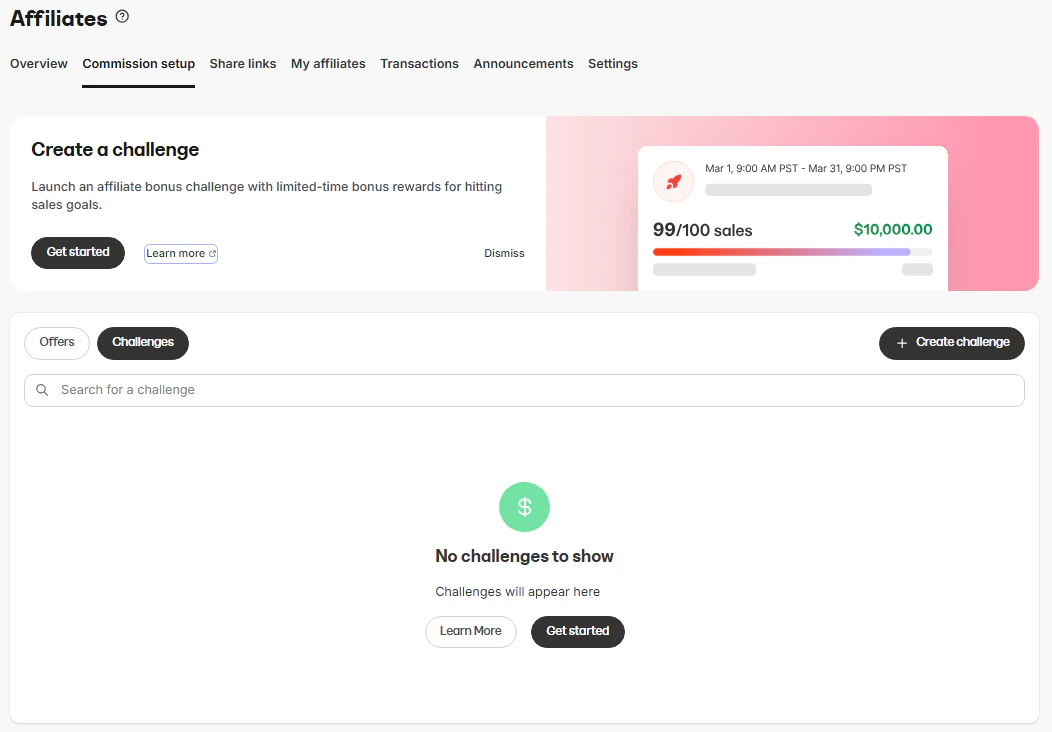
2. Click **Create challenge.**
 ### Add Challenge details
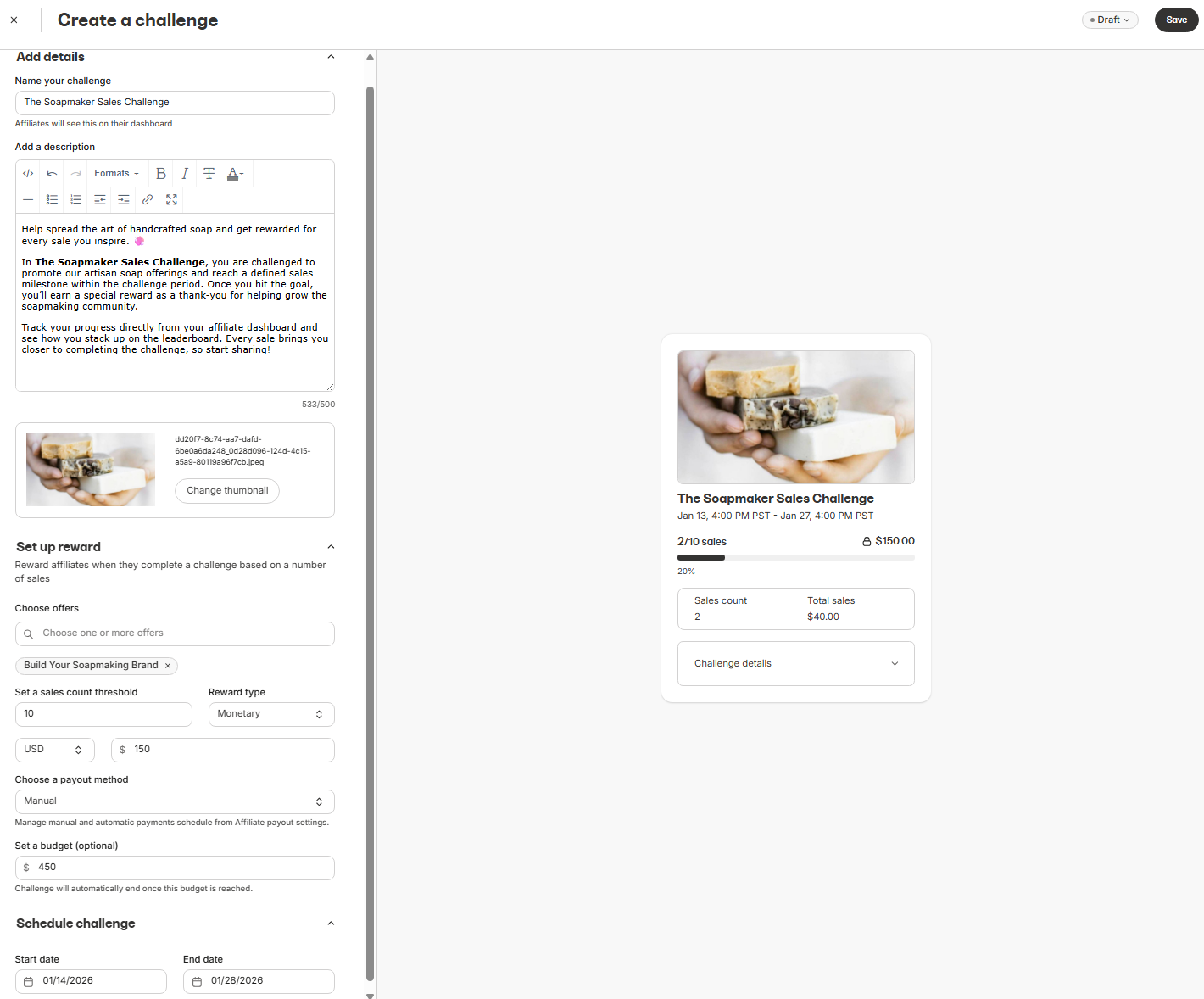
* **Name your challenge** - This is visible to affiliates on their dashboard.
* **Description** - Use this to explain the goal, rules, or reward details (500 or less characters).
* **Thumbnail** - Upload an image to visually highlight the challenge for your affiliates.
### Set up the reward
When configuring rewards, you'll define what affiliates need to achieve and what they earn.
* Choose **Offers** - Select one or more Offers that count toward the Challenge.
* Set a **Sales count** threshold - Define how many sales an affiliate must generate to complete the Challenge.
* Choose a **Reward type**. Choices include:
* **Monetary**
* Enter a dollar amount.
* Select a payout method (manual or automatic, based on your affiliate payout settings).
* **Custom**
* Use this for non-cash rewards (for example, gift cards, swag, or private perks).
* Custom rewards are tracked but fulfilled manually.
### Set a budget (optional)
Setting a budget helps you cap spending and run controlled promotions.
* Define a maximum total budget for the Challenge
* Once the budget is reached, the Challenge automatically ends.
### Schedule the challenge
Set a **Start date** and **End date.** Only sales made within this window count toward the Challenge.
### Add Challenge details
* **Name your challenge** - This is visible to affiliates on their dashboard.
* **Description** - Use this to explain the goal, rules, or reward details (500 or less characters).
* **Thumbnail** - Upload an image to visually highlight the challenge for your affiliates.
### Set up the reward
When configuring rewards, you'll define what affiliates need to achieve and what they earn.
* Choose **Offers** - Select one or more Offers that count toward the Challenge.
* Set a **Sales count** threshold - Define how many sales an affiliate must generate to complete the Challenge.
* Choose a **Reward type**. Choices include:
* **Monetary**
* Enter a dollar amount.
* Select a payout method (manual or automatic, based on your affiliate payout settings).
* **Custom**
* Use this for non-cash rewards (for example, gift cards, swag, or private perks).
* Custom rewards are tracked but fulfilled manually.
### Set a budget (optional)
Setting a budget helps you cap spending and run controlled promotions.
* Define a maximum total budget for the Challenge
* Once the budget is reached, the Challenge automatically ends.
### Schedule the challenge
Set a **Start date** and **End date.** Only sales made within this window count toward the Challenge.
 ## Publish and manage Challenges
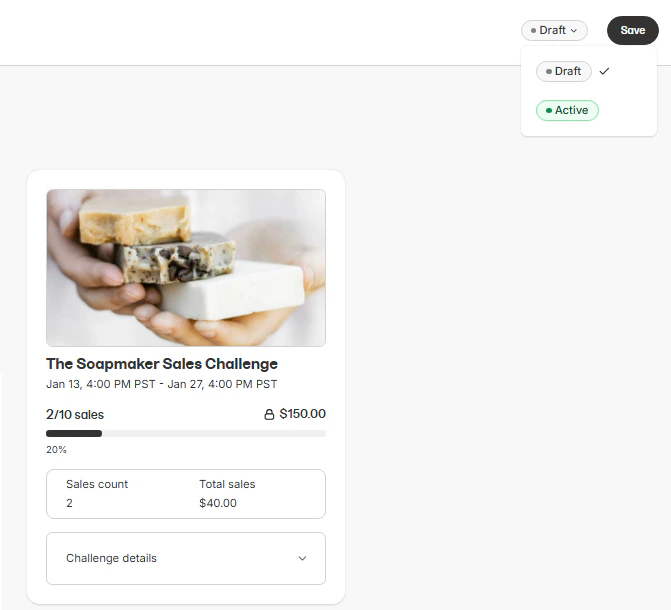
After creating a Challenge, you can:
* **Publish** the Challenge when you're ready.
* **Edit** Challenge details before or during its run (depending on status).
* **Delete** a Challenge if it's no longer needed
## Publish and manage Challenges
After creating a Challenge, you can:
* **Publish** the Challenge when you're ready.
* **Edit** Challenge details before or during its run (depending on status).
* **Delete** a Challenge if it's no longer needed
 ## View Challenge progress
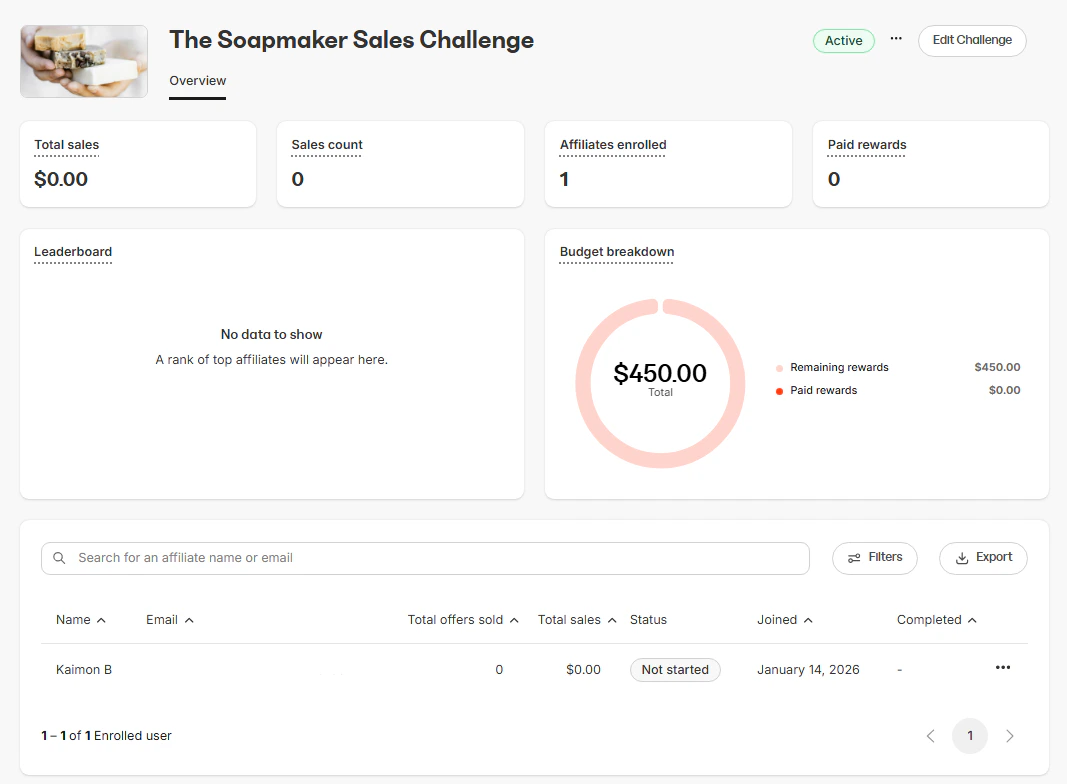
Opening a Challenge shows an overview of its performance, including:
### Key metrics
* **Total sales**
* **Sales count**
* **Affiliates enrolled**
* **Paid rewards**
### Leaderboard
The **Leaderboard** makes it easy to identify top performers and track competition at a glance. It ranks affiliates based on:
* **Total sales**
* **Challenge completion progress**
### Budget breakdown
The **Budget breakdown** helps you understand how much of your allocated budget has been used and what's still available. This includes:
* **Total budget**
* **Paid rewards**
* **Remaining rewards**
## View Challenge progress
Opening a Challenge shows an overview of its performance, including:
### Key metrics
* **Total sales**
* **Sales count**
* **Affiliates enrolled**
* **Paid rewards**
### Leaderboard
The **Leaderboard** makes it easy to identify top performers and track competition at a glance. It ranks affiliates based on:
* **Total sales**
* **Challenge completion progress**
### Budget breakdown
The **Budget breakdown** helps you understand how much of your allocated budget has been used and what's still available. This includes:
* **Total budget**
* **Paid rewards**
* **Remaining rewards**
 ## Affiliate view of Challenges
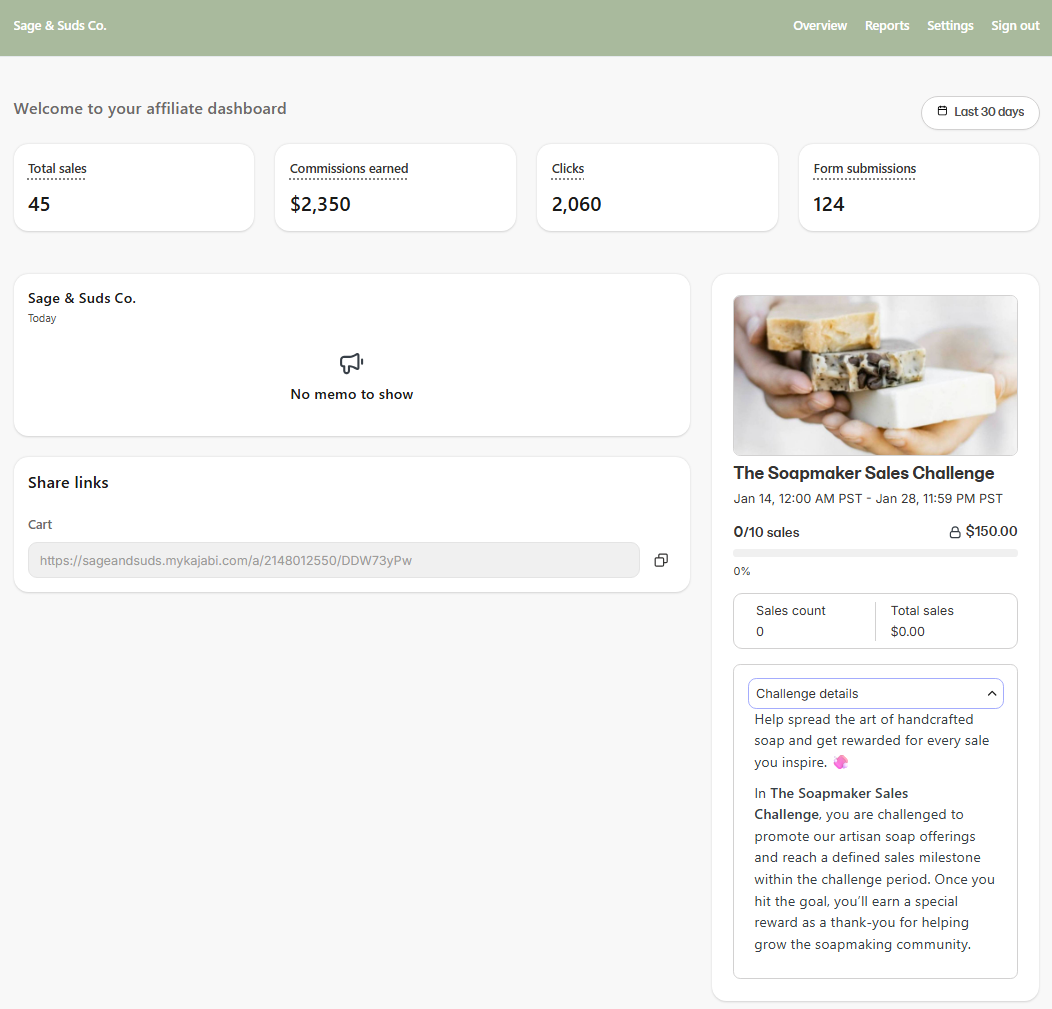
When an affiliate opens a Challenge, they're shown a dedicated challenge card with clear, actionable information about their progress and rewards. Affiliates can view:
* **Challenge name** and **Thumbnail**: Makes it easy to recognize active promotions.
* **Active Challenge dates**: Includes **Start** and **End time**.
* **Sales goal** and **progress:** Displays as a progress bar (for example, *0 / 10 sales*).
* **Reward amount:** The total reward they can earn for completing the challenge.
* **Real-time metrics**: Including **Sales count** and **Total sales** amount.
By expanding **Challenge details**, affiliates can also read the full description you set when configuring the Challenge.
All progress updates automatically as sales are tracked, so affiliates always know where they stand and how close they are to earning the reward.
## Affiliate view of Challenges
When an affiliate opens a Challenge, they're shown a dedicated challenge card with clear, actionable information about their progress and rewards. Affiliates can view:
* **Challenge name** and **Thumbnail**: Makes it easy to recognize active promotions.
* **Active Challenge dates**: Includes **Start** and **End time**.
* **Sales goal** and **progress:** Displays as a progress bar (for example, *0 / 10 sales*).
* **Reward amount:** The total reward they can earn for completing the challenge.
* **Real-time metrics**: Including **Sales count** and **Total sales** amount.
By expanding **Challenge details**, affiliates can also read the full description you set when configuring the Challenge.
All progress updates automatically as sales are tracked, so affiliates always know where they stand and how close they are to earning the reward.
 ## Export Challenge results
Exports make it easy to analyze performance or reconcile rewards outside the platform. You can export challenge data at any time for reporting or payouts.
Exported fields include:
* **Affiliate ID**
* **State**
* **Sales Count**
* **Sales Amount (in cents)**
* **Completed At**
* **Affiliate Name**
* **Affiliate Email**
## Export Challenge results
Exports make it easy to analyze performance or reconcile rewards outside the platform. You can export challenge data at any time for reporting or payouts.
Exported fields include:
* **Affiliate ID**
* **State**
* **Sales Count**
* **Sales Amount (in cents)**
* **Completed At**
* **Affiliate Name**
* **Affiliate Email**