> ## Documentation Index
> Fetch the complete documentation index at: https://help.kajabi.com/llms.txt
> Use this file to discover all available pages before exploring further.
# Affiliate Portal overview
> Resources and reports available to your affiliates from their Affiliate Portal.
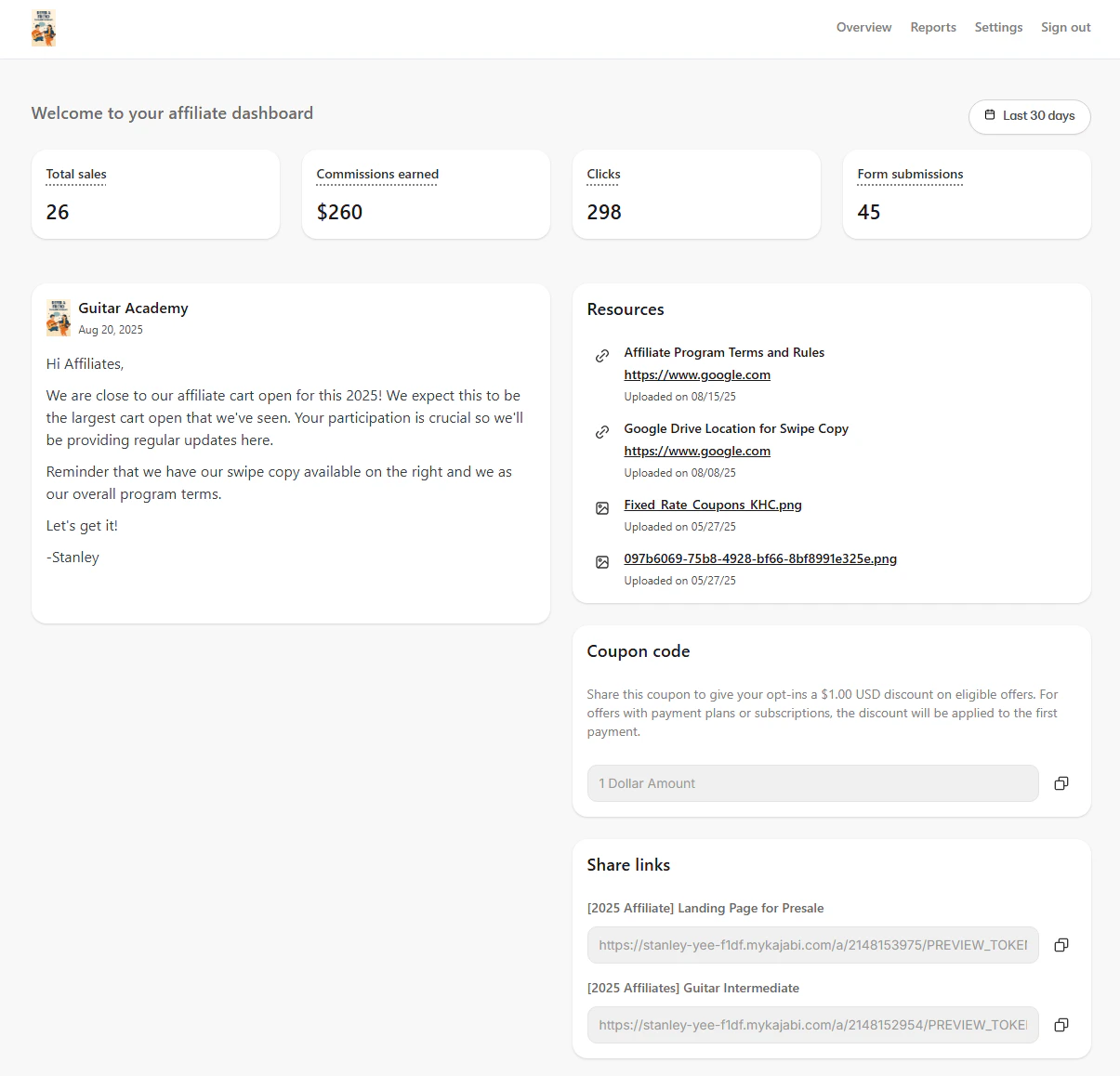
The **Affiliate Portal** is your affiliate's dashboard where they can access their resources, reports, and performance data. Similar to your [Affiliate Dashboard](../../sales/affiliates/affiliates-overview), it gives affiliates a real-time view of their sales activity and program materials.
After an affiliate is added to your site by registering or by being manually added, they receive an **Affiliate User** welcome email containing their login credentials and a link to access their Affiliate Portal.
**Note:**
The Affiliate feature is only available with Growth and Pro Plans. See [kajabi.com/pricing](https://kajabi.com/pricing) for more details.
[Learn how to send your affiliate the link to log in](../../sales/affiliates/manage-your-affiliates).
### Affiliate Portal features
* View their **Stats** within a specified time range.
* View the latest updates of your affiliate program in the **Memo.**
* Download or access **Resources** you've uploaded in your **Affiliate Settings**.
* Access their **Share Links** or their personalized **Coupon Code**.
* Export their **Purchase Summary Report**.
* Change their **Settings** to update their profile, email preferences, and change their password.
 ## Access the Affiliate Portal
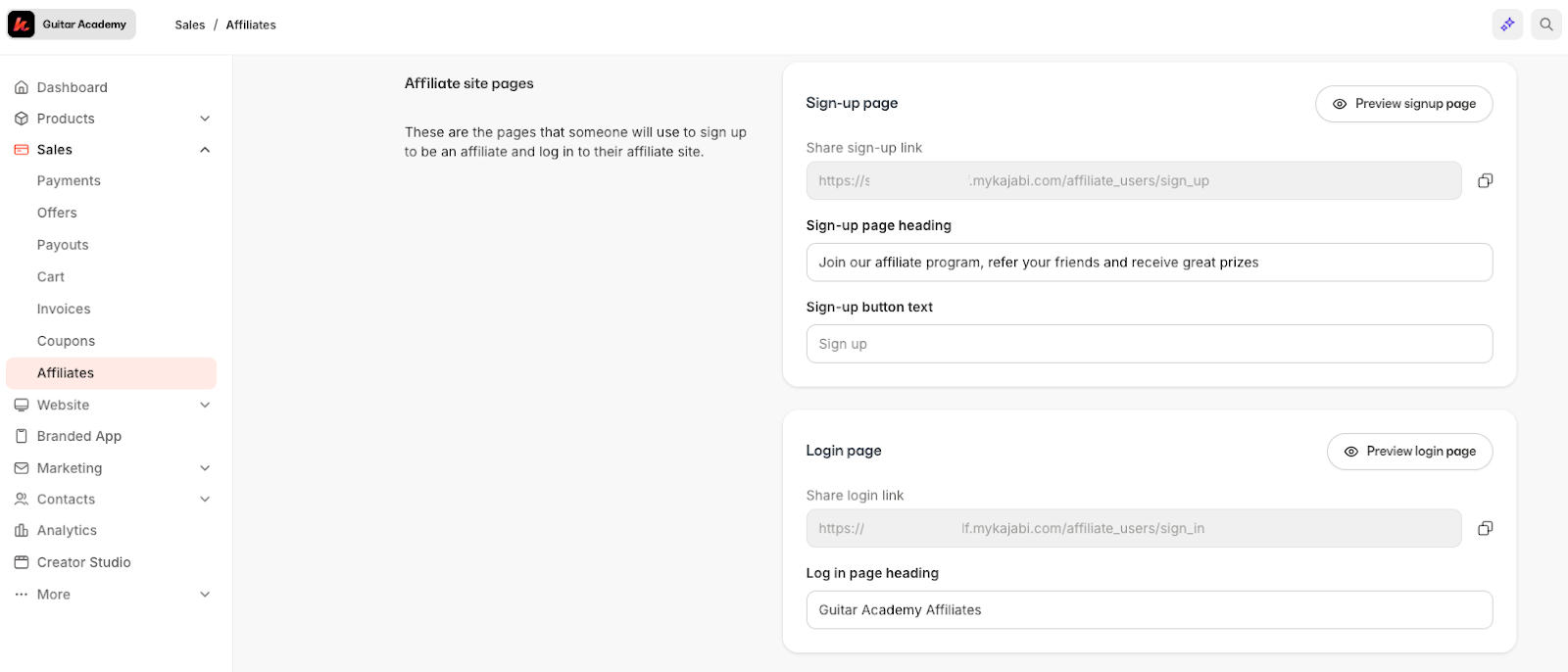
1. Affiliates are provided the login URL when they register to be an affiliate or are added by you.
2. You can access the login or registration URL by going to **Affiliates > Settings.**
## Access the Affiliate Portal
1. Affiliates are provided the login URL when they register to be an affiliate or are added by you.
2. You can access the login or registration URL by going to **Affiliates > Settings.**
 ## Affiliate Dashboard
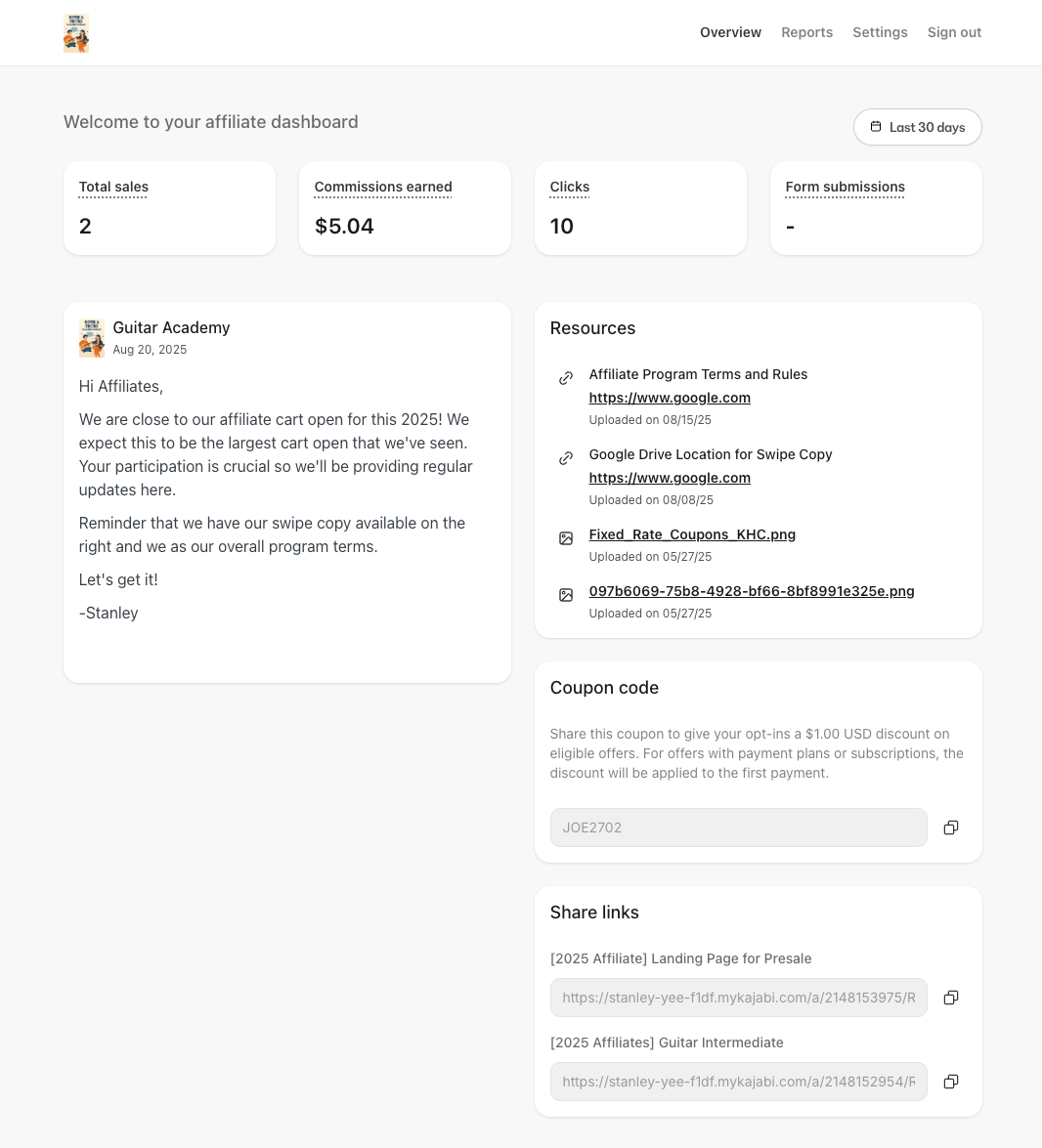
The **Affiliate Dashboard** provides a real-time snapshot of performance and quick access to announcements, resources, coupon codes (if enabled), and share links.
## Affiliate Dashboard
The **Affiliate Dashboard** provides a real-time snapshot of performance and quick access to announcements, resources, coupon codes (if enabled), and share links.
 ### Date filter
Affiliates can use the date filter to view metrics for a specific time period (e.g., this week, this month, a custom range). All metrics update to reflect the selected range.
### Performance metrics
The Dashboard displays four key metrics, each scoped to the selected date range:
* **Total Sales**: The **count** of sales attributed to the affiliate over the selected period.
* **Commissions Earned**: The **total value of commissions** earned over the selected period, **excluding any refunds**.
* **Clicks**: The **total number of times** an individual clicked any of the affiliate's share links.
* **Form Submissions**: The **count of form submissions** attributed to the affiliate over the selected period.
**Tip:**
Affiliates can use the date filter to compare launches or campaigns.
### Memo
The **Memo** is a static message from the program owner that appears for all affiliates. Affiliates may see launch dates, campaign rules, payout information, or other timely updates here. This is a great place to provide information on upcoming events or helpful information for affiliates to get started.
### Resources
The **Resources** section is where your affiliates can access helpful links and downloadable assets such as brand guidelines, images, copy templates, or swipe files provided by you.
You can update this in your **Affiliates Settings**.
### Coupon Code
If you have enabled them, the affiliate will see their specific **Affiliate Coupon Code** here. Affiliates can use this code in their promotions as instructed by the owner.
### Share Links
These are affiliate-specific **Share Links** that your affiliates can copy and share in content, emails, and social posts, so clicks and sales can be attributed correctly.
**Note:**
Share Links are unique to the logged‑in affiliate and links marked as private will not be displayed.
## Reports
### Purchase Summary
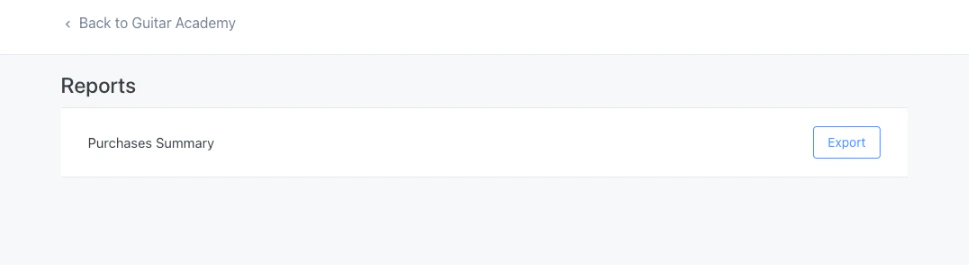
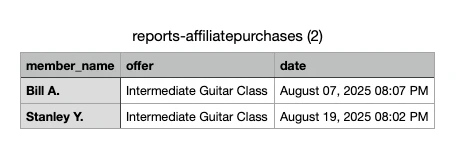
The **Purchase Summary** is the report available to affiliates. It provides a downloadable export of purchases attributed to the affiliate with the following fields:
* **Customer Name**
* **Offer Name**
* **Date of Purchase**
Affiliates can use this export for tracking, reconciliation, or to analyze which offers and timeframes perform best.
### Date filter
Affiliates can use the date filter to view metrics for a specific time period (e.g., this week, this month, a custom range). All metrics update to reflect the selected range.
### Performance metrics
The Dashboard displays four key metrics, each scoped to the selected date range:
* **Total Sales**: The **count** of sales attributed to the affiliate over the selected period.
* **Commissions Earned**: The **total value of commissions** earned over the selected period, **excluding any refunds**.
* **Clicks**: The **total number of times** an individual clicked any of the affiliate's share links.
* **Form Submissions**: The **count of form submissions** attributed to the affiliate over the selected period.
**Tip:**
Affiliates can use the date filter to compare launches or campaigns.
### Memo
The **Memo** is a static message from the program owner that appears for all affiliates. Affiliates may see launch dates, campaign rules, payout information, or other timely updates here. This is a great place to provide information on upcoming events or helpful information for affiliates to get started.
### Resources
The **Resources** section is where your affiliates can access helpful links and downloadable assets such as brand guidelines, images, copy templates, or swipe files provided by you.
You can update this in your **Affiliates Settings**.
### Coupon Code
If you have enabled them, the affiliate will see their specific **Affiliate Coupon Code** here. Affiliates can use this code in their promotions as instructed by the owner.
### Share Links
These are affiliate-specific **Share Links** that your affiliates can copy and share in content, emails, and social posts, so clicks and sales can be attributed correctly.
**Note:**
Share Links are unique to the logged‑in affiliate and links marked as private will not be displayed.
## Reports
### Purchase Summary
The **Purchase Summary** is the report available to affiliates. It provides a downloadable export of purchases attributed to the affiliate with the following fields:
* **Customer Name**
* **Offer Name**
* **Date of Purchase**
Affiliates can use this export for tracking, reconciliation, or to analyze which offers and timeframes perform best.
 **Note:**
Sensitive information (e.g., full name, email address, payment information) is not available to the affiliate.
[Learn how your affiliates get paid](../../sales/affiliates/manage-affiliate-payouts-and-commissions).
## Settings
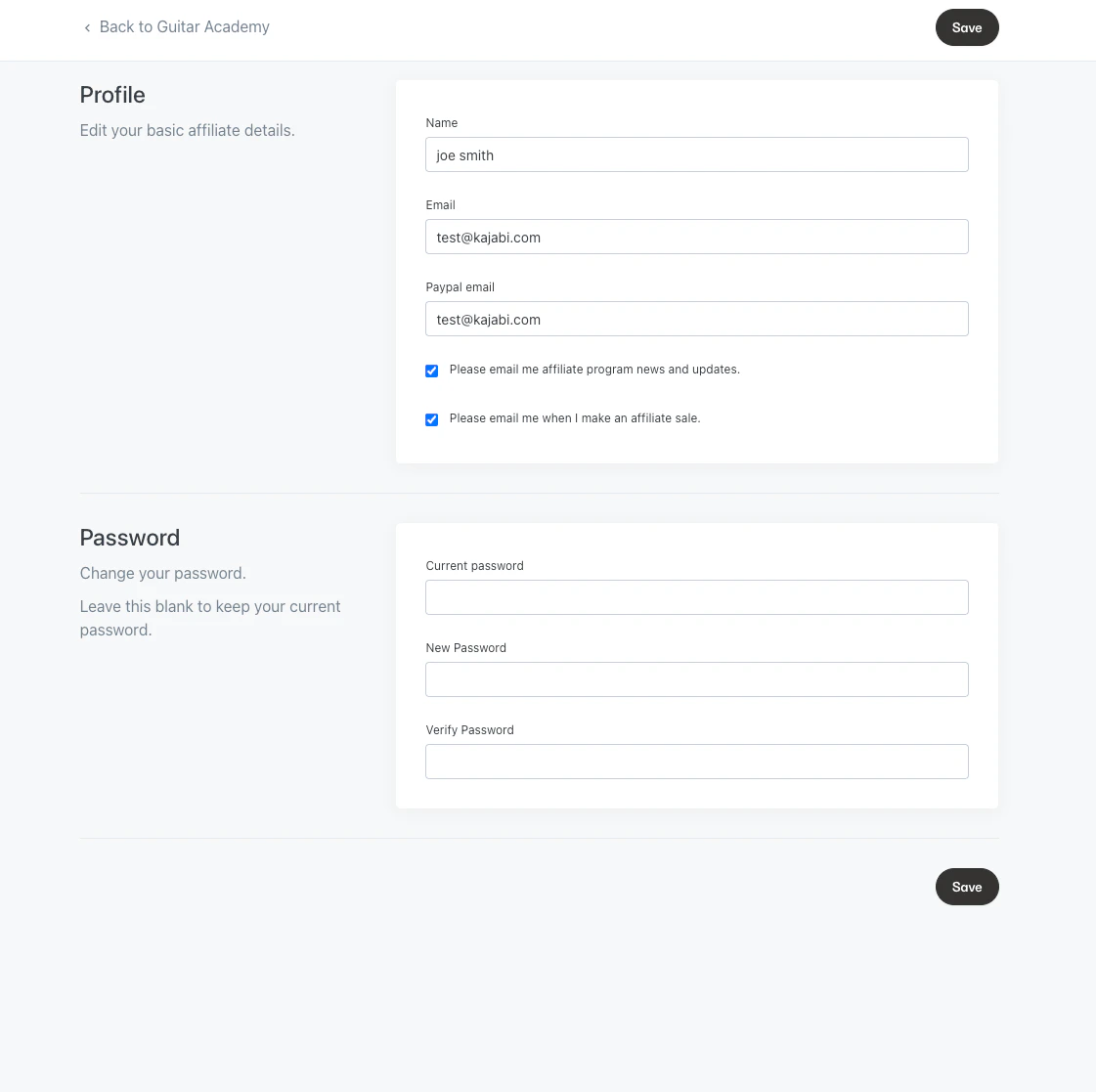
Affiliates can manage profile information, payout email, notifications, and password from **Settings**.
**Note:**
Sensitive information (e.g., full name, email address, payment information) is not available to the affiliate.
[Learn how your affiliates get paid](../../sales/affiliates/manage-affiliate-payouts-and-commissions).
## Settings
Affiliates can manage profile information, payout email, notifications, and password from **Settings**.
 ### Profile information
Affiliates can update the following details:
* **Name**
* **Email**
* **PayPal email** (used if you pay affiliates via PayPal)
### Email notifications
Affiliates can control which emails they receive:
* **Please email me affiliate program news and updates:** Opt in or out of affiliate announcements from your site.
* **Please email me when I make an affiliate sale:** Kajabi sends an automatic email whenever a new sale is made with the affiliate as the referring affiliate.
### Change password
Affiliates can update their password at any time. For security, they should use a unique passphrase with a mix of letters, numbers, and symbols.
### Profile information
Affiliates can update the following details:
* **Name**
* **Email**
* **PayPal email** (used if you pay affiliates via PayPal)
### Email notifications
Affiliates can control which emails they receive:
* **Please email me affiliate program news and updates:** Opt in or out of affiliate announcements from your site.
* **Please email me when I make an affiliate sale:** Kajabi sends an automatic email whenever a new sale is made with the affiliate as the referring affiliate.
### Change password
Affiliates can update their password at any time. For security, they should use a unique passphrase with a mix of letters, numbers, and symbols.