> ## Documentation Index
> Fetch the complete documentation index at: https://help.kajabi.com/llms.txt
> Use this file to discover all available pages before exploring further.
# Affiliates overview
> Use Kajabi's Affiliates feature to leverage partnerships and grow your sales through referral commissions.
**Affiliates** lets you leverage partnerships to grow your revenue by rewarding others for selling your courses on your behalf. You set the commission, your affiliates share the links, and Kajabi tracks every conversion.
**Note:**
Affiliates are only available with the Growth and Pro Plans. See [kajabi.com/pricing](https://kajabi.com/pricing) for more details.
### Key benefits
* Manage affiliate registrations and accounts
* Track conversions and form submissions
* Automatically calculate earnings
* Create detailed reports
### Determine payout method
* **Automatic Payouts** reduce manual work by scheduling payments directly through PayPal.
* **Manual Payouts** give you full control over when and how affiliates are paid. Kajabi helps you track and batch **Due commissions**, but you send the money outside Kajabi (for example, PayPal, Wise, or cash).
### Set up a payout schedule
* Go to **Transactions** > **Payouts** to determine your preferred method of paying out your affiliates
* Create a payout schedule to keep transactions organized and set reminders to pay commissions
### Enable commissions
* [Enable Affiliate Commission](../../sales/affiliates/activate-affiliate-commission) for your Offers
### Create Share Links or Affiliate Coupons
* [Create Share Links](../../sales/affiliates/create-an-affiliate-share-link) to track referrals from affiliate traffic
* [Create Affiliate Coupons](../../sales/affiliates/create-affiliate-coupons) to credit affiliates when their personalized code is used
## Affiliate Dashboard
The **Affiliate Dashboard** shows an overview of how your affiliates are performing.
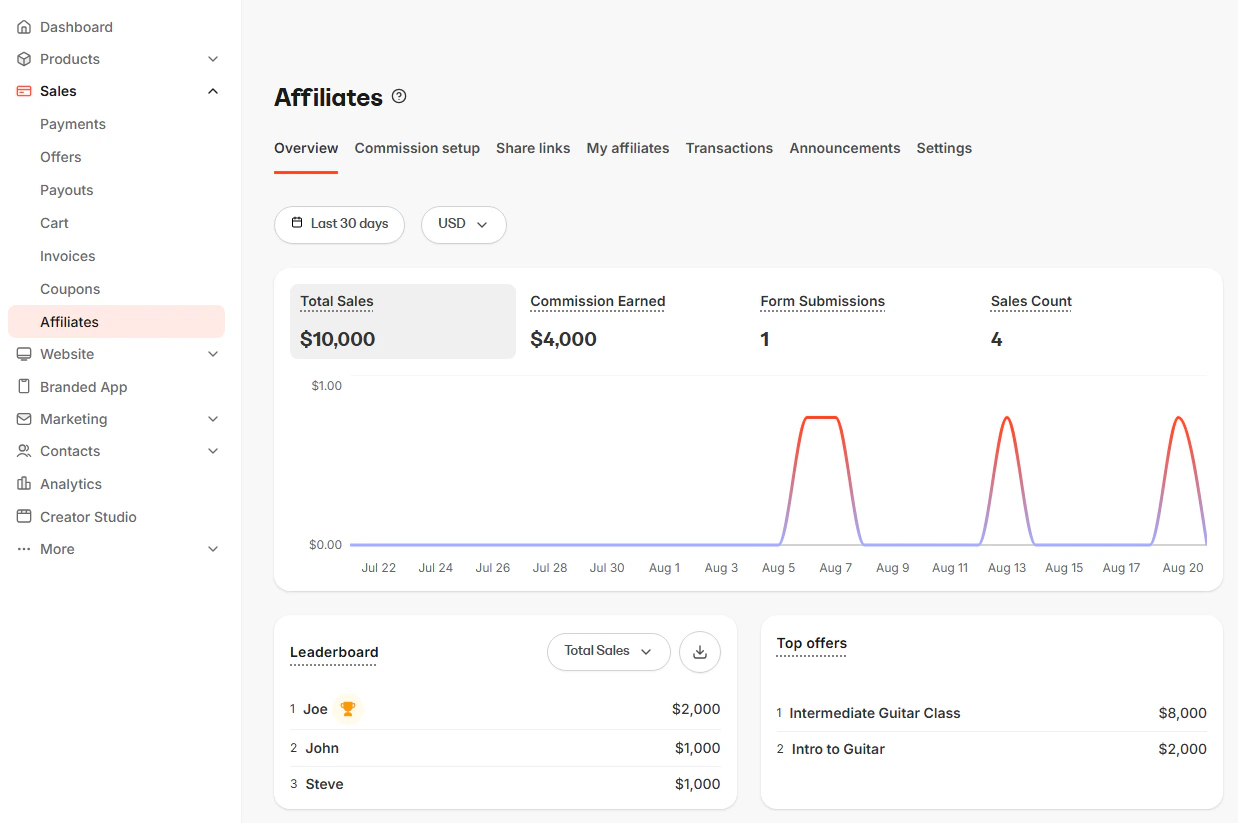 Set the **Date range** and **Currency** using the selectors above the graph to narrow down the data to review the following metrics:
* **Total Sales**: The total value of sales attributed to your affiliates, excluding refunds.
* **Commission Earned**: The total amount of commissions earned by your affiliates, excluding refunds.
* **Form Submissions**: The count of form submissions attributed to your affiliates.
* **Sales Count**: The count of both free and paid sales attributed to your affiliate.
* **Leaderboard**: A ranked list of your top affiliates.
* **Top offers**: A ranked list of your top-selling affiliate-related Offers
## Commission setup
Set up your affiliate's commission percentage or amount for each **Offer** when it is purchased with their unique **Share Link** or personalized **Coupon Code**.
[Learn how to activate Affiliate Commission](../../sales/affiliates/activate-affiliate-commission).
## Share Links and Affiliate Coupons
### Share Links
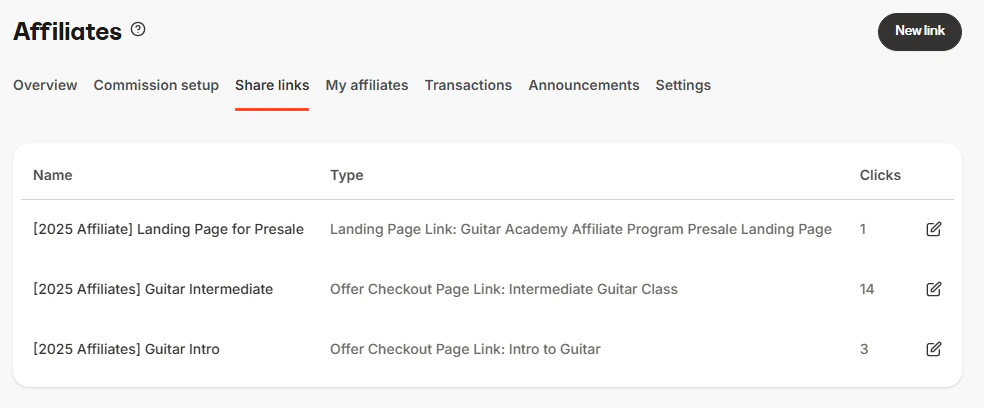
A Share Link is simply a URL that can lead to any site or page (even a site outside Kajabi). When a user clicks on a Share Link a cookie is placed in their browser based upon the referral conversion window you have set in your Affiliate settings. This cookie will attribute the visitor's form submissions and purchases to the appropriate Affiliate.
[Create Share Links](../../sales/affiliates/create-an-affiliate-share-link) that lead to any URL, Landing Page, or Checkout Page. As long as the user completes a purchase of an Offer on Kajabi using the same browser where they originally clicked the Share Link, the sale will be credited to the Affiliate User.
Set the **Date range** and **Currency** using the selectors above the graph to narrow down the data to review the following metrics:
* **Total Sales**: The total value of sales attributed to your affiliates, excluding refunds.
* **Commission Earned**: The total amount of commissions earned by your affiliates, excluding refunds.
* **Form Submissions**: The count of form submissions attributed to your affiliates.
* **Sales Count**: The count of both free and paid sales attributed to your affiliate.
* **Leaderboard**: A ranked list of your top affiliates.
* **Top offers**: A ranked list of your top-selling affiliate-related Offers
## Commission setup
Set up your affiliate's commission percentage or amount for each **Offer** when it is purchased with their unique **Share Link** or personalized **Coupon Code**.
[Learn how to activate Affiliate Commission](../../sales/affiliates/activate-affiliate-commission).
## Share Links and Affiliate Coupons
### Share Links
A Share Link is simply a URL that can lead to any site or page (even a site outside Kajabi). When a user clicks on a Share Link a cookie is placed in their browser based upon the referral conversion window you have set in your Affiliate settings. This cookie will attribute the visitor's form submissions and purchases to the appropriate Affiliate.
[Create Share Links](../../sales/affiliates/create-an-affiliate-share-link) that lead to any URL, Landing Page, or Checkout Page. As long as the user completes a purchase of an Offer on Kajabi using the same browser where they originally clicked the Share Link, the sale will be credited to the Affiliate User.
 ### Affiliate Coupons
Unlike Share Links, when an [Affiliate Coupon](../../sales/affiliates/create-affiliate-coupons) code is used to purchase an **Offer** from your site, the affiliate is credited with the transaction without needing to click a Share Link first. As an administrator, you can create **Discounts** that generate personalized coupon codes for each affiliate.
## Affiliate Users
Create and manage your Affiliate Users in the **Users** section of your **Affiliate Dashboard.**
Click on an Affiliate User's **Name** to:
* Review their individual affiliate statistics.
* Override their **Affiliate Percentage**.
* View which **Share Links** are available to each affiliate.
* View and update your affiliates' personalized **Coupon Code**.
* Manually add an affiliate transaction.
* Export their form submissions, which contain the following:
* Form Title
* Form ID
* Submission Date
* Customer Name
* Customer ID
* Customer Email
* Affiliate ID
* Affiliate Name
* Affiliate Email
See [Managing your Affiliates](../../sales/affiliates/manage-your-affiliates) for more details.
## Transactions
View all transactions credited to your Affiliate Users in **Transactions**.
### Affiliate Coupons
Unlike Share Links, when an [Affiliate Coupon](../../sales/affiliates/create-affiliate-coupons) code is used to purchase an **Offer** from your site, the affiliate is credited with the transaction without needing to click a Share Link first. As an administrator, you can create **Discounts** that generate personalized coupon codes for each affiliate.
## Affiliate Users
Create and manage your Affiliate Users in the **Users** section of your **Affiliate Dashboard.**
Click on an Affiliate User's **Name** to:
* Review their individual affiliate statistics.
* Override their **Affiliate Percentage**.
* View which **Share Links** are available to each affiliate.
* View and update your affiliates' personalized **Coupon Code**.
* Manually add an affiliate transaction.
* Export their form submissions, which contain the following:
* Form Title
* Form ID
* Submission Date
* Customer Name
* Customer ID
* Customer Email
* Affiliate ID
* Affiliate Name
* Affiliate Email
See [Managing your Affiliates](../../sales/affiliates/manage-your-affiliates) for more details.
## Transactions
View all transactions credited to your Affiliate Users in **Transactions**.
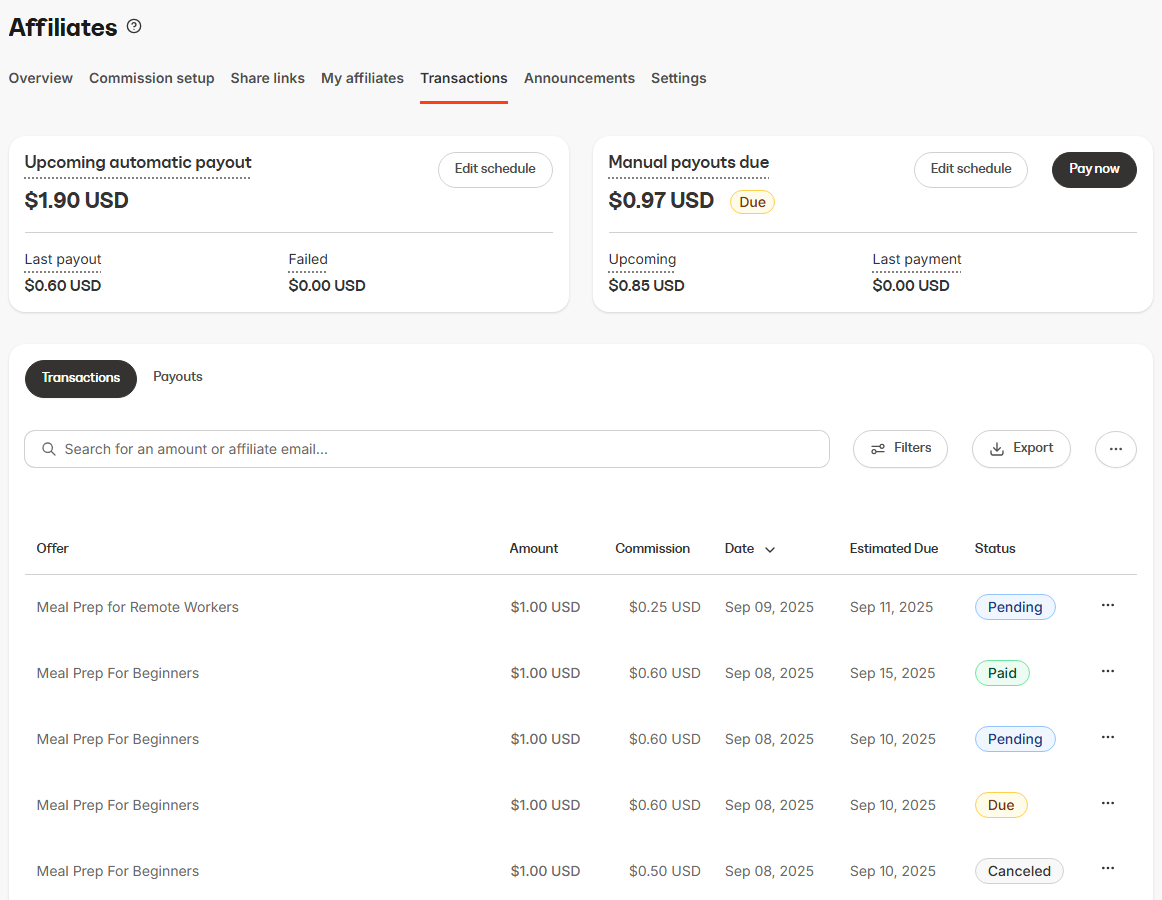 Learn more about the [Affiliate Commission Workflow](../../sales/affiliates/understanding-the-affiliates-commission-workflow) and how to [manage Affiliate payouts and commissions](../../sales/affiliates/manage-affiliate-payouts-and-commissions) to begin allocating commission and paying out your affiliates.
## Announcements
Learn more about the [Affiliate Commission Workflow](../../sales/affiliates/understanding-the-affiliates-commission-workflow) and how to [manage Affiliate payouts and commissions](../../sales/affiliates/manage-affiliate-payouts-and-commissions) to begin allocating commission and paying out your affiliates.
## Announcements
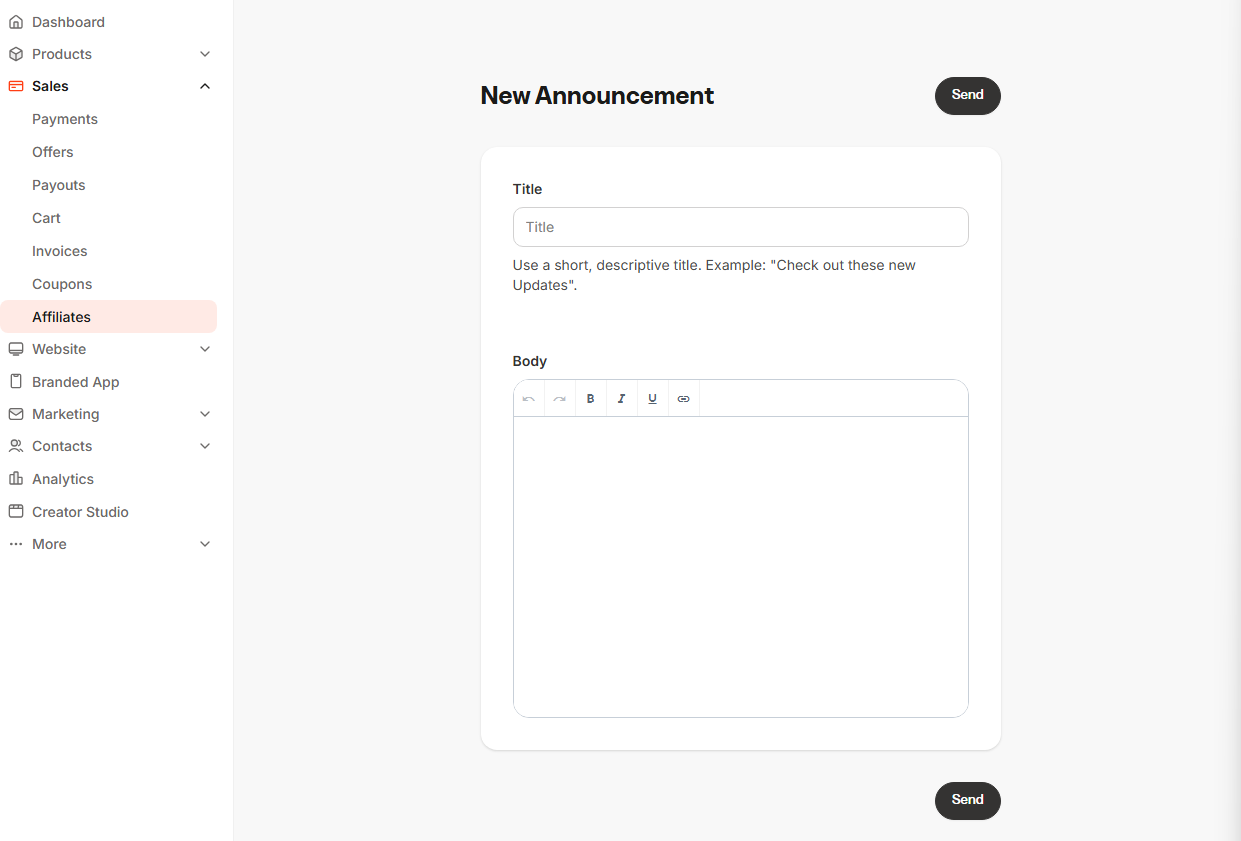
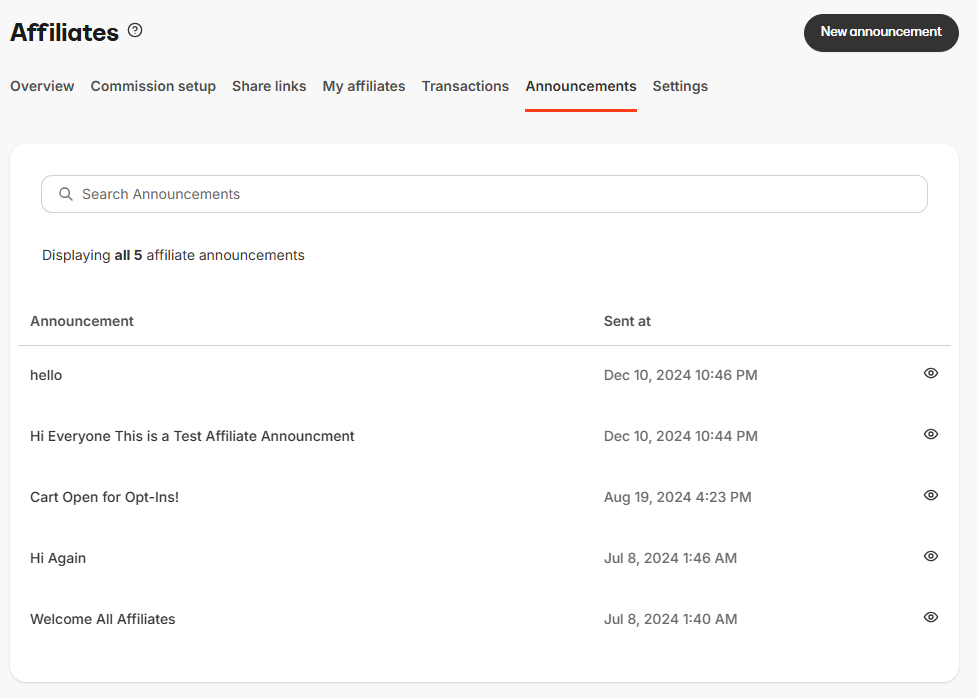 Communicate with every Affiliate User on your site by creating an **Announcement**. An Announcement sends an email to every affiliate, including a **Title** and **Body** text.
 ## Settings
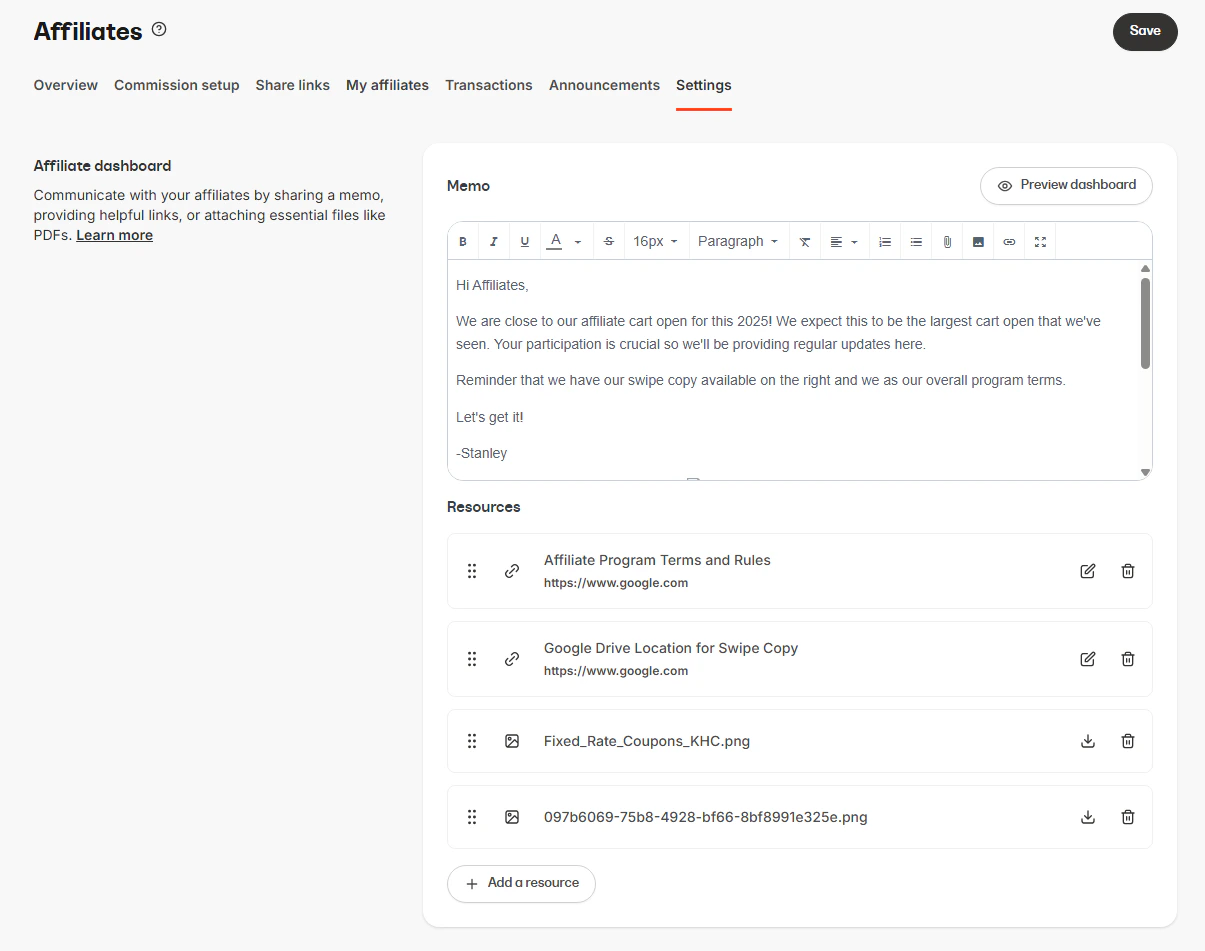
**Affiliate Settings** in the top menu of your Affiliates page lets you customize the appearance of your Affiliate Dashboards and configure key elements of your affiliate program.
Use **Memos** to convey useful information that your affiliates will see when they sign in. Use **Resources** to share files and links (e.g., promo creatives, swipe copy, calendars). A maximum of 10 resources can be added at any given time.
**Preview the dashboard** to see the view your affiliates have when they log into their Portal.
## Settings
**Affiliate Settings** in the top menu of your Affiliates page lets you customize the appearance of your Affiliate Dashboards and configure key elements of your affiliate program.
Use **Memos** to convey useful information that your affiliates will see when they sign in. Use **Resources** to share files and links (e.g., promo creatives, swipe copy, calendars). A maximum of 10 resources can be added at any given time.
**Preview the dashboard** to see the view your affiliates have when they log into their Portal.
 **Tip:**
Click and drag your resources to rearrange the order that your affiliates view them.
The **Affiliate Signup Page** is where individuals can register as your affiliate. Learn how to [create a custom Affiliate Signup Page](https://help.kajabi.com/hc/en-us/articles/360037244074).
**Note:**
If **Registrations** are disabled, this page will prompt your prospective affiliate to send an email to the Support email listed in your **Site Details**.
The **Affiliate Login page** is where your registered affiliates log in to their own Affiliate Dashboard and view their sales metrics.
The **Referral Conversion Window** determines the duration of an affiliate cookie in a visitor's browser. [Learn more about the Referral Conversion Window](../../sales/affiliates/activate-affiliate-commission).
## Affiliate Portal
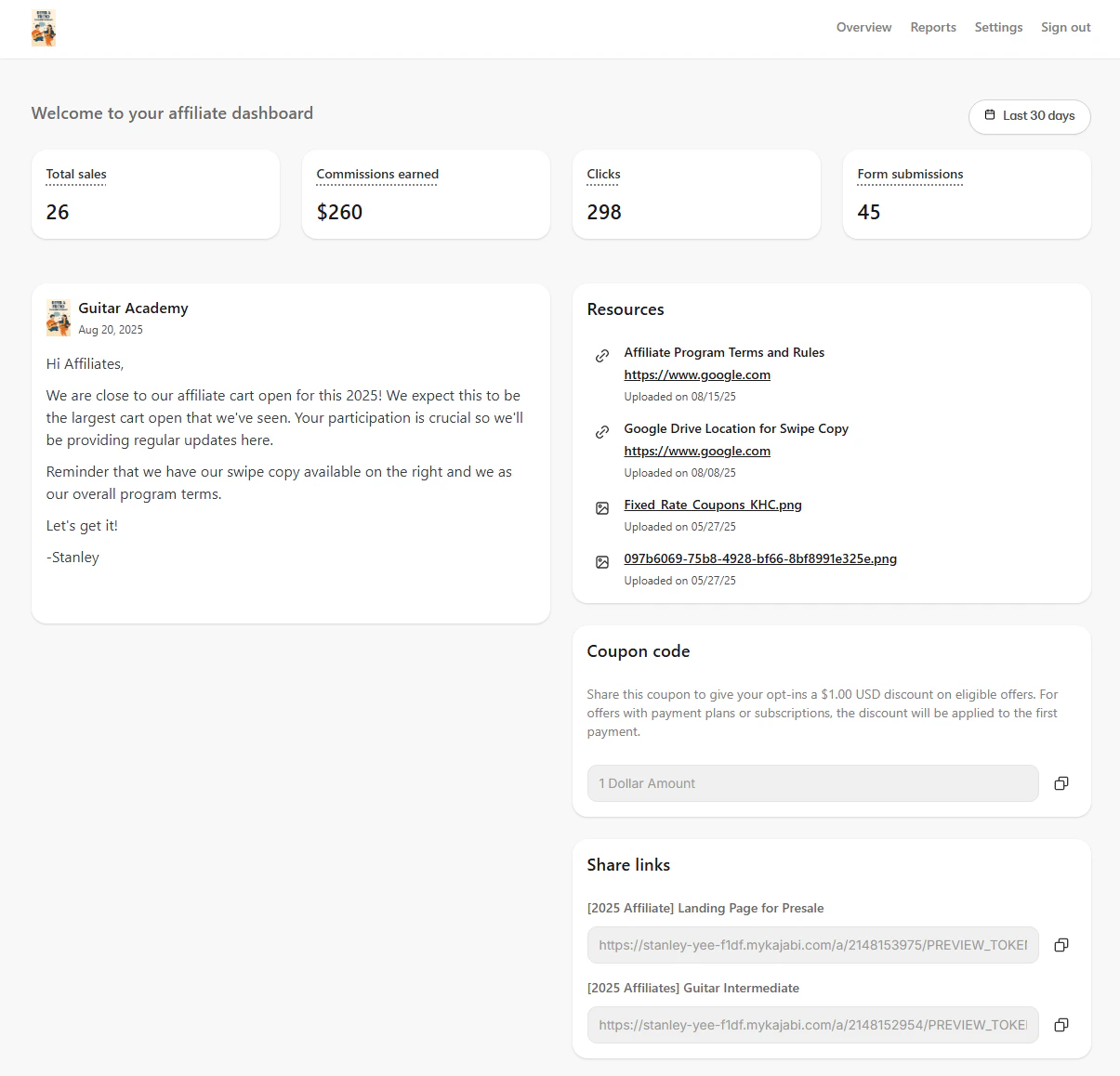
After an affiliate is added to your site manually or through registration, they receive an Affiliate User welcome email containing a link to set up their affiliate account and instructions on how to access their **Affiliate Portal**.
### Affiliate Portal features
* View their **Stats** within a specified time range:
* Total **Sales**
* **Commissions** earned
* **Clicks**
* **Form submissions**
* View the latest updates of your affiliate program in the **Memo.**
* Download or access **Resources** you've uploaded in your Affiliate Settings.
* Access their **Share Links** or their Personalized **Coupon Code**.
* Export their **Purchase Summary Report**.
* Change their **Settings** to update their profile, email preferences, and change their password.
**Tip:**
Click and drag your resources to rearrange the order that your affiliates view them.
The **Affiliate Signup Page** is where individuals can register as your affiliate. Learn how to [create a custom Affiliate Signup Page](https://help.kajabi.com/hc/en-us/articles/360037244074).
**Note:**
If **Registrations** are disabled, this page will prompt your prospective affiliate to send an email to the Support email listed in your **Site Details**.
The **Affiliate Login page** is where your registered affiliates log in to their own Affiliate Dashboard and view their sales metrics.
The **Referral Conversion Window** determines the duration of an affiliate cookie in a visitor's browser. [Learn more about the Referral Conversion Window](../../sales/affiliates/activate-affiliate-commission).
## Affiliate Portal
After an affiliate is added to your site manually or through registration, they receive an Affiliate User welcome email containing a link to set up their affiliate account and instructions on how to access their **Affiliate Portal**.
### Affiliate Portal features
* View their **Stats** within a specified time range:
* Total **Sales**
* **Commissions** earned
* **Clicks**
* **Form submissions**
* View the latest updates of your affiliate program in the **Memo.**
* Download or access **Resources** you've uploaded in your Affiliate Settings.
* Access their **Share Links** or their Personalized **Coupon Code**.
* Export their **Purchase Summary Report**.
* Change their **Settings** to update their profile, email preferences, and change their password.
 See [Affiliate Portal overview](../../sales/affiliates/affiliate-portal-overview) for more details.