> ## Documentation Index
> Fetch the complete documentation index at: https://help.kajabi.com/llms.txt
> Use this file to discover all available pages before exploring further.
# Create an Affiliate Share link
> Generate and edit an Affiliate Share link to maximize affiliate revenue.
A **Share Link** is a URL that can lead to any site or page, even outside Kajabi. When a visitor clicks a Share Link, a cookie is placed in their browser for 30 days. This cookie tracks the visitor's activity on your site and attributes any resulting sales to the appropriate affiliate.
 Create Share Links that lead to any URL, Landing Page, or Checkout Page. As long as the visitor completes a purchase of an Offer on Kajabi using the same browser where they originally clicked the Share Link, the sale is credited to the Affiliate User.
Keep in mind that although you can track clicks for specific Share Links, there is no way to determine which Affiliate Link was used by a specific customer or the affiliate credited.
Truncating an Affiliate Share Link using tools like the [Bitly URL shortener](https://bitly.com/) still credits the affiliate for the conversion.
**Note:**
Affiliates will only be credited if you set an **Affiliate percentage** in the Offer. Learn how to set up your Affiliate Commission in the [Additional Settings of an Offer](../../sales/offers/how-to-include-additional-settings-for-your-offer).
## Generate a Share Link
1. Open the **Sales** tab from your Dashboard.
2. Click **Affiliates**.
3. Select **Share links** from the top menu of the **Affiliates Dashboard**.
4. Click **New affiliate link**.
Or, if you've previously created an affiliate link, click **+ New Link** at the top right.
Create Share Links that lead to any URL, Landing Page, or Checkout Page. As long as the visitor completes a purchase of an Offer on Kajabi using the same browser where they originally clicked the Share Link, the sale is credited to the Affiliate User.
Keep in mind that although you can track clicks for specific Share Links, there is no way to determine which Affiliate Link was used by a specific customer or the affiliate credited.
Truncating an Affiliate Share Link using tools like the [Bitly URL shortener](https://bitly.com/) still credits the affiliate for the conversion.
**Note:**
Affiliates will only be credited if you set an **Affiliate percentage** in the Offer. Learn how to set up your Affiliate Commission in the [Additional Settings of an Offer](../../sales/offers/how-to-include-additional-settings-for-your-offer).
## Generate a Share Link
1. Open the **Sales** tab from your Dashboard.
2. Click **Affiliates**.
3. Select **Share links** from the top menu of the **Affiliates Dashboard**.
4. Click **New affiliate link**.
Or, if you've previously created an affiliate link, click **+ New Link** at the top right.
## Share Link editor
### Create a link
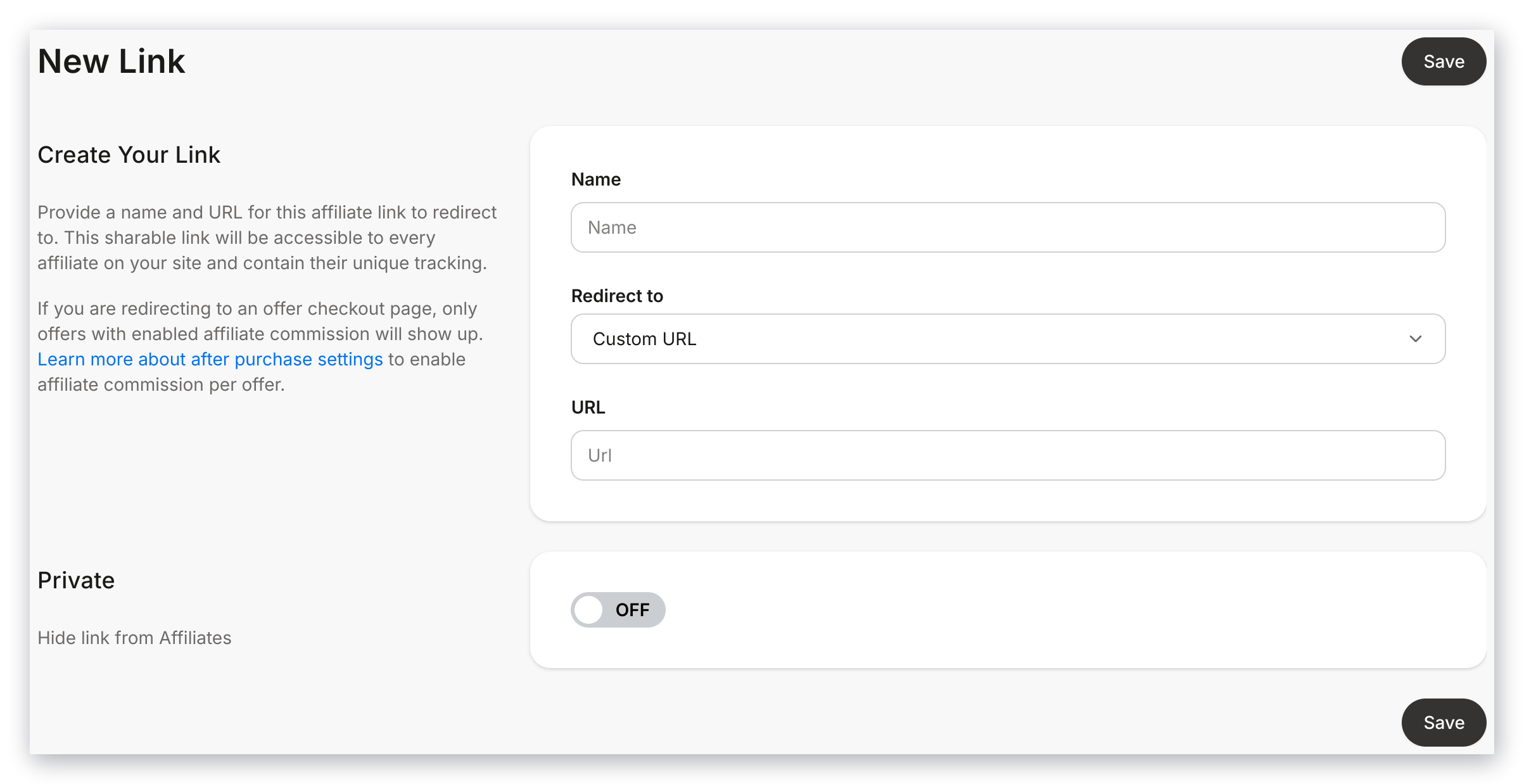
Enter the **Name** and **Target URL** where you'd like the Affiliate Share link to redirect. The Name and URL will be visible to the affiliate.
Redirect to a:
* Custom URL
* Landing Page
* Checkout Page
This link will be accessible to every Affiliate User on your site, and will contain their unique tracking info.
 ### Private
Toggle on or off the **Private** setting in the Share link editor to hide the link from your affiliates or make it accessible to every affiliate on your site.
Creating a Private Share Link will not display the Share link in your [Affiliate's Portal](../../sales/affiliates/affiliates-overview#h_52456a83-02fd-4d90-81a2-62a8f7e565e1). This allows you to keep the Share link unpublished or send it directly to a specific affiliate only.
### Private
Toggle on or off the **Private** setting in the Share link editor to hide the link from your affiliates or make it accessible to every affiliate on your site.
Creating a Private Share Link will not display the Share link in your [Affiliate's Portal](../../sales/affiliates/affiliates-overview#h_52456a83-02fd-4d90-81a2-62a8f7e565e1). This allows you to keep the Share link unpublished or send it directly to a specific affiliate only.
 **Note:**
Although you can track clicks for specific Share links, there is no way to determine which Affiliate Share link was used and who used it.
**Note:**
Although you can track clicks for specific Share links, there is no way to determine which Affiliate Share link was used and who used it.