> ## Documentation Index
> Fetch the complete documentation index at: https://help.kajabi.com/llms.txt
> Use this file to discover all available pages before exploring further.
# Manage affiliates
> Create, invite, and manage Affiliate Users in your Kajabi Affiliates Dashboard.
Create and manage your affiliates in the **My affiliates** section of your **Affiliates Dashboard**. Before getting started, ensure your Kajabi site is set up for affiliate use, including enabling affiliate features and setting default and Offer-level commissions.
[Access your Affiliate report](/articles/sales/affiliates/affiliate-report) for an overview of affiliate data.
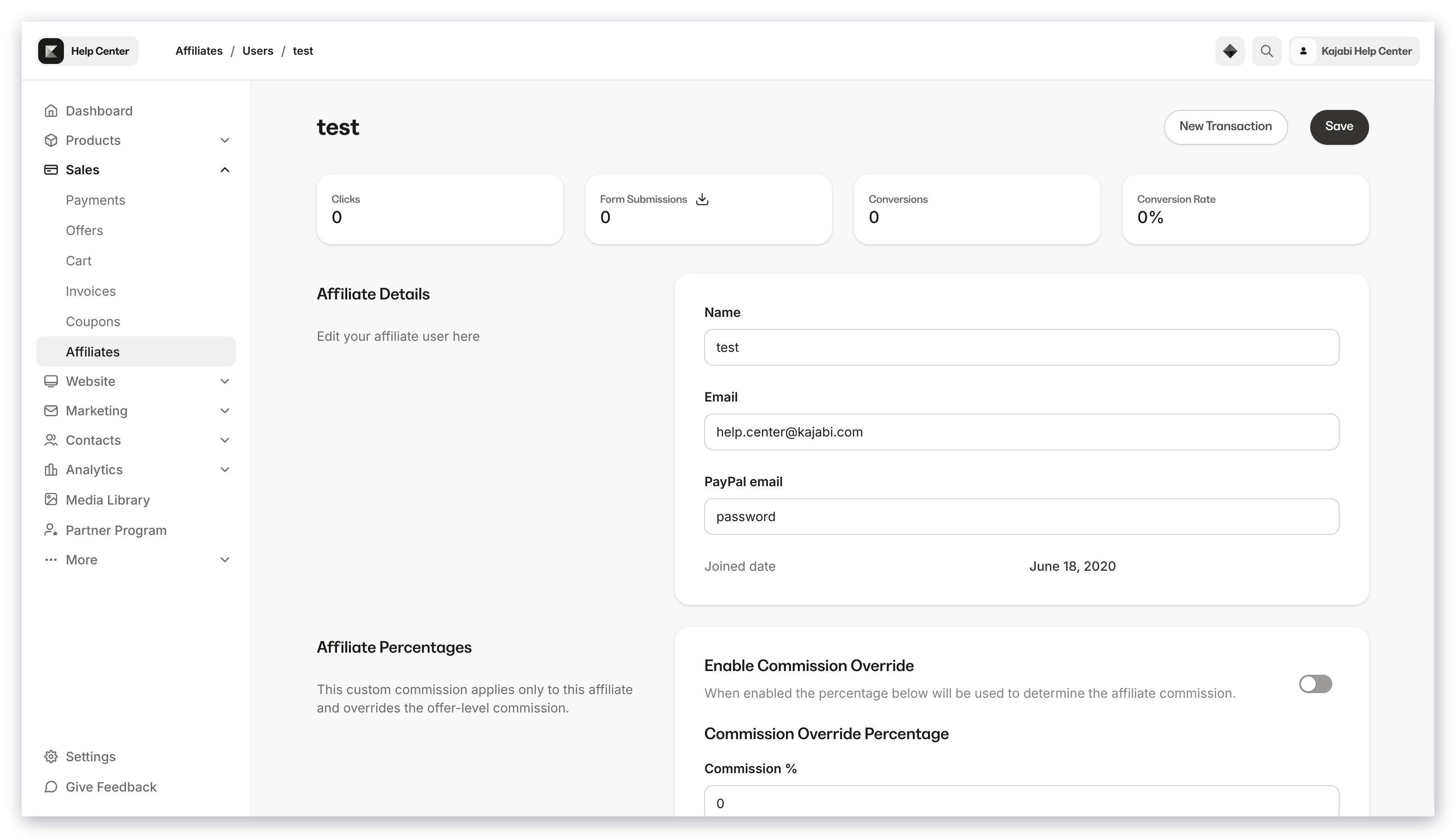
Click on an affiliate's **Name** to:
* Review their individual affiliate statistics
* Override their affiliate [Percentage](/articles/sales/affiliates/set-up-your-affiliate-program#set-default-affiliate-commission)
* View which **Share Links** are available to each affiliate
* Create a **Manual Transaction** to credit your affiliate
 **Note:** Affiliates do not automatically get added to your **Contacts** tab. Because affiliates do not need to be customers of your site, they may only exist on your **Affiliates Dashboard**.
However, if your affiliates complete a **Form** created on your Kajabi site, purchase an **Offer**, or are manually imported into your Contacts tab, then you will be able to see your affiliates in both your Affiliates Dashboard and your Contacts tab.
## Invite Affiliates
Manually import affiliates by sending an invite to join your site.
1. Open the **Sales** tab from your Dashboard.
2. Then, select **Affiliates**.
3. Open **My affiliates** from the top navigation menu.
4. There, click **+ Invite affiliates** in the top right corner of the page.
5. Enter the **Name** and **Email Address** of your new affiliate(s).
6. Then, click **Invite**.
You will receive an email from our support team to the email associated with your account when the affiliate import process has finished.
**Note:** You may add up to 500 affiliates with each import.
### Use a CSV to import affiliates
You may copy and paste affiliate information into the **Invite new affiliates** field from a specifically formatted CSV file. Your CSV file **must** be formatted as below for your affiliates to be accepted and successfully imported into Kajabi:
**Note:** Affiliates do not automatically get added to your **Contacts** tab. Because affiliates do not need to be customers of your site, they may only exist on your **Affiliates Dashboard**.
However, if your affiliates complete a **Form** created on your Kajabi site, purchase an **Offer**, or are manually imported into your Contacts tab, then you will be able to see your affiliates in both your Affiliates Dashboard and your Contacts tab.
## Invite Affiliates
Manually import affiliates by sending an invite to join your site.
1. Open the **Sales** tab from your Dashboard.
2. Then, select **Affiliates**.
3. Open **My affiliates** from the top navigation menu.
4. There, click **+ Invite affiliates** in the top right corner of the page.
5. Enter the **Name** and **Email Address** of your new affiliate(s).
6. Then, click **Invite**.
You will receive an email from our support team to the email associated with your account when the affiliate import process has finished.
**Note:** You may add up to 500 affiliates with each import.
### Use a CSV to import affiliates
You may copy and paste affiliate information into the **Invite new affiliates** field from a specifically formatted CSV file. Your CSV file **must** be formatted as below for your affiliates to be accepted and successfully imported into Kajabi:
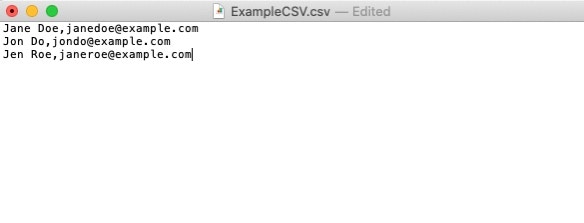 * Format each line as **First Name Last Name**,**Email Address**
* Do not include extra commas or special characters
* **Examples:**
* John Doe,[jdoe@example.com](mailto:jdoe@example.com)
* Jane Smith,[jsmith@example.com](mailto:jsmith@example.com)
### Activate Affiliate commissions
After inviting your affiliates, activate **Affiliate commissions** to credit your affiliates for transactions made with their Share Links. [Learn more](/articles/sales/affiliates/activate-affiliate-commission).
Additionally, you can activate affiliate commissions specifically for certain offers:
1. From **Sales** in your Dashboard navigation, click **Pricing**.
2. Select the desired **Offer**.
3. Select the **Settings** tab.
4. Toggle on **Activate affiliate commissions for this offer** to configure the specific payout percentage or fixed amount for that offer.
For custom affiliate links, head to the **Affiliates Dashboard** and use the **Share Links** tab to generate referral links that redirect to specific Landing Pages, Sales Pages, or Checkout Pages. Provide affiliates with these unique links for targeted promotions.
To manage payouts, monitor transactions in the **Transactions** tab of the Affiliates Dashboard. From here, you can export reports for performance reviews and configure automatic or manual payouts.
**Note:** When opening an exported report CSV file, use TextEdit (for Mac) or Notepad (for PCs).
## After inviting an Affiliate
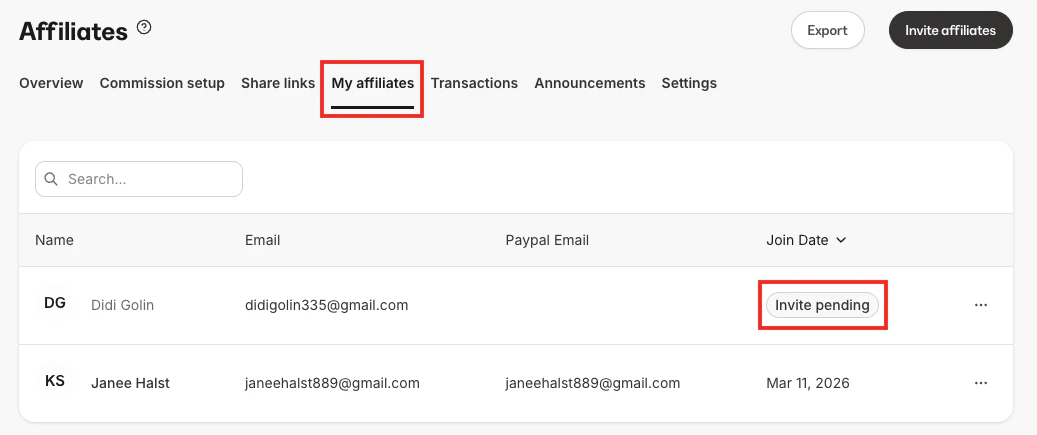
An invited affiliate is marked with an **Invite pending** banner until they have confirmed their desire to join as an affiliate of your site:
* Format each line as **First Name Last Name**,**Email Address**
* Do not include extra commas or special characters
* **Examples:**
* John Doe,[jdoe@example.com](mailto:jdoe@example.com)
* Jane Smith,[jsmith@example.com](mailto:jsmith@example.com)
### Activate Affiliate commissions
After inviting your affiliates, activate **Affiliate commissions** to credit your affiliates for transactions made with their Share Links. [Learn more](/articles/sales/affiliates/activate-affiliate-commission).
Additionally, you can activate affiliate commissions specifically for certain offers:
1. From **Sales** in your Dashboard navigation, click **Pricing**.
2. Select the desired **Offer**.
3. Select the **Settings** tab.
4. Toggle on **Activate affiliate commissions for this offer** to configure the specific payout percentage or fixed amount for that offer.
For custom affiliate links, head to the **Affiliates Dashboard** and use the **Share Links** tab to generate referral links that redirect to specific Landing Pages, Sales Pages, or Checkout Pages. Provide affiliates with these unique links for targeted promotions.
To manage payouts, monitor transactions in the **Transactions** tab of the Affiliates Dashboard. From here, you can export reports for performance reviews and configure automatic or manual payouts.
**Note:** When opening an exported report CSV file, use TextEdit (for Mac) or Notepad (for PCs).
## After inviting an Affiliate
An invited affiliate is marked with an **Invite pending** banner until they have confirmed their desire to join as an affiliate of your site:
 **Note:** Your invited affiliate will have up to 72 hours to confirm and verify their email before they are successfully added to your site.
## Send the Affiliate Signup link
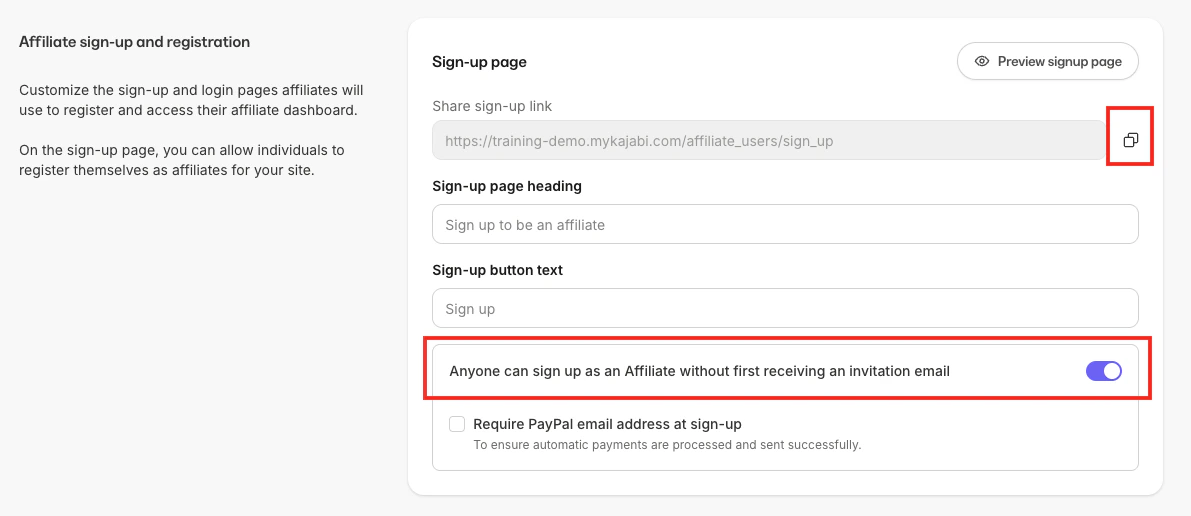
Enable self-registration to allow Affiliate Users to register for your site.
### Enable Affiliate registrations
1. Open the **Sales** tab from your Dashboard.
2. Click **Affiliates**.
3. Open **Settings** from the top navigation menu.
4. Toggle on **Enable Self-Registrations**.
**Note:** Your invited affiliate will have up to 72 hours to confirm and verify their email before they are successfully added to your site.
## Send the Affiliate Signup link
Enable self-registration to allow Affiliate Users to register for your site.
### Enable Affiliate registrations
1. Open the **Sales** tab from your Dashboard.
2. Click **Affiliates**.
3. Open **Settings** from the top navigation menu.
4. Toggle on **Enable Self-Registrations**.
 ### Copy and share the Affiliate sign-up link
1. Open the **Sales** tab from your Dashboard.
2. Click **Affiliates**.
3. Open **Settings** from the top navigation menu.
4. Select **Copy** next to the **Share sign-up link** field.
**Tip:** Learn how to [create a custom Affiliate Signup Page](/articles/contacts/manage-your-contacts/create-a-custom-affiliate-signup-page) to customize your affiliate onboarding experience.
## Affiliate user welcome email
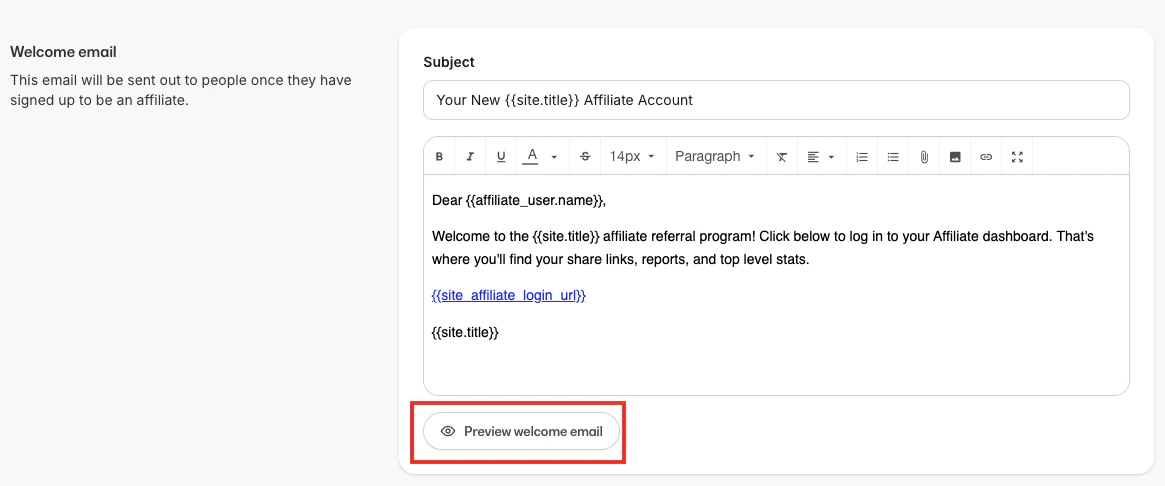
An **affiliate user welcome email** is sent to your affiliates after they've successfully signed up as an affiliate of your site.
### Default welcome email
### Copy and share the Affiliate sign-up link
1. Open the **Sales** tab from your Dashboard.
2. Click **Affiliates**.
3. Open **Settings** from the top navigation menu.
4. Select **Copy** next to the **Share sign-up link** field.
**Tip:** Learn how to [create a custom Affiliate Signup Page](/articles/contacts/manage-your-contacts/create-a-custom-affiliate-signup-page) to customize your affiliate onboarding experience.
## Affiliate user welcome email
An **affiliate user welcome email** is sent to your affiliates after they've successfully signed up as an affiliate of your site.
### Default welcome email
 ## Edit the affiliate user welcome email
1. Open the **Sales** tab from your Dashboard.
2. Click **Affiliates**.
3. Select the **Settings** tab from the top menu.
4. Scroll down the page to the **Welcome email**.
5. Edit your **Subject line** and **Email body**.
6. Click **Save** to apply your changes.
7. Then, click **Preview welcome email** to view how your email will appear to your Affiliates.
## Send an Affiliate Portal login link
New affiliates will receive an email containing their login credentials and the link to log in to their [Affiliate Portal](/articles/sales/affiliates/affiliates-overview#affiliate-portal).
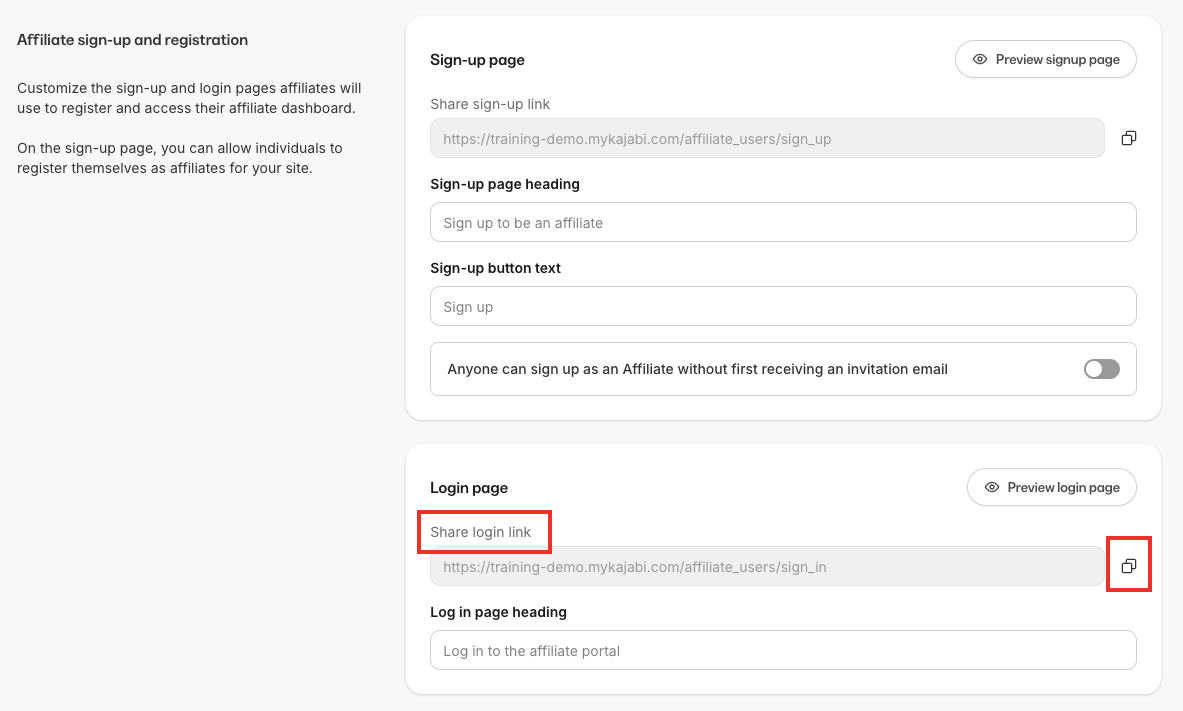
If you wish to send your affiliates the link to log in directly:
1. Open the **Sales** tab from your Dashboard.
2. Click the **Affiliates** tab.
3. Select the **Settings** tab from the top menu.
4. In the **Affiliate sign-up and registration** section, click **Copy** next to the **Login page link** and send to your new affiliate.
## Edit the affiliate user welcome email
1. Open the **Sales** tab from your Dashboard.
2. Click **Affiliates**.
3. Select the **Settings** tab from the top menu.
4. Scroll down the page to the **Welcome email**.
5. Edit your **Subject line** and **Email body**.
6. Click **Save** to apply your changes.
7. Then, click **Preview welcome email** to view how your email will appear to your Affiliates.
## Send an Affiliate Portal login link
New affiliates will receive an email containing their login credentials and the link to log in to their [Affiliate Portal](/articles/sales/affiliates/affiliates-overview#affiliate-portal).
If you wish to send your affiliates the link to log in directly:
1. Open the **Sales** tab from your Dashboard.
2. Click the **Affiliates** tab.
3. Select the **Settings** tab from the top menu.
4. In the **Affiliate sign-up and registration** section, click **Copy** next to the **Login page link** and send to your new affiliate.
 ## Delete an Affiliate User
Deleting an affiliate will permanently remove them from your site, including all related affiliate data such as clicks and conversions.
1. Open the **Sales** tab from your Dashboard.
2. Click **Affiliates**.
3. Select **My affiliates** from the top navigation menu.
4. Select the name of the Affiliate you wish to remove.
5. Navigate to the bottom of the page and click **Delete**.
6. Complete the prompt.
7. Click **Delete affiliate**.
## Additional resources
* [Create an Affiliate Share Link](/articles/sales/affiliates/create-an-affiliate-share-link)
* [Create a custom Affiliate Signup Page](/articles/contacts/manage-your-contacts/create-a-custom-affiliate-signup-page)
* [Affiliates overview](/articles/sales/affiliates/affiliates-overview)
* [Affiliate Portal overview](/articles/sales/affiliates/affiliate-portal-overview)
* [Manually add an Affiliate Transaction](/articles/sales/affiliates/manually-add-an-affiliate-transaction)
## Delete an Affiliate User
Deleting an affiliate will permanently remove them from your site, including all related affiliate data such as clicks and conversions.
1. Open the **Sales** tab from your Dashboard.
2. Click **Affiliates**.
3. Select **My affiliates** from the top navigation menu.
4. Select the name of the Affiliate you wish to remove.
5. Navigate to the bottom of the page and click **Delete**.
6. Complete the prompt.
7. Click **Delete affiliate**.
## Additional resources
* [Create an Affiliate Share Link](/articles/sales/affiliates/create-an-affiliate-share-link)
* [Create a custom Affiliate Signup Page](/articles/contacts/manage-your-contacts/create-a-custom-affiliate-signup-page)
* [Affiliates overview](/articles/sales/affiliates/affiliates-overview)
* [Affiliate Portal overview](/articles/sales/affiliates/affiliate-portal-overview)
* [Manually add an Affiliate Transaction](/articles/sales/affiliates/manually-add-an-affiliate-transaction)