> ## Documentation Index
> Fetch the complete documentation index at: https://help.kajabi.com/llms.txt
> Use this file to discover all available pages before exploring further.
# Disable the purchase confirmation email
> Turn off the automatic purchase confirmation email sent to customers after they complete a purchase.
By default, Kajabi sends an automatic confirmation email to customers after they complete a purchase. If you prefer to handle post-purchase communication through your own email sequences or want to reduce the number of emails your customers receive, you can disable this confirmation email.
## Disable the confirmation email
1. Go to **Sales** > **Pricing**
2. Select the offer you want to modify
3. Select the **Purchase flow** tab.
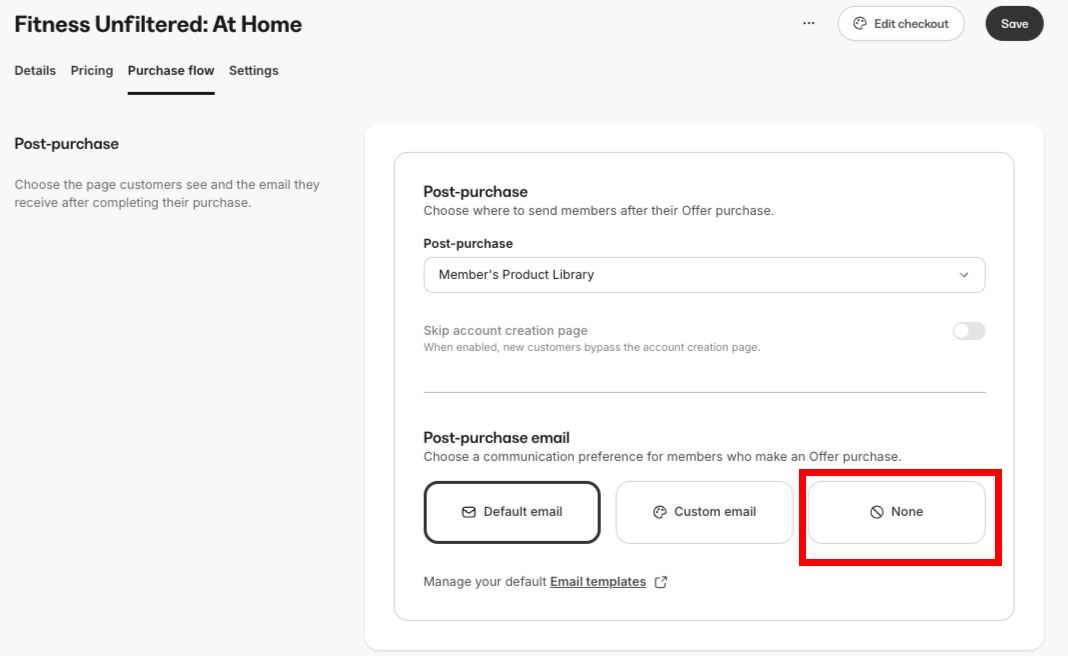
4. In the **Post-purchase** section, select **None** for **Post-purchase email**.
5. Click **Save**.
 **Warning:** Disabling this email means customers will not receive an automated receipt or confirmation from Kajabi. Consider setting up your own email automation if you still want to send a welcome message or receipt.