> ## Documentation Index
> Fetch the complete documentation index at: https://help.kajabi.com/llms.txt
> Use this file to discover all available pages before exploring further.
# Popup Checkout
> Enable Popup Checkout to let customers purchase directly from any page without leaving your site.
## Overview
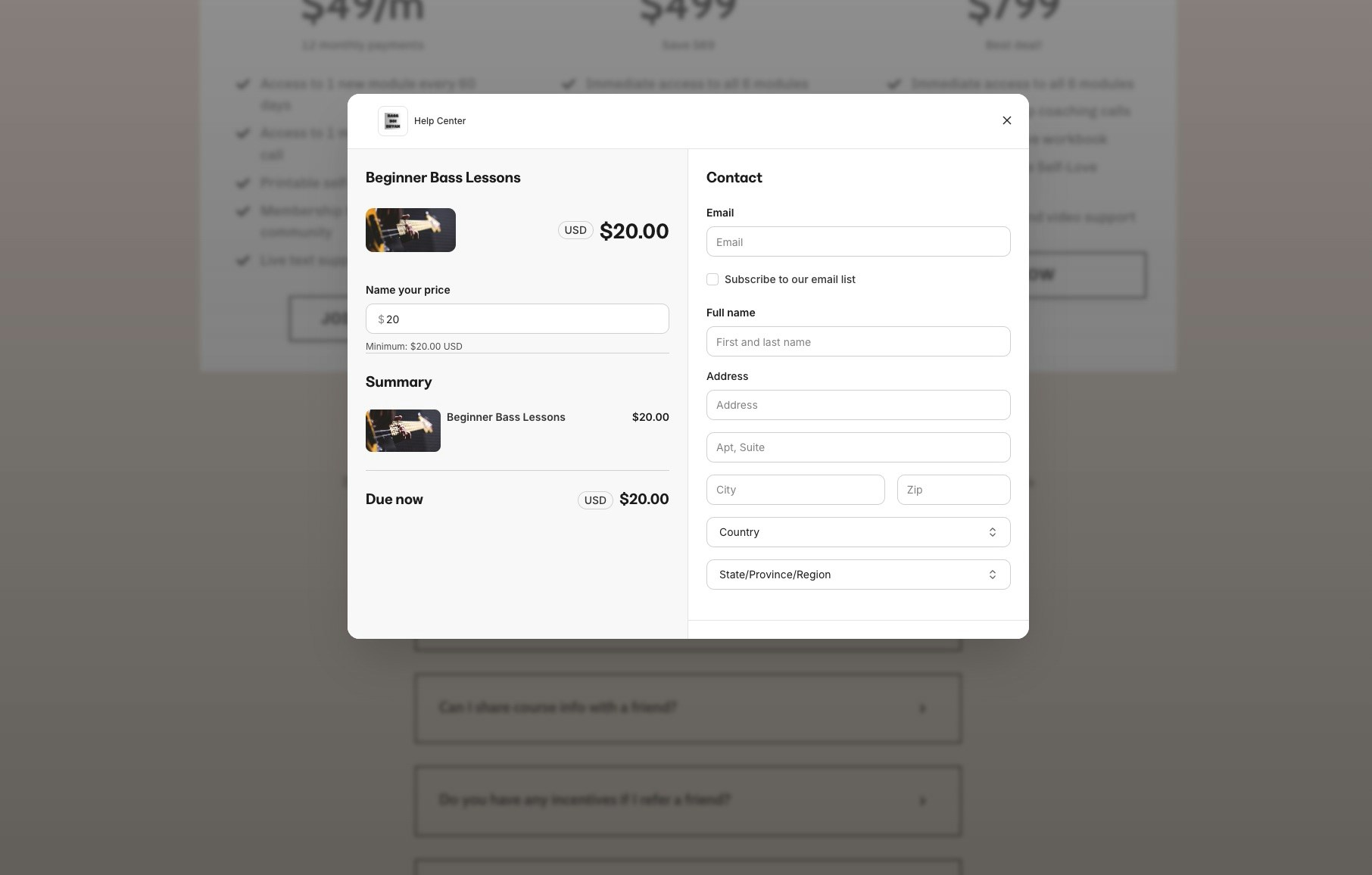
Popup Checkout allows customers to complete their purchase in an overlay window that appears directly on your page. This keeps customers engaged with your content while providing a seamless buying experience.
Instead of redirecting customers to a separate checkout page, Popup Checkout opens a streamlined payment form right where they are. This reduces friction in the buying process and can help improve conversion rates by keeping customers focused on your offer.
Popup Checkout works with buttons, links, and other clickable elements throughout your Kajabi site.
 ## How Popup Checkout works
When a customer clicks a checkout button or link with Popup Checkout enabled:
1. An overlay appears on the current page
2. The customer enters their payment information
3. The purchase completes without a page redirect
4. The customer sees a confirmation message
The customer stays on your sales page or landing page throughout the entire process, maintaining the context and momentum you've built.
## Enable Popup Checkout on a button
To set up Popup Checkout for a button on your page:
1. Open the **Page Builder** for your page
2. Select the button you want to configure
3. In the button settings, click **Action**
4. Select **Checkout** as the action type
5. Choose your offer from the dropdown
6. Enable the **Open in popup** toggle
7. Click **Save** and publish your page
## How Popup Checkout works
When a customer clicks a checkout button or link with Popup Checkout enabled:
1. An overlay appears on the current page
2. The customer enters their payment information
3. The purchase completes without a page redirect
4. The customer sees a confirmation message
The customer stays on your sales page or landing page throughout the entire process, maintaining the context and momentum you've built.
## Enable Popup Checkout on a button
To set up Popup Checkout for a button on your page:
1. Open the **Page Builder** for your page
2. Select the button you want to configure
3. In the button settings, click **Action**
4. Select **Checkout** as the action type
5. Choose your offer from the dropdown
6. Enable the **Open in popup** toggle
7. Click **Save** and publish your page
 **Note:** Popup Checkout requires the Enhanced Checkout to be enabled on your offer. If your offer uses the legacy checkout, upgrade it first in your offer settings.
## Enable Popup Checkout on a link
You can also trigger Popup Checkout from text links:
1. Select the text you want to link
2. Click the **Link** icon in the text editor
3. Choose **Offer Checkout** as the link type
4. Select your offer
5. Enable the **Open in popup** option
6. Click **Apply**
## Best practices for Popup Checkout
* **Keep your offer simple** — Popup Checkout works best with single products or straightforward payment options
* **Test on mobile devices** — Verify the popup displays correctly on smaller screens
* **Use clear call-to-action text** — Button text like "Buy Now" or "Get Instant Access" sets the right expectation
* **Limit form fields** — The fewer fields customers need to complete, the faster they can purchase
**Tip:** Popup Checkout is especially effective on long-form sales pages where customers might hesitate to navigate away to a separate checkout page.
## FAQs
### Does Popup Checkout work with all payment types?
Yes, Popup Checkout supports one-time payments, payment plans, and subscriptions. Customers can use credit cards and other payment methods enabled in your payment processor settings.
### Can I customize the popup appearance?
The popup inherits styling from your Enhanced Checkout settings. Customize colors, fonts, and branding in your offer's checkout editor, and those changes apply to both the popup and standalone checkout page.
### What happens if the popup is blocked?
If a customer's browser blocks popups, the checkout opens in a tab instead. The purchase process works the same way, just on a separate page.
### Does Popup Checkout work with order bumps and upsells?
Yes, order bumps display within the popup checkout. Post-purchase upsells appear after the initial transaction completes.
### Can I use Popup Checkout on external websites?
Popup Checkout is designed for pages hosted on Kajabi. For external websites, use the standard checkout link or embed options.
**Note:** Popup Checkout requires the Enhanced Checkout to be enabled on your offer. If your offer uses the legacy checkout, upgrade it first in your offer settings.
## Enable Popup Checkout on a link
You can also trigger Popup Checkout from text links:
1. Select the text you want to link
2. Click the **Link** icon in the text editor
3. Choose **Offer Checkout** as the link type
4. Select your offer
5. Enable the **Open in popup** option
6. Click **Apply**
## Best practices for Popup Checkout
* **Keep your offer simple** — Popup Checkout works best with single products or straightforward payment options
* **Test on mobile devices** — Verify the popup displays correctly on smaller screens
* **Use clear call-to-action text** — Button text like "Buy Now" or "Get Instant Access" sets the right expectation
* **Limit form fields** — The fewer fields customers need to complete, the faster they can purchase
**Tip:** Popup Checkout is especially effective on long-form sales pages where customers might hesitate to navigate away to a separate checkout page.
## FAQs
### Does Popup Checkout work with all payment types?
Yes, Popup Checkout supports one-time payments, payment plans, and subscriptions. Customers can use credit cards and other payment methods enabled in your payment processor settings.
### Can I customize the popup appearance?
The popup inherits styling from your Enhanced Checkout settings. Customize colors, fonts, and branding in your offer's checkout editor, and those changes apply to both the popup and standalone checkout page.
### What happens if the popup is blocked?
If a customer's browser blocks popups, the checkout opens in a tab instead. The purchase process works the same way, just on a separate page.
### Does Popup Checkout work with order bumps and upsells?
Yes, order bumps display within the popup checkout. Post-purchase upsells appear after the initial transaction completes.
### Can I use Popup Checkout on external websites?
Popup Checkout is designed for pages hosted on Kajabi. For external websites, use the standard checkout link or embed options.