> ## Documentation Index
> Fetch the complete documentation index at: https://help.kajabi.com/llms.txt
> Use this file to discover all available pages before exploring further.
# Coupon analytics
> See how each coupon is performing with built-in redemption metrics.
Every coupon has an Analytics panel that shows how it's performing, so you can track a promotion's results without exporting transactions or checking a third-party tool.
## View a coupon's analytics
1. Open the **Sales** tab from the Dashboard.
2. Select **Coupons**.
3. Click the coupon you want to review.
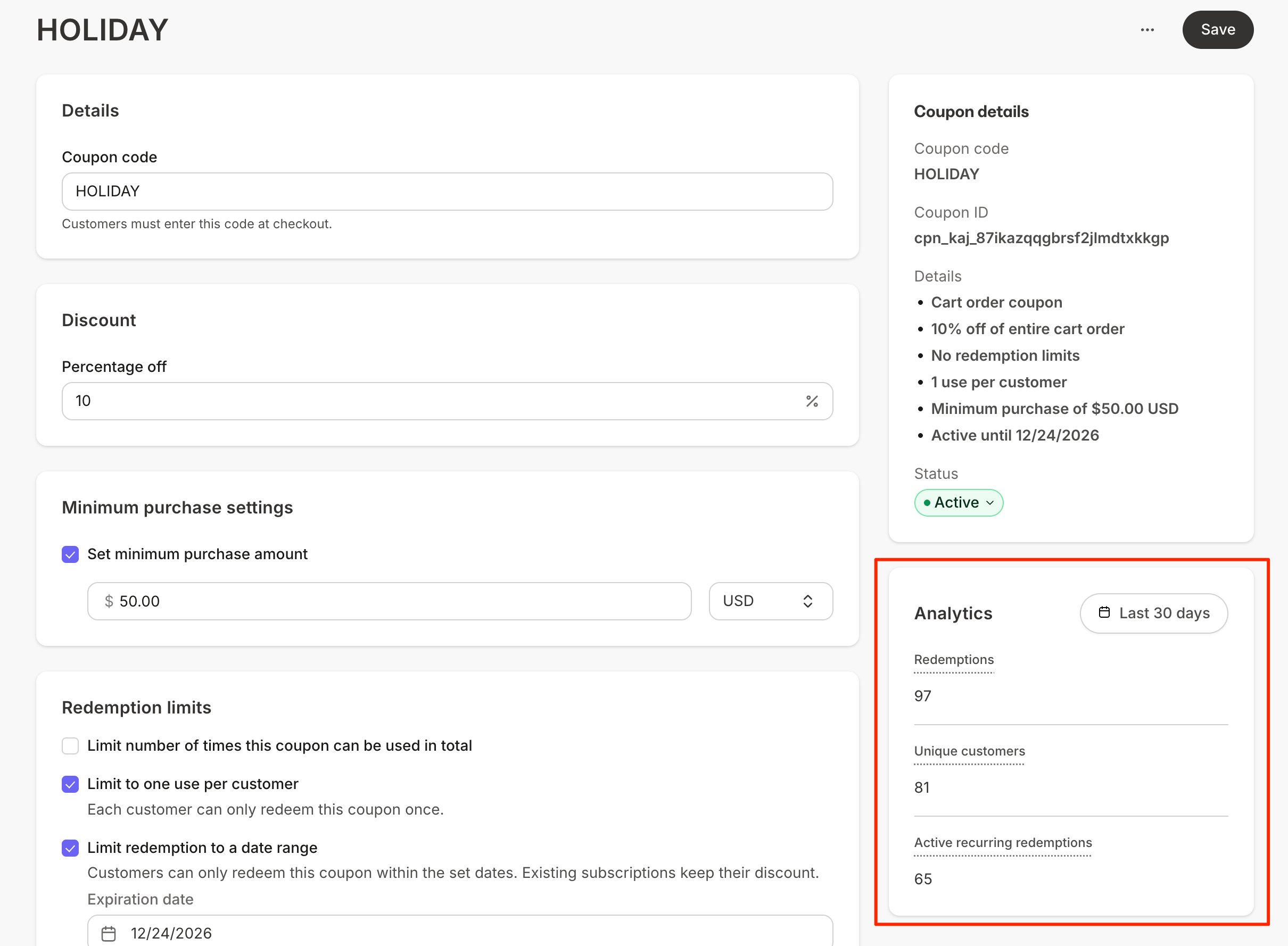
The **Analytics** panel appears in the right sidebar of the coupon detail page.
 ## Understand the metrics
* **Total redemptions:** The number of times the coupon has been redeemed at checkout.
* **Total unique customers:** The number of individual customers who have redeemed the coupon. If the coupon allows multiple uses per customer, this number can be lower than total redemptions.
* **Active recurring redemptions:** The number of active subscriptions and payment plans the coupon is currently attached to. When a subscription is canceled or a payment plan completes, it no longer counts here.
## Filter by date
Use the date filter at the top of the Analytics panel to change the reporting period. Analytics default to the last 30 days.
## Coupons without activity
The Analytics panel stays in a placeholder state until the coupon has at least one redemption. Draft coupons can't be redeemed, so their analytics remain empty until the coupon is Active and a customer uses it.
## Find customers who used a coupon
To see which customers redeemed a specific coupon:
1. Open the **Contacts** tab from the Dashboard.
2. Click **Filters**.
3. Select **Coupon** from the Category dropdown.
4. Select **Coupon used** as the conditional.
5. Choose your coupon code as the value.
Your Contacts list now shows every customer who purchased with that coupon.
## Understand the metrics
* **Total redemptions:** The number of times the coupon has been redeemed at checkout.
* **Total unique customers:** The number of individual customers who have redeemed the coupon. If the coupon allows multiple uses per customer, this number can be lower than total redemptions.
* **Active recurring redemptions:** The number of active subscriptions and payment plans the coupon is currently attached to. When a subscription is canceled or a payment plan completes, it no longer counts here.
## Filter by date
Use the date filter at the top of the Analytics panel to change the reporting period. Analytics default to the last 30 days.
## Coupons without activity
The Analytics panel stays in a placeholder state until the coupon has at least one redemption. Draft coupons can't be redeemed, so their analytics remain empty until the coupon is Active and a customer uses it.
## Find customers who used a coupon
To see which customers redeemed a specific coupon:
1. Open the **Contacts** tab from the Dashboard.
2. Click **Filters**.
3. Select **Coupon** from the Category dropdown.
4. Select **Coupon used** as the conditional.
5. Choose your coupon code as the value.
Your Contacts list now shows every customer who purchased with that coupon.