> ## Documentation Index
> Fetch the complete documentation index at: https://help.kajabi.com/llms.txt
> Use this file to discover all available pages before exploring further.
# Troubleshoot coupon errors
> Troubleshoot common coupon errors when customers try to use coupons at checkout.
If a customer received an error message when attempting to use a coupon on your checkout page, refer to this guide for more information and troubleshooting solutions.
## Coupon error messages
A message box will appear if an error occurs when a customer attempts to complete a purchase while using a coupon on your checkout page. Your customer will not be able to use the coupon and complete the purchase until the error is resolved.
**Example:**
 ## Common coupon errors
The following is a list of common coupon errors that may be causing the issue.
### Wrong currency
This error message will appear if the coupon and offer have been set up for different currencies. For example, if you have an offer set up for CAD currency and the coupon is \$100 off USD currency, it will not work.
#### Edit Offer pricing
1. Open the **Sales** tab from your Dashboard.
2. Select **Pricing**.
3. Select the Offer you would like to edit or [create a new one](/articles/sales/offers/create-an-offer).
4. In the Offer Editor, click the **Pricing** tab.
5. Scroll down to the **Price Details** section and use the **Currency** dropdown menu to choose your Currency.
6. Click **Save** to apply your changes.
## Common coupon errors
The following is a list of common coupon errors that may be causing the issue.
### Wrong currency
This error message will appear if the coupon and offer have been set up for different currencies. For example, if you have an offer set up for CAD currency and the coupon is \$100 off USD currency, it will not work.
#### Edit Offer pricing
1. Open the **Sales** tab from your Dashboard.
2. Select **Pricing**.
3. Select the Offer you would like to edit or [create a new one](/articles/sales/offers/create-an-offer).
4. In the Offer Editor, click the **Pricing** tab.
5. Scroll down to the **Price Details** section and use the **Currency** dropdown menu to choose your Currency.
6. Click **Save** to apply your changes.
**Coupon Currency:**
A Coupon's currency can only be edited when first creating the coupon. After the coupon has been created, the currency cannot be changed.
#### Create a new coupon
1. Open the **Sales** tab from your Dashboard.
2. Choose **Coupons**.
3. Click **+ New Coupon**.
4. Select **Single Coupon Code** or **Bulk Codes**.
5. Enter your **Coupon Code**.
6. Choose **Amount Off** under **Discount Type**.
7. In the **Amount Off** menu, use the **Currency Type** dropdown menu to select your currency.
8. Press **Continue** to save your Coupon.
### 100% off an amount
A 100% off coupon will not work if the "Amount Off" option was selected during the Coupon Creation process instead of "Percentage Off".
Amount off coupons require a monetary payment, they cannot be completely free. Only "Percentage Off" coupons can make an offer completely free.
A new coupon will need to be created using "Percentage Off" if a 100% discount is the intended outcome.
### Previously deleted coupon
If a coupon was previously deleted from your Kajabi site it will no longer be valid for use. This will cause the coupon error message to show upon checkout. A new coupon will need to be created.
### Expired coupon
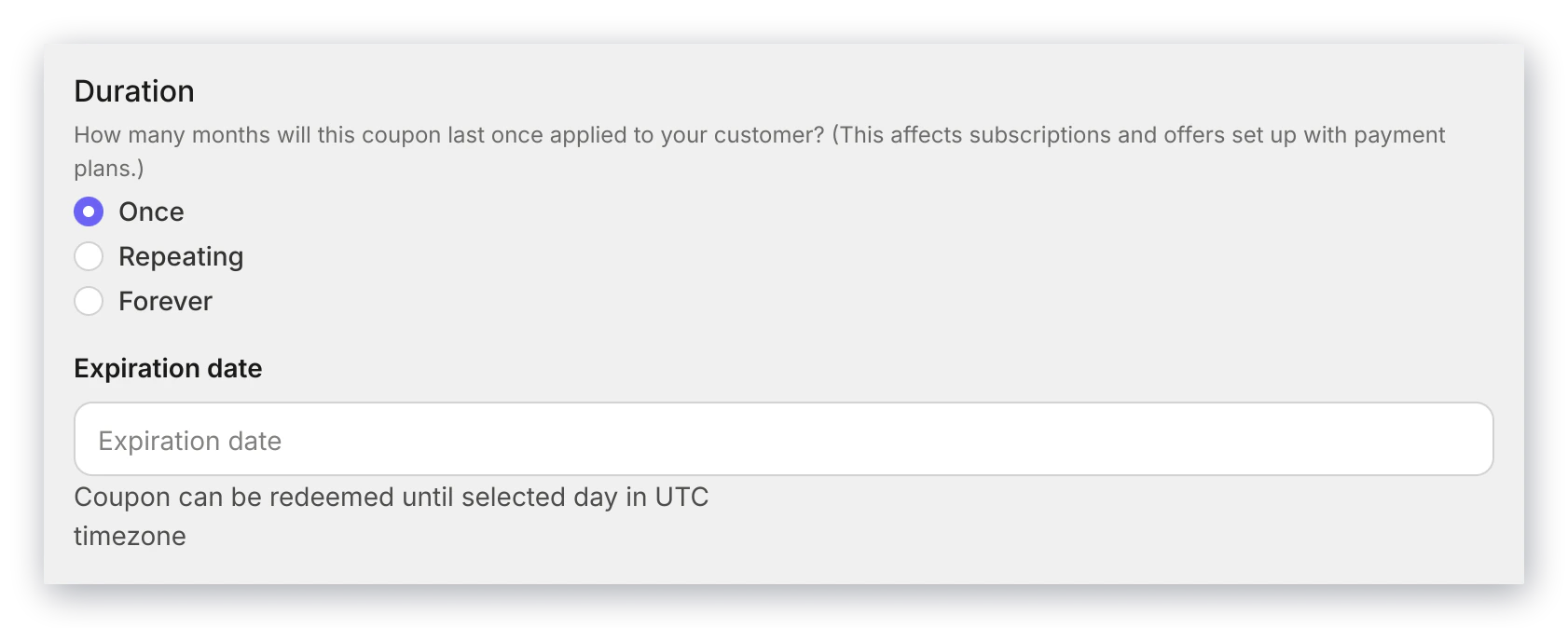
If the coupon's expiration date has passed, the coupon can no longer be used. A coupon's expiration date can be set during coupon creation in the **Duration** section of the coupon creator:
 ### Wrong Offer attached to coupon
A coupon will only work with the Offer that has been attached to it. If the coupon code is entered on the wrong offer checkout page, the coupon will not work and the error message will show.
#### Add an Offer to a coupon
1. Open the **Sales** tab from the Dashboard.
2. Select **Coupons**.
3. Select the coupon you wish to edit or [create a new one](/articles/sales/coupons/how-to-create-a-coupon).
4. Navigate to the Included Offers section and click **+ Add Offer**.
5. Choose the Offer you want to include, then click **Done** to save your changes.
**Tip:** Once your coupon is working, you can share a checkout link with the discount already applied. Go to **Sales** > **Coupons**, click your coupon, and copy the **Offer checkout URL**. [Learn how to copy Offer coupon URLs](https://help.kajabi.com/articles/sales/coupons/how-to-create-a-coupon#copy-offer-coupon-urls).
### Wrong Offer attached to coupon
A coupon will only work with the Offer that has been attached to it. If the coupon code is entered on the wrong offer checkout page, the coupon will not work and the error message will show.
#### Add an Offer to a coupon
1. Open the **Sales** tab from the Dashboard.
2. Select **Coupons**.
3. Select the coupon you wish to edit or [create a new one](/articles/sales/coupons/how-to-create-a-coupon).
4. Navigate to the Included Offers section and click **+ Add Offer**.
5. Choose the Offer you want to include, then click **Done** to save your changes.
**Tip:** Once your coupon is working, you can share a checkout link with the discount already applied. Go to **Sales** > **Coupons**, click your coupon, and copy the **Offer checkout URL**. [Learn how to copy Offer coupon URLs](https://help.kajabi.com/articles/sales/coupons/how-to-create-a-coupon#copy-offer-coupon-urls).
Still have questions? Reach out to [our support team](/articles/resources/support/how-to-contact-kajabi-support) if you need additional assistance.