> ## Documentation Index
> Fetch the complete documentation index at: https://help.kajabi.com/llms.txt
> Use this file to discover all available pages before exploring further.
# Enable Apple Pay and Google Pay on Kajabi Payments Offers
> Enable digital wallets like Apple Pay and Google Pay as additional payment methods at checkout with Kajabi Payments.
**Note:** Kajabi Payments is currently available to Kajabi Heroes whose businesses are registered in the United States, Canada, Australia, the United Arab Emirates, the United Kingdom, and select European countries.
Apple Pay and Google Pay give your customers a fast, secure way to complete purchases using their digital wallets. Enabling these payment methods can help reduce checkout friction and improve conversion rates.
## Apple Pay and Google Pay overview
Apple Pay and Google Pay purchases are processed the same way as credit/debit cards are with Kajabi Payments and do not incur any additional fees. You can expect to see purchases made with these digital wallets reflected throughout the Kajabi application and take actions, like sending receipts, pausing or canceling subscriptions, and refunding payments just like any other transactions are handled today.
Digital wallet transactions will appear on the following pages:
* Payments Overview page
* Transactions, Subscriptions, and Payment Plans pages
* Purchase Information page
* Analytics
Enabling Apple Pay and Google Pay for your offer will update the look and feel of the checkout experience. Your customers will see a UI that displays a selection of all the payment methods you've configured to the offer at checkout (credit card, Apple Pay or Google Pay, and/or PayPal).
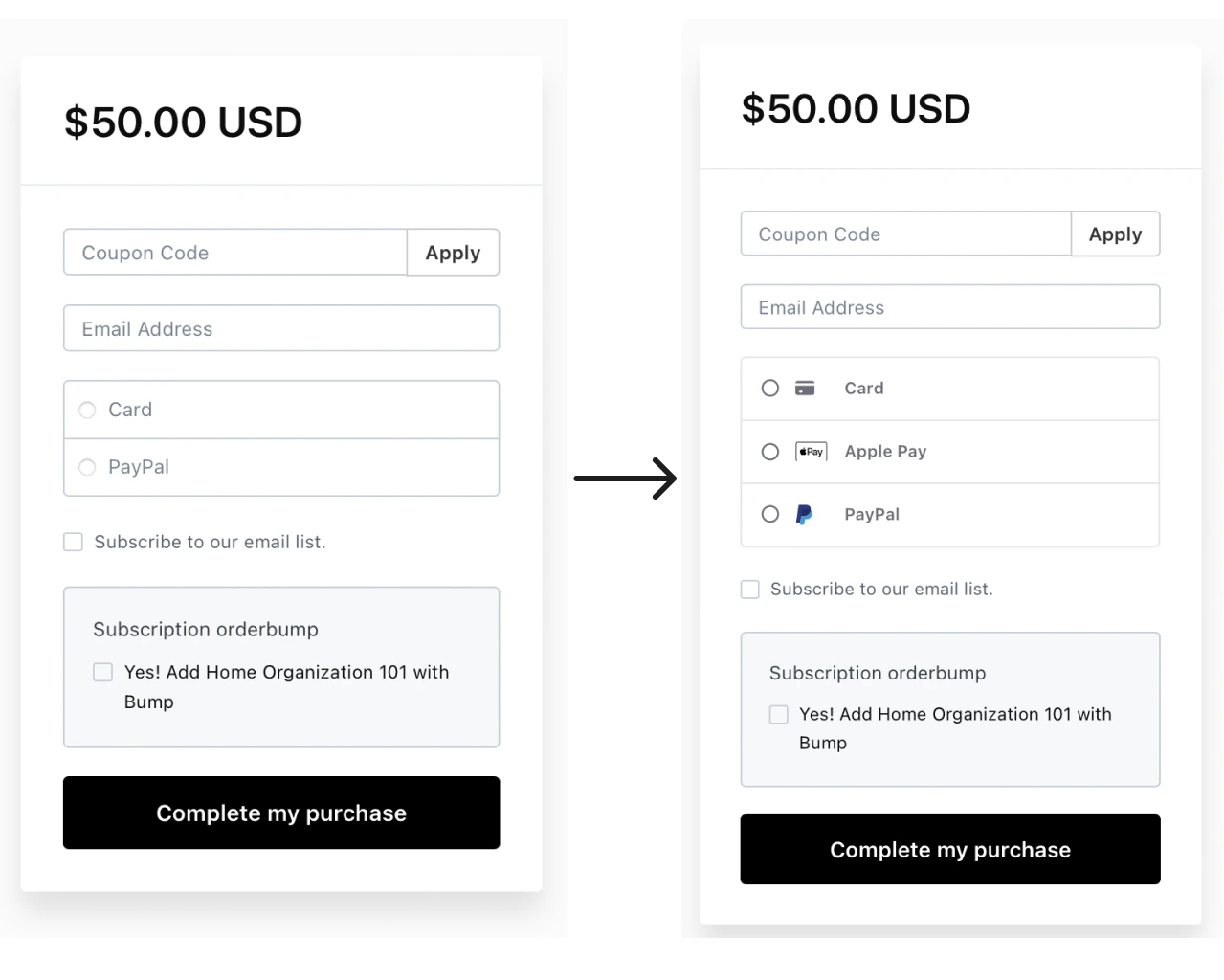 **Note:** You and your customers will not see both Apple Pay and Google Pay as payment options on the same checkout page. These methods are device-specific and will only appear depending on the end user's correlating device (Android devices with Google Pay, or Apple devices with Apple Pay set up).
## Enable Apple Pay or Google Pay on an offer
To enable Apple Pay and/or Google Pay on an offer with Kajabi Payments:
1. Go to **Sales** > **Pricing** > **Offers**.
2. Select the **Offer** you wish to edit or [create a new one](/articles/sales/offers/create-an-offer)
3. Select the **Pricing** tab
4. Navigate to the **Payment Providers** section
5. Check the box next to **Apple Pay** and/or **Google Pay**
6. Click **Save** to apply your changes
**Note:** You and your customers will not see both Apple Pay and Google Pay as payment options on the same checkout page. These methods are device-specific and will only appear depending on the end user's correlating device (Android devices with Google Pay, or Apple devices with Apple Pay set up).
## Enable Apple Pay or Google Pay on an offer
To enable Apple Pay and/or Google Pay on an offer with Kajabi Payments:
1. Go to **Sales** > **Pricing** > **Offers**.
2. Select the **Offer** you wish to edit or [create a new one](/articles/sales/offers/create-an-offer)
3. Select the **Pricing** tab
4. Navigate to the **Payment Providers** section
5. Check the box next to **Apple Pay** and/or **Google Pay**
6. Click **Save** to apply your changes
**Note:** Apple Pay and Google Pay are exclusively available through Kajabi Payments. Learn more about [getting started with Kajabi Payments](/articles/sales/kajabi-payments/kajabi-payments-overview).
## Filter by Apple Pay or Google Pay purchases
Keep track of how many purchases have been made with Apple Pay or Google Pay on the Transactions page.
To filter by Apple Pay or Google Pay purchases:
1. Open the **Sales** tab from the Dashboard
2. Click **Transactions**
3. Select **Filters**
4. Navigate to **Payment Methods**
5. Select **Apple Pay** or **Google Pay**
6. Click **Show results**
## Apple Pay FAQs
### What offers will Apple Pay work for?
Apple Pay is only available to any one-time, subscription, or payment plan offers that are configured to Kajabi Payments. It also supports additional purchases tied to the offer, such as trials, set-up fees, order bumps, upsells.
### Why don't I see Apple Pay on checkout?
Apple Pay is only visible as a payment method on checkout if you **already** have Apple Pay set up on supported Apple devices.
* On an iPhone
* iPhone models with Face ID
* iPhone models with Touch ID, except iPhone 5s
* On an iPad
* iPad Pro, iPad Air, iPad, and iPad mini models with Touch ID or Face ID
* On a Mac
* On the web in Safari
### When will my customers see Apple Pay on checkout?
Your customers will only see Apple Pay as a payment method on checkout if they **already** have Apple Pay set up on supported Apple devices.
* On an iPhone
* iPhone models with Face ID
* iPhone models with Touch ID, except iPhone 5s
* On an iPad
* iPad Pro, iPad Air, iPad, and iPad mini models with Touch ID or Face ID
* On a Mac
* On the web in Safari
## Google Pay FAQs
### What offers will Google Pay work for?
Google Pay is only available to any one-time, subscription, or payment plan offers that are configured to Kajabi Payments. It also supports additional purchases tied to the offer, such as trials, set-up fees, order bumps, upsells.
### Why don't I see Google Pay on checkout?
Google Pay is only visible as a payment method on checkout if you already have Google Pay set up with your Google account.
### When will my customers see Google Pay on checkout?
Your customers will only see Google Pay as a payment method on checkout if they already have Google Pay set up with their Google account.