> ## Documentation Index
> Fetch the complete documentation index at: https://help.kajabi.com/llms.txt
> Use this file to discover all available pages before exploring further.
# Manage failed payments with Kajabi Payments
> Handle failed recurring payments, view and export failed payment data, and manage automatic retries with Kajabi Payments.
## Overview
Payments can fail when a customer's recurring payment (subscription or payment plan) is not processed successfully. Kajabi Payments provides tools to handle failed payments, view and export them, and manage automatic retries.
**Note:**
Kajabi Payments is currently available to Heroes whose businesses are registered in the United States, Canada, Australia, the United Arab Emirates, the United Kingdom, and select European countries.
## Understand failed payments
Payments can fail when a customer's recurring payment (subscription or payment plan) is not processed successfully. These failures can stem from a variety of reasons, including:
* Lack of a payment method tied to the customer record
* An expired payment method
* The payment is declined, which can happen for a variety of reasons
## Handle failed payments with Kajabi Payments
Kajabi Payments uses Stripe's Smart Retries feature to automatically attempt to recover failed payments. When a payment fails, Smart Retries will attempt to collect the payment up to 4 times over the course of several weeks. The timing of retries is optimized for success—for example, the attempt could be sooner if it predicts there is a higher chance of success due to new information. For additional insights, refer to [Stripe's documentation on Smart Retries](https://stripe.com/docs/billing/automatic-collection#smart-retries).
### What happens when a payment fails?
* If a payment fails, the status of the purchase record becomes **Past Due** wherever it is displayed in Kajabi
* On the Transactions Details page, the failed charge shows a **Retrying** status
* If a retry succeeds, the status is set back to **Active**
* If all 4 retries fail, the subscription or payment plan will be **Canceled** which revokes product access for the customer
### Automatic emails
When a payment fails, Kajabi will automatically send emails to:
1. Your customer, prompting them to update their payment information when a payment fails. [Learn how to customize the failed payment email notification](/articles/account-settings/notifications/edit-automated-email-notifications).
2. Your email on file, alerting you why the payment didn't go through, how many times we've retried, and the approximate date for the next attempt.
## View failed payments
To access information regarding failed payments, follow these steps:
1. Navigate to the **Payments page**
2. Click the **Transactions** tab
3. Click **Filter**
4. In the Filter Menu, select **Failed** and **Kajabi Payments**
5. Apply the filter to view failed payments
6. Use **...** to view more details about the failed payment
## Export failed payments
To export your failed payment data:
1. Go to **Sales** > **Transactions**
2. Filter for Failed payments
3. Click **Export**
## Auto revoke and auto grant after failed payment
If you want to revoke product access after the first failed payment for a subscription or payment plan, and then have access auto-granted back to your customer once the payment has succeeded, this setting can be turned on from your **Customer Payments** setting page. This feature is exclusively available to Kajabi Payments and Stripe.
To turn on Auto Revoke/Auto Grant:
1. From your Kajabi Dashboard, navigate to **Settings**
2. In Settings, select **Customer Payments**
3. Toggle the box under the revoke and grant access section
4. Click **Save** to apply the changes
**Note:**
The auto revoke/grant feature does not trigger grant automations.
## Manually retry failed payments
With Kajabi Payments, you can manually retry a failed payment. This process can be attempted twice every 24 hours, per transaction.
To manually retry a failed payment:
1. From the Kajabi Dashboard select the **Sales** tab
2. Click **Payments**
3. Select the **Transactions** tab
4. Locate the transaction you wish to retry, then click on the **payment**
5. Select **Retry Payment**
6. Click **Retry Payment** in the pop-up window to confirm
## Turn off automatic retries
If you'd prefer to stop retries after a failed payment—without canceling the subscription—you can do so directly in Kajabi.
### Disable automatic retries on a failed payment
1. Go to **Sales** > **Payments** > **Transactions**
2. Locate the failed transaction. You can do this by filtering by status: **Failed**
3. Once you have selected the failed transaction click the **...** menu and select **Turn Off Automatic Retries**

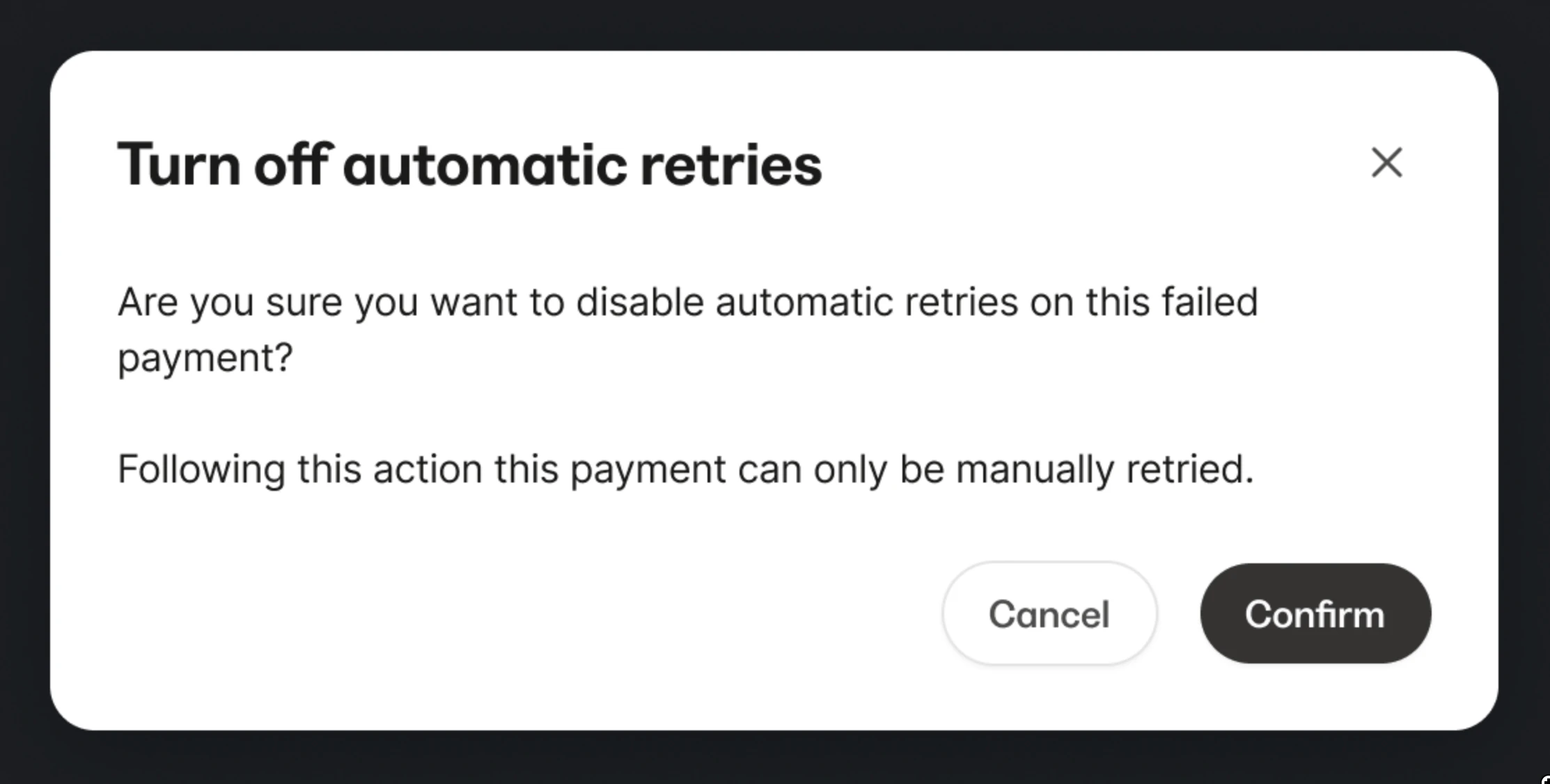 Once turned off:
* Retry attempts will stop immediately
* The transaction will update from Retrying to Failed
* The subscription remains active unless manually canceled
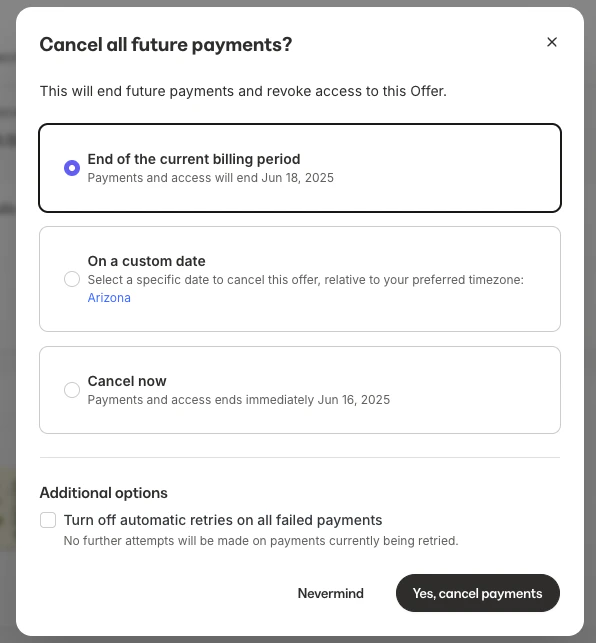
### Disable automatic retries when canceling a subscription or payment plan
1. Go to **Sales** > **Payments** > **Transactions**
2. Locate the subscription or payment plan
3. Click the **...** menu and select **Cancel Subscription**
4. Select your cancellation option and check the box **Turn off automatic retries on all failed payments**
This action will disable automatic retries on all current retrying transactions when the subscription or payment plan is cancelled.
Once turned off:
* Retry attempts will stop immediately
* The transaction will update from Retrying to Failed
* The subscription remains active unless manually canceled
### Disable automatic retries when canceling a subscription or payment plan
1. Go to **Sales** > **Payments** > **Transactions**
2. Locate the subscription or payment plan
3. Click the **...** menu and select **Cancel Subscription**
4. Select your cancellation option and check the box **Turn off automatic retries on all failed payments**
This action will disable automatic retries on all current retrying transactions when the subscription or payment plan is cancelled.
 ### Disable automatic retries when pausing a subscription or payment plan
1. Go to **Sales** > **Payments** > **Transactions**
2. Locate the subscription or payment plan
3. Click the **...** menu and select **Pause Subscription**
4. Check the box **Turn off automatic retries on all failed payments**
5. Click the **Pause subscription** button
### Disable automatic retries when pausing a subscription or payment plan
1. Go to **Sales** > **Payments** > **Transactions**
2. Locate the subscription or payment plan
3. Click the **...** menu and select **Pause Subscription**
4. Check the box **Turn off automatic retries on all failed payments**
5. Click the **Pause subscription** button
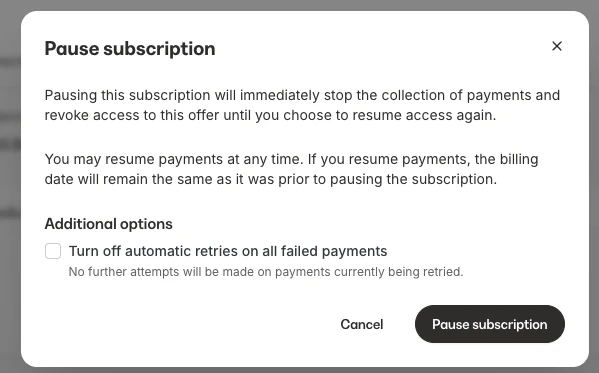 This action will disable automatic retries on all current retrying transactions when the subscription or payment plan is paused. Unpausing the subscription or payment plan does not re-enable auto-collection for the affected transactions.
**Note:**
This is only available for Kajabi Payments and only applies to subscription or payment plan types.
## Failed payment decline reasons
To access reasons for payment declines and recommended next steps, see [failed payment reasons](/articles/sales/offers/failed-payment-reasons).
If you have questions or run into issues, reach out to [payments.support@kajabi.com](mailto:payments.support@kajabi.com).
This action will disable automatic retries on all current retrying transactions when the subscription or payment plan is paused. Unpausing the subscription or payment plan does not re-enable auto-collection for the affected transactions.
**Note:**
This is only available for Kajabi Payments and only applies to subscription or payment plan types.
## Failed payment decline reasons
To access reasons for payment declines and recommended next steps, see [failed payment reasons](/articles/sales/offers/failed-payment-reasons).
If you have questions or run into issues, reach out to [payments.support@kajabi.com](mailto:payments.support@kajabi.com).