> ## Documentation Index
> Fetch the complete documentation index at: https://help.kajabi.com/llms.txt
> Use this file to discover all available pages before exploring further.
# View Kajabi Payments payouts and payout details
> View and track payouts, export payout details, and manage payout schedules with Kajabi Payments.
## Overview
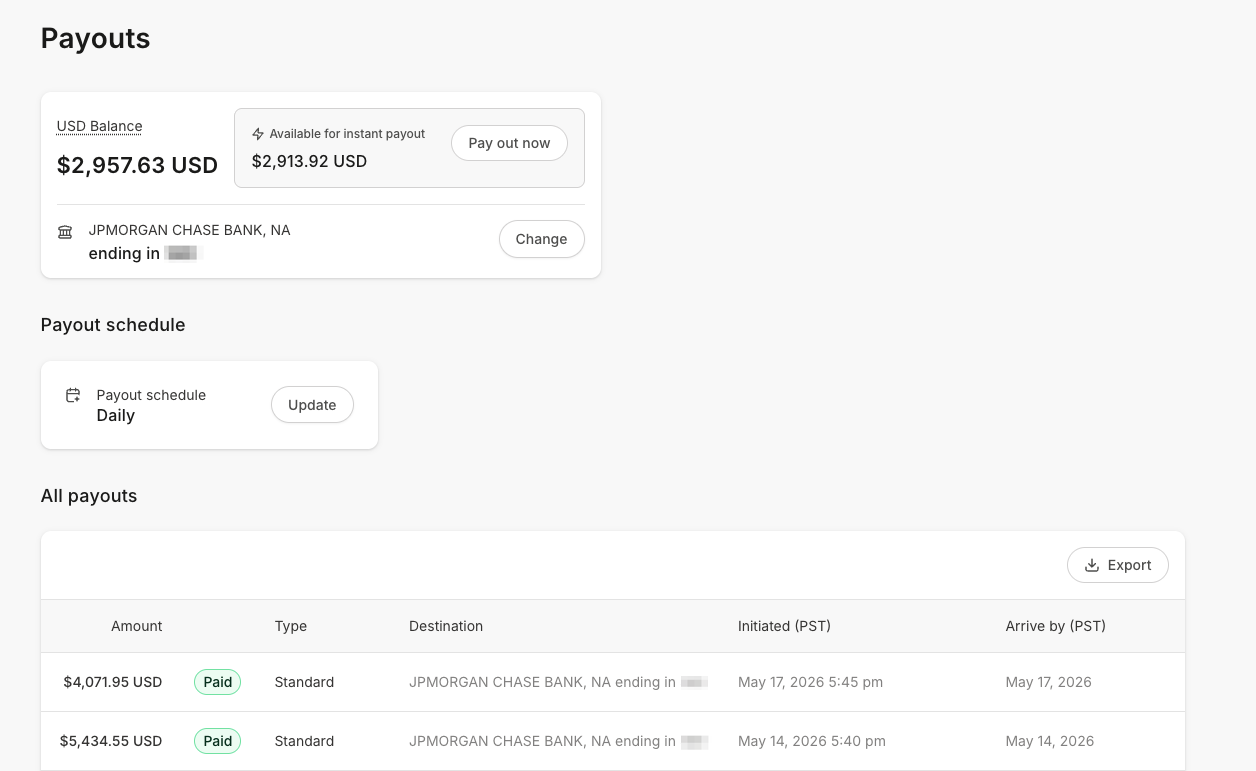
To receive funds from Kajabi Payments, payouts are made directly to your bank account. You can view your current balance, the status and date that you expect to receive your next payout, and more on the Kajabi Payments Payouts Page.
 Kajabi Payments is currently available to Heroes whose businesses are registered in the United States, Canada, Australia, the United Arab Emirates, the United Kingdom, and select European countries.
Learn more about [payout timing, transaction delays, and failed payouts](/articles/sales/kajabi-payments/kajabi-payments-payouts).
## View payouts
### View Kajabi Payments payouts
1. From the Kajabi Dashboard, select **Sales > Payouts**
2. Click **View payouts** to access your Payouts page
3. You can see recent payouts in the **Overview** and access a complete list of all your payout records by toggling to **All payouts** in the top navigation menu
Kajabi Payments is currently available to Heroes whose businesses are registered in the United States, Canada, Australia, the United Arab Emirates, the United Kingdom, and select European countries.
Learn more about [payout timing, transaction delays, and failed payouts](/articles/sales/kajabi-payments/kajabi-payments-payouts).
## View payouts
### View Kajabi Payments payouts
1. From the Kajabi Dashboard, select **Sales > Payouts**
2. Click **View payouts** to access your Payouts page
3. You can see recent payouts in the **Overview** and access a complete list of all your payout records by toggling to **All payouts** in the top navigation menu
### Payout status
With Kajabi Payments your payouts can have the following statuses:
* **Paid** - The payout has landed in your bank account
* **In Transit** - The payout is on its way to your bank account
* **Failed** - The payout was unsuccessful, and you might need to connect to a different bank account to receive your balance
**Note:** Your initial payout may take up to 7 business days to become available for disbursement regardless of your selected payout schedule. In addition, payouts may experience delays due to bank holidays. In the event of a bank holiday, your payout is expected to be processed on the next business day. [Learn more](/articles/sales/kajabi-payments/kajabi-payments-payouts).
## View payout details
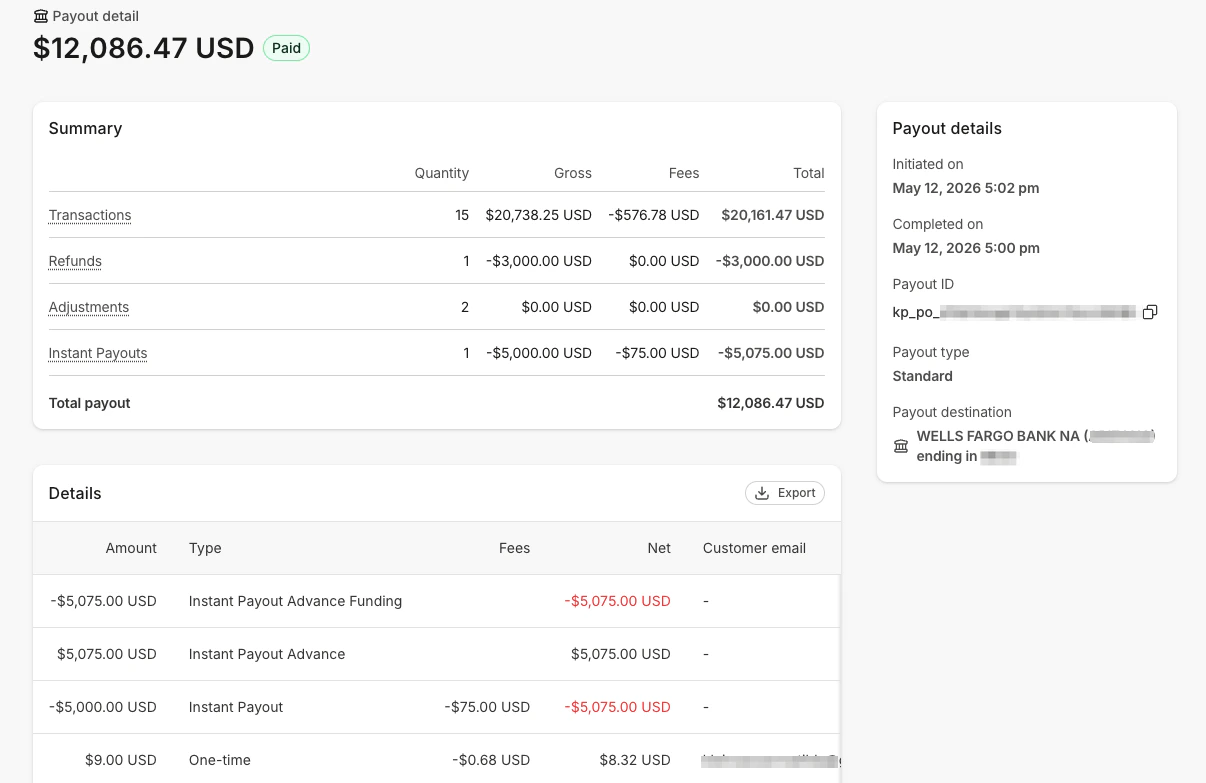
You can view a breakdown of each payout by clicking on the **Payout Details Page** for records with a **Paid** status. This page provides an itemized view of all transactions included in the specific payout, including fees, refunds, and any adjustments made. Hover over each fee under the Payout Details to see the exact charges applied to a transaction.
### Payout types and adjustments
Each payout has a **Payout type** of either Standard or Instant, visible on the payout detail page.
A payout consists of multiple factors that contribute to the total amount you receive:
* **Transactions:** Successful transactions from your customers, including one-time purchases, payment plans, and subscriptions.
* **Refund:** Amounts refunded to your customers.
* **Adjustment:** Additions or deductions to your Kajabi Payments balance that occur outside the standard charge or refund process.
* **Dispute Fee:** A withdrawal of the dispute fee when a payment is disputed by your customer.
* **Dispute Refund:** A withdrawal of the total disputed transaction amount when a payment is disputed by your customer.
* **Dispute Win:** A returned amount if a dispute is resolved in your favor.
* **Failed ACH Fee:** A fee applied when an ACH payment fails.
* **Instant Payouts:** When a previous Instant Payout is reflected in your next standard payout, you will see up to three related line items:
* **Instant Payout:** The amount that was paid out instantly including the fee.
* **Instant Payout Advance Funding:** A temporary balance transaction offset by Instant Payout Advance.
* **Instant Payout Advance:** A temporary balance transaction offset by Instant Payout Advance Funding.
 ## Export payout details
You have the option to either individually export a single payout or bulk export your payouts within a specified timeline. You can choose between exporting a summary of these payouts or an itemized report that includes individual fee breakdowns for each transaction.
### Export transaction details
1. Navigate to the **Payments** page in your Kajabi Account
2. Click **View payouts** to access your Payouts page
3. Click on the **Export** button
4. Choose whether you'd like to export a summary of all your payouts within the specified date range or select an itemized report that includes all payouts and transactions within the specified date range
**Summary Payouts Export includes:**
* Payout ID
* Payout Type: Standard or Instant
* Initiated date
* Estimated arrival
* Gross
* Fees
* Refunds
* Adjustments
* Net
* Currency
**Itemized Payouts Export includes:**
* Payout ID
* Payout type: Standard or Instant
* Transaction type
* Initiated date
* Estimated arrival
* Amount
* Currency
* Fee
* Net
* Customer ID
* Customer Name
* Customer Email
* Offer ID
* Offer Title
* Provider
* Payment Method
* Created At
* Coupon Used
* Presented Amount
* Presented Currency
* Exchange Rate
## Update a payout schedule
You can find your current Payout schedule on the Payouts Page.
## Export payout details
You have the option to either individually export a single payout or bulk export your payouts within a specified timeline. You can choose between exporting a summary of these payouts or an itemized report that includes individual fee breakdowns for each transaction.
### Export transaction details
1. Navigate to the **Payments** page in your Kajabi Account
2. Click **View payouts** to access your Payouts page
3. Click on the **Export** button
4. Choose whether you'd like to export a summary of all your payouts within the specified date range or select an itemized report that includes all payouts and transactions within the specified date range
**Summary Payouts Export includes:**
* Payout ID
* Payout Type: Standard or Instant
* Initiated date
* Estimated arrival
* Gross
* Fees
* Refunds
* Adjustments
* Net
* Currency
**Itemized Payouts Export includes:**
* Payout ID
* Payout type: Standard or Instant
* Transaction type
* Initiated date
* Estimated arrival
* Amount
* Currency
* Fee
* Net
* Customer ID
* Customer Name
* Customer Email
* Offer ID
* Offer Title
* Provider
* Payment Method
* Created At
* Coupon Used
* Presented Amount
* Presented Currency
* Exchange Rate
## Update a payout schedule
You can find your current Payout schedule on the Payouts Page.
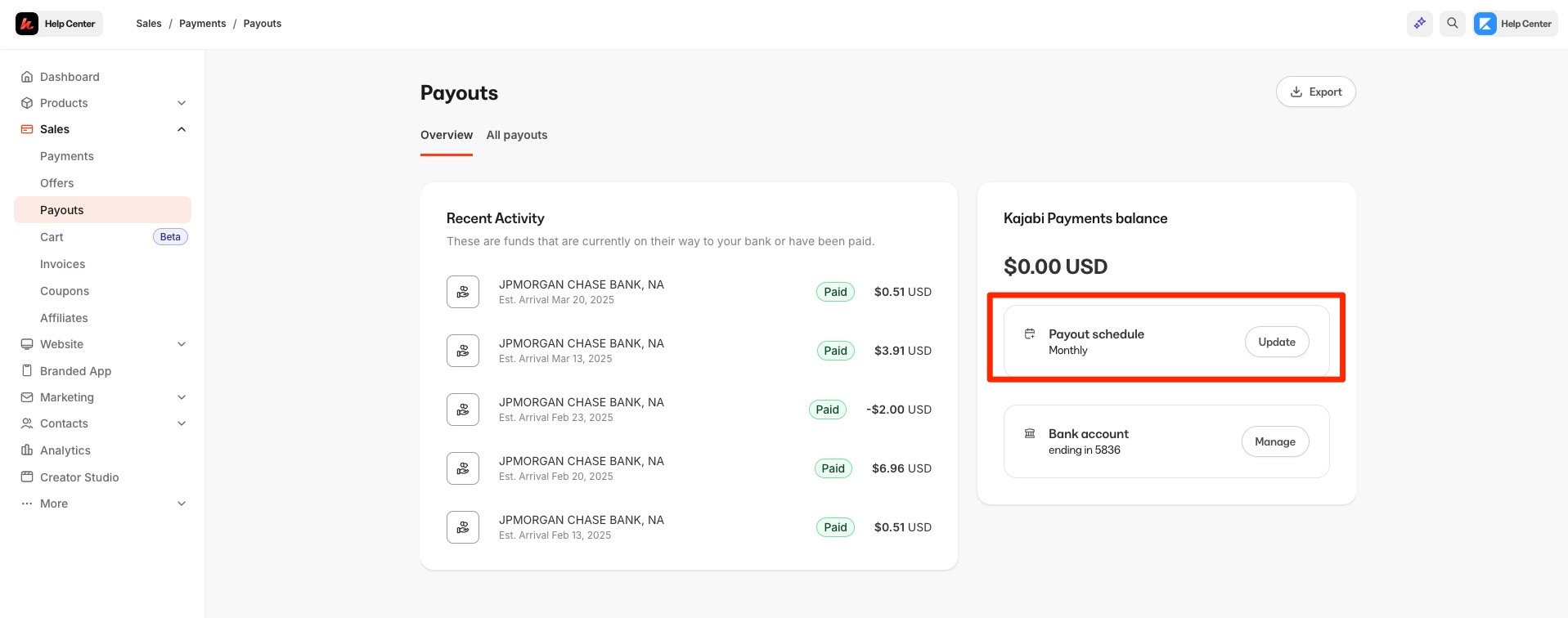 To change your payout schedule, follow these steps:
1. From the Kajabi Dashboard, select **Sales > Payouts**
2. Select **Update** next to the Payout schedule
3. Choose the **Frequency** you'd like to receive payouts (e.g., weekly or monthly)
4. For weekly or monthly schedules, select the desired day for payouts
To change your payout schedule, follow these steps:
1. From the Kajabi Dashboard, select **Sales > Payouts**
2. Select **Update** next to the Payout schedule
3. Choose the **Frequency** you'd like to receive payouts (e.g., weekly or monthly)
4. For weekly or monthly schedules, select the desired day for payouts
Depending on your business, you may not see all the options for additional payout scheduling. Payout scheduling options can vary based on a variety of factors such as the industry you're operating in, etc. [Learn more](/articles/sales/kajabi-payments/kajabi-payments-payouts).
## Update or add a bank account for payouts
### Add multiple bank accounts
Heroes in [Canada](/articles/sales/kajabi-payments/getting-started-with-kajabi-payments-canada), the [United Kingdom](/articles/sales/kajabi-payments/getting-started-with-kajabi-payments-united-kingdom), and [Europe](/articles/sales/kajabi-payments/getting-started-with-kajabi-payments-europe) can connect multiple bank accounts to receive payouts in different currencies.
At this time, Heroes in the United States and Australia can only connect one bank account.
### Update a bank account
**To update bank account(s):**
1. From the Kajabi Dashboard, navigate to the **Sales** tab and then select **Payouts**
2. Select **Change** next to your current bank account
3. Update your bank account details as needed
## Handle a negative Kajabi Payments balance
Occasionally, you may need to process refunds or you may receive a chargeback after a payout has been initiated, causing your Kajabi Payments balance to drop below zero.
Any incoming sales will go towards bringing your Kajabi Payments balance back up, but if it is still negative when your next payout is scheduled to transfer, Kajabi may initiate a balance adjustment from your connected bank account to cover the deficit.
**Note:** To view your Stripe or PayPal payouts, you will need to sign into your Stripe or PayPal account.