> ## Documentation Index
> Fetch the complete documentation index at: https://help.kajabi.com/llms.txt
> Use this file to discover all available pages before exploring further.
# Instant Payouts with Kajabi Payments
Access your available balance in Kajabi Payments within minutes.
Instant Payouts give you on-demand access to your available Kajabi Payments funds faster, any day of the week, including weekends and holidays. Your regular payout schedule stays exactly as is.
Use Instant Payouts for the moments when timing matters. It is a separate, optional feature and does not replace your standard payouts.
## **Before you begin**
Before using Instant Payouts, confirm that your account meets the following requirements:
* You have an active Kajabi Payments account
* You are the account owner or sub-owner (all other user roles cannot access this feature)
* You have an available balance eligible for instant payout
* Have an instant payout supported bank account or debit card
Instant Payouts are available in most countries where Kajabi Payments is supported, with the exception of Slovakia. Availability may also depend on other account-level factors. If Instant Payouts is not visible in your account, your account may not currently meet the required criteria. See [Kajabi Payments overview](https://help.kajabi.com/articles/sales/kajabi-payments/kajabi-payments-overview) for a full list of supported countries.
## **Request an Instant Payout**
You can use Instant Payouts to pay out funds from your Kajabi Payments account to an eligible bank account or debit card.
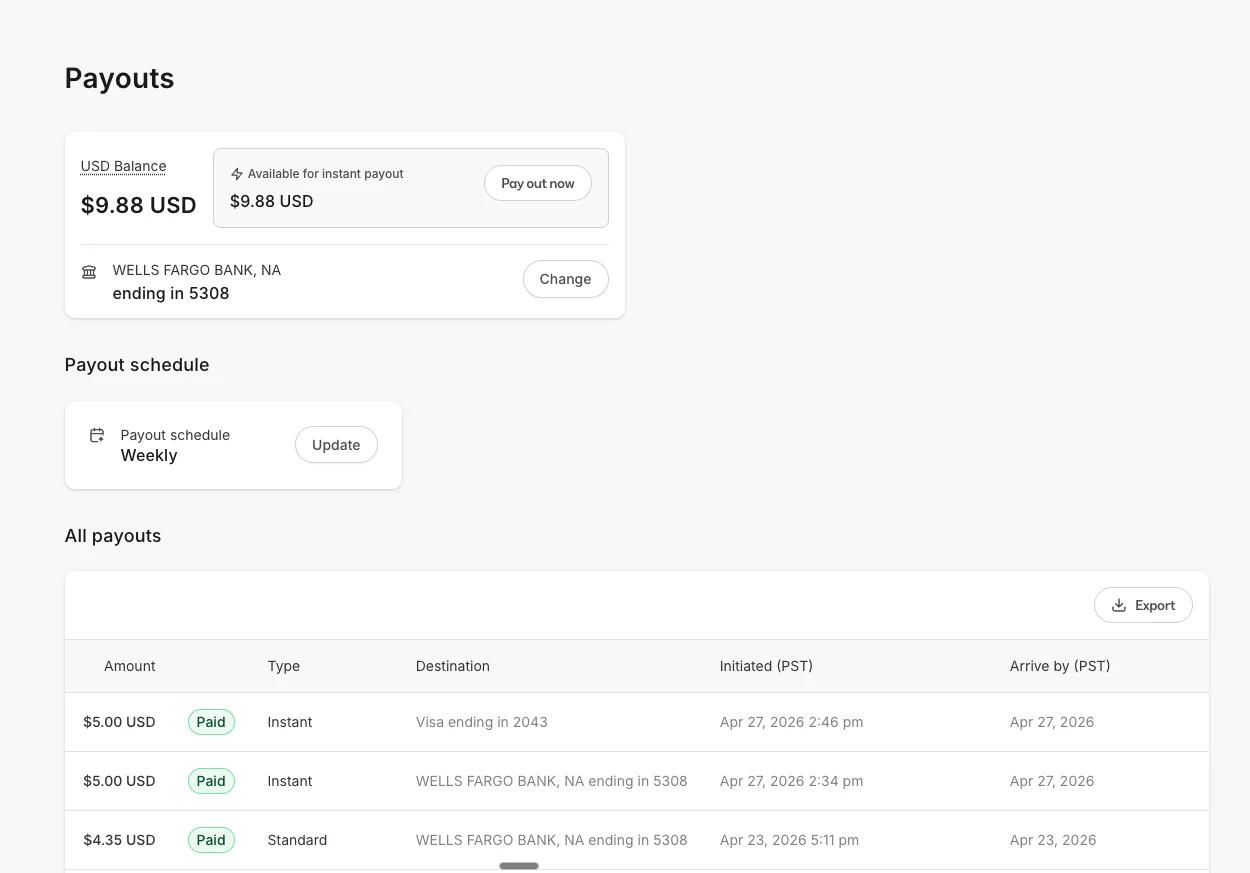
To access instant payouts
1. Go to the **Sales** > **Payouts** page in the left navigation.
2. If eligible, you will see the Instant Payout section. This displays your available balance eligible for instant payout.
Instant Payouts are only available in the default currency for your Kajabi Payments region, regardless of the bank account or debit card connected to your account. For example, if your Kajabi Payments account is based in the United Kingdom, you can only make an instant payout in GBP.
1. Click **Pay out Now**.
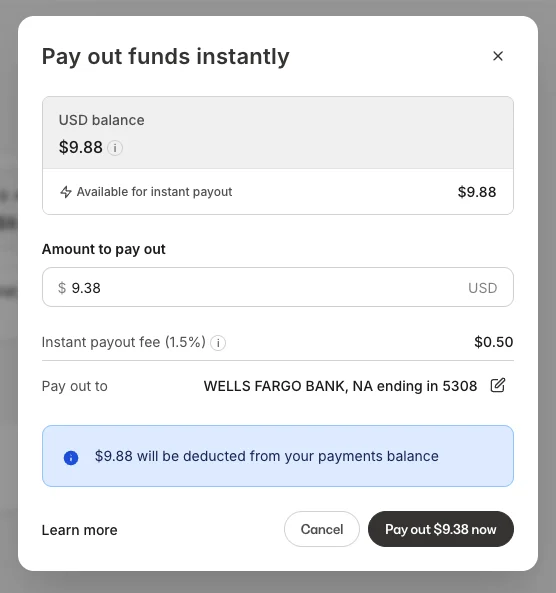
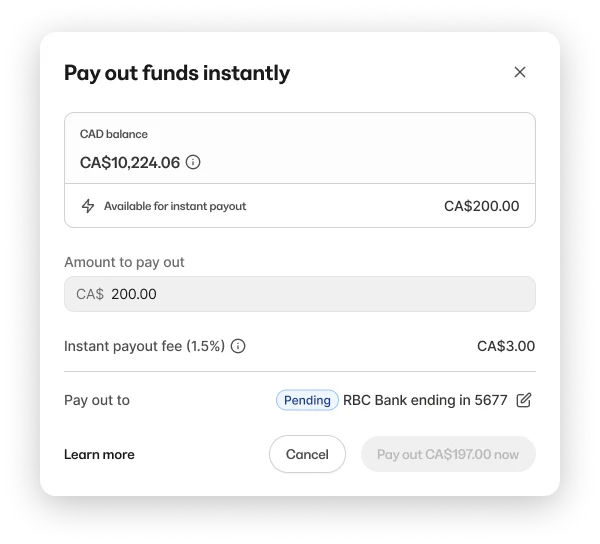
 2. In the payout modal, review the available amount and adjust if needed.
3. If your bank account is eligible, you should see it in the ‘**Pay out to**’ section with the payout button below enabled.
2. In the payout modal, review the available amount and adjust if needed.
3. If your bank account is eligible, you should see it in the ‘**Pay out to**’ section with the payout button below enabled.
 4. If your bank account is not eligible, you will be asked to add a debit card.
5. Upon clicking the **Pay out** button below, the Instant Payout will be initiated.
Once submitted, Kajabi processes the transfer using your selected payout destination. If the payout is successful, you will be returned to the **Payouts** page and shown a confirmation. Your instant payout balance will be cleared, and your funds will be sent to the bank account or debit card you selected.
Instant Payouts are subject to daily limits. If you have reached your daily limit, the **Pay out now** button will be disabled. Limits reset at midnight in your local timezone.
## **Payout destinations**
Instant Payouts can be sent to an eligible bank account or a verified debit card.
### **Bank** account
If your connected bank account is eligible for Instant Payouts, it will appear as the default destination. No additional setup is required. Not all bank accounts support instant transfers. Eligibility depends on your region and your bank's participation in the relevant payment network.
### **Debit card**
If you prefer to send funds to a different destination than your connected bank account, or if your bank account is not eligible, you can add an eligible debit card to receive Instant Payouts.
## **Adding a Debit Card**
Before using a debit card for Instant Payouts, you may need to add and verify the card in your payout settings.
To add a debit card:
1. Go to the **Sales** > **Payouts** page from the left navigation.
2. Click **Pay out now** on the Available Instant Payout section
3. If your bank account is ineligible for instant payout, you’ll be prompted to add a debit card.
4. If your bank account is not eligible, you will be asked to add a debit card.
5. Upon clicking the **Pay out** button below, the Instant Payout will be initiated.
Once submitted, Kajabi processes the transfer using your selected payout destination. If the payout is successful, you will be returned to the **Payouts** page and shown a confirmation. Your instant payout balance will be cleared, and your funds will be sent to the bank account or debit card you selected.
Instant Payouts are subject to daily limits. If you have reached your daily limit, the **Pay out now** button will be disabled. Limits reset at midnight in your local timezone.
## **Payout destinations**
Instant Payouts can be sent to an eligible bank account or a verified debit card.
### **Bank** account
If your connected bank account is eligible for Instant Payouts, it will appear as the default destination. No additional setup is required. Not all bank accounts support instant transfers. Eligibility depends on your region and your bank's participation in the relevant payment network.
### **Debit card**
If you prefer to send funds to a different destination than your connected bank account, or if your bank account is not eligible, you can add an eligible debit card to receive Instant Payouts.
## **Adding a Debit Card**
Before using a debit card for Instant Payouts, you may need to add and verify the card in your payout settings.
To add a debit card:
1. Go to the **Sales** > **Payouts** page from the left navigation.
2. Click **Pay out now** on the Available Instant Payout section
3. If your bank account is ineligible for instant payout, you’ll be prompted to add a debit card.
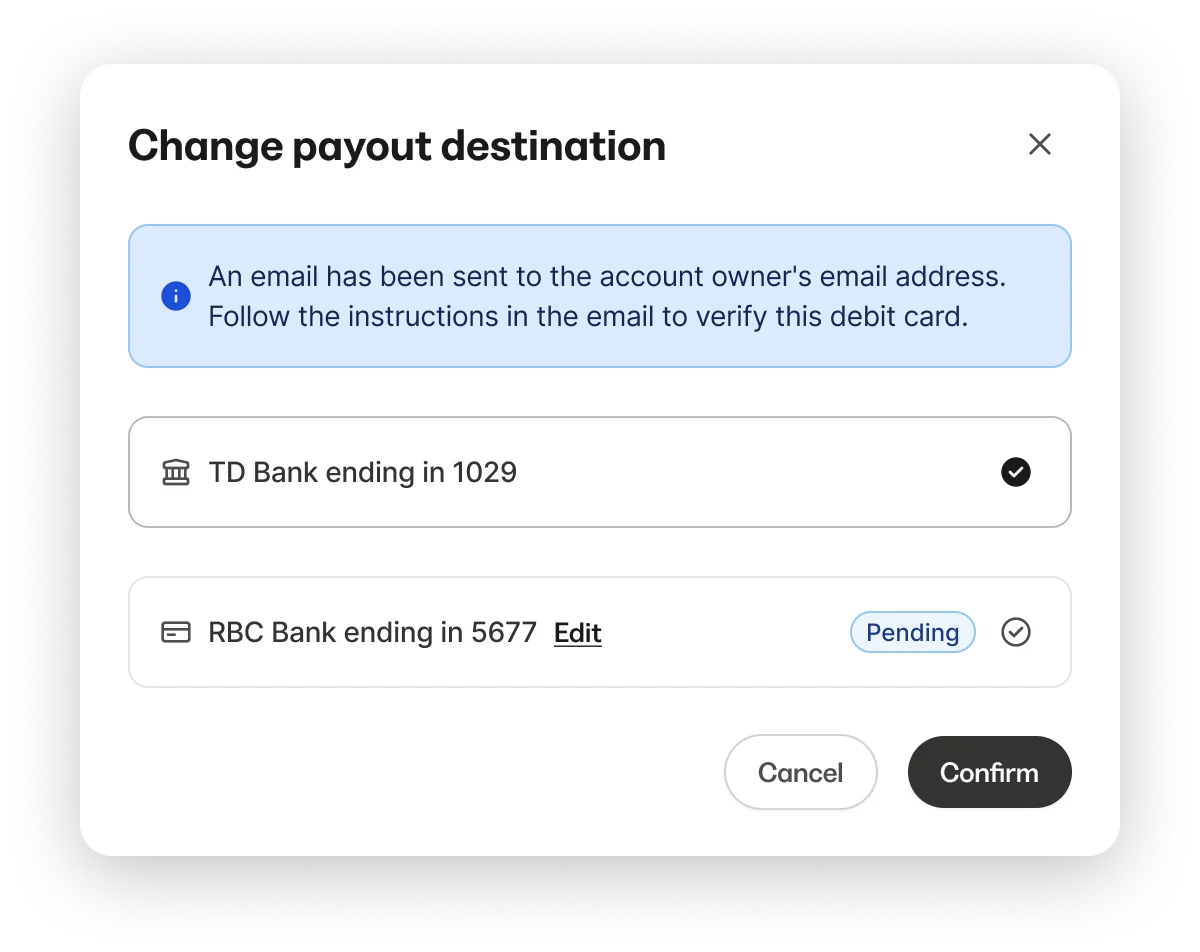
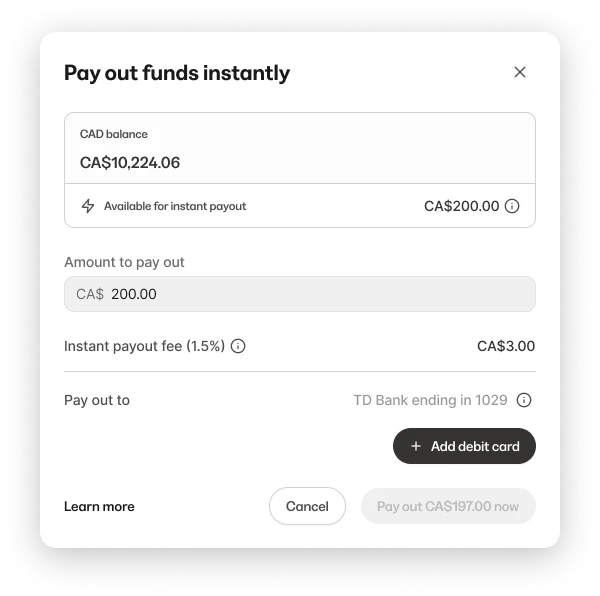 4. Otherwise, you can click the edit icon next to the ‘Pay out to’ destination to change your payout destination.
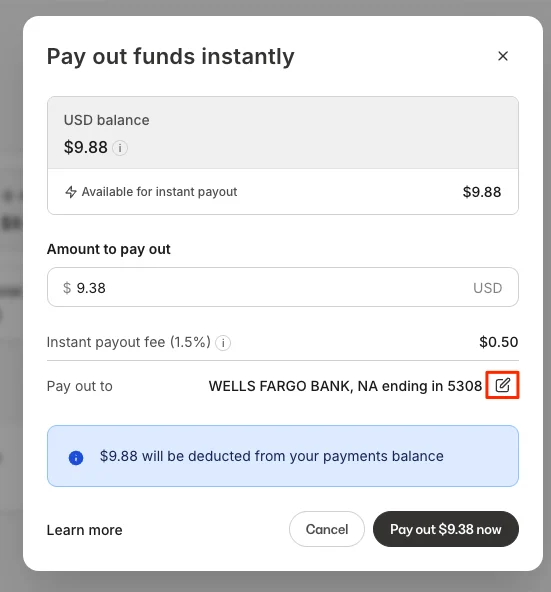 5. Next you’ll be taken to a form to add your debit card.
6. Once added, your debit card will be in a pending status, and an email will be sent to the owner of the Kajabi account to verify it.
5. Next you’ll be taken to a form to add your debit card.
6. Once added, your debit card will be in a pending status, and an email will be sent to the owner of the Kajabi account to verify it.
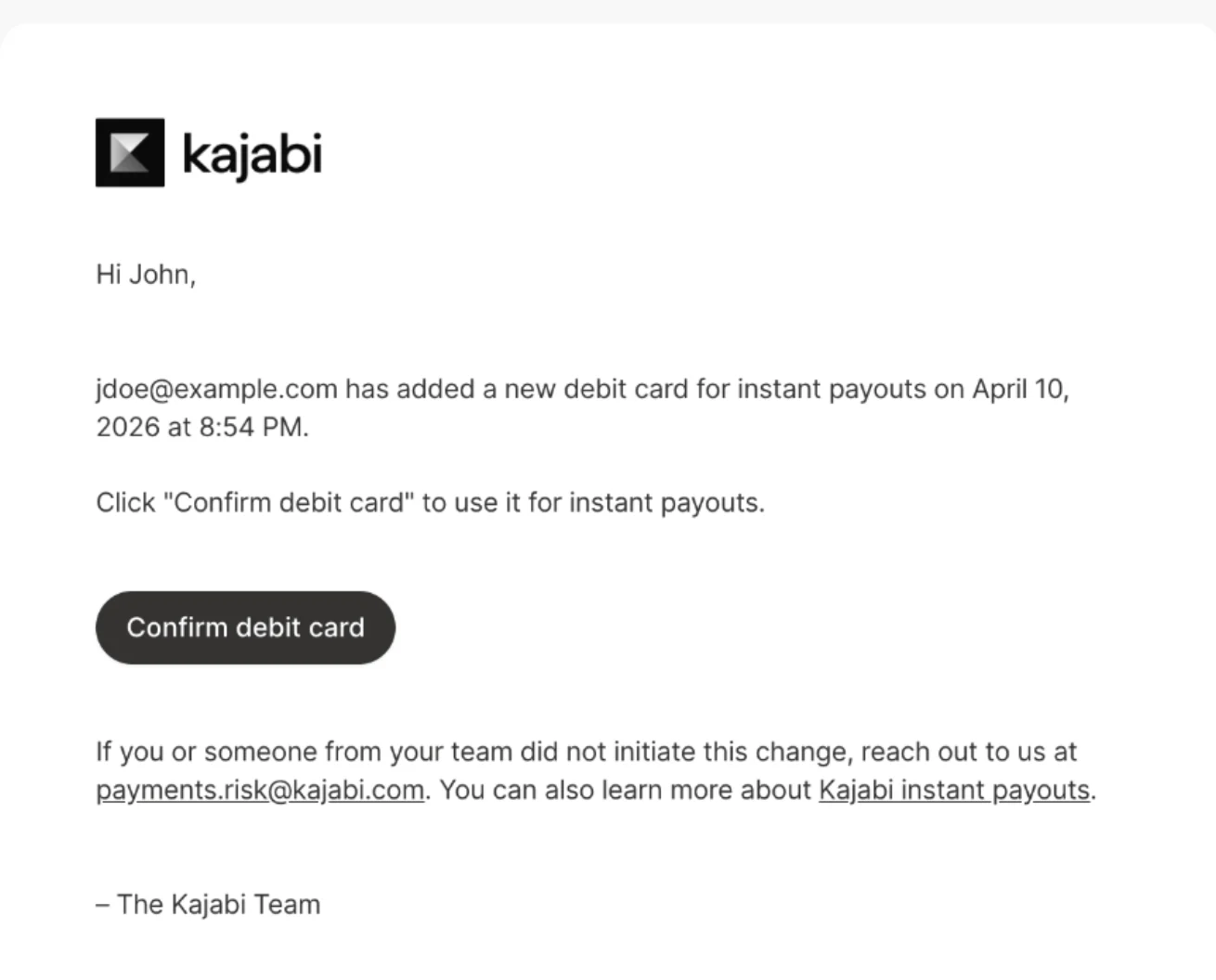
 7. Confirm the debit card by clicking through the link on the email:
 8. After your debit card is successfully added, it may become available as an option for future instant payouts.
## **Instant payout fees**
A service fee applies to each Instant Payout. The fee is shown upfront in the payout modal before you confirm. Your regular payout schedule has no additional fees.
For specific fee rates by region, visit [Kajabi Payments Processing Fees](https://help.kajabi.com/en/articles/12695453-kajabi-payments-processing-fees)
## **Payout details and transaction history:**
Instant Payouts appear in your payout history on the **Payouts** page with a payout type of *Instant*.
### **Instant payout detail page**
The detail page for an instant payout shows the payout amount, fee, and net amount received. It does not include transaction-level details such as individual sales or charges.
8. After your debit card is successfully added, it may become available as an option for future instant payouts.
## **Instant payout fees**
A service fee applies to each Instant Payout. The fee is shown upfront in the payout modal before you confirm. Your regular payout schedule has no additional fees.
For specific fee rates by region, visit [Kajabi Payments Processing Fees](https://help.kajabi.com/en/articles/12695453-kajabi-payments-processing-fees)
## **Payout details and transaction history:**
Instant Payouts appear in your payout history on the **Payouts** page with a payout type of *Instant*.
### **Instant payout detail page**
The detail page for an instant payout shows the payout amount, fee, and net amount received. It does not include transaction-level details such as individual sales or charges.
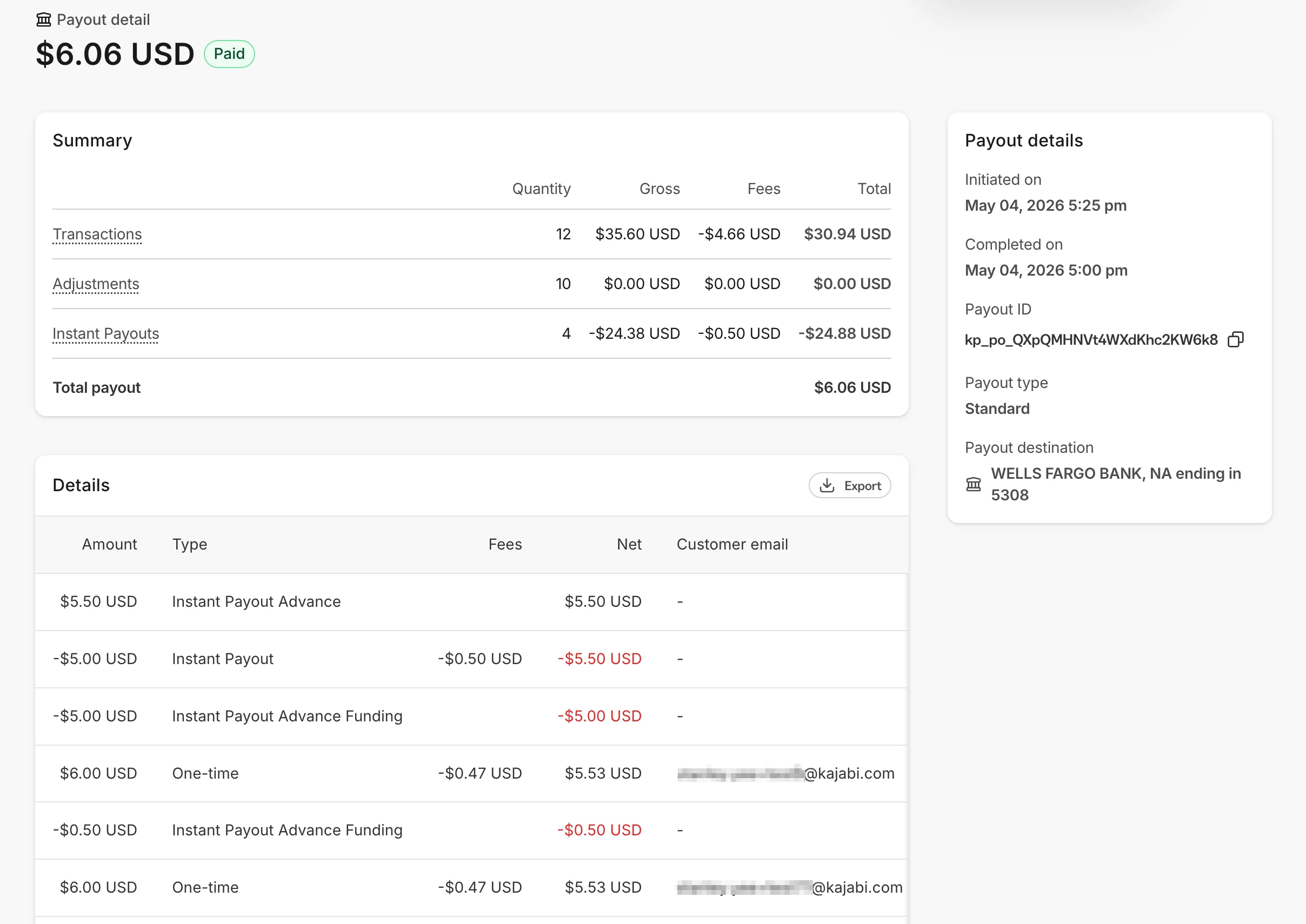
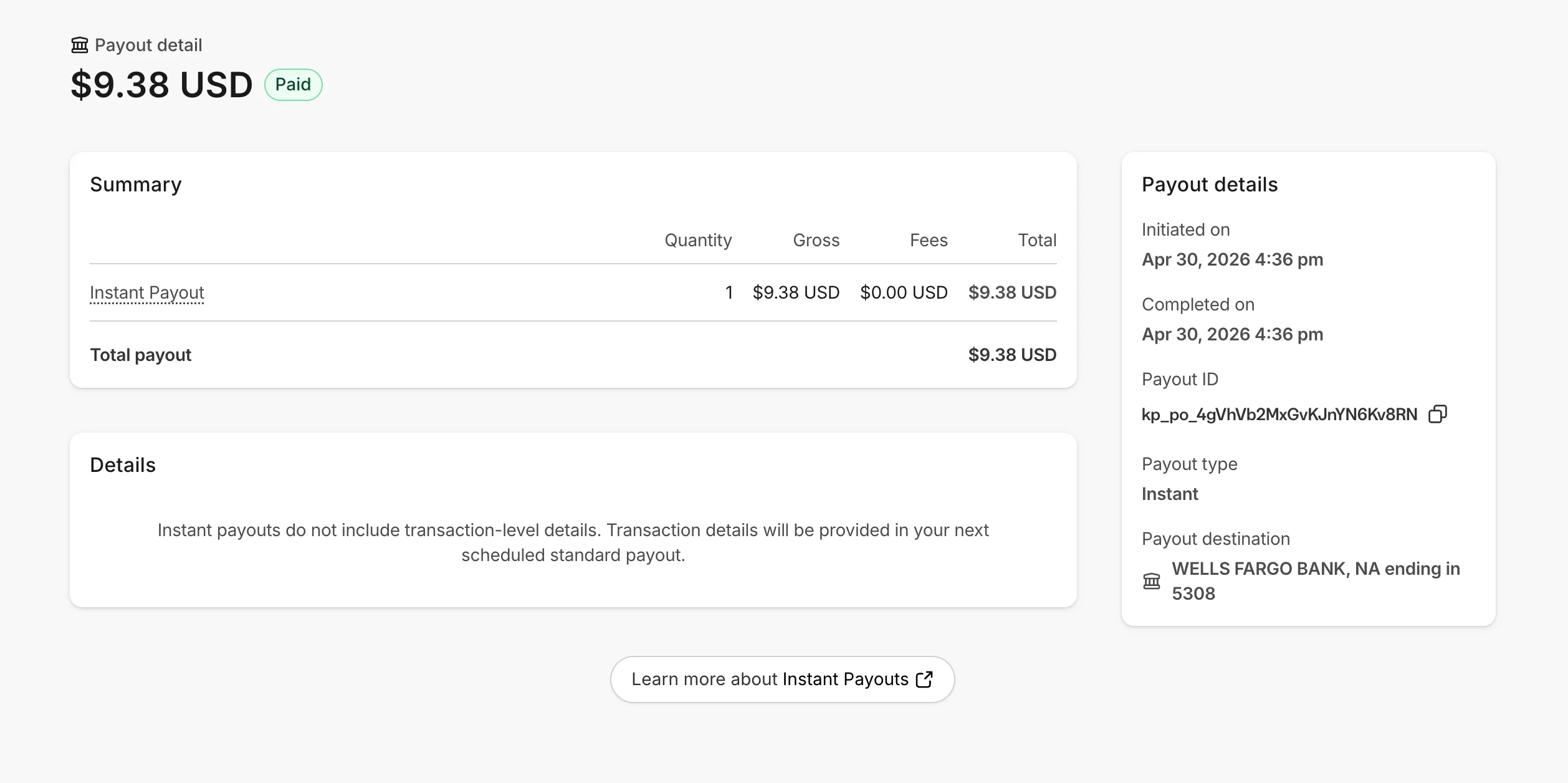 Transaction-level details for funds included in an instant payout will appear in your next scheduled payout. That payout will include a line item with a type of *Instant Payout* below the Adjustments category, along with all transactions that would have been included in your instant payout.
 ### **Payout exports**
Payout exports include a **Payout type** column that identifies each payout as either standard or instant. Instant payouts appear as a single line item in itemized exports with an Adjustment type.
## **Notifications**
Kajabi will send notifications related to Instant Payout activity so you can stay informed about important changes and payout status updates.
### **New Debit Card Added**
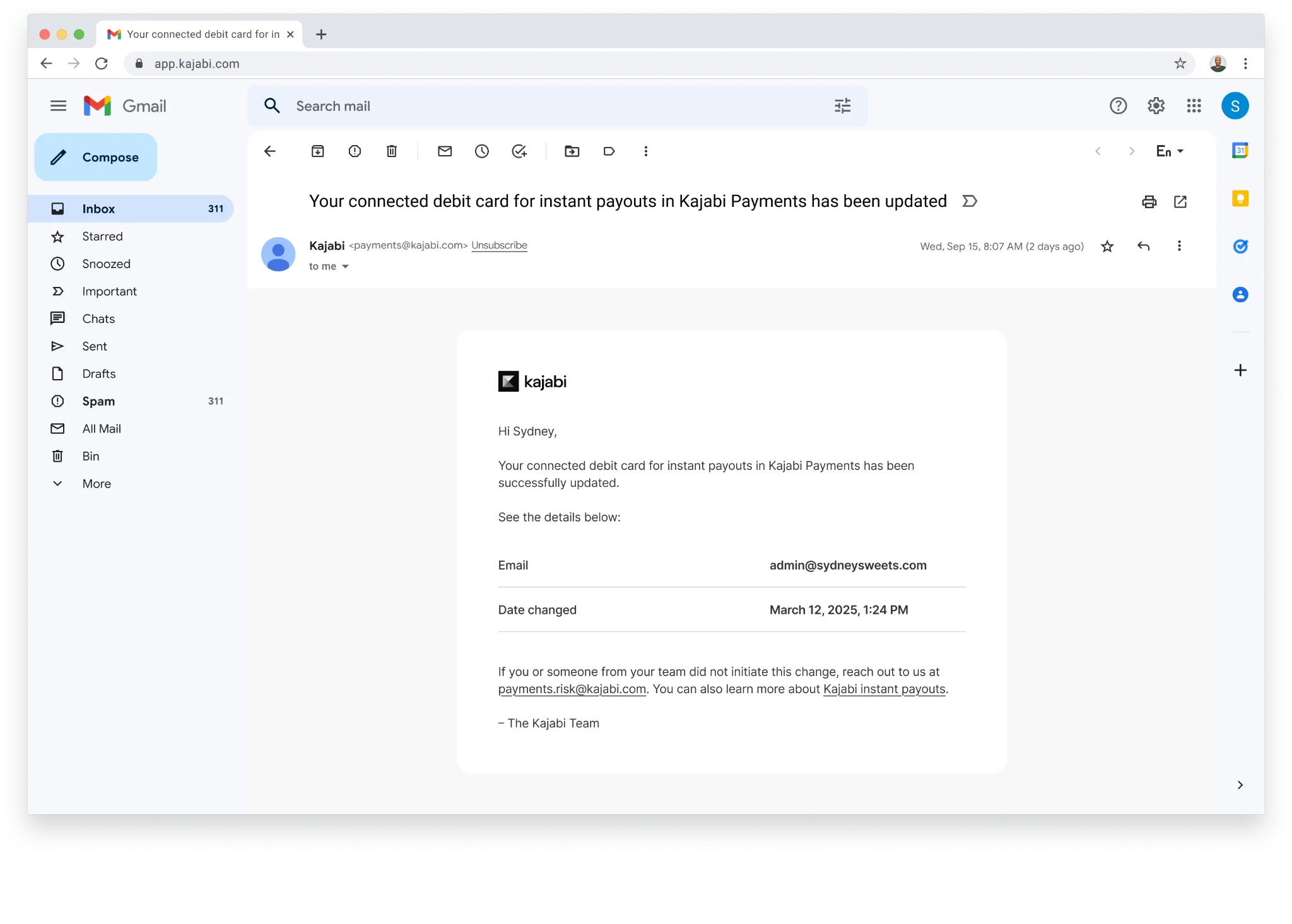
You will receive a notification when a new debit card is added to your account. This helps you confirm that the payout method was added successfully and alerts you to any unexpected changes.
### **Payout exports**
Payout exports include a **Payout type** column that identifies each payout as either standard or instant. Instant payouts appear as a single line item in itemized exports with an Adjustment type.
## **Notifications**
Kajabi will send notifications related to Instant Payout activity so you can stay informed about important changes and payout status updates.
### **New Debit Card Added**
You will receive a notification when a new debit card is added to your account. This helps you confirm that the payout method was added successfully and alerts you to any unexpected changes.
 ### **Payout Success**
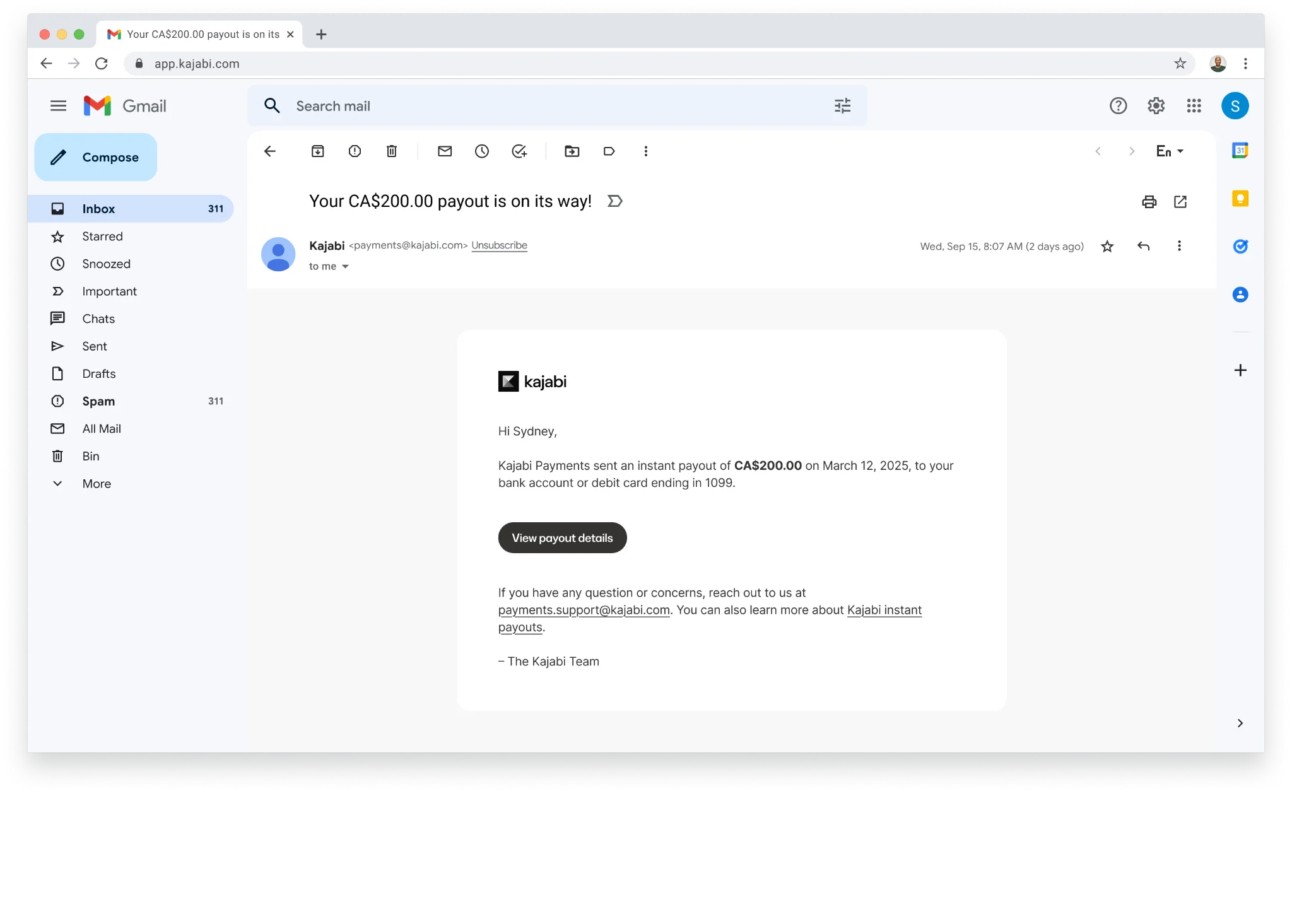
You will receive a payout success notification after an instant payout has been completed successfully. This confirms that the funds were sent using your selected payout method.
### **Payout Success**
You will receive a payout success notification after an instant payout has been completed successfully. This confirms that the funds were sent using your selected payout method.
 ### **Payout Failure**
If an instant payout cannot be completed, you will receive a payout failure notification. This can happen for several reasons, such as an unsupported card, incorrect payout details, or a temporary issue with the payout method.
If a payout fails, review your payout details and confirm that your selected bank account or debit card is eligible and up to date before trying again.
## **Additional notes**
Instant Payouts are designed to give you faster access to your funds, but transfer timing can still vary depending on the payout method and eligibility status.
To avoid payout issues:
* Keep your payout details current
* Make sure your debit card is active and eligible
* Review any account verification requirements
* Monitor your notifications for payout updates
## **FAQs**
### **How long does an instant payout take?**
Funds typically arrive within 30 minutes. In some cases it may take longer depending on your bank or card provider.
### **Does using Instant Payouts affect my regular payout schedule?**
No. Your standard payout schedule stays exactly as is. Instant Payouts are a separate, on-demand option.
### **What is the fee for an instant payout?**
A service fee applies and varies by region. The exact fee is shown upfront in the payout modal before you confirm. For a full breakdown by region, see [Kajabi Payments Processing Fees](https://help.kajabi.com/en/articles/12695453-kajabi-payments-processing-fees).
### **Can I schedule or standard instant payouts?**
No. Instant Payouts are on-demand only and must be initiated manually each time.
### **Can I do a partial instant payout?**
You can adjust the payout amount in the modal up to your available balance. Full or partial payouts are supported up to the maximum payout limit for your region.
### **Why can I only have an instant payout in one currency?**
Instant Payouts are available for your default balance currency only. If you have balances in multiple currencies, instant payouts apply to the currency associated with your Kajabi Payments country.
### **Can team members or admins initiate instant payouts?**
No. Instant Payouts can only be initiated by the account owner or sub-owner. The feature is not available to other user roles.
### **Where can I find transaction details for my instant payout?**
Transaction-level details are not shown on the instant payout detail page. They will appear in your next standard payout below the Adjustments category, with a type of *Instant Payout*.
### **Payout Failure**
If an instant payout cannot be completed, you will receive a payout failure notification. This can happen for several reasons, such as an unsupported card, incorrect payout details, or a temporary issue with the payout method.
If a payout fails, review your payout details and confirm that your selected bank account or debit card is eligible and up to date before trying again.
## **Additional notes**
Instant Payouts are designed to give you faster access to your funds, but transfer timing can still vary depending on the payout method and eligibility status.
To avoid payout issues:
* Keep your payout details current
* Make sure your debit card is active and eligible
* Review any account verification requirements
* Monitor your notifications for payout updates
## **FAQs**
### **How long does an instant payout take?**
Funds typically arrive within 30 minutes. In some cases it may take longer depending on your bank or card provider.
### **Does using Instant Payouts affect my regular payout schedule?**
No. Your standard payout schedule stays exactly as is. Instant Payouts are a separate, on-demand option.
### **What is the fee for an instant payout?**
A service fee applies and varies by region. The exact fee is shown upfront in the payout modal before you confirm. For a full breakdown by region, see [Kajabi Payments Processing Fees](https://help.kajabi.com/en/articles/12695453-kajabi-payments-processing-fees).
### **Can I schedule or standard instant payouts?**
No. Instant Payouts are on-demand only and must be initiated manually each time.
### **Can I do a partial instant payout?**
You can adjust the payout amount in the modal up to your available balance. Full or partial payouts are supported up to the maximum payout limit for your region.
### **Why can I only have an instant payout in one currency?**
Instant Payouts are available for your default balance currency only. If you have balances in multiple currencies, instant payouts apply to the currency associated with your Kajabi Payments country.
### **Can team members or admins initiate instant payouts?**
No. Instant Payouts can only be initiated by the account owner or sub-owner. The feature is not available to other user roles.
### **Where can I find transaction details for my instant payout?**
Transaction-level details are not shown on the instant payout detail page. They will appear in your next standard payout below the Adjustments category, with a type of *Instant Payout*.