> ## Documentation Index
> Fetch the complete documentation index at: https://help.kajabi.com/llms.txt
> Use this file to discover all available pages before exploring further.
# Migrate Stripe subscriptions & payment plans to Kajabi Payments
> Seamlessly migrate active subscriptions and payment plans from Stripe to Kajabi Payments without customer disruption.
## Overview
**Kajabi Payments migration** lets you move active Stripe subscriptions and payment plans into Kajabi Payments without interrupting billing or asking customers to re-enter their payment details. Once migrated, you'll avoid third-party processor fees and unlock payment methods like Apple Pay, Google Pay, Afterpay, and Klarna.
**Note:** Kajabi Payments is currently available to Kajabi Heroes whose businesses are registered in the United States, Canada, Australia, the United Arab Emirates, the United Kingdom, and select European countries.
## **Supported migration types**
### Stripe subscriptions created through your Kajabi site to Kajabi Payments
If your customers purchased subscriptions or payment plans through your Kajabi checkout with Stripe as your payment processor, this is the standard migration path. Active and trialing subscriptions, as well as payment plans with remaining installments, are all eligible.
### Externally or manually created Stripe subscriptions to Kajabi Payments
If you have active subscriptions in Stripe that were created outside of Kajabi through another platform, service, or manually created within Stripe, we can migrate those subscriptions into Kajabi Payments as well.
If your subscriptions aren't currently stored in Stripe or don't have a Stripe subscription object, we may still be able to help depending on a few factors. Submit a migration request and our team will take a look.
PayPal subscriptions cannot be migrated at this time.
## **Before you submit**
Before submitting a migration request, make sure the following are in place.
### You are onboarded to Kajabi Payments
Kajabi Payments must be active on your account before a migration can take place. If you haven't set it up yet, visit [Kajabi Payments Overview](https://help.kajabi.com/en/articles/12695442) to get started.
### You are the Kajabi account owner or have their authorization
Migration requests must come from the Kajabi account owner, or include confirmation that the account owner has authorized the request. If you're submitting on behalf of someone else, make sure you have their explicit sign-off before reaching out.
### You have access to the Stripe account
You'll need to be able to log into the Stripe account where your subscriptions live. If you can't access the Stripe account, our team won't be able to proceed.
### Your offers are set to accept Kajabi Payments
Any offers tied to the subscriptions being migrated need to be set to accept Kajabi Payments before migration can begin. You can update this in your Kajabi dashboard under **Sales > Offers**.
### Subscriptions using Link or ACH payment methods cannot be migrated
Kajabi Payments does not support Link or ACH as payment methods. Customers with Link or ACH attached to their subscription will need to update their payment method before those subscriptions can be included in the migration.
## **What to know**
### Subscription statuses
Only active and trialing subscriptions are migrated. Paused subscriptions are skipped and remain paused in Stripe. Past-due subscriptions are also skipped. To maximize the number of subscriptions migrated, we recommend resolving as many of these as possible before your migration date by retrying past-due payments and resuming paused subscriptions where appropriate.
### Billing dates
Your customers' next charge dates carry over exactly. No one is billed early or out of cycle, and no receipts are sent at the time of migration. Billing resumes normally on the next scheduled charge.
### Trials
If a customer is currently in a trial, that trial carries over. They keep the same trial end date in Kajabi Payments.
### Coupons
Forever discounts carry over as adjusted prices on the migrated subscription. Subscriptions with active temporary discounts are skipped, but can be retried once the discount period ends. In both cases, the migrated subscription record in your Kajabi admin will not have a coupon attached. You don't need to make any changes to your coupons to support the migration.
### Affiliates
If the original purchase had an affiliate attached, that relationship is matched and carried over to the new migrated subscription.
### Sales tax
Sales tax cannot be applied to migrated subscriptions.
### Temporary authorization
As Stripe validates the card on the new account, customers may see a temporary \$0 authorization on their statement. This is not a charge and will clear automatically.
### Customer access
Product access and progress are preserved throughout the migration. The Access Start Date on the migrated record reflects the date of the original purchase.
### Emails and automations
No purchase emails or receipts are sent at the time of migration, and automations do not trigger by default. The Member Welcome Email will be sent if the customer of the migrated subscription does not already exist as a customer in your Kajabi site (typically only relevant for externally created Stripe subscriptions).
### **Migration process**
1. **Submit your request** — Complete the [migration request form](https://form.typeform.com/to/uMqJKeeV) to get started.
2. **Review and confirmation** — Our team will review your submission and reach out to confirm the scope of the migration and any remaining requirements.
3. **Preparation** — Our team will work with you to get everything in place. We'll guide you through any steps needed on your end.
4. **Migration** — We'll move your subscriptions and payment plans into Kajabi Payments. Most migrations are completed within 1 to 3 weeks of the initial request.
5. **Post-migration summary** — Once complete, our team will follow up with a summary of what was migrated so you have a full record of the changes.
## **How migration works**
A new subscription or payment plan is created in Kajabi Payments using your customer's data from Stripe. For subscriptions, the new plan picks up on the existing billing schedule. For payment plans, the new record reflects only the remaining installments. For example, if a customer has completed 1 of 2 payments, the new plan will show 1 payment remaining.
Immediately after the new plan is created, the original Stripe plan is canceled to prevent duplicate billing.
Skipped subscriptions (those that are paused, past-due, have an active temporary discount, or use an unsupported payment method like Link or ACH) are noted in the post-migration summary. Many can be retried once the underlying issue is resolved
## Admin view after migration
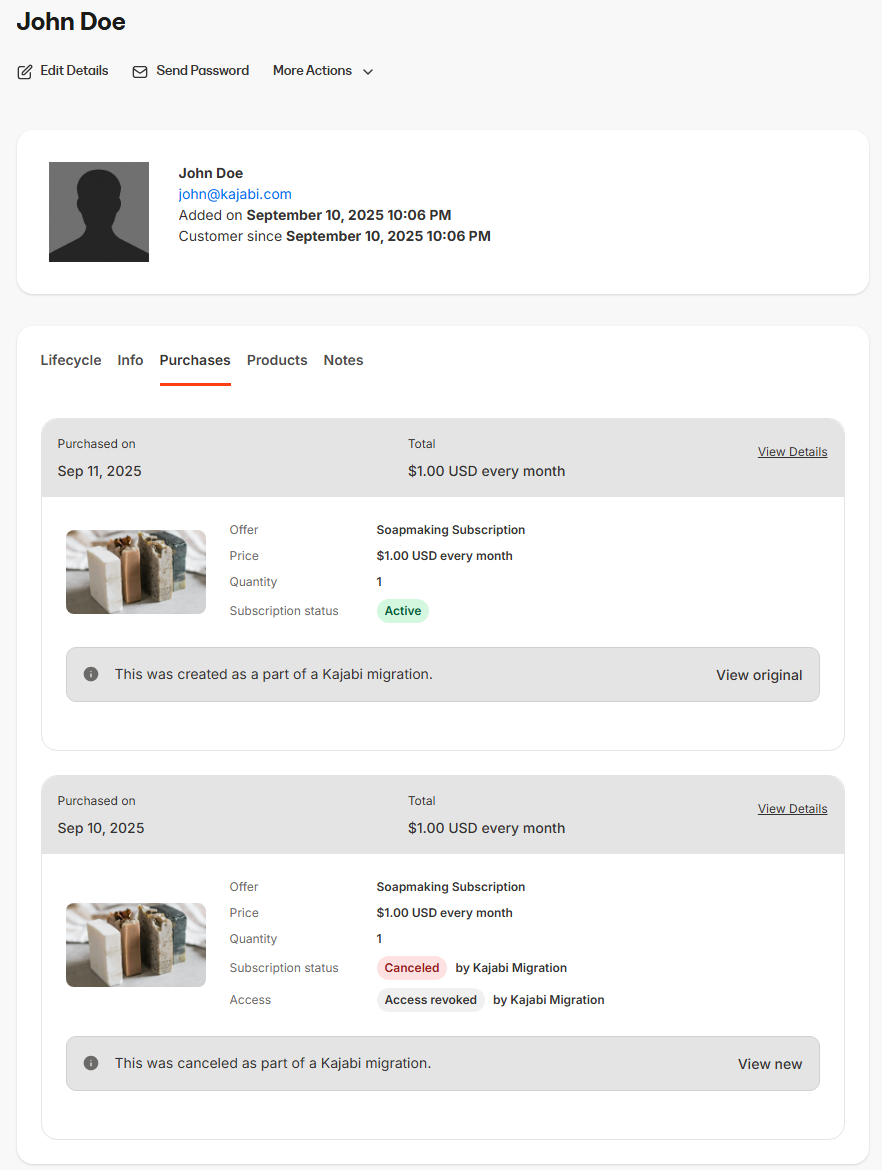
In the customer's **Purchases** tab, you'll see both the original Stripe record and the Kajabi Payments record. Each entry is clearly labeled as **Canceled by Kajabi migration** for the Stripe plan and **Created by Kajabi migration** for the new one. You can click into either record for details, and a link back to the original Stripe record will also be available.
For payment plans, the Kajabi Payments record will only show the remaining installments. For example, if a customer completed 2 of 10 payments before migration, the plan will display as 0 of 8, keeping the schedule aligned.
 ## Customer view after migration
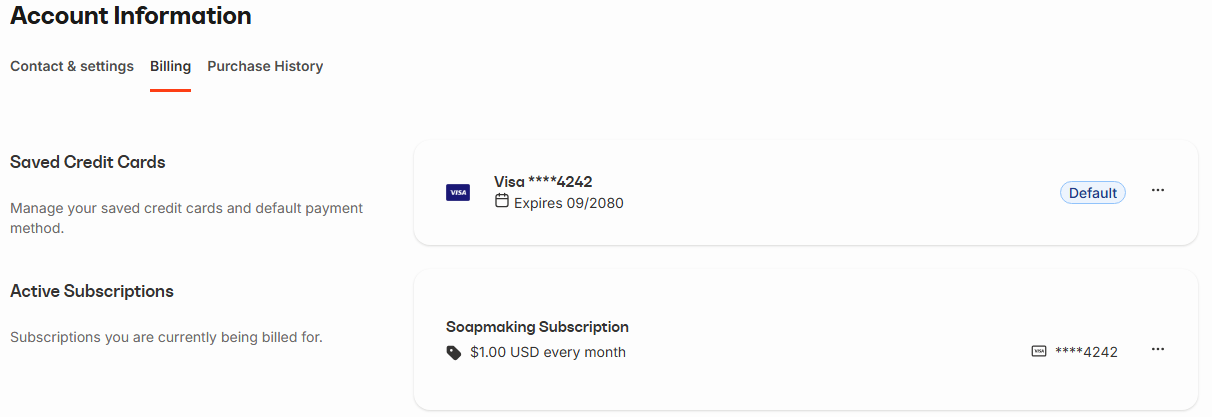
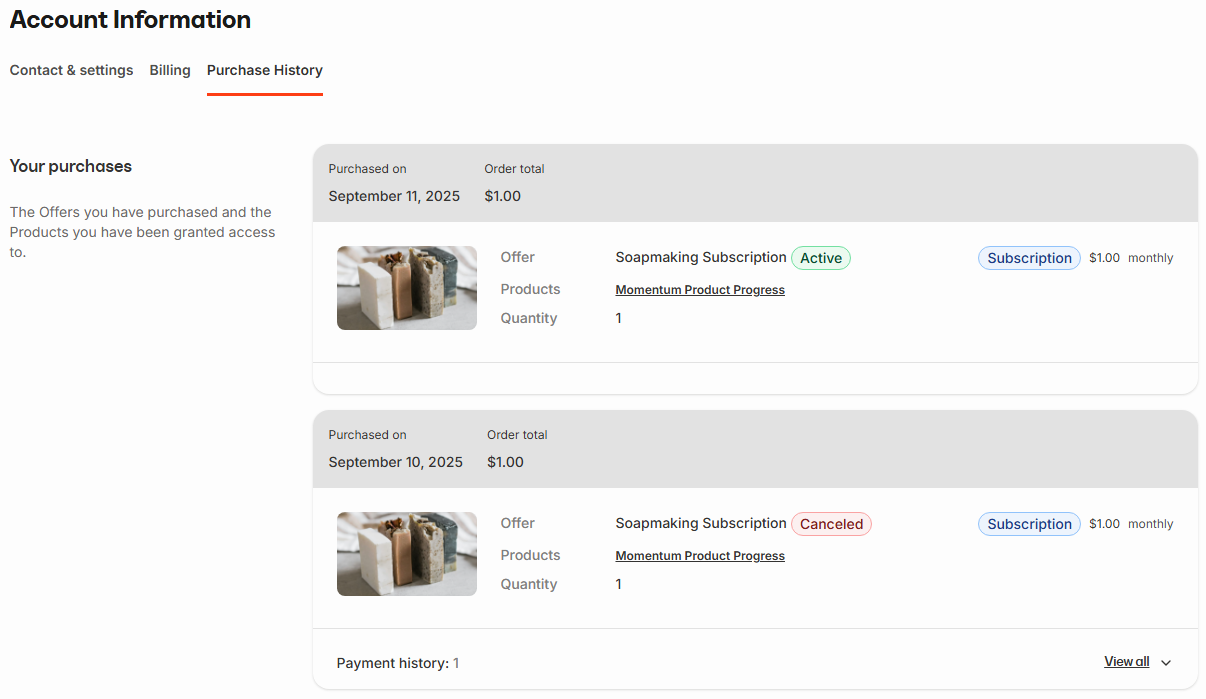
Your customers will hardly notice a change. In their account, they'll see one active subscription in billing, just as before. If they check their purchase history, the original Stripe subscription will appear as canceled with all past receipts still available, and the active subscription or payment in Kajabi Payments will show as their current plan. Everything looks familiar, clear, and uninterrupted.
## Customer view after migration
Your customers will hardly notice a change. In their account, they'll see one active subscription in billing, just as before. If they check their purchase history, the original Stripe subscription will appear as canceled with all past receipts still available, and the active subscription or payment in Kajabi Payments will show as their current plan. Everything looks familiar, clear, and uninterrupted.
 ##
##