> ## Documentation Index
> Fetch the complete documentation index at: https://help.kajabi.com/llms.txt
> Use this file to discover all available pages before exploring further.
# Create a test purchase in Kajabi
> Verify that Offers, checkout, and post-purchase flows work correctly before going live.
Before posting your Offers to the public, you may want to consider a **test purchase** from your Kajabi site to be certain everything is working as it should.
## Test purchase
**Note:**
Test purchase and accidental customer purchase **transaction** fees are non-refundable.
First, clear your cache and cookies from your browser and log out of your Kajabi account, or open a private/incognito window or use a different browser.
### Test your purchase in incognito mode
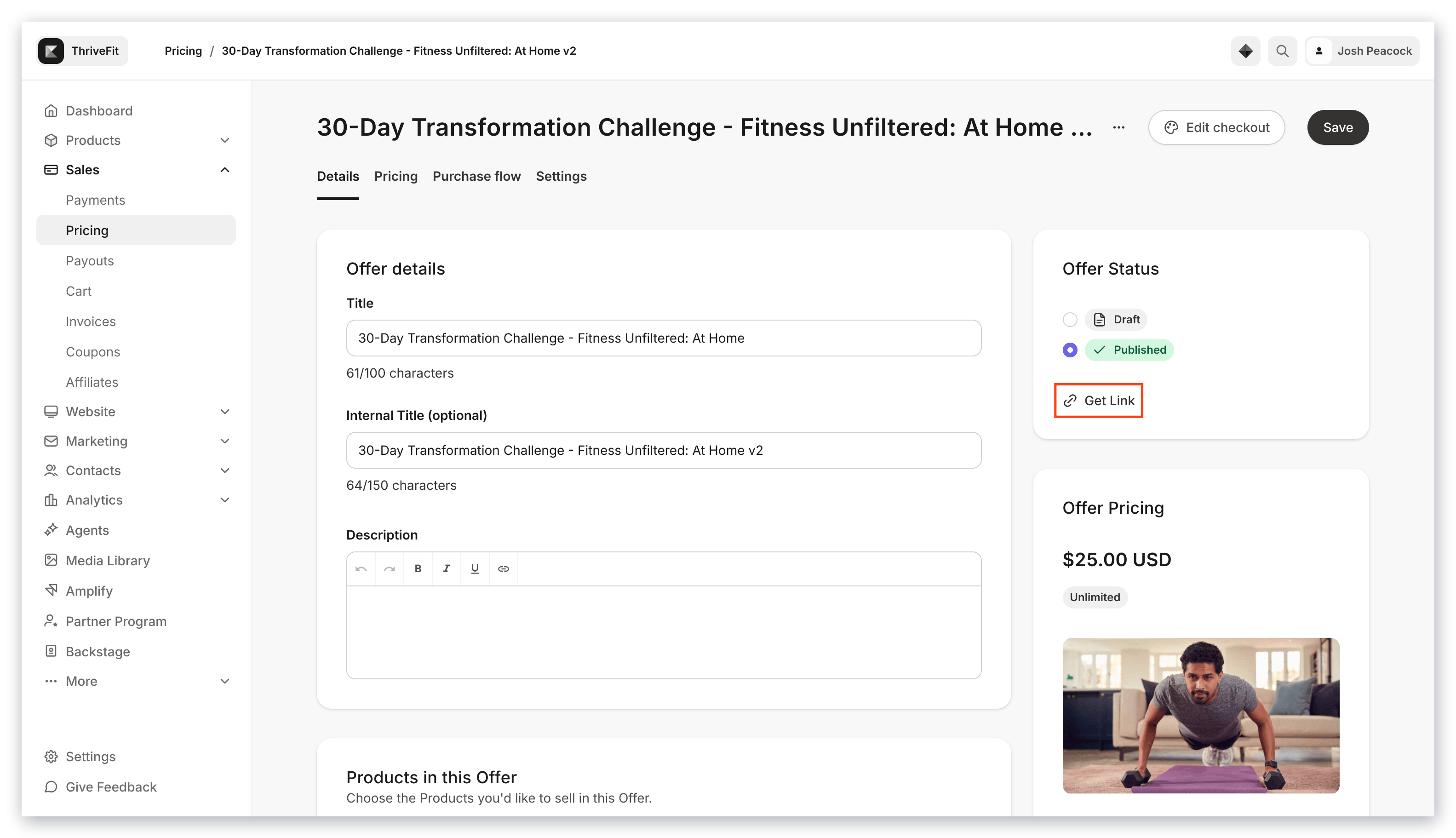
1. Open the **Sales** tab from your Dashboard.
2. Click **Pricing** and select the Offer you want to test.
3. In the Offer Status card, click **Get Link**.
4. Open an incognito window and paste your link.
5. On the checkout page, follow the flow of your customers by going through the process of purchasing your Offer.
After you submit your payment (or sign up for free, if testing a free Offer), you'll receive an email at the email address you entered on the checkout page. The email will contain a login link to access the product(s).
**Tip:**
If you don't want to charge your card you can:
* [Edit the Offer price](/articles/sales/offers/how-to-create-a-pricing-plan-for-your-offer) to be free before testing the purchase.
* [Create a coupon for the Offer](/articles/sales/coupons/what-is-the-difference-between-single-coupon-codes-and-bulk-coupon-codes) that you can use to bring the price of the Offer down to \$0.00 (an error will occur if the end price is between \$0.01 - \$0.49).
## Best practices when testing a purchase
### Only use the Offer Link (not the Preview link) when testing
 ### Always use a different browser or incognito/private window when testing
To successfully test a purchase, do not test on the same browser when logged in as an Admin of your Kajabi account.
### Troubleshoot an un-clickable checkout button
Is your purchase button un-clickable? Be sure to exit out of preview mode when testing your Checkout Page:
### Always use a different browser or incognito/private window when testing
To successfully test a purchase, do not test on the same browser when logged in as an Admin of your Kajabi account.
### Troubleshoot an un-clickable checkout button
Is your purchase button un-clickable? Be sure to exit out of preview mode when testing your Checkout Page:
Testing a purchase in Preview mode will not allow you to purchase.
Simply open a new window and enter the checkout page URL excluding the `preview=true` piece of the URL.
### Use a different email address when testing
We recommend creating a separate email address specifically for testing purposes. This will allow you to use different variations of the same email address for tests you wish to perform on your site.
* If you are using G-Suite or any new test Gmail address, simply insert a "+" character before the "@" symbol and insert any verbiage you wish. This will send any applicable emails connected with your test to your Gmail inbox with a unique identifier.
* Example: kajabihelpcenter\*\*+purchasetest1-date\*\*@gmail.com
### Testing as an existing customer
For an existing customer, be sure that you are not logged in as the existing user to simulate the same transaction process. Remember to always test in a different browser or incognito/private window when testing to ensure an accurate simulation of a purchase.
[Learn how existing customers can purchase additional Offers](/articles/sales/offers/how-do-existing-customers-purchase-additional-offers) from your site.