> ## Documentation Index
> Fetch the complete documentation index at: https://help.kajabi.com/llms.txt
> Use this file to discover all available pages before exploring further.
# Add and remove Upsells and Downsells
> Maximize your profit by adding Upsells and Downsells to your order flow.
Maximize your profit by adding **Upsells and Downsells** to your order flow. Your customers can choose to purchase additional product(s) after completing their initial purchase.
## Upsells and Downsells
### What is an Upsell?
An Upsell is used as a way to advertise another Offer after the initial Offer has been purchased.
A user will complete a purchase and the Upsell will appear as a separate page after checking out and before the account creation page:
 **Note:** Add up to 10 upsells and downsells to your Offer checkout process. Standard business practice is to use between 3 - 4 upsells and downsells to avoid overwhelming your customers.
The upsell page will ask your customer to make an additional purchase. Your customer can then choose to purchase the Upsell or decline the Upsell.
Afterward, they will be redirected to the account creation page to set up their account details.
[Learn more about what happens when a customer purchases an Offer](/articles/sales/offers/what-happens-when-a-customer-purchases-my-offer).
### What is a Downsell?
A Downsell is another Offer presented to customers that decline to purchase the Upsell.
This gives you a second chance to make an additional sale if your customer declines the original Upsell.
Downsells are typically lower-priced Offers, a discount on the same Product, or an Offer for a completely new Product.
[Learn more about adding and editing Downsells](/articles/sales/offers/how-to-add-and-edit-a-downsell).
## Add an Upsell
### Add an Upsell to a paid Offer
1. First, [create an Offer](/articles/sales/offers/create-an-offer) to use as an **Upsell**
2. Then, return to your Offers Dashboard and select the Offer you wish to attach your Upsell to
3. Navigate to the Cross-selling tab and click **Get Started**
4. In the dropdown menu, select the **Offer** you want to use as the Upsell
5. Add a **Title** and **Description** for your Upsell, and optionally upload a Video and customize the Purchase and Cancel button text
6. Click **Add Upsell** to apply your changes
7. Finally, toggle your Upsell to **Active** to ensure your customers will see it when checking out
**Note:** Add up to 10 upsells and downsells to your Offer checkout process. Standard business practice is to use between 3 - 4 upsells and downsells to avoid overwhelming your customers.
The upsell page will ask your customer to make an additional purchase. Your customer can then choose to purchase the Upsell or decline the Upsell.
Afterward, they will be redirected to the account creation page to set up their account details.
[Learn more about what happens when a customer purchases an Offer](/articles/sales/offers/what-happens-when-a-customer-purchases-my-offer).
### What is a Downsell?
A Downsell is another Offer presented to customers that decline to purchase the Upsell.
This gives you a second chance to make an additional sale if your customer declines the original Upsell.
Downsells are typically lower-priced Offers, a discount on the same Product, or an Offer for a completely new Product.
[Learn more about adding and editing Downsells](/articles/sales/offers/how-to-add-and-edit-a-downsell).
## Add an Upsell
### Add an Upsell to a paid Offer
1. First, [create an Offer](/articles/sales/offers/create-an-offer) to use as an **Upsell**
2. Then, return to your Offers Dashboard and select the Offer you wish to attach your Upsell to
3. Navigate to the Cross-selling tab and click **Get Started**
4. In the dropdown menu, select the **Offer** you want to use as the Upsell
5. Add a **Title** and **Description** for your Upsell, and optionally upload a Video and customize the Purchase and Cancel button text
6. Click **Add Upsell** to apply your changes
7. Finally, toggle your Upsell to **Active** to ensure your customers will see it when checking out
**Tip:** Add up to 10 upsells to your Offer checkout process. Standard business practice is to use between 3 - 4 upsells and downsells to avoid overwhelming your customers.
**Note:** Upsells can only be added to paid offers. This means that Users with a 100% off coupon for an Offer with an Upsell will not be given the Upsell because it is no longer a paid offer with their coupon applied. [Learn more about troubleshooting your Upsell](/articles/sales/offers/can-upsells-be-used-with-a-free-offer).
## Preview your upsell
View your upsell purchase experience by clicking `...` to the right of your Upsell status and selecting **Preview**:
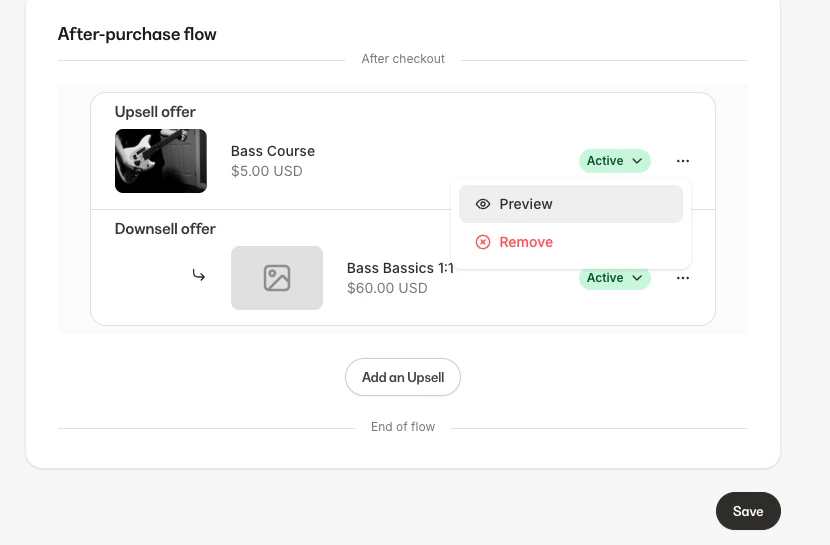 If you want to test your customer experience with multiple Upsells or Downsells in your Offer, decline to purchase each Upsell or Downsell in order to see each page when previewing.
## Remove an Upsell
### Remove an Upsell from an Offer
1. Open the **Sales** tab from the Dashboard
2. Click **Offers**
3. Select the Offer from which you'd like to remove the Upsell
4. Navigate to the **Cross-selling** tab on the Offer page
5. On the Cross-selling page, click the `…` menu next to the Upsell Offer
6. Click **Remove** to delete it
If you want to test your customer experience with multiple Upsells or Downsells in your Offer, decline to purchase each Upsell or Downsell in order to see each page when previewing.
## Remove an Upsell
### Remove an Upsell from an Offer
1. Open the **Sales** tab from the Dashboard
2. Click **Offers**
3. Select the Offer from which you'd like to remove the Upsell
4. Navigate to the **Cross-selling** tab on the Offer page
5. On the Cross-selling page, click the `…` menu next to the Upsell Offer
6. Click **Remove** to delete it
**Note:** If you've added a Downsell to your Upsell, you must delete it first prior to deleting the top-level Upsell.